
ESP32 Stock Ticker Display: Fetch Live Prices on TFT Screen
Building an ESP32 stock ticker that fetches live prices and displays them on a TFT screen is a perfect weekend project for Indian makers who want to combine IoT, WiFi connectivity, and display technology into something genuinely useful. Instead of constantly checking your phone for NSE/BSE stock prices, imagine a dedicated device on your desk that auto-refreshes every 60 seconds, scrolling your favourite stocks across a bright, colourful TFT display. In this guide, we will build exactly that — using the ESP32’s built-in WiFi to fetch stock data from a free API, parse JSON responses, and render a smooth scrolling ticker on an ILI9341 TFT display.
Components Required
- ESP32 development board (ESP32-WROOM-32 or DEVKIT V1)
- 2.8″ ILI9341 TFT display (320×240, SPI interface)
- Micro-USB cable for programming
- Jumper wires
- 5V USB power adapter (for standalone operation)
- Optional: 3D printed or acrylic enclosure
- Optional: DS3231 RTC module for accurate time display
The total component cost for this project is approximately ₹500–800, making it one of the most cost-effective financial gadgets you can build.

DHT11 Temperature & Humidity Sensor Module
Enhance your stock ticker with a room temperature display — show current temp and humidity alongside stock prices on your TFT screen.
Choosing a Stock Price API
This is the most critical design decision for your ESP32 stock ticker. You need an API that:
- Returns JSON data (easy to parse on ESP32)
- Has a free tier with sufficient request quotas
- Provides HTTPS access (ESP32 supports TLS, but certificate management is important)
- Returns Indian market data (NSE/BSE) or at minimum global stocks
Here are the best options for Indian makers:
- Yahoo Finance (via RapidAPI): Free tier at 500 requests/month. Supports NSE-listed stocks using the format
RELIANCE.NS(append.NSfor NSE,.BOfor BSE). Most reliable option for Indian stock data. - Alpha Vantage: Free tier with 25 API calls/day and 500 calls/month. Supports global stocks. Register for a free API key at alphavantage.co. NSE stocks available with
function=GLOBAL_QUOTE&symbol=RELIANCE.NSE. - Twelve Data: Generous free tier (800 API calls/day). Excellent JSON structure. Supports NSE/BSE Indian stocks. Recommended for this project.
- NSE India unofficial API: The NSE website exposes JSON endpoints without authentication, but they are rate-limited and may block requests from non-browser user agents. Use only for personal projects, not commercial.
For this tutorial, we will use Twelve Data as it is the most ESP32-friendly (simple JSON, HTTPS, free tier). Sign up at twelvedata.com and note your API key.
Wiring ESP32 to TFT Display
The ILI9341 TFT communicates via SPI. On ESP32, the default SPI pins differ from Arduino Uno:
| TFT Pin | Function | ESP32 GPIO |
|---|---|---|
| VCC | Power | 3.3V (or 5V if module has regulator) |
| GND | Ground | GND |
| CS | TFT Chip Select | GPIO 15 |
| RESET | Display Reset | GPIO 4 |
| DC/RS | Data/Command | GPIO 2 |
| MOSI | SPI Data | GPIO 23 |
| SCK | SPI Clock | GPIO 18 |
| LED/BL | Backlight | 3.3V (or GPIO with PWM for dimming) |
Important: Most ILI9341 TFT modules are 3.3V logic but accept 5V VCC due to onboard regulators. Connect MOSI, SCK, CS, DC, and RST directly to ESP32’s 3.3V GPIO — do not use a voltage divider on these SPI lines as it will slow the SPI bus.
Installing Libraries
In Arduino IDE, install the following libraries via the Library Manager (Tools → Manage Libraries):
- TFT_eSPI by Bodmer — the fastest ILI9341 library for ESP32, with DMA support. After installing, edit
libraries/TFT_eSPI/User_Setup.hto defineILI9341_DRIVERand the correct GPIO pin numbers. - ArduinoJson by Benoit Blanchon — version 6.x for parsing the stock API JSON response.
- HTTPClient — included with the ESP32 Arduino core (no separate install needed).
- WiFi — also included with ESP32 Arduino core.
Also ensure you have the ESP32 board package installed: go to File → Preferences, add https://raw.githubusercontent.com/espressif/arduino-esp32/gh-pages/package_esp32_index.json to the Additional Boards Manager URLs, then install the “esp32” package from Boards Manager.
Full Stock Ticker Code
#include <WiFi.h>
#include <HTTPClient.h>
#include <ArduinoJson.h>
#include <TFT_eSPI.h>

const char* ssid     = "YOUR_WIFI_SSID";
const char* password = "YOUR_WIFI_PASSWORD";
const char* apiKey   = "YOUR_TWELVEDATA_API_KEY";

// Stocks to track (NSE symbols on Twelve Data)
const char* symbols[] = {"RELIANCE", "TCS", "INFY", "HDFCBANK", "ITC"};
const int numStocks = 5;

TFT_eSPI tft = TFT_eSPI();

struct StockData {
  String symbol;
  float  price;
  float  change;
  float  pct;
};

StockData stocks[5];

void connectWiFi() {
  WiFi.begin(ssid, password);
  tft.setCursor(10, 110);
  tft.setTextColor(TFT_WHITE);
  tft.print("Connecting WiFi");
  while (WiFi.status() != WL_CONNECTED) {
    delay(500);
    tft.print(".");
  }
  tft.fillScreen(TFT_BLACK);
}

void fetchStock(int idx) {
  HTTPClient http;
  String url = "https://api.twelvedata.com/quote?symbol="
               + String(symbols[idx])
               + ":NSE&apikey=" + String(apiKey);

  http.begin(url);
  int code = http.GET();

  if (code == HTTP_CODE_OK) {
    String payload = http.getString();
    DynamicJsonDocument doc(2048);
    deserializeJson(doc, payload);

    stocks[idx].symbol = String(symbols[idx]);
    stocks[idx].price  = doc["close"].as<float>();
    stocks[idx].change = doc["change"].as<float>();
    stocks[idx].pct    = doc["percent_change"].as<float>();
  }
  http.end();
  delay(300); // Throttle API calls
}

void drawHeader() {
  tft.fillRect(0, 0, 320, 40, TFT_NAVY);
  tft.setCursor(8, 8);
  tft.setTextColor(TFT_WHITE);
  tft.setTextSize(2);
  tft.print("NSE LIVE TICKER");
  tft.setTextSize(1);
  tft.setCursor(230, 28);
  tft.setTextColor(TFT_CYAN);
  tft.print("zbotic.in");
}

void drawStocks() {
  int y = 50;
  for (int i = 0; i < numStocks; i++) {
    uint16_t rowBg = (i % 2 == 0) ? 0x1082 : TFT_BLACK;
    tft.fillRect(0, y, 320, 36, rowBg);

    // Symbol
    tft.setTextColor(TFT_WHITE);
    tft.setTextSize(1);
    tft.setCursor(6, y + 5);
    tft.setTextSize(2);
    tft.print(stocks[i].symbol);

    // Price
    tft.setTextSize(1);
    tft.setCursor(140, y + 5);
    tft.setTextColor(TFT_YELLOW);
    tft.printf("Rs %.2f", stocks[i].price);

    // Change
    uint16_t col = (stocks[i].change >= 0) ? TFT_GREEN : TFT_RED;
    tft.setCursor(140, y + 22);
    tft.setTextColor(col);
    char sign = (stocks[i].change >= 0) ? '+' : ' ';
    tft.printf("%c%.2f (%.2f%%)", sign, stocks[i].change, stocks[i].pct);

    y += 38;
  }
}

void setup() {
  tft.init();
  tft.setRotation(1); // Landscape
  tft.fillScreen(TFT_BLACK);
  tft.setTextSize(2);
  tft.setCursor(50, 100);
  tft.setTextColor(TFT_WHITE);
  tft.print("NSE Stock Ticker");

  connectWiFi();
}

void loop() {
  drawHeader();
  for (int i = 0; i < numStocks; i++) {
    fetchStock(i);
  }
  drawStocks();
  delay(60000); // Refresh every 60 seconds
}
Designing the TFT Display Layout
The 320×240 ILI9341 display in landscape mode gives us a clean layout area. Here is the display design used in the code above:
- Header bar (y=0 to 40, navy blue): “NSE LIVE TICKER” in large white text + “zbotic.in” watermark in cyan. Acts as a permanent title bar.
- Stock rows (y=50 to 240, alternating dark backgrounds): Each row is 38px tall with the stock symbol in bold on the left, price in yellow in the centre-right, and change amount + percentage below it in green (positive) or red (negative).
- Refresh indicator: A subtle countdown or last-updated timestamp can be added at the bottom-right of the header bar using a smaller font size.
With 38px rows and a 40px header, you can fit exactly 5 stocks in the remaining 200px of height (5 × 38 = 190px). For more stocks, use a scrolling approach — display 5 at a time and auto-scroll to the next 5 after 10 seconds.
Adapting for NSE/BSE Indian Markets
Twelve Data’s symbol format for Indian markets uses the stock symbol directly, with the exchange specified as a parameter:
- NSE stocks:
RELIANCE:NSE,TCS:NSE,INFY:NSE,HDFCBANK:NSE - BSE stocks:
500325:BSE(BSE uses numeric scrip codes)
Popular NSE stocks to track for an Indian investor ticker: RELIANCE, TCS, INFY, HDFCBANK, ICICIBANK, HINDUNILVR, WIPRO, BHARTIARTL, ADANIENT, TATAMOTORS, ITC, NIFTY (index via NIFTY50:NSE), SENSEX.
Note: NSE market hours are 9:15 AM to 3:30 PM IST, Monday to Friday. Outside these hours, the API returns the last closing price. You can add market-hours detection in code:
// Get IST hour from NTP
#include <time.h>
bool isMarketOpen() {
  struct tm timeinfo;
  if (!getLocalTime(&timeinfo)) return false;
  int h = timeinfo.tm_hour;
  int m = timeinfo.tm_min;
  // IST = UTC+5:30, set in configTime()
  // Market: 9:15 AM to 3:30 PM, Mon-Fri
  if (timeinfo.tm_wday == 0 || timeinfo.tm_wday == 6) return false;
  if (h < 9 || (h == 9 && m < 15)) return false;
  if (h > 15 || (h == 15 && m > 30)) return false;
  return true;
}

// In setup():
configTime(19800, 0, "pool.ntp.org"); // IST = UTC+5:30 = 19800 seconds
LM35 Temperature Sensor
Add a room temperature widget to your stock ticker display — show temperature data in the corner of your TFT screen alongside live stock prices.

DHT20 SIP Temperature and Humidity Sensor
I2C temperature and humidity sensor — free up SPI pins for your TFT while adding environmental data to your ESP32 stock ticker dashboard.
Building an Enclosure for Desktop Use
To turn this into a polished desk gadget:
- 3D print an enclosure: Tinkercad (free, browser-based) lets you design a simple box with a rectangular cutout for the TFT. Print in black PLA for a professional look. Print time: ~3 hours on most FDM printers.
- Acrylic stand: Cut a simple L-shaped stand from 3mm acrylic sheet. Glue the TFT module and ESP32 to the stand with double-sided tape. Clean and low-cost option.
- Repurpose an old picture frame: A 4×6″ photo frame from a local store can house the TFT display beautifully. Run a USB cable out the back for power.
- Power supply: Any 5V USB phone charger works. The ESP32 + TFT draws about 250–350mA total, well within any standard charger’s capacity.
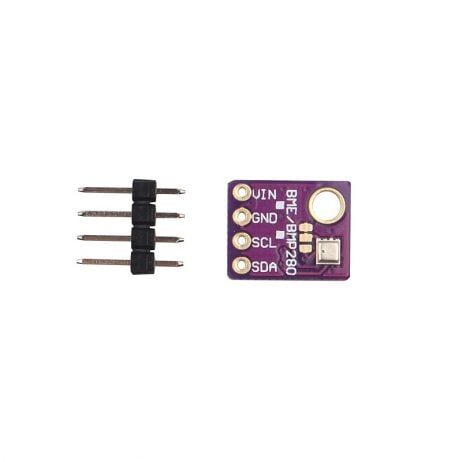
GY-BME280 5V Temperature, Humidity & Pressure Sensor
5V compatible BME280 sensor — perfect for adding a full environmental panel to your ESP32 stock ticker project without any voltage level shifting.
Frequently Asked Questions
Does the ESP32 support HTTPS connections to stock APIs?
Yes. The ESP32 Arduino core includes WiFiClientSecure which handles TLS/SSL for HTTPS. For APIs with verified certificates (like Twelve Data or Alpha Vantage), use http.setInsecure() for quick testing, or load the root CA certificate for production security. Certificate verification is recommended to prevent man-in-the-middle attacks on financial data.
How many API calls does this project make per day?
With 5 stocks refreshed every 60 seconds and market hours of 6.25 hours (9:15 AM – 3:30 PM), the project makes 5 × 6.25 × 60 = 1,875 API calls per market day. Twelve Data’s free tier allows 800 calls/day — so either increase the refresh interval to 5 minutes (375 calls/day) or upgrade to a paid plan. Alpha Vantage free tier (500/day) is also insufficient for 1-minute updates with 5 stocks.
Can I display a stock price chart (line graph) on the TFT?
Yes. Fetch intraday price data (available on Twelve Data as the /time_series endpoint) for the last 60 minutes, store the values in an array, and plot them as a line graph on the TFT using drawLine() calls from TFT_eSPI. This requires more API calls and memory, so use an ESP32 with PSRAM (like the ESP32-WROVER) for larger datasets.
Will this project work during power cuts common in India?
The ESP32 automatically reconnects to WiFi after a power cut and resumes fetching data. Add a reconnect() function that checks WiFi.status() before each API call and re-runs WiFi.begin() if disconnected. For critical monitoring, power the ESP32 from a small UPS or power bank with pass-through charging.
Can I add a buzzer to alert when a stock crosses a target price?
Yes! Add a passive buzzer between any ESP32 GPIO and GND. In the stock update loop, compare the fetched price against your target: if (stocks[i].price >= target[i]) tone(BUZZER_PIN, 1000, 500);. This turns your stock ticker into a simple price alert system — very useful for setting stop-loss or target price notifications without needing your phone.
Is this project legal for displaying NSE/BSE data?
Fetching and displaying stock prices for personal, non-commercial use is generally acceptable under NSE/BSE data policies. However, redistributing real-time market data or using it for commercial purposes requires a data licence. For personal desk use, this project falls within fair personal use. Always review the terms of service of whichever stock API you use.
Build Your Own NSE Stock Ticker This Weekend
The ESP32 stock ticker with TFT display is a genuinely useful gadget that combines WiFi networking, JSON API parsing, and colourful graphics into an ₹800 desk device. Whether you are a trader, investor, or just a maker who loves IoT projects, this is a satisfying build that you will actually use every day.
Get your ESP32 modules, TFT displays, and sensor add-ons at Zbotic.in — fast delivery across India, genuine components, maker-friendly prices.






Add comment