
The ESP32-H2 Zigbee Thread native support marks a turning point for Indian IoT developers who want to build truly interoperable smart-home devices without juggling multiple radios. Unlike earlier ESP32 variants that relied on Wi-Fi or BLE, the ESP32-H2 is Espressif’s first chip to integrate IEEE 802.15.4 at the hardware level — enabling Zigbee 3.0, Thread 1.3, and Matter natively on a single, affordable microcontroller.
In this guide we’ll cover everything you need to know: chip architecture, setting up the ESP-IDF environment, writing your first Zigbee coordinator, building a Thread Border Router, and combining both protocols for a production-grade smart-home mesh. Products from Zbotic.in are referenced throughout so you can source hardware locally and get started quickly.
What Is the ESP32-H2?
Launched in 2023, the ESP32-H2 is Espressif’s RISC-V based SoC purpose-built for low-power, short-range wireless applications. Its standout feature is an integrated IEEE 802.15.4 radio that supports both Zigbee and Thread simultaneously — something previously achievable only by pairing two separate chips.
Key specifications:
- CPU: 32-bit RISC-V single core @ 96 MHz
- Flash: up to 4 MB internal
- SRAM: 320 KB
- Radio: IEEE 802.15.4 (2.4 GHz), Bluetooth 5 LE (optional in some module variants)
- Security: RSA-3072, AES-128/256, SHA-2, True Random Number Generator
- Power: Deep-sleep current as low as 8 µA
- I/O: 19 GPIO, SPI, I2C, UART, I2S, USB Serial/JTAG
The chip was explicitly designed with Matter in mind. Matter is the new unified smart-home standard backed by Apple, Google, Amazon, and the CSA (Connectivity Standards Alliance), and it uses Thread as its IPv6 transport layer. By choosing ESP32-H2, you get a future-proof foundation for any smart-home project.
Compared to the older CC2530/CC2538 Zigbee SoCs that Indian makers have used for years, the ESP32-H2 offers a far richer developer experience: a modern C SDK, OTA support, Matter SDK integration, and an active open-source community.
IEEE 802.15.4 Primer: Zigbee vs Thread
Both Zigbee and Thread are built on top of the IEEE 802.15.4 PHY/MAC layer, but they differ sharply in their network layer and application layer designs.
| Feature | Zigbee 3.0 | Thread 1.3 |
|---|---|---|
| Network Layer | Zigbee PRO (proprietary mesh) | IPv6 + 6LoWPAN (open mesh) |
| Application Layer | Zigbee Cluster Library (ZCL) | CoAP / Matter |
| Internet Routable | No (needs gateway) | Yes (Border Router) |
| Max Nodes | 65,000+ | 250+ per partition |
| Typical Range | 10–100 m (mesh) | 10–100 m (mesh) |
| Matter Compatible | No (Matter uses Thread) | Yes (Matter over Thread) |
Zigbee’s strength is its huge installed base — millions of smart bulbs, sensors, and switches sold in India already use it. Thread’s strength is its IP-native design, which makes integration with cloud services and local home assistants (Home Assistant, Apple HomeKit, Google Home) far cleaner.
The ESP32-H2 can run as a Zigbee coordinator, Zigbee router, Zigbee end device, Thread router, or Thread sleepy end device — making it incredibly versatile for product designers and hobbyists alike.
Setting Up ESP-IDF for ESP32-H2
The ESP32-H2 is supported from ESP-IDF v5.1 onwards. The Zigbee SDK (esp-zigbee-sdk) and the Thread/OpenThread port are maintained by Espressif as separate components installed via IDF Component Manager.
1. Install ESP-IDF v5.2+
git clone --recursive https://github.com/espressif/esp-idf.git
cd esp-idf
git checkout v5.2.1
./install.sh esp32h2
. ./export.sh
2. Target the ESP32-H2
idf.py set-target esp32h23. Add Zigbee Component
# In your project's idf_component.yml
dependencies:
  idf: ">=5.1"
  espressif/esp-zigbee-sdk: "*"
4. Add Thread/OpenThread Component
dependencies:
  idf: ">=5.1"
  espressif/openthread: "*"
For beginners, Espressif provides ready-to-flash pre-built binaries for common roles (Zigbee coordinator, Thread CLI). These are useful for hardware validation before you write any application code.
Building a Zigbee Coordinator
A Zigbee coordinator is the root node of the Zigbee mesh. Every Zigbee network has exactly one coordinator, and the ESP32-H2 is an excellent choice because its RISC-V core gives you headroom to run coordinator logic plus application-level MQTT bridging simultaneously.
Minimal Coordinator Sketch
#include "nvs_flash.h"
#include "esp_zigbee_core.h"

#define COORDINATOR_PAN_ID   0x1A2B
#define COORDINATOR_CHANNEL  11   // 2.405 GHz

static void zb_task(void *pvParameters) {
    ESP_ERROR_CHECK(esp_zb_init(NULL));
    esp_zb_cfg_t cfg = {
        .esp_zb_role  = ESP_ZB_DEVICE_TYPE_COORDINATOR,
        .install_code_policy = INSTALL_CODE_POLICY_DISABLE,
        .nwk_cfg.zczr_cfg.max_children = 10,
    };
    esp_zb_set_network_channel(COORDINATOR_CHANNEL);
    esp_zb_set_pan_id(COORDINATOR_PAN_ID);
    ESP_ERROR_CHECK(esp_zb_start(false));
    esp_zb_main_loop_iteration();
}

void app_main(void) {
    ESP_ERROR_CHECK(nvs_flash_init());
    xTaskCreate(zb_task, "zigbee_task", 8192, NULL, 5, NULL);
}
Once flashed, the coordinator forms a Zigbee network and permits new devices to join for a configurable window (typically 60 seconds after a button press or MQTT trigger). End devices — temperature sensors, smart plugs, contact sensors — then join and report data through the mesh back to the coordinator.
Bridging Zigbee to MQTT (Node-RED Pattern)
A common Indian DIY pattern is to connect the ESP32-H2 coordinator over UART to a Raspberry Pi or Orange Pi running a Zigbee2MQTT container. The ESP32-H2 handles the 802.15.4 radio while the Pi handles the TCP/IP stack and MQTT broker connection. This architecture is used by thousands of Indian hobbyists on YouTube and GitHub.
Thread Border Router Setup
A Thread Border Router bridges the Thread mesh (IPv6 over 802.15.4) to your existing Wi-Fi/Ethernet network. The ESP32-H2 alone cannot serve as a Border Router because it lacks a Wi-Fi radio — for that role you need an ESP32 + ESP32-H2 combo or a dedicated RCP (Radio Co-Processor) setup.
RCP Pattern
The most popular ESP32 Thread Border Router architecture uses:
- ESP32-H2 as the Radio Co-Processor (handles 802.15.4)
- ESP32 or ESP32-S3 as the Host (handles Wi-Fi + OpenThread stack)
- UART or SPI as the inter-chip bus
Espressif ships a ready-to-use Border Router example at esp-idf/examples/openthread/ot_br. Flash the RCP firmware to the ESP32-H2 and the BR firmware to the ESP32-S3, connect them via UART, and you have a fully functional Thread Border Router in under an hour.
# On ESP32-H2 (RCP role)
idf.py -p /dev/ttyUSB0 flash -C examples/openthread/ot_rcp

# On ESP32 host (Border Router role)
idf.py -p /dev/ttyUSB1 flash -C examples/openthread/ot_br
Once the Border Router is running, Thread end devices can receive routable IPv6 addresses and communicate directly with your home server, cloud APIs, or Apple HomeKit controller — without any additional gateway hardware.
Matter over Thread
Matter (formerly CHIP) is the application layer that runs on top of Thread (or Wi-Fi). ESP32-H2 has official support in the esp-matter SDK, and Espressif provides certified Matter device examples including light bulbs, light switches, temperature sensors, and door locks.
Commissioning a Matter Device
Once your ESP32-H2 device has Matter firmware, commissioning is done via QR code scan in the Apple Home app, Google Home, or Amazon Alexa. The controller automatically discovers the Thread network and provisions the device — no manual IP configuration needed.
# Clone esp-matter SDK
git clone --recursive https://github.com/espressif/esp-matter.git
cd esp-matter && ./install.sh
. ./export.sh

# Build a Matter light example for ESP32-H2
cd examples/light
idf.py set-target esp32h2
idf.py build flash monitor
With Matter, your ESP32-H2-based devices work across all major ecosystems simultaneously — a major selling point for commercial product developers in India who want to avoid ecosystem lock-in.
Recommended Hardware from Zbotic
While the ESP32-H2 module itself is the star, you’ll need supporting hardware for your Zigbee/Thread projects. Here are our top picks from Zbotic.in:

Ai Thinker ESP32 CAM Development Board WiFi+Bluetooth
Pair this with an ESP32-H2 RCP for a Thread Border Router that also supports camera-based presence detection — great for smart security projects.
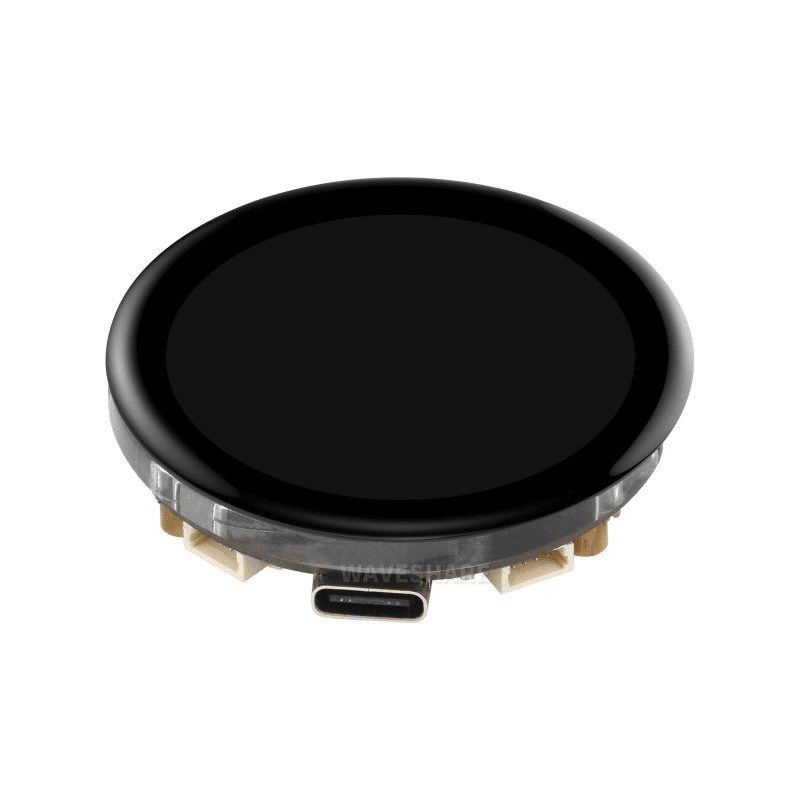
Waveshare ESP32-S3 1.43inch AMOLED Display Development Board
Use this ESP32-S3 board as the Wi-Fi host in a Thread Border Router setup — its powerful dual-core processor easily handles OpenThread + Wi-Fi stack simultaneously, and the display shows network status.

DHT11 Digital Relative Humidity and Temperature Sensor Module
Connect a DHT11 to your ESP32-H2 end device to build a Zigbee or Thread temperature sensor that reports to your smart-home hub at configurable intervals.

2 x 18650 Lithium Battery Shield for ESP32/ESP8266
The ESP32-H2’s 8 µA deep-sleep current makes battery-powered Zigbee sensors practical. This dual 18650 shield gives months of runtime for typical reporting intervals.

BMP280 Barometric Pressure and Altitude Sensor I2C/SPI Module
Add altitude and barometric pressure data to your Thread sensor node. Perfect for multi-parameter environmental monitoring across a Zigbee mesh network.
Frequently Asked Questions
Can the ESP32-H2 use Zigbee and Thread at the same time?
Not simultaneously on the same chip — the 802.15.4 radio can only run one protocol stack at a time. However, you can switch between them at runtime, or use a multi-chip design where one ESP32-H2 runs Zigbee and another runs Thread.
Does the ESP32-H2 have Wi-Fi?
No. The ESP32-H2 only has IEEE 802.15.4 and Bluetooth 5 LE. If you need Wi-Fi alongside Zigbee/Thread, pair it with an ESP32, ESP32-S3, or ESP32-C3 as the Wi-Fi host in a split-radio architecture.
What is the range of ESP32-H2 Zigbee in an Indian home?
In a typical Indian apartment (concrete walls, 2–3 BHK layout), direct range is 15–25 metres. With Zigbee mesh routing through intermediate router devices, you can easily cover 3–4 floors or a large villa compound.
Is ESP32-H2 compatible with Home Assistant?
Yes. Home Assistant supports ESP32-H2 via Zigbee2MQTT (with EZSP firmware) and via the OpenThread Border Router add-on. The Matter integration is also natively supported in Home Assistant 2023.5+.
Where can I buy ESP32-H2 modules in India?
ESP32-H2 modules are available from Indian electronics distributors. While you wait for more local stock, Zbotic.in carries a full range of ESP32 family development boards, sensors, and accessories to build your Zigbee/Thread ecosystem today.
Ready to Build Your Zigbee/Thread Project?
Zbotic.in stocks a wide range of ESP32 family boards, sensors, and power management modules — everything you need to start experimenting with ESP32-H2 Zigbee and Thread today.






Add comment