
The MAX7219 7-segment LED driver is one of the most satisfying chips to use in DIY electronics. With just three wires from your Arduino (SPI: DIN, CLK, CS), you can drive up to 8 seven-segment digits — and by daisy-chaining multiple MAX7219 modules, you can cascade dozens of digits while still using those same three pins. This guide covers everything about the max7219 7 segment driver cascade arduino setup: hardware details, wiring, cascading multiple modules, and clean Arduino code using the popular LedControl library. By the end, you’ll be building scrolling clocks, score counters, and multi-digit sensor readouts.
MAX7219 Overview & Key Features
The MAX7219 is a compact, serially interfaced common-cathode display driver from Maxim Integrated (now Analog Devices). Originally designed in the early 1990s, it remains a staple in hobbyist electronics because it solves a real problem elegantly: driving multiple 7-segment digits without consuming a GPIO pin per segment.
Here’s what makes it special:
- SPI serial interface — only 3 wires (DIN, CLK, LOAD/CS) regardless of how many digits you drive
- Drives up to 8 digits per chip, handling all multiplexing internally at ~800Hz
- Onboard BCD decoder — send the digit 0–9 and the chip figures out which segments to light
- Software-controlled brightness — 16 levels via a single register write
- Shutdown and test modes — save power or run a lamp test with a single command
- Daisy-chain support — DOUT of one chip connects to DIN of the next, all sharing CLK and CS
Operating voltage is 4.0V–5.5V, making it directly compatible with 5V Arduino boards. Supply current per segment is regulated by a single external resistor (RSET), eliminating per-digit current resistors.
Pin Description & Module Variants
The raw MAX7219 IC comes in a 24-pin DIP package, but most hobbyists use ready-made modules that break out all connections and include the current-setting resistor. Common module variants:
- MAX7219 8-digit 7-segment module: A PCB with 8 seven-segment digits in a row. Ideal for clocks, timers, and counters.
- MAX7219 8×8 dot matrix module: Uses the same chip but drives an 8×8 LED matrix instead of segments. Great for scrolling text and animations.
- MAX7219 cascade board: Some modules come with pre-soldered DOUT headers specifically designed for chaining.
Key module pins:
| Pin | Name | Function |
|---|---|---|
| VCC | Power | 4.0–5.5V supply |
| GND | Ground | Common ground |
| DIN | Data In | SPI MOSI from Arduino |
| CLK | Clock | SPI clock from Arduino |
| CS / LOAD | Chip Select | Latch signal from Arduino |
| DOUT | Data Out | To DIN of next module (cascade) |
Wiring a Single MAX7219 Module to Arduino
For a single 8-digit MAX7219 module connected to an Arduino Uno:
| MAX7219 Pin | Arduino Uno Pin |
|---|---|
| VCC | 5V |
| GND | GND |
| DIN | D11 (MOSI) |
| CLK | D13 (SCK) |
| CS / LOAD | D10 (SS) |
You can use any digital pin for CS — D10 is just conventional. DIN and CLK should ideally use the hardware SPI pins (D11 and D13 on Uno) for speed, but any digital pins work with software SPI via the LedControl library.
Power tip: Add a 100nF decoupling capacitor between VCC and GND, as close to the MAX7219 as possible. Also add a 10µF electrolytic capacitor from the module’s VCC to GND for stability when all segments light up simultaneously.
Cascading Multiple MAX7219 Modules
Cascading (daisy-chaining) is the big advantage of MAX7219. The SPI data chain works like a shift register: you connect DOUT of module 1 → DIN of module 2 → DIN of module 3, and so on. All modules share the same CLK and CS lines from Arduino.
When you send data, you shift 16 bits per module through the chain simultaneously. The LedControl library handles all this transparently — you just tell it how many modules are connected and address them by index (0, 1, 2…).
Cascade wiring for 3 modules:
- Arduino D11 → Module 1 DIN
- Module 1 DOUT → Module 2 DIN
- Module 2 DOUT → Module 3 DIN
- Arduino D13 → Module 1 CLK, Module 2 CLK, Module 3 CLK (all shared)
- Arduino D10 → Module 1 CS, Module 2 CS, Module 3 CS (all shared)
Power for multiple modules: Each MAX7219 module at full brightness can draw up to 500mA. For 3+ modules, use an external 5V 2A+ power supply and share GND with the Arduino. Never power multiple cascaded modules from the Arduino’s 5V pin alone.
Arduino Code with LedControl Library
Install the LedControl library by Eberhard Fahle via Arduino Library Manager. Here’s a complete example for 2 cascaded 8-digit modules (16 digits total):
#include <LedControl.h>

// LedControl(DIN, CLK, CS, numModules)
LedControl lc = LedControl(11, 13, 10, 2); // 2 cascaded modules

void setup() {
  // Initialize both modules
  for (int i = 0; i < 2; i++) {
    lc.shutdown(i, false);   // Wake up from shutdown
    lc.setIntensity(i, 8);   // Brightness 0-15
    lc.clearDisplay(i);
  }
}

void loop() {
  // Display score on module 0
  long score = 1234567;
  displayNumber(0, score);

  // Display temperature on module 1
  int temp = 28;
  lc.setDigit(1, 7, temp / 10, false); // Tens place
  lc.setDigit(1, 6, temp % 10, false); // Units place
  lc.setChar(1, 5, 'C', false);        // 'C' for Celsius

  delay(1000);
}

void displayNumber(int module, long num) {
  lc.clearDisplay(module);
  int digit = 0;
  if (num == 0) { lc.setDigit(module, 0, 0, false); return; }
  while (num > 0 && digit < 8) {
    lc.setDigit(module, digit, num % 10, false);
    num /= 10;
    digit++;
  }
}
Key LedControl functions:
setDigit(addr, digit, value, dp)— display digit 0–9 with optional decimal pointsetChar(addr, digit, char, dp)— display letters A-F, H, E, L, P etc.setRow(addr, digit, byte)— raw segment control for custom characterssetIntensity(addr, level)— brightness 0 (dim) to 15 (max)clearDisplay(addr)— blank all digits on that module
Brightness Control & Scan Limit
The MAX7219 has two important configuration registers often overlooked by beginners:
Intensity Register (0x0A): Controls brightness via internal PWM. Values 0x00 to 0x0F give 16 steps from ~1/32 to 31/32 duty cycle. At maximum brightness (0x0F), all segments of all 8 digits lit simultaneously, the chip draws around 320mA. For battery projects, set intensity to 4–6 to balance visibility and power.
Scan Limit Register (0x0B): Tells the chip how many digits to multiplex. If you only use 4 digits, set scan limit to 3 (0-indexed) — this doubles the brightness of those 4 digits since each gets more on-time per cycle. The LedControl library defaults to scanning all 8.
No-op Register (0x00): Used during cascading to send a no-op (do nothing) command to modules that aren’t being addressed. The library handles this automatically.
For a scrolling text effect across cascaded modules, iterate through digit positions and shift characters one step per frame, updating all modules in one CS pulse cycle for flicker-free output.
Recommended Products from Zbotic
Build complete projects by pairing MAX7219 displays with these sensors from Zbotic:

LM35 Temperature Sensor
A classic analog temperature sensor — output 10mV/°C. Read with analogRead(), scale to Celsius, and display the value on your MAX7219 7-segment display in real time.

CJMCU-219 INA219 I2C Bi-directional Current/Power Monitor
Display real-time voltage, current, and power on a cascaded MAX7219 display. INA219 works over I2C so it won’t interfere with the SPI lines used by MAX7219.
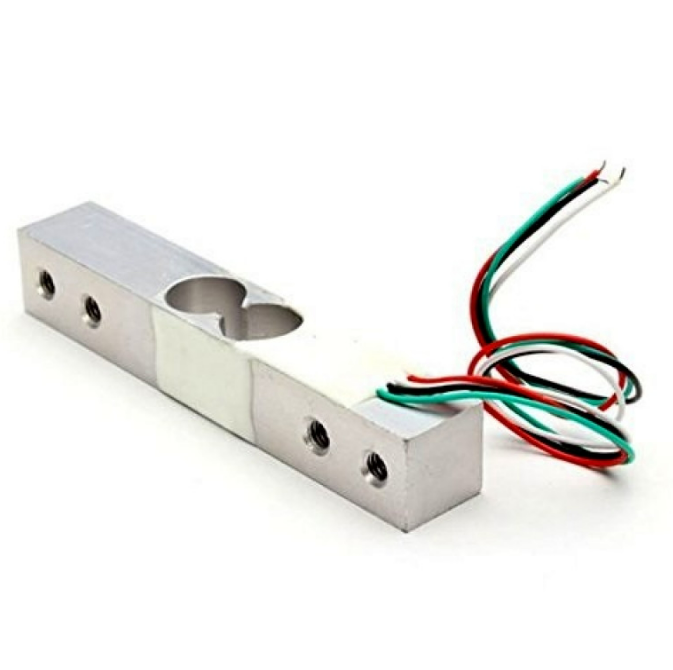
10Kg Load Cell – Electronic Weighing Scale Sensor
Build a digital weighing scale that shows weight on a MAX7219 7-segment display. Combine with an HX711 amplifier board and the LedControl library for a clean readout.

DHT11 Digital Relative Humidity and Temperature Sensor Module
Show temperature and humidity alternately on a dual MAX7219 cascade — 8 digits for temp, 8 digits for humidity. A beginner-friendly display project with real-world data.
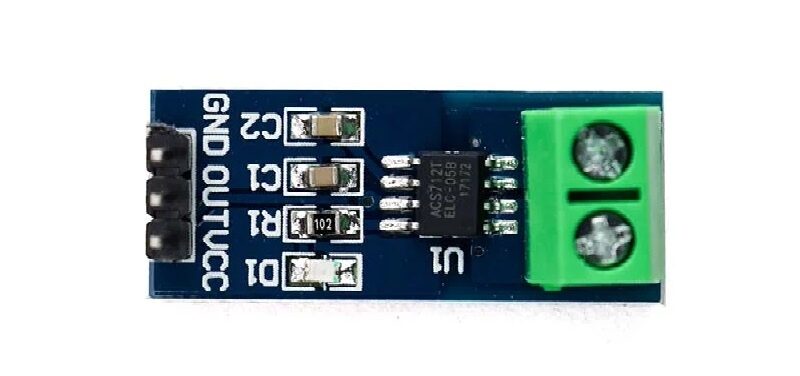
5A Range Current Sensor Module ACS712
Pair with MAX7219 to build a simple clamp meter — measure current through a circuit and display the result on 7-segment digits. Great for monitoring small appliances.
Frequently Asked Questions
How many MAX7219 modules can I cascade?
Theoretically there’s no hard limit — the shift register chain can be as long as you want. In practice, 4–8 modules is practical before SPI signal integrity becomes an issue at the far end of the chain. Use short wires, keep CLK speed reasonable (1MHz is fine), and add 100nF bypass capacitors on each module. Beyond 8 modules, consider buffering the CLK signal.
Can I use MAX7219 with a 3.3V microcontroller like ESP32?
The MAX7219 requires 4.0–5.5V for VCC, but its data inputs (DIN, CLK, CS) are compatible with 3.3V logic — the datasheet specifies a minimum VIH of 3.5V, which 3.3V barely meets. For reliable operation, use a level shifter on the data lines, or power the MAX7219 from 5V and use a simple voltage divider or 74AHCT125 buffer on each signal line.
My display shows only partial segments or random characters. What’s wrong?
Common causes: (1) Incorrect RSET resistor value — the resistor between pin 18 and VCC sets segment current. For typical 20mA LEDs, use 10kΩ. (2) Missing decoupling capacitor — add 100nF between VCC and GND pins on the MAX7219. (3) SPI wiring errors — verify DIN, CLK, and CS connections. (4) Not calling shutdown(addr, false) in setup — the chip powers up in shutdown mode.
What’s the difference between BCD decode mode and no-decode mode?
In BCD decode mode (LedControl default for setDigit), you send the digit value (0–9, ‘-‘, ‘E’, ‘H’, ‘L’, ‘P’) and the chip handles segment selection. In no-decode mode (setRow), you send a raw byte where each bit maps to a segment (a-g + dp), enabling fully custom characters. Use no-decode for letters and special symbols the BCD decoder doesn’t support.
Does MAX7219 work with common-anode 7-segment displays?
No — the MAX7219 is designed exclusively for common-cathode 7-segment displays. If you have a common-anode display, you’d need a different driver like the MAX7221 (same chip, different package) or the TM1637, which supports common-anode configurations. The ready-made MAX7219 modules sold for Arduino all use common-cathode digits.
Find Arduino modules, sensors, and all the components you need at Zbotic.in — fast delivery across India with expert support for makers and students.





Add comment