
Building a DIY oscilloscope with STM32 and an OLED display is one of the most rewarding weekend projects for any electronics hobbyist in India. Whether you are debugging PWM signals, checking sensor outputs, or learning about waveforms for the first time, a pocket oscilloscope built around the DS0138 kit and an OLED screen gives you a real lab instrument at a fraction of the cost of commercial units. In this guide, we walk through every step — from understanding the DS0138 kit to upgrading it with an STM32 microcontroller and a crisp OLED panel.
What Is the DS0138 Oscilloscope Kit?
The DS0138 is a popular single-channel digital oscilloscope kit sold as a DIY build. It is based on the STM32F103C8T6 ARM Cortex-M3 microcontroller and originally ships with a 2.4-inch TFT color display. The kit has a maximum sampling rate of 1 Msps and a bandwidth of around 200 kHz — more than enough for audio circuits, PWM motor control, I2C/SPI bus debugging, and general hobby electronics work.
In India, the DS0138 kit is extremely popular because it costs under ₹600-800 fully assembled, making it accessible to students and hobbyists who cannot afford a bench oscilloscope. The kit comes with BNC input, a test probe, and basic trigger controls. However, the stock TFT display is power-hungry and relatively dim. That is where the OLED upgrade becomes interesting.
Key specifications of the DS0138:
- MCU: STM32F103C8T6 (72 MHz, 64KB flash, 20KB RAM)
- Max sample rate: 1 Msps (analogue input)
- Bandwidth: ~200 kHz
- Input impedance: 1 MΩ
- Input voltage range: 0–30V with probe attenuation
- Display: 2.4″ TFT (320×240) — upgradeable to OLED
Why Upgrade to STM32 and OLED?
The stock DS0138 firmware runs on the STM32 already. The upgrade we are talking about is replacing the power-hungry TFT display with a 0.96″ or 1.3″ OLED module (SSD1306 or SH1106 driver). Here is why this matters:
- Power consumption: A 0.96″ OLED draws as little as 8–20 mA versus the TFT backlight pulling 60–80 mA. This matters enormously if you run the scope off a USB power bank.
- Contrast and readability: OLED pixels are self-emissive. In a dimly lit lab or outdoors in India’s bright sunlight (with a shade), the contrast is far superior to backlit TFT.
- Size and portability: You can build the entire scope into an Altoids tin or a compact 3D-printed case with an OLED display instead of the larger TFT.
- Learning value: Rewriting or adapting the display driver in STM32 firmware is an excellent exercise in SPI/I2C peripheral programming using the STM32 HAL or bare-metal registers.
For a more advanced upgrade, some makers use a 1.54″ or 2.42″ larger OLED (SSD1309, 128×64) which gives the same resolution headroom as the original TFT but with far less current draw.
Components You Will Need
Here is a complete bill of materials for the DS0138 + OLED oscilloscope project:
- DS0138 oscilloscope kit (assembled or kit form)
- 0.96″ SSD1306 OLED module (128×64, I2C) — or 1.3″ SH1106 for larger view
- STM32F103C8T6 Blue Pill board (if building from scratch)
- 10:1 oscilloscope probe with BNC connector
- USB to TTL programmer (ST-Link V2 or CH340G) for firmware flashing
- Breadboard, jumper wires, 100nF bypass capacitors
- Optional: LM35 or DHT20 sensor for live waveform testing
- Optional: ACS712 current sensor module for power analysis
Most of these are available on Zbotic, making it a one-stop shop for your build. The sensors below are great for generating test signals to verify your scope is working correctly after assembly.

LM35 Temperature Sensors
The LM35 outputs a clean analogue voltage proportional to temperature — a perfect test signal for checking your DIY oscilloscope’s analogue input and waveform rendering.

DHT11 Digital Relative Humidity and Temperature Sensor Module
Use the DHT11’s single-wire digital output to test your oscilloscope’s digital signal capture — its 40-bit serial protocol is a great exercise for trigger and time-base settings.
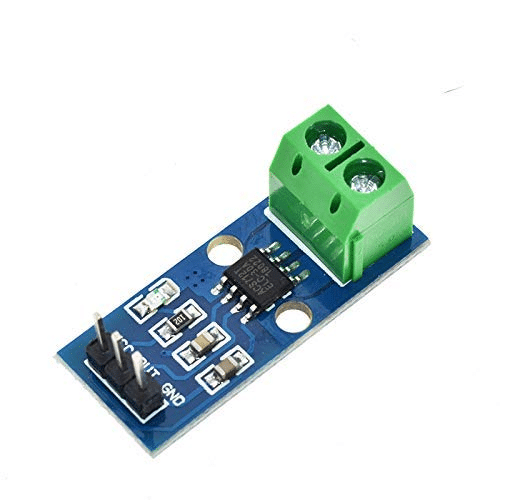
30A Range Current Sensor Module ACS712
The ACS712 outputs an analogue voltage corresponding to current flow — ideal for power monitoring projects where you want to visualise current waveforms on your DIY scope.
Wiring and Assembly Guide
If you are using the DS0138 kit with its original STM32 board and replacing the TFT with an OLED, follow these steps:
Step 1: Desolder the TFT Header
The DS0138 TFT connects via an 8-pin or 10-pin header to the main board. Carefully desolder or disconnect this header. The TFT uses an SPI interface on the STM32 (SPI1: PA5=SCK, PA7=MOSI, PA4=CS, PB0=DC, PB1=RST).
Step 2: Connect the OLED
For a 128×64 SSD1306 OLED on I2C:
- OLED VCC → 3.3V
- OLED GND → GND
- OLED SCL → PB6 (I2C1 SCL on STM32)
- OLED SDA → PB7 (I2C1 SDA on STM32)
If you prefer SPI OLED (faster refresh), wire to the same SPI pins as the original TFT but adapt the CS/DC/RST lines.
Step 3: Modify the Firmware
The DS0138 firmware is open source (available on GitHub under JYE-Tech). You need to replace the TFT driver calls with SSD1306 I2C driver calls. Key libraries for STM32 HAL: ssd1306.h from afiskon or stm32-ssd1306 repository.
Step 4: Flash with ST-Link
Use STM32CubeProgrammer or OpenOCD with your ST-Link V2 to flash the modified firmware. Connect SWDIO, SWCLK, 3.3V, and GND from the ST-Link to the STM32 header pads on the DS0138 board.
Firmware Setup and Code
The key change in firmware is replacing the display driver. Here is a minimal snippet showing how to initialise the SSD1306 and draw a waveform line using the STM32 HAL:
#include "ssd1306.h"

void display_init(void) {
  ssd1306_Init();
  ssd1306_Fill(Black);
  ssd1306_SetCursor(0, 0);
  ssd1306_WriteString("DIY Scope v1.0", Font_7x10, White);
  ssd1306_UpdateScreen();
}

void draw_waveform(uint8_t *samples, uint16_t count) {
  ssd1306_Fill(Black);
  for (uint16_t i = 1; i < count && i < 127; i++) {
    ssd1306_DrawLine(i-1, 63 - (samples[i-1] >> 2),
                     i,   63 - (samples[i]   >> 2), White);
  }
  ssd1306_UpdateScreen();
}
The full firmware needs to handle ADC DMA transfers, trigger detection, time-base scaling, and voltage calibration. The JYE-Tech source is the best starting point — fork it and swap out the display layer.
For beginners building from scratch on a Blue Pill, the STM32duino framework (Arduino IDE compatible) is an easier entry point. You can use the Adafruit SSD1306 library and write a simpler scope sketch that reads ADC pin PA0 at high speed and plots the samples on the OLED.
Calibration and Testing
Once assembled, calibration is critical for accurate measurements:
- Zero offset: With the probe tip grounded, adjust the vertical position potentiometer until the flat line sits at mid-screen.
- Voltage scale: Apply a known DC voltage (e.g., 3.3V from a regulator) and verify the scope reads within ±5%.
- Time-base: Use the test signal output (usually a 1 kHz square wave on the kit) to verify the time-base. Count grid squares and confirm the period matches 1 ms.
- Trigger test: Connect a DHT11 data pin and set trigger to rising edge. You should see the DHT11 start pulse cleanly on the OLED.
- Bandwidth test: Feed a 100 kHz square wave from an Arduino (using PWM or Timer output). Verify the waveform is still recognisable (it will round off but should be visible).
In India, temperature fluctuations can cause voltage reference drift. Use a 10nF ceramic capacitor across the ADC reference pin (VREF+) to GND to reduce noise.
Real-World Use Cases for Indian Makers
Your DIY oscilloscope + OLED becomes incredibly useful once you start debugging real projects:
- Motor control: Visualise PWM signals from ESCs or motor drivers. Check frequency and duty cycle without a multimeter’s limitations.
- Audio circuits: See sine waves from audio oscillators or amplifier outputs. Debug guitar pedal circuits.
- Sensor debugging: Probe SPI/I2C bus lines to see if your BME280 or INA219 is communicating correctly.
- Power supply ripple: Measure ripple on a 5V or 12V supply using AC coupling mode.
- RF detection: While bandwidth-limited, you can see carrier envelopes from IR remotes or 433 MHz modules.
In Indian workshops and college labs where bench oscilloscopes are shared or unavailable, having your own pocket scope changes how you debug. Pair it with the BMP280 or INA219 for environmental and power projects.

CJMCU-219 INA219 I2C Bi-directional Current/Power Monitoring Module
Monitor current and power in real time. Use alongside your DIY oscilloscope to cross-verify waveform measurements with digital readings over I2C.

BMP280 Barometric Pressure and Altitude Sensor I2C/SPI Module
Combine with your STM32 oscilloscope project — use the BMP280’s SPI/I2C signals as a live test input while learning to read digital protocols on the scope.
Frequently Asked Questions
Can the DS0138 measure signals above 200 kHz?
Not reliably. The DS0138’s analogue front end and STM32 ADC limit usable bandwidth to around 150–200 kHz. Above that, the waveform rolls off significantly. For higher frequencies you would need a dedicated analogue IC like the AD8065 or a faster ADC chip.
Which OLED is best for this project — SSD1306 or SH1106?
Both work well. The SSD1306 is I2C-native and easier to wire; the SH1106 supports both I2C and SPI and has a slightly different internal mapping. For screen size under 1.3″, use SSD1306 I2C. For 1.3″ modules, SH1106 SPI gives faster refresh which matters for oscilloscope sweep speed.
Do I need STM32CubeIDE for this project?
Not necessarily. You can use the Arduino IDE with the STM32duino core for a simpler approach. STM32CubeIDE with HAL is recommended if you want to modify the original DS0138 firmware for maximum performance.
Is there a risk of damaging the STM32 with high voltages?
Yes. The STM32F103 ADC input is only rated to 3.6V. The DS0138 has a front-end attenuator for this reason. Never connect a probe directly to mains or high-voltage circuits without proper probe attenuation and isolation.
Where can I buy DS0138 components in India?
The DS0138 kit is widely available on Indian e-commerce platforms. Sensors, current monitors, and STM32 accessories are available at Zbotic with fast delivery across India.
Ready to Build Your DIY Oscilloscope?
Get all the sensors and modules you need for your STM32 + OLED oscilloscope project from Zbotic — India’s trusted electronics components store with fast shipping.







Add comment