
What if you could change a resistor value in firmware without ever touching your soldering iron? The MCP4131 digital potentiometer makes this possible. It’s an 8-bit SPI-controlled variable resistor that digitally steps through 128 positions between 0Ω and 10kΩ (or 50kΩ or 100kΩ versions). You send two bytes over SPI and the resistance changes instantly — repeatable to within ±20% end-to-end, with each step being ~78.7Ω for the 10kΩ version.
Applications range from digitally adjustable audio volume and tone controls to variable gain amplifiers, automatic bias control in RF circuits, software-calibratable sensor bridges, and motor speed control. This tutorial walks you through everything: pinout, SPI protocol, Arduino code, voltage divider calculations, and three complete application circuits.
MCP4131 Overview and Specifications
The MCP4131 is manufactured by Microchip Technology and is part of the MCP413x/415x/423x/425x family of single/dual channel SPI digital potentiometers. Key specifications:
| Parameter | Value |
|---|---|
| Resolution | 7-bit (128 positions, 0–127) |
| End-to-end resistance (RAB) | 5kΩ, 10kΩ, 50kΩ, 100kΩ |
| Wiper resistance (RW) | ~75Ω typical |
| Step size (10kΩ version) | ~78.7Ω per step |
| Supply voltage | 1.8V to 5.5V |
| SPI modes | 0,0 and 1,1 (CPOL=0,CPHA=0 or CPOL=1,CPHA=1) |
| Max SPI clock | 10 MHz |
| Package | 8-pin DIP, SOIC, TSSOP, 2×3 DFN |
| Non-volatile version | MCP4141 (EEPROM, remembers on power loss) |
| Max continuous wiper current | 2.5 mA |
| Operating temperature | -40°C to +125°C |
Important limitation: The MCP4131 is a signal-level potentiometer, not a power potentiometer. The wiper current is limited to 2.5 mA maximum. Do not use it directly in high-current circuits (motors, speakers at full drive, heating elements). Use it as a control element feeding a power amplifier, driver IC, or transistor gate.
Pinout and Wiring to Arduino
The MCP4131 is an 8-pin IC. The DIP package is breadboard-friendly.
MCP4131 Pin Layout (DIP-8, top view):

  CS  ─ 1  8 ─ VDD (2.7V–5.5V)
  SCK ─ 2  7 ─ PA0 (terminal A)
  SDI ─ 3  6 ─ PW0 (wiper)
  SDO ─ 4  5 ─ PB0 (terminal B)
            GND  (connect to GND)

Note: GND is connected by tying pin 4 area (GND pad).
Actual DIP-8 pinout:
  Pin 1: CS (chip select, active low)
  Pin 2: SCK (SPI clock)
  Pin 3: SDI (MOSI)
  Pin 4: SDO (MISO)
  Pin 5: VSS (GND)
  Pin 6: PB0 (terminal B of resistor)
  Pin 7: PW0 (wiper)
  Pin 8: VDD
  Pin 9: PA0 (terminal A) — wait, DIP is 8 pins

Correct DIP-8:
  Pin 1: CS
  Pin 2: SCK
  Pin 3: SDI
  Pin 4: SDO
  Pin 5: VSS
  Pin 6: PB0
  Pin 7: PW0 (wiper)
  Pin 8: VDD
  (PA0 is connected to VDD internally for single-supply rheostat use
   OR to VDD externally for potentiometer use)
Wiring to Arduino Uno:
MCP4131 → Arduino Uno
  Pin 1 (CS)  → Digital 10 (SS)
  Pin 2 (SCK) → Digital 13 (SCK)
  Pin 3 (SDI) → Digital 11 (MOSI)
  Pin 4 (SDO) → Digital 12 (MISO) [optional if not reading back]
  Pin 5 (VSS) → GND
  Pin 6 (PB0) → GND (for rheostat config) or one end of circuit
  Pin 7 (PW0) → Output to circuit
  Pin 8 (VDD) → 5V
  PA0 (internal) → connected to VDD internally in rheostat mode
For a potentiometer (voltage divider) configuration: connect Pin 8 (VDD) to the reference voltage, Pin 6 (PB0) to GND, and read Pin 7 (PW0). The wiper voltage will be: V_PW0 = V_ref × (wiper_pos / 128).
SPI Protocol: Commands and Registers
The MCP4131 uses a simple 2-byte SPI command: one command/address byte followed by one data byte.
Byte 1 (Command byte): [A3 A2 A1 A0 | C1 C0 | D9 D8]
Byte 2 (Data byte):   [D7 D6 D5 D4 | D3 D2 | D1 D0]

Address bits (A3:A0):
  0x00 = Volatile Wiper 0 (the main register you care about)
  0x0A = TCON (Terminal Control Register)
  0x0F = Status Register (read-only)

Command bits (C1:C0):
  00 = Write
  10 = Read
  01 = Increment wiper
  11 = Decrement wiper

For Write to Wiper 0:
  Byte 1 = 0x00  (address 0, command 00, data bits [9:8] = 0)
  Byte 2 = wiper_value (0–127)

For Increment:
  Byte 1 = 0x04  (address 0, command 01)
  (no second byte needed for increment/decrement)

For Decrement:
  Byte 1 = 0x08  (address 0, command 11)
The IC operates in SPI Mode 0,0 (CPOL=0, CPHA=0). CS must be held LOW for the entire 2-byte transaction, then pulled HIGH to latch the value.
Arduino Library and Code Examples
Bare SPI example (no library required):
#include <SPI.h>

#define CS_PIN 10

void mcp4131_write(byte value) {
  // Clamp to 0–127
  if (value > 127) value = 127;

  SPI.beginTransaction(SPISettings(1000000, MSBFIRST, SPI_MODE0));
  digitalWrite(CS_PIN, LOW);
  SPI.transfer(0x00);    // Write command to wiper register 0
  SPI.transfer(value);   // Wiper position 0–127
  digitalWrite(CS_PIN, HIGH);
  SPI.endTransaction();
}

byte mcp4131_read() {
  SPI.beginTransaction(SPISettings(1000000, MSBFIRST, SPI_MODE0));
  digitalWrite(CS_PIN, LOW);
  SPI.transfer(0x0C);    // Read command to wiper register 0
  byte val = SPI.transfer(0xFF); // Send dummy byte, read result
  digitalWrite(CS_PIN, HIGH);
  SPI.endTransaction();
  return val & 0x7F; // Mask to 7 bits
}

void mcp4131_increment() {
  SPI.beginTransaction(SPISettings(1000000, MSBFIRST, SPI_MODE0));
  digitalWrite(CS_PIN, LOW);
  SPI.transfer(0x04);    // Increment command
  digitalWrite(CS_PIN, HIGH);
  SPI.endTransaction();
}

void mcp4131_decrement() {
  SPI.beginTransaction(SPISettings(1000000, MSBFIRST, SPI_MODE0));
  digitalWrite(CS_PIN, LOW);
  SPI.transfer(0x08);    // Decrement command
  digitalWrite(CS_PIN, HIGH);
  SPI.endTransaction();
}

void setup() {
  pinMode(CS_PIN, OUTPUT);
  digitalWrite(CS_PIN, HIGH); // Deselect
  SPI.begin();
  Serial.begin(9600);

  // Sweep from 0 to max resistance
  Serial.println("Sweeping from 0 to 127...");
  for (byte i = 0; i <= 127; i++) {
    mcp4131_write(i);
    delay(50);
  }
  Serial.println("Done. Setting to mid-point (63)");
  mcp4131_write(63);
}

void loop() {
  // Read back current value
  byte current = mcp4131_read();
  float resistance = 75.0 + (current * (10000.0 / 128.0)); // RW + step*RAB
  Serial.print("Wiper: "); Serial.print(current);
  Serial.print(" | Resistance: "); Serial.print(resistance); Serial.println(" ohms");
  delay(1000);
}
Resistance calculation formula:
R_WB = RW + (wiper_pos / 128) × RAB
Where RW = 75Ω (wiper resistance), RAB = 10000Ω (for 10kΩ version). At wiper_pos = 0: R = 75Ω. At wiper_pos = 127: R = 75 + (127/128) × 10000 = ~9,997Ω.
Application 1: Voltage Divider for ADC Reference
A classic use: set a precise reference voltage for an ADC, adjustable in software. Connect PA0 to your reference voltage (e.g., 3.3V or a precision 4.096V reference), PB0 to GND, and PW0 to the AREF or analog input pin.
// Set ADC reference voltage to 1.65V (half of 3.3V)
// wiper_pos = (desired_fraction) × 128 = 0.5 × 128 = 64
mcp4131_write(64);

// Set to 2.5V from 3.3V reference:
// wiper_pos = (2.5 / 3.3) × 128 = 96
mcp4131_write(96);
Note: Do not draw more than 2.5 mA from the wiper. The wiper is a signal source, not a power source. For loads below 10 kΩ, add an op-amp voltage follower buffer between the wiper and the load.
Application 2: Digital Audio Volume Control
Connect the audio signal to PA0, audio output to PW0 (through a 100Ω series resistor), and PB0 to GND. The MCP4131 acts as a voltage divider, attenuating the audio signal proportional to the wiper position.
// Volume control: map 0-100% to 0-127
void setVolume(int percent) {
  int wiperPos = map(percent, 0, 100, 0, 127);
  mcp4131_write(wiperPos);
}

// Use logarithmic scaling for perceptual volume control
void setVolumeLog(int percent) {
  // Human hearing is logarithmic — linear wiper position sounds wrong
  float fraction = (float)percent / 100.0;
  float logPos = pow(fraction, 2.5); // Approximate loudness curve
  int wiperPos = (int)(logPos * 127);
  mcp4131_write(wiperPos);
}
Important for audio applications: The MCP4131 resistive elements introduce some distortion (THD ~0.02%). For high-fidelity audio, use the MCP4261 (dual, better linearity) or the DS1882 (logarithmic taper specifically for audio). For casual Arduino audio projects, the MCP4131 is perfectly adequate.
Application 3: Variable Gain Op-Amp
Connect the MCP4131 as the gain resistor in a non-inverting op-amp configuration (e.g., LM358 or TL071). This creates a software-adjustable amplifier — useful for automatic gain control (AGC) in microphone preamplifiers or sensor signal conditioning.
// Non-inverting op-amp gain = 1 + RF/Rin
// Set MCP4131 as RF (feedback resistor), Rin fixed at 1kΩ
// Gain = 1 + (75 + pos * 78.7) / 1000

float calculateGain(byte wiperPos) {
  float RF = 75.0 + wiperPos * (10000.0 / 128.0);
  float Rin = 1000.0; // 1kΩ fixed
  return 1.0 + RF / Rin;
}

void setGain(float desiredGain) {
  // Solve for wiper: gain = 1 + (75 + pos*78.7)/1000
  // pos = ((gain - 1) * 1000 - 75) / 78.7
  float RF_needed = (desiredGain - 1.0) * 1000.0;
  int pos = (int)((RF_needed - 75.0) / 78.7);
  pos = constrain(pos, 0, 127);
  mcp4131_write(pos);
  Serial.print("Gain set to: ");
  Serial.println(calculateGain(pos));
}

// Set gain to 5x
setGain(5.0); // Expected: pos ≈ 50, actual gain ≈ 4.97
Using Multiple MCP4131 on One SPI Bus
Multiple MCP4131 devices share the same SPI bus (MOSI, MISO, SCK) but each gets its own CS pin. Since the MCP4131 has only one CS pin, this is straightforward: pull all CS pins HIGH, then pull only the one you want LOW during the transaction.
#define CS_PIN_1 10
#define CS_PIN_2 9
#define CS_PIN_3 8

int csPins[] = {CS_PIN_1, CS_PIN_2, CS_PIN_3};

void mcp4131_write_n(int device, byte value) {
  if (device < 0 || device > 2) return;
  if (value > 127) value = 127;

  SPI.beginTransaction(SPISettings(1000000, MSBFIRST, SPI_MODE0));
  digitalWrite(csPins[device], LOW);
  SPI.transfer(0x00);
  SPI.transfer(value);
  digitalWrite(csPins[device], HIGH);
  SPI.endTransaction();
}

void setup() {
  for (int i = 0; i < 3; i++) {
    pinMode(csPins[i], OUTPUT);
    digitalWrite(csPins[i], HIGH);
  }
  SPI.begin();

  // Set three different resistances
  mcp4131_write_n(0, 32);  // ~2.5kΩ
  mcp4131_write_n(1, 64);  // ~5kΩ
  mcp4131_write_n(2, 96);  // ~7.5kΩ
}
You can control up to as many MCP4131 as you have free digital pins for CS — easily 10+ on an Arduino Mega or ESP32.
MCP4131 Alternatives and Family Members
| Part | Channels | Resolution | NV Memory | Notes |
|---|---|---|---|---|
| MCP4131 | 1 | 7-bit (128) | No | This article’s subject |
| MCP4141 | 1 | 7-bit | Yes (EEPROM) | Remembers setting on power cycle |
| MCP4231 | 2 | 7-bit | No | Dual channel, saves pins |
| MCP4151 | 1 | 8-bit (256) | No | Higher resolution (39Ω steps) |
| X9C103 | 1 | 7-bit | Yes | Up/down pin interface (no SPI) |
| AD5206 | 6 | 8-bit | No | 6-channel, for complex AGC systems |
Use the MCP4141 (non-volatile version) in any application where the resistance setting must survive power cycling — for instance, a calibrated sensor offset stored at the factory. The extra ~₹15 over the MCP4131 is well worth it for production hardware.
Recommended Sensors for MCP4131 Projects

20A Range Current Sensor Module ACS712
The ACS712 analog output pairs perfectly with an MCP4131-controlled voltage divider for fine-tuning the ADC reference voltage in precision current measurement systems.
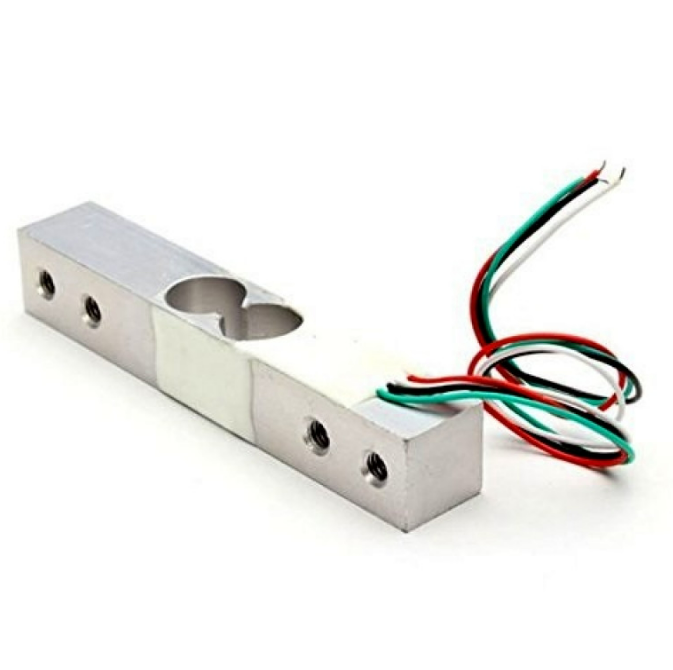
10Kg Load Cell Electronic Weighing Scale Sensor
Load cell Wheatstone bridge circuits benefit from a digitally adjustable zero-offset resistor using the MCP4131 — enables software-controlled tare calibration.
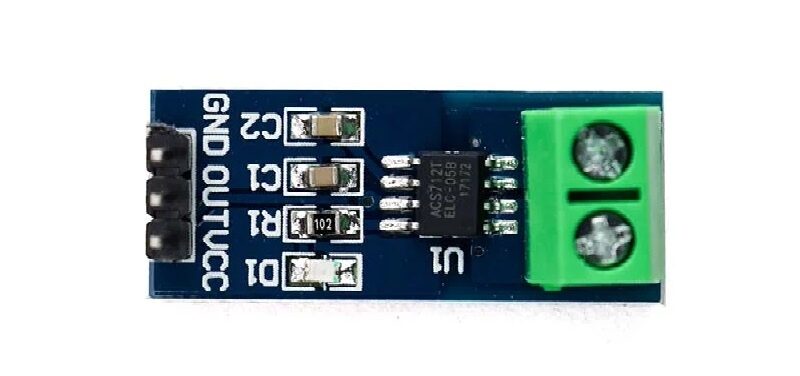
5A Range Current Sensor Module ACS712
Use the MCP4131 with a 5A ACS712 to build a digitally calibrated current monitoring system with adjustable sensitivity and zero-point correction in firmware.
FAQ
What is the MCP4131 maximum resistance?
The MCP4131-104 (10kΩ version) has a maximum wiper-to-end resistance of approximately 10,000Ω + 75Ω wiper resistance = ~10,075Ω. The exact value depends on the manufacturing tolerance (±20% end-to-end). The minimum resistance is just the wiper resistance: ~75Ω (when wiper_pos = 0).
Does the MCP4131 remember its position after power loss?
No. The MCP4131 is volatile — it resets to the mid-scale position (64) on power up. If you need the setting to persist across power cycles, use the MCP4141, which stores the wiper position in internal EEPROM (writes survive power loss, rated for 100,000 write cycles).
Can I use the MCP4131 to control motor speed?
Yes, indirectly. Use the MCP4131 to set the reference voltage on a motor driver IC (e.g., L298N sense resistor bypass, or DRV8825 VREF for stepper current control). Never connect the wiper directly to a motor — the 2.5 mA current limit would be immediately exceeded.
What SPI mode does MCP4131 use?
The MCP4131 supports SPI Mode 0,0 (CPOL=0, CPHA=0) and Mode 1,1 (CPOL=1, CPHA=1). Use SPI_MODE0 in Arduino’s SPI library for the standard connection. The maximum clock speed is 10 MHz, though 1–4 MHz is typical for most microcontrollers.
How do I calculate the step size for a 50kΩ MCP4131?
Step size = (RAB − RW) / 128 = (50,000 − 75) / 128 = ~390Ω per step. The 50kΩ version gives coarser steps but higher maximum resistance, useful for high-impedance circuits like op-amp feedback networks where loading effects matter.
Can MCP4131 be used as a DAC (Digital to Analog Converter)?
In voltage divider mode, yes — with limitations. Apply a stable reference voltage to PA0, ground PB0, and read PW0 as a DAC output. Maximum output current: 2.5 mA. For a proper DAC, use an MCP4725 (12-bit I2C DAC) or MCP4921 (12-bit SPI DAC). The MCP4131 “DAC” has ±20% gain error and poor linearity compared to a dedicated DAC IC.
The MCP4131 pairs beautifully with current sensors, load cells, and pressure sensors for software-calibratable measurement systems. Browse our full sensor range at Zbotic Sensors & Modules and build your next precision instrument.





Add comment