Looking for 2.8 Inch Touch Module? 2.8 Inch Touch Display Module for Raspberry Pi Pico( WAVESHARE ) is available at Zbotic with fast shipping across India.
2.8 Inch Touch Display Module for Raspberry Pi Pico
This is a Brand New 2.8 Inch Touch Display Module for Raspberry Pi Pico. With Resistive Touch Controller XPT2046, ST7789 Driver. And 262K Colors, 320×240 Pixels, and SPI Interface.
Useful link:
To use this display, please follow this tutorial for hardware setup.
After hardware setup, please follow this tutorial for software setup.
Features:
- 320×240 resolution, IPS screen, 262K colors, clear and colorful displaying effect
- Dedicated touch controller, bringing more smooth touching effect than AD-controlled solutions
- MicroSD card slot for storing images and direct displaying them easily
- Programmable backlight control, power saving
- Comes with development resources and manual (Raspberry Pi Pico C/C and MicroPython examples)
Pinout Diagram:
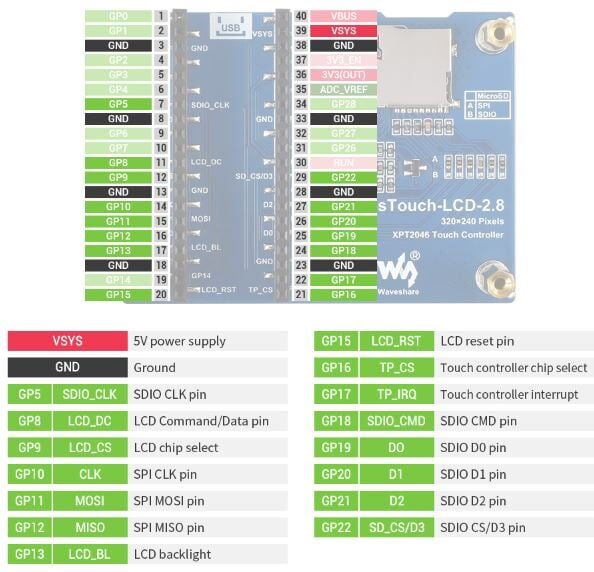
Package Includes:
1 x 2.8inch Touch Display Module for Raspberry Pi Pico
2.8 Inch Touch Display Module for Raspberry Pi Pico Overview
The 2.8 Inch Touch Display Module for Raspberry Pi Pico by Waveshare is a compact IPS screen add-on designed to bring rich color graphics and touch interaction to Pico projects. With a 320×240 resolution driven by the ST7789 controller and a dedicated XPT2046 resistive touch panel, it’s ideal for building custom user interfaces and interactive prototypes.
Key Features of 2.8 Inch Touch Display Module for Raspberry Pi Pico
- 320×240 resolution IPS panel with 262K colors delivers sharp, vivid images
- Resistive touch control via XPT2046 offers reliable, precise touch response
- ST7789 driver IC ensures stable SPI communication and consistent display performance
- SPI interface simplifies wiring to Raspberry Pi Pico’s SPI0/SPI1 ports
- Built-in microSD card slot for storing and displaying images locally
- Available at Zbotic: genuine Waveshare module with fast shipping across India
Applications and Use Cases
- Portable user interfaces for Pico-based DIY electronics
- Real-time data dashboards for sensor monitoring or robotics
- Custom embedded game consoles and menu systems
- Home automation control panels with touch navigation
- Interactive learning tools and educational kits
How to Use 2.8 Inch Touch Display Module for Raspberry Pi Pico
Begin by wiring the display’s 5V and GND lines to the Pico’s power pins and connect SPI signals (MOSI, SCK, CS, DC) to the Pico’s GPIO headers. Attach touch controller lines (T_CS, T_IRQ, T_DO, T_DIN, T_CLK) to spare GPIOs. After hardware setup, install Waveshare’s MicroPython drivers for ST7789 and XPT2046 via Thonny or command line, then run the provided example scripts to initialize the display and touch functionality.
Why Buy from Zbotic?
- Genuine Products: All items sourced from authorized distributors
- Fast Shipping: Orders ship within 24 hours with tracking (non backordered products)
- Free Shipping: Free delivery on qualifying orders
- COD Available: Cash on Delivery, UPI, cards, net banking
- Technical Support: Expert help for setup and troubleshooting
- Easy Returns: Hassle-free replacement for defective products
Frequently Asked Questions
How do I wire the 2.8″ touch display to Raspberry Pi Pico?
Connect the display’s SPI pins (MOSI, SCK, CS, DC), 5V VCC and GND to the corresponding pins on the Pico. For touch, link the XPT2046 signals (T_CS, T_IRQ, T_DO, T_DIN, T_CLK) to free GPIOs. Refer to Waveshare’s Pico wiring diagram for exact pin assignments.
Which software libraries support this SPI display and touch controller?
Waveshare provides MicroPython drivers for both the ST7789 display and the XPT2046 touch controller. Copy the st7789.py and xpt2046.py modules onto your Pico using Thonny or rshell, then run the example scripts available on Waveshare’s GitHub to get started.
How can I display images stored on the microSD card?
Insert a FAT32-formatted microSD card containing BMP or JPEG files into the onboard slot. Use the ST7789 library’s image-loading functions (e.g., display.image()) to read and render files directly from the SD card—ensure the card is properly seated before powering the module.

Arduino DAC Output: MCP4725 Module Setup & Waveform Generation
Every Arduino beginner quickly learns that analogWrite() doesn't actually produce a true analogue voltage — it generates a...
Read More →
Arduino SD Card Data Logger with Timestamps and RTC
Data logging is one of the most practical skills you can develop with Arduino. Whether you are monitoring...
Read More →
ESP32 Email Alert: Send SMTP Notifications from Sensors
Esp32 Email Smtp Alert — this detailed tutorial covers everything from hardware selection to complete working code, designed...
Read More →Technical Specifications
| Brand | WAVESHARE |
|---|---|
| Display Size | 2.8" |
| SKU | AI0880 |
| Weight | 0.1 kg |
| Availability | In Stock |
Applications & Use Cases
The 2.8 Inch Touch Display Module for Raspberry Pi Pico( WAVESHARE ) is a versatile tft lcd displays used across a wide range of applications including embedded HMI interfaces, Raspberry Pi touchscreen projects, Arduino display projects, industrial control panels, and information kiosks.
Common use cases:
- Adding a touch display to a Raspberry Pi project
- Building a portable game console
- Creating a dashboard for sensor data
This product is ideal for embedded developers, IoT makers, and industrial engineers.
Technical Tip: Check interface type (SPI, I2C, HDMI, RGB) and driver IC compatibility with your development board. IPS panels offer better viewing angles than TN.
Shipping & Delivery
- Free shipping on orders above ₹999 across India
- Dispatched within 1-3 business days
- Expected delivery: 3-7 business days depending on location
- Secure packaging to ensure safe transit of electronic components
- Genuine WAVESHARE product sourced from authorized channels