
Transform any old speaker or amplifier into a modern wireless audio system with a Raspberry Pi Bluetooth audio receiver. This project lets you stream music from your smartphone, tablet, or laptop to any speaker that has an AUX or RCA input — no expensive Bluetooth adapters or smart speakers required. In India, where many households have quality speakers from the ’90s and 2000s that still sound great but lack wireless connectivity, this Raspberry Pi project breathes new life into beloved audio equipment.
Project Overview and Benefits
A Raspberry Pi Bluetooth audio receiver works by accepting A2DP (Advanced Audio Distribution Profile) Bluetooth connections from your phone or computer and routing that audio to the Pi’s audio output — either the 3.5mm headphone jack or a USB/I2S DAC (Digital-to-Analog Converter) for higher quality sound.
The main advantages of this approach over commercial Bluetooth receivers are:
- Cost-effective: Build it for ₹3,000–₹5,000 vs ₹2,000–₹8,000 for commercial Bluetooth receivers (with far more customizability)
- Multi-device support: Queue multiple devices for easy switching
- Range: Raspberry Pi’s Bluetooth 5.0 (on Pi 4/5) offers up to 40 metres range
- Hackable: Add features like a touchscreen display, volume control, track info, or even integrate with Home Assistant
- Reuse old hardware: Perfect for home theatre setups with traditional amplifiers
This guide uses BlueALSA, a lightweight Bluetooth audio backend that works without PulseAudio, making it more stable for dedicated audio streaming on resource-constrained setups.
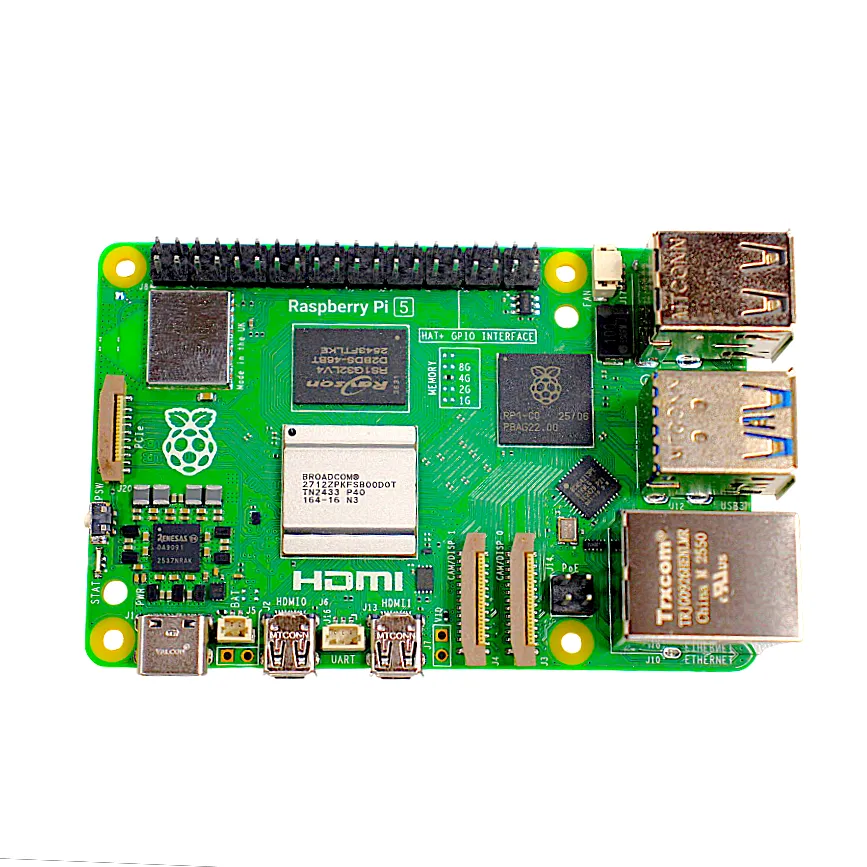
Raspberry Pi 5 Model 4GB RAM
The Raspberry Pi 5 with Bluetooth 5.0 is perfect for a high-quality audio receiver. Its powerful processor handles audio decoding flawlessly, and the 4GB RAM leaves headroom for additional features like a touchscreen display.
Components and Hardware Required
Here is what you need for this Raspberry Pi Bluetooth audio receiver project:
- Raspberry Pi 3B+, 4B, or 5: All have built-in Bluetooth (Pi Zero W also works for basic setups)
- MicroSD card: 8GB or larger
- Power supply: Official Raspberry Pi power adapter
- 3.5mm AUX cable: To connect to your amplifier or speaker
- Speaker or amplifier: Any system with AUX/RCA input
- Optional — USB DAC: For better audio quality than the Pi’s built-in audio jack
- Optional — 2.8 inch touchscreen: To display track info and controls
The Pi 3.5mm audio jack is adequate for casual listening, but if you have a quality amplifier and speakers, investing in an external USB DAC (available for ₹800–₹3,000) makes a significant difference in sound quality. The Pi’s built-in DAC has measurable noise floor issues that audiophiles will notice.

2.8 Inch Touch Display Module for Raspberry Pi Pico
Add a touch display to your Bluetooth audio receiver to show currently playing track info, volume level, and connection status. Makes the project feel like a proper consumer product.
Setting Up Raspberry Pi OS
Use Raspberry Pi OS Lite (no desktop) for a dedicated audio receiver — it boots faster, uses less RAM, and is more stable for long-running audio applications. Flash the latest 64-bit OS Lite using Raspberry Pi Imager, enabling SSH and your Wi-Fi credentials during setup.
After first boot, SSH in and update the system:
sudo apt update && sudo apt full-upgrade -y
sudo reboot
After reboot, disable unnecessary services to reduce system load and boot time:
sudo systemctl disable bluetooth-mesh.service
sudo systemctl disable triggerhappy.service
Configuring Bluetooth on Raspberry Pi
The Raspberry Pi’s built-in Bluetooth stack (BlueZ) needs to be configured for audio streaming. First, ensure Bluetooth and required audio packages are installed:
sudo apt install bluetooth bluez bluez-tools -y
sudo systemctl enable bluetooth
sudo systemctl start bluetooth
Now set the Raspberry Pi to be discoverable as a Bluetooth audio device. Start the interactive bluetoothctl tool:
sudo bluetoothctl

# Inside bluetoothctl:
power on
agent on
default-agent
discoverable on
pairable on

# Give your device a friendly name:
system-alias "RaspberryPi Speaker"

quit
To make the Pi permanently discoverable, edit the Bluetooth service configuration:
sudo nano /etc/bluetooth/main.conf

# Find and modify:
DiscoverableTimeout = 0
PairableTimeout = 0
Discoverable = true
Setting Up BlueALSA for Audio Streaming
BlueALSA is the recommended solution for Bluetooth audio on Raspberry Pi without PulseAudio. It is lighter, more reliable, and works perfectly for A2DP audio sink (receiving audio).
Install BlueALSA:
sudo apt install bluealsa -yConfigure BlueALSA to start as a systemd service with A2DP support. Create or edit the service file:
sudo nano /etc/systemd/system/bluealsa-aplay.service

[Unit]
Description=BlueALSA aplay
Requires=bluealsa.service
After=bluealsa.service

[Service]
Type=simple
User=pi
ExecStart=/usr/bin/bluealsa-aplay 00:00:00:00:00:00
Restart=on-failure
RestartSec=5

[Install]
WantedBy=multi-user.target
Enable and start the service:
sudo systemctl daemon-reload
sudo systemctl enable bluealsa-aplay
sudo systemctl start bluealsa-aplay
The 00:00:00:00:00:00 wildcard address means BlueALSA will accept audio from any paired Bluetooth device. You can replace it with a specific device MAC address to restrict it to one phone if preferred.
Auto-Connect and Pairing Management
One of the most important features for a practical Bluetooth audio receiver is auto-reconnecting when your phone comes within range. A small Python script handles this elegantly:
sudo nano /usr/local/bin/bt-auto-connect.sh

#!/bin/bash
# Auto-connect to all trusted Bluetooth devices
while true; do
  for device in $(bluetoothctl devices Paired | awk '{print $2}'); do
    bluetoothctl connect $device &>/dev/null
  done
  sleep 10
done
sudo chmod +x /usr/local/bin/bt-auto-connect.shCreate a systemd service for it:
sudo nano /etc/systemd/system/bt-auto-connect.service

[Unit]
Description=Bluetooth Auto Connect
After=bluetooth.target

[Service]
Type=simple
ExecStart=/usr/local/bin/bt-auto-connect.sh
Restart=always

[Install]
WantedBy=multi-user.target
To pair a new device, temporarily make the Pi discoverable from bluetoothctl and pair from your phone. After pairing, run bluetoothctl trust DEVICE_MAC so the device auto-reconnects without PIN entry in the future.
Improving Audio Quality
The default Raspberry Pi audio jack output (analogic) has a signal-to-noise ratio of about 60dB. For audiophile-grade audio, consider these improvements:
Enable AAC or aptX Codec
BlueZ and BlueALSA support the AAC codec on the Raspberry Pi 4/5. AAC provides noticeably better audio quality than the default SBC codec at the same bitrate. Enable it in the BlueALSA service startup flags:
ExecStart=/usr/bin/bluealsa --profile=a2dp-sink --codec=aacAdjust Audio Buffer Size
Edit /etc/asound.conf to reduce audio latency and improve stream stability:
pcm.!default {
  type plug
  slave.pcm "plughw:0,0"
}

ctl.!default {
  type hw
  card 0
}
Set System Volume
Use alsamixer to set the system volume to 100% and control volume from your phone. Or use this command:
amixer sset Master 100%
Raspberry Pi 5 Model 16GB RAM
The flagship Raspberry Pi 5 with 16GB RAM is ideal if you want to add advanced features to your Bluetooth audio receiver — like a music visualizer, touchscreen UI, or even a local music server running alongside the receiver.
Frequently Asked Questions
Which Raspberry Pi has the best Bluetooth for audio?
The Raspberry Pi 4 and Raspberry Pi 5 both feature Bluetooth 5.0, which offers better range, lower latency, and supports more advanced audio codecs like AAC compared to the Bluetooth 4.2 in the Pi 3. For best audio quality, the Pi 4 or Pi 5 is recommended.
Can I connect multiple Bluetooth speakers simultaneously?
Not easily in this basic setup. However, with PulseAudio configured with multiple sinks, you can stream to multiple Bluetooth speakers simultaneously. This is an advanced configuration that requires more processing power — the Pi 5 handles it well.
Is there audio delay (latency) when using Raspberry Pi as a Bluetooth receiver?
With the A2DP profile and SBC codec, you may notice 100–300ms latency. With AAC or aptX, this reduces to around 40–100ms. For listening to music this is fine, but for watching videos you will need to sync audio manually in your video player.
Can I use Raspberry Pi Zero W as a Bluetooth audio receiver?
Yes, the Pi Zero W has Bluetooth 4.1 and can run BlueALSA. However, its single-core processor may struggle with AAC codec decoding. Use SBC codec for reliable operation on Pi Zero W. The Pi Zero 2W is a much better choice at only slightly higher cost.
Will this work with a Bluetooth speaker (output)?
This guide covers making the Pi a Bluetooth audio receiver (sink). Making it a Bluetooth audio sender (source) to a Bluetooth speaker requires a different A2DP source configuration, which is also possible with BlueALSA.
Build Your Wireless Audio Receiver Today!
Get the Raspberry Pi and accessories you need from Zbotic. We stock all Raspberry Pi models with fast delivery across India.







Add comment