
Have you ever dreamed of running your own Raspberry Pi radio station? With this tiny computer and the right software, you can broadcast your own music, podcasts, or talk shows to listeners around your neighbourhood via low-power FM, or reach a global audience through internet streaming. This project is perfect for community radio enthusiasts, college radio clubs, event organisers, and music lovers across India who want to share their playlists without depending on commercial platforms.
Why Build a Raspberry Pi Radio Station?
The Raspberry Pi is uniquely suited for radio broadcasting projects. Its GPIO pins allow direct hardware interfacing for FM transmission, and its Linux-based OS supports professional audio broadcasting software like Icecast, Liquidsoap, and Darkice. Whether you want to broadcast to a few rooms in your house or stream live to thousands of listeners online, the Pi handles both.
In India, community radio stations have gained popularity under the TRAI-licensed community radio framework. While setting up a licensed FM station requires government approval, a Raspberry Pi radio station is perfect for:
- Private FM broadcasting within your home, hostel, or event venue (within legal power limits)
- Internet radio stations accessible worldwide via browser or apps like TuneIn and VLC
- Podcast hosting and streaming for educational institutions
- Live commentary at college fests, weddings, and sports events
- Learning about RF transmission and audio production
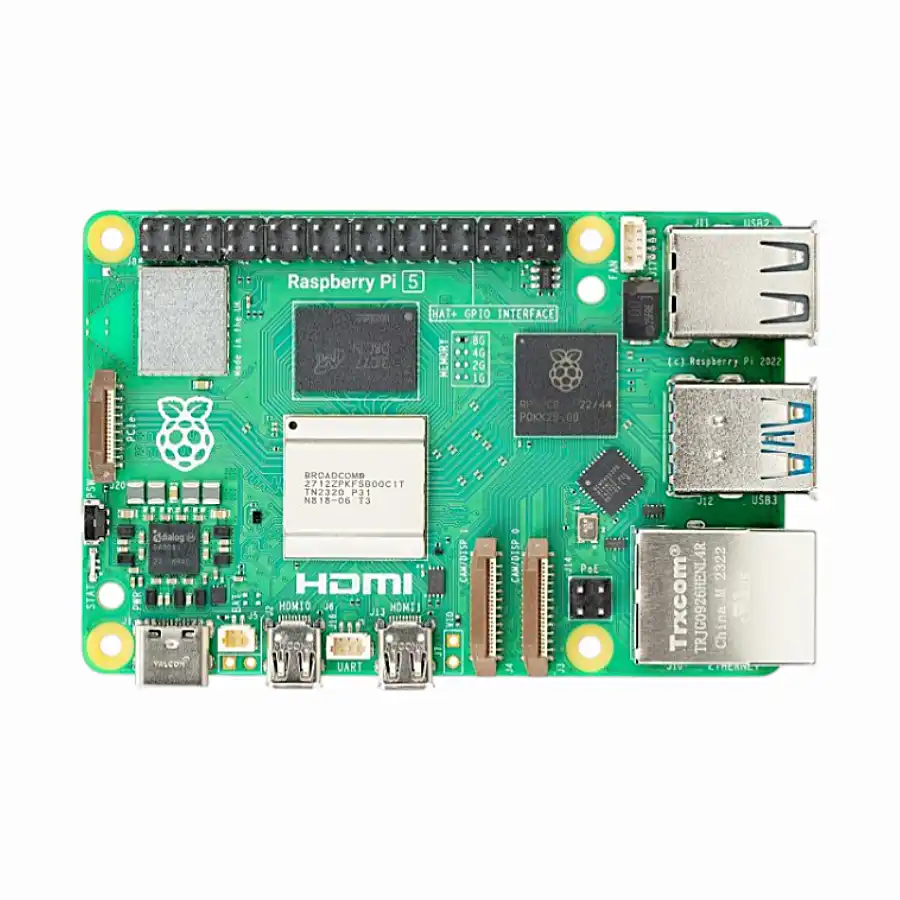
Raspberry Pi 5 Model 2GB RAM
The Raspberry Pi 5 (2GB) is an excellent base for a radio station — fast enough to run Icecast, Liquidsoap, and a web interface simultaneously while staying affordable for budget-conscious broadcasters.
FM Radio Transmitter with PiFM
The most exciting feature of a Raspberry Pi radio station is FM transmission using the GPIO pins. The PiFM (or its successor rpitx) software uses the Pi’s PWM clock on GPIO 4 (pin 7) to generate an FM carrier signal. Connect a short wire antenna (about 75cm for optimal FM range) to GPIO 4 and you have a working FM transmitter!
Installing rpitx
rpitx is the modern, maintained fork of PiFM with support for multiple modulation modes:
sudo apt install git -y
git clone https://github.com/F5OEO/rpitx
cd rpitx
./install.sh
After installation, test with an audio file:
# Transmit an MP3 on 98.5 MHz FM
ffmpeg -i music.mp3 -f s16le -ar 44100 -ac 1 - | sudo ./pifm - 98.5
You can now tune any FM radio receiver to 98.5 MHz and hear your broadcast! The range with a simple wire antenna is typically 10–50 metres indoors, sufficient for a single apartment or small office.
Continuous Broadcast Script
For a continuous music station, create a playlist broadcaster:
#!/bin/bash
# fm_broadcast.sh - Continuous FM broadcast from /home/pi/music folder
FREQ=98.5
MUSIC_DIR=/home/pi/music

while true; do
  for song in $(ls $MUSIC_DIR/*.mp3 | shuf); do
    echo "Now playing: $song"
    ffmpeg -i "$song" -f s16le -ar 44100 -ac 1 - 2>/dev/null |
    sudo /home/pi/rpitx/pifm - $FREQ
  done
done
Internet Radio Streaming with Icecast
For online broadcasting, Icecast is the industry-standard open source streaming server. It allows listeners anywhere in the world to tune into your stream via a web browser, VLC, or apps like TuneIn Radio.
Installing Icecast2
sudo apt install icecast2 -yDuring installation, you will be asked to configure hostname, passwords for admin and source. Set these carefully — the source password is what Liquidsoap (your audio source) will use to push audio to Icecast.
The Icecast configuration file is at /etc/icecast2/icecast.xml. Key settings to configure:
<icecast>
  <location>Mumbai, India</location>
  <admin>[email protected]</admin>
  <limits>
    <clients>100</clients>
    <sources>2</sources>
  </limits>
  <authentication>
    <source-password>your_source_password</source-password>
    <admin-user>admin</admin-user>
    <admin-password>your_admin_password</admin-password>
  </authentication>
  <hostname>your-public-ip-or-domain</hostname>
</icecast>
Start Icecast: sudo systemctl enable icecast2 && sudo systemctl start icecast2
Access the Icecast admin panel at http://raspberrypi.local:8000
Automated Playlists with Liquidsoap
Liquidsoap is the professional audio programming language used by real radio stations. It handles playlist management, live source switching, automatic fallback, crossfading, and much more.
Installing Liquidsoap
sudo apt install liquidsoap liquidsoap-plugin-all -yBasic Radio Station Script
Create /home/pi/radio.liq:
#!/usr/bin/liquidsoap

# Music playlist (shuffle)
music = playlist(mode="randomize", "/home/pi/music")

# Crossfade between tracks
music = crossfade(music)

# Add station ID jingle every 30 minutes
jingle = single("/home/pi/jingles/station-id.mp3")
radio = rotate(weights=[1, 9], [jingle, music])

# Encode to MP3
encoder = %mp3(bitrate=128)

# Stream to Icecast
output.icecast(encoder,
  host="localhost",
  port=8000,
  password="your_source_password",
  mount="/radio",
  name="My Raspberry Pi Radio",
  description="Broadcasting from India!",
  genre="Mixed",
  radio)
Start Liquidsoap: liquidsoap /home/pi/radio.liq &
Listeners can now tune in at http://your-ip:8000/radio using VLC or any internet radio player!

Raspberry Pi 5 Model 16GB RAM
For a full-featured internet radio station with Icecast, Liquidsoap, a web interface, and high listener capacity, the Raspberry Pi 5 16GB RAM gives you the headroom to run everything smoothly without throttling.
Hardware and Component Guide
For a complete Raspberry Pi radio station, here is the hardware breakdown:
- FM antenna: A 75cm wire soldered or clipped to GPIO pin 4 works for short-range. For better range, use a telescopic antenna with a proper ground plane.
- USB audio interface: For live microphone input to your radio station, connect a USB audio interface (like the Behringer UMC22) or a USB headset.
- External storage: A USB hard drive or large USB flash drive for your music library is recommended over the microSD card for longevity.
- UPS/battery backup: Critical for uninterrupted broadcasting during power cuts.

18650 Battery Holder Development Board for Raspberry Pi 3B/3B+
Keep your radio station broadcasting even during power outages. This battery backup board integrates seamlessly with Raspberry Pi for uninterrupted operation — essential for live broadcasts.
Advanced Features and Add-ons
Live DJ Mode with DarkIce
DarkIce captures live audio from a microphone or line-in and streams it directly to Icecast. Install with sudo apt install darkice and configure it to switch to live microphone input when connected, falling back to the Liquidsoap playlist automatically.
Now Playing on Social Media
Use Liquidsoap’s metadata hooks to post the currently playing track to Twitter/X or update a website. This makes your internet radio station feel professional and keeps listeners engaged.
Stream to Multiple Platforms
With Liquidsoap, you can simultaneously stream to Icecast (for your own server), and use tools to relay to popular platforms. Many internet radio directories like Internet Radio Database (IRDB) and TuneIn accept Icecast stream URLs for listing.
Web Player
Host a simple HTML5 web player using nginx on the same Raspberry Pi. Listeners visit your website and click play — the browser streams audio directly from Icecast.
Legal Considerations in India
FM transmission in India is regulated by the Ministry of Information and Broadcasting and TRAI. Key points:
- Low power FM: Transmission up to 10 milliwatts (extremely short range) falls in a legal grey area. The PiFM/rpitx output is well below this threshold and is used widely for educational purposes.
- Music licensing: For internet radio playing copyrighted music, you technically need a PPL (Phonographic Performance Limited) licence in India, similar to radio stations. For private/educational use, this is generally not enforced.
- Community radio licence: If you want to operate a proper FM station, apply through the Ministry of I&B’s community radio scheme — eligible for educational institutions and NGOs.
- Internet streaming: There is no specific licensing required for streaming internet radio for personal or educational use in India.
Frequently Asked Questions
What is the FM range of a Raspberry Pi radio transmitter?
With a simple wire antenna on GPIO pin 4, the range is typically 10–50 metres indoors. With a proper quarter-wave vertical antenna with a ground plane, you can achieve 100–200 metres outdoors. The signal quality and range depend heavily on antenna design and local RF environment.
Can I broadcast live shows on my Raspberry Pi radio station?
Yes! Using DarkIce with a USB microphone or audio interface, you can do live broadcasts. Liquidsoap’s input.harbor() function also accepts live streams from broadcasting software like BUTT (Broadcast Using This Tool) running on your PC.
How many listeners can an Icecast server handle?
On a Raspberry Pi 5, Icecast can comfortably handle 50–100 simultaneous listeners for a 128 kbps MP3 stream (limited by network bandwidth, not CPU). For larger audiences, you would host Icecast on a VPS and use the Pi only as the audio source (encoder).
Can I use Raspberry Pi to receive internet radio too?
Absolutely! Install VLC or MPD (Music Player Daemon) on a Raspberry Pi to receive and play any internet radio stream. Connect it to your amplifier and create a beautiful internet radio receiver — the reverse of the broadcasting setup.
Is Raspberry Pi radio transmission legal in India?
Very low power FM transmission for private, non-commercial, educational use is widely practised in India. Commercial FM broadcasting requires a licence from the Ministry of Information and Broadcasting. For internet streaming, no licence is required for personal/educational use.
Start Broadcasting with Raspberry Pi!
Get your Raspberry Pi and all accessories from Zbotic — India’s trusted electronics components store with fast delivery pan-India.


Add comment