
Hall effect sensors are one of the most versatile and widely used sensor families in electronics. From counting rotations in motors to detecting door positions, measuring current, and determining magnetic field strength, they appear in everything from smartphones to washing machines to industrial robots. Yet many Arduino beginners treat all Hall effect sensors as interchangeable — they are not. There are three fundamentally different types: linear (analog) Hall sensors, rotary Hall sensors, and Hall switch (digital) sensors, each suited for entirely different tasks.
This comprehensive guide explains how each type works, their specifications, wiring to Arduino, code examples, and which type to choose for common maker projects.
1. The Hall Effect: How It Works
The Hall effect was discovered by Edwin Hall in 1879. When a current-carrying conductor is placed in a magnetic field perpendicular to the current flow, a voltage (the Hall voltage) develops across the conductor in the third perpendicular direction. This voltage is proportional to the magnetic field strength and the current — both of which are measurable.
Modern Hall effect sensors integrate the Hall element, amplifier, and signal conditioning into a single IC. The core operating principle is:
- A known bias current flows through the Hall element (a thin silicon wafer)
- An external magnetic field deflects the charge carriers sideways
- This deflection creates a measurable voltage differential across the element
- On-chip amplifiers and signal processing convert this to a usable output
The output type — analog voltage, digital switch, or encoded angle — depends on the additional processing circuitry built into the specific sensor IC. This is why we have three distinct types.
Key magnetic field terms:
- Gauss (G) / Tesla (T): Magnetic field strength. 1 Tesla = 10,000 Gauss. Earth’s field is ~0.5 Gauss. Strong neodymium magnets are ~3000–5000 Gauss at the surface.
- Operate point (B_OP): Field strength at which a Hall switch turns ON
- Release point (B_RP): Field strength at which a Hall switch turns OFF
- Hysteresis: B_OP − B_RP; the dead zone that prevents chattering
2. Type 1: Hall Switch (Digital On/Off Sensor)
The Hall switch is the simplest and most commonly found Hall effect sensor in maker kits. It outputs a digital HIGH or LOW depending on whether a magnetic field above a threshold (the operate point) is present.
Popular Hall Switch ICs
- A3144 / SS49E: Unipolar — triggers only on South pole (or North pole, depending on variant); common in maker modules
- US1881 / TLE4935: Latching unipolar — output stays latched until a field of opposite polarity releases it
- AH276 / SS441A: Omnipolar — triggers on both North and South poles
- DRV5023: Omnipolar digital, single-supply 2.5–38V, very robust
Two Subtypes of Hall Switch
Non-latching (chopper-stabilized): Output is HIGH when field is above operate point, returns LOW when field drops below release point. Used for rotation counting, door sensors, speed sensing.
Latching: South pole turns ON, North pole turns OFF. Maintains last state without constant magnet presence. Used for pushbuttons, position memory, brush-less motor commutation.
Key Specifications (A3144 example)
- Supply voltage: 4.5–24V
- Output: Open-drain NPN (active LOW when magnet present)
- Operate point: ~170 Gauss
- Release point: ~50 Gauss
- Response frequency: up to 100 kHz
- Package: TO-92 (through-hole) or SOT-23 (SMD)
3. Type 2: Linear Hall Sensor (Analog Output)
A linear Hall sensor outputs an analog voltage proportional to the magnetic field strength and direction. At zero field (no magnet), it outputs exactly half of VCC (the null point). Stronger South pole fields push the voltage toward VCC; stronger North pole fields push it toward GND.
Popular Linear Hall ICs
- A1302 / A1308: Ratiometric linear output, 2.5mV/G sensitivity
- HAL 826 (TDK): Low-noise linear Hall for precision applications
- SS495A: High sensitivity (3.125 mV/G), ±67 mT range
- DRV5055: Rail-to-rail output linear Hall, 2.5mV/G or 5mV/G variants
- ALS31313 (3D Hall): Measures field in all three axes (X, Y, Z) — a 3D linear Hall sensor
Key Specifications (A1302 example)
- Supply voltage: 4.5–6V (ratiometric to VCC)
- Output: Analog voltage (VCC/2 at zero field)
- Sensitivity: 1.3 mV/Gauss (at 5V)
- Range: ±1000 Gauss (approx.)
- Output clamp: 0.5V to VCC−0.5V
- Temperature coefficient: 0.1%/°C (compensated on-chip)
Practical Notes
When using a linear Hall sensor with Arduino’s 10-bit ADC (0–1023 scale at 5V), the sensitivity is approximately 0.26 counts per Gauss (1.3 mV/G ÷ 4.88 mV/count). This means you can detect field changes of ~4 Gauss per ADC count — adequate for measuring strong permanent magnets, current-carrying wires, and motor fields, but not Earth’s weak field (0.5 Gauss) without amplification.
4. Type 3: Rotary Hall Sensor (Angle Measurement)
Rotary Hall sensors — also called magnetic encoders — measure the angular position of a rotating shaft. They use a diametrically magnetized disk magnet on the shaft and a Hall IC that can determine the angle of the field from 0–360 degrees with high resolution.
Popular Rotary Hall Encoder ICs
- AS5600: 12-bit (0.088°) resolution, I2C, programmable start/stop angles, 0–360° absolute
- AS5048A: 14-bit (0.022°) resolution, SPI or PWM output, absolute encoder
- TLE5012B (Infineon): 15-bit, differential hall, for harsh automotive environments
- MA730 (MPS): 14-bit, SPI, integrated zero-position calibration
- AMT22 (CUI): Capacitive encoder (not Hall, but same application)
Key Specifications (AS5600 example)
- Supply voltage: 3.3V or 5V
- Resolution: 12-bit (4096 steps per revolution)
- Accuracy: ±0.5° (after calibration)
- Interface: I2C (0x36 fixed address)
- Output modes: I2C, PWM, or analog (selectable via OUT pin)
- Magnet strength: 20–70 mT (uses AGC — Automatic Gain Control)
- RPM: up to ~23,000 RPM without loss of data
- Zero position: programmable via BURN command or OTP
- Package: SOIC-8 or QFN-16 (breakout boards available)
The AS5600 is the most popular option for BLDC motor position control, gimbal head position, robotic joint angles, and motorized lens focus rings in the maker community.
5. Full Comparison Table
| Feature | Hall Switch | Linear Hall | Rotary Hall |
|---|---|---|---|
| Output | Digital (0 or 1) | Analog (mV) | Digital angle (degrees) |
| Measures | Presence/absence | Field strength | Shaft angle |
| Typical examples | A3144, US1881 | A1302, SS495A | AS5600, AS5048A |
| Interface | GPIO (digitalRead) | ADC (analogRead) | I2C / SPI |
| Library needed | None | None | Yes (AS5600Async etc.) |
| Cost | Very low (₹10–30) | Low (₹40–100) | Moderate (₹200–500) |
| Resolution | Binary | ADC resolution | 12–15 bit |
| Magnet required | Any permanent magnet | Any permanent magnet | Diametrically magnetized disk |
| Best use case | RPM, door, position | Current, field, joystick | Motor control, gimbal |
6. Wiring Hall Switch with Arduino
The A3144 Hall switch has an open-drain NPN output — it pulls the output LOW when a magnet is present, and the pin floats HIGH (requires external pull-up) when no magnet is present.
| A3144 Pin | Arduino Connection |
|---|---|
| Pin 1 (VCC) | 5V |
| Pin 2 (GND) | GND |
| Pin 3 (Output) | Digital Pin 2 + 10kΩ pull-up to 5V |
Note: Most Hall sensor modules (breakout boards) include the pull-up resistor on-board. If using bare A3144 IC in TO-92 package, add a 10kΩ resistor between the output pin and 5V yourself. A 100 nF decoupling capacitor between VCC and GND (close to the IC) reduces switching noise.
7. Wiring Linear Hall Sensor with Arduino
| A1302 Pin | Arduino Connection |
|---|---|
| Pin 1 (VCC) | 5V |
| Pin 2 (GND) | GND |
| Pin 3 (Output) | Analog Pin A0 |
The A1302’s output is a straightforward analog voltage — no pull-up needed. Place 0.1 µF ceramic capacitors between VCC and GND, and between the Output pin and GND (output decoupling), especially if the sensor output wire is long.
Zero-field offset: Connect the sensor and read the ADC value with no magnet nearby. This is your null point (should be close to 512 on a 10-bit ADC at 5V). Subtract this baseline from all readings to get a ±field reading centered at zero.
8. Arduino Code: Hall Switch (RPM Counter)
// Hall Switch RPM Counter
// Mount a small magnet on a rotating shaft.
// The A3144 output goes LOW once per revolution.

const int HALL_PIN = 2;
volatile uint32_t pulseCount = 0;
uint32_t lastCount = 0;
unsigned long lastTime = 0;

void IRAM_ATTR hallPulse() {
  pulseCount++;
}

void setup() {
  Serial.begin(115200);
  pinMode(HALL_PIN, INPUT_PULLUP);
  // Trigger on FALLING (when magnet passes: output goes LOW)
  attachInterrupt(digitalPinToInterrupt(HALL_PIN), hallPulse, FALLING);
  Serial.println("Hall Switch RPM Counter Ready");
}

void loop() {
  unsigned long now = millis();

  if (now - lastTime >= 1000) { // Calculate every second
    uint32_t count = pulseCount;
    uint32_t delta = count - lastCount;
    lastCount = count;
    lastTime = now;

    // RPM = pulses/second × 60 ÷ magnets_per_revolution
    // (1 magnet per revolution in this example)
    float rpm = delta * 60.0f;

    Serial.print("Pulses: "); Serial.print(delta);
    Serial.print(" | RPM: "); Serial.println(rpm, 1);
  }
}
For multi-pole configurations (e.g., 4 magnets spaced equally around a disk for a bicycle wheel), divide the RPM by the number of magnets: float rpm = delta * 60.0f / NUM_MAGNETS;
9. Arduino Code: Linear Hall (Magnetic Field Strength)
// Linear Hall Sensor - Magnetic Field Reading
// A1302: sensitivity 1.3 mV/G at 5V, null = VCC/2

const int HALL_PIN = A0;
const float SENSITIVITY = 1.3;    // mV per Gauss
const float VCC = 5000.0;          // mV
const float ADC_STEPS = 1023.0;
const float MV_PER_STEP = VCC / ADC_STEPS; // ~4.89 mV/step

int nullReading = 512; // Update this with your calibrated zero-field value

void setup() {
  Serial.begin(115200);

  // Calibrate null point (no magnet nearby)
  long sum = 0;
  for (int i = 0; i < 100; i++) {
    sum += analogRead(HALL_PIN);
    delay(5);
  }
  nullReading = sum / 100;
  Serial.print("Null reading calibrated: "); Serial.println(nullReading);
}

void loop() {
  int raw = analogRead(HALL_PIN);
  int delta = raw - nullReading;

  float voltageOffset = delta * MV_PER_STEP; // mV from null
  float fieldGauss = voltageOffset / SENSITIVITY;

  Serial.print("Raw ADC: "); Serial.print(raw);
  Serial.print(" | Field: "); Serial.print(fieldGauss, 1);
  Serial.println(" Gauss");

  if (fieldGauss > 50) Serial.println("Strong South pole detected");
  else if (fieldGauss < -50) Serial.println("Strong North pole detected");
  else Serial.println("Weak or no field");

  delay(100);
}
This code detects both magnetic poles (positive for South, negative for North with A1302), measures approximate field strength in Gauss, and prints a qualitative assessment.
10. Arduino Code: AS5600 Rotary Hall (Angle)
// AS5600 Rotary Hall Encoder - Read Angle
// Requires: "AS5600" library by Rob Tillaart (install via Library Manager)
#include <Wire.h>
#include <AS5600.h>

AS5600 encoder;

void setup() {
  Serial.begin(115200);
  Wire.begin();

  // Check if AS5600 is detected
  if (!encoder.begin()) {
    Serial.println("AS5600 not found! Check wiring.");
    while (1);
  }

  // Check magnet presence (AGC status)
  if (encoder.magnetDetected()) {
    Serial.println("Magnet detected - OK");
  } else {
    Serial.println("WARNING: No magnet detected!");
  }

  encoder.setDirection(AS5600_CLOCK_WISE); // or AS5600_COUNTERCLOCK_WISE
  Serial.println("AS5600 Ready");
}

void loop() {
  // getRawAngle returns 0–4095 (12-bit)
  uint16_t rawAngle = encoder.rawAngle();

  // getAngle returns 0.0–360.0 degrees
  float degrees = encoder.readAngle() * AS5600_RAW_TO_DEGREES;

  Serial.print("Raw: "); Serial.print(rawAngle);
  Serial.print(" | Angle: "); Serial.print(degrees, 2);
  Serial.println("°");

  // AGC and magnitude for diagnostics
  Serial.print("AGC: "); Serial.print(encoder.readAGC());
  Serial.print(" | Magnitude: "); Serial.println(encoder.readMagnitude());

  delay(100);
}
Install the AS5600 library by Rob Tillaart from the Arduino Library Manager. The readAngle() function returns raw 12-bit counts (0–4095 per revolution). Multiply by AS5600_RAW_TO_DEGREES (0.08789) to get degrees. The AGC value (0–255) tells you if the magnet is properly positioned — aim for 80–100 for optimal accuracy.
11. Project Selection Guide
Hall Switch — Best For:
- RPM / Speed measurement — Motor shaft speed, bicycle speedometer, fan speed monitoring
- Door/lid open-close detector — Laptop lid detection, appliance door sensor, security alarm
- Liquid level sensor — Float with magnet rises/falls past fixed Hall switch
- Brushless motor commutation — Three Hall switches at 60° or 120° for BLDC stator sensing
- Anti-tamper detection — Enclosure opened when magnet moves away from Hall switch
- Coin counter — Coins passing on a slide deflect a magnet past the Hall switch
Linear Hall — Best For:
- Contactless joystick / thumbstick — Two perpendicular linear Hall sensors for XY position, no mechanical wear
- Current measurement — Measure the magnetic field around a current-carrying wire (ACS712 uses this principle)
- Pedal position sensor — E-bike or go-kart throttle with no moving electrical contacts
- Linear position measurement — Slide a magnet along a track, read displacement from field strength change
- Magnetic field mapping — Map the field distribution from motors, speakers, or transformers
Rotary Hall Encoder — Best For:
- Brushless motor FOC (Field-Oriented Control) — Precise rotor position for efficient BLDC/PMSM control
- Gimbal head position control — Camera stabilization gimbal joint angle feedback
- Robotic arm joint angles — Absolute position without home-seeking on power-up
- Motorized camera lens focus — Track focus ring position precisely
- CNC axis position — Absolute encoder for stepper or servo systems
- Volume / parameter knob — Infinite rotation rotary encoder for UI control
12. Recommended Products from Zbotic
Complete your Hall effect sensor projects with these complementary modules from Zbotic:

20A Range Current Sensor Module ACS712
The ACS712 uses a linear Hall effect element inside — it’s the perfect example of a linear Hall sensor in action, measuring AC/DC current up to 20A for power monitoring projects.
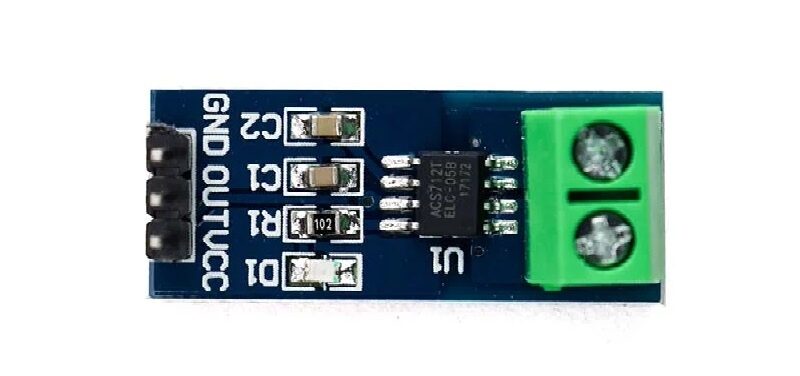
5A Range Current Sensor Module ACS712
For lower-current projects (battery systems, LED drivers, small motors), the 5A ACS712 variant offers better sensitivity and resolution — uses the same Hall effect sensing principle.

CJMCU-219 INA219 I2C Bi-directional Current/Power Monitoring Module
For precision bi-directional current and power measurement alongside your Hall-based RPM or position sensing, the INA219 provides high-accuracy current/voltage/power data via I2C.
13. Frequently Asked Questions
What magnet do I use with a Hall effect sensor?
For Hall switches (A3144, US1881): any permanent magnet strong enough to exceed the operate point (~170 Gauss for A3144). Small 6mm neodymium disc magnets work well. For linear Hall sensors: any permanent magnet — strength determines measurement range. For rotary Hall encoders (AS5600): a specific diametrically magnetized axial disc magnet is required (typically 6mm diameter, 2.5mm thick, N52 or N42 grade neodymium, 20–70 mT at sensor face).
What is the difference between a latching and non-latching Hall sensor?
A non-latching (standard) Hall switch turns ON when a magnet is close enough, and turns OFF when the magnet moves away. A latching Hall switch turns ON when a South pole magnet passes, and stays ON (latched) even after the magnet is removed — it only turns OFF when a North pole magnet passes. Latching sensors are used where you need the output to remember the last magnetic event, such as brushless motor commutation or bistable switches.
Why is my Hall switch always LOW (or always HIGH)?
Always LOW: Your magnet may be too strong and always keeping the sensor in operate state. Move the magnet further away. Or you may have the wrong polarity — some unipolar Hall switches only respond to one pole. Try flipping the magnet. Always HIGH: The magnet is not strong enough, or the pull-up resistor is missing. Check that you have a 10kΩ pull-up on the output pin (or use INPUT_PULLUP in Arduino). Also ensure the magnet polarity matches the sensor’s required pole.
Can I measure current with a Hall effect sensor?
Yes. A current-carrying conductor generates a magnetic field proportional to the current (Ampere’s law). A linear Hall sensor placed near the conductor can measure this field and hence the current. This is exactly how the ACS712 current sensor module works — it has a Hall element inside a small channel through which the measured current flows. For custom current sensing, use an A1302 or similar linear Hall sensor mounted close to the wire carrying the current.
What is the maximum RPM the AS5600 can measure?
The AS5600 updates its angle register at up to 3 kHz (with 12-bit resolution at 1 kHz update rate). At 1 kHz sampling, the maximum unambiguous RPM is approximately 30,000 RPM (500 RPS × 60). In practice, with proper I2C polling and interrupt-based reading, accurate RPM measurement is achievable up to ~15,000–20,000 RPM on standard Arduino at 400 kHz I2C.
Is the A3144 the same as the 44E Hall sensor module?
Not exactly. The “44E” designation (or 3144, OH44E, AH44E) refers to a family of similar unipolar Hall switch ICs from various manufacturers (Allegro, ABLIC, Honeywell, etc.). They are functionally equivalent for most maker applications — unipolar, open-drain output, 5V supply. Specific operate/release points may differ slightly between brands. For Arduino projects, they are interchangeable with the same wiring and code.
14. Conclusion
Hall effect sensors are a family, not a single device. Understanding which type you need — switch, linear, or rotary — is the key to choosing correctly for your project:
- Need to detect magnet presence? → Hall Switch (A3144, US1881)
- Need to measure field strength or current? → Linear Hall (A1302, ACS712)
- Need absolute shaft angle? → Rotary Hall Encoder (AS5600, AS5048A)
All three types share the advantage of being non-contact, wear-free, vibration-resistant, and sealed against dust and moisture — major advantages over mechanical switches and optical encoders in harsh environments. They work at -40°C to +150°C in industrial versions, and are reliable for millions of cycles.
With Arduino, all three types are easy to get working within a few minutes. Hall switches need just a digitalRead(), linear Hall sensors need an analogRead(), and rotary encoders need a single I2C library. Start with the switch if you’re new to Hall sensors, and graduate to the rotary encoder when your projects need it.






Add comment