
Build a Smart Weather Station Using Waveshare E-Paper Display & ESP32


Introduction:
Want to build a low-power IoT weather monitoring system that looks professional and runs for weeks on battery?
In this project, we’ll create a Smart Weather Station using a Waveshare E-Paper display and ESP32 development board – both available on Zbotic.in.
This project is ideal for:
- Engineering & diploma students
- Robotics & IoT enthusiasts
- Smart home automation
- Industrial environment monitoring
Why Use Waveshare E-Paper Display?
Waveshare E-Ink displays are perfect for IoT dashboards because:
✅ Ultra-low power consumption
✅ Sunlight-readable display
✅ No backlight required
✅ Crisp, paper-like visibility
✅ Industrial-grade reliability
Unlike LCD screens, E-Paper consumes power only when refreshing, making it ideal for battery-powered projects.
Components Required (Available on Zbotic.in)
You can internally link these to your product pages:
1️⃣ Waveshare E-Paper Display (2.9”, 4.2”, or 7.5”)
- Waveshare 1.54 inch e-Ink Paper Display Module
- Waveshare 3inch e-Paper (Optional)
- Waveshare 2.13inch E-Paper HAT+ For Raspberry Pi, E-Ink Display (Optional)
2️⃣ ESP32 Development Board
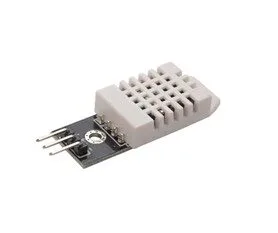
3️⃣ DHT22 Temperature & Humidity Sensor
4️⃣ Jumper Wires
5️⃣ Power Source (Battery or USB)
👉 Browse Waveshare Products on Zbotic:
https://zbotic.in/
How the Project Works:
- ESP32 reads temperature & humidity from DHT22 sensor.
- It optionally fetches online weather data via WiFi API.
- The data is displayed on the Waveshare E-Paper screen.
- The system refreshes every 15–30 minutes.
- ESP32 enters deep sleep mode to conserve battery.
Because the E-Paper display uses power only during refresh, the system can run for weeks or even months on battery.
Basic Wiring Connections:
DHT22 to ESP32:
- VCC → 3.3V
- GND → GND
- DATA → GPIO 4
E-Paper (SPI) to ESP32:
- DIN → MOSI
- CLK → SCK
- CS → GPIO 5
- DC → GPIO 17
- RST → GPIO 16
- BUSY → GPIO 4
(GPIO pins can be adjusted as per your configuration)
Basic Code Logic (Arduino IDE):
#include <WiFi.h>
#include <DHT.h>
#include <GxEPD2_BW.h>
#include <Fonts/FreeMonoBold9pt7b.h>
// ================= WIFI SETTINGS =================
const char* ssid = “YOUR_WIFI_NAME”;
const char* password = “YOUR_WIFI_PASSWORD”;
// ================= DHT SETTINGS =================
#define DHTPIN 4
#define DHTTYPE DHT22
DHT dht(DHTPIN, DHTTYPE);
// ================= E-PAPER SETTINGS =================
// For Waveshare 4.2″ display
GxEPD2_BW<GxEPD2_420, GxEPD2_420::HEIGHT> display(
GxEPD2_420(/*CS=*/ 5, /*DC=*/ 17, /*RST=*/ 16, /*BUSY=*/ 4)
);
void connectWiFi() {
WiFi.begin(ssid, password);
Serial.print(“Connecting to WiFi”);
while (WiFi.status() != WL_CONNECTED) {
delay(500);
Serial.print(“.”);
}
Serial.println(“nWiFi Connected!”);
}
void setup() {
Serial.begin(115200);
dht.begin();
connectWiFi();
display.init();
display.setRotation(1);
display.setFont(&FreeMonoBold9pt7b);
display.setTextColor(GxEPD_BLACK);
float temperature = dht.readTemperature();
float humidity = dht.readHumidity();
if (isnan(temperature) || isnan(humidity)) {
Serial.println(“Failed to read from DHT sensor!”);
return;
}
Serial.println(“Temperature: ” + String(temperature));
Serial.println(“Humidity: ” + String(humidity));
display.firstPage();
do {
display.fillScreen(GxEPD_WHITE);
display.setCursor(10, 30);
display.print(“SMART WEATHER”);
display.setCursor(10, 70);
display.print(“Temp: “);
display.print(temperature);
display.print(” C”);
display.setCursor(10, 110);
display.print(“Humidity: “);
display.print(humidity);
display.print(” %”);
display.setCursor(10, 150);
display.print(“WiFi: Connected”);
} while (display.nextPage());
// Sleep for 15 minutes
esp_sleep_enable_timer_wakeup(15 * 60 * 1000000ULL);
Serial.println(“Going to sleep…”);
esp_deep_sleep_start();
}
void loop() {
// Not used (Deep sleep mode)
}
Applications of This Project:
- Agriculture weather monitoring
- Smart home dashboard
- Factory environment monitoring
- College mini-project
- IoT product prototype
This project helps students and startups understand low-power embedded systems design.
Why Buy Waveshare from Zbotic.in?
✔ 100% Genuine Products
✔ Fast Shipping Across India
✔ Bulk Orders & Institutional Support
✔ Technical Assistance
Zbotic provides original Waveshare modules for robotics, IoT, and AI projects.
Libraries Required:
- This project uses the official Arduino ESP32 board package. You can install it from the official documentation here:
Official ESP32 Arduino Documentation - E-Paper Library – GxEPD2 E-Paper Display Library
- DHT22 – Adafruit DHT22 Guide
❓ Frequently Asked Questions (FAQs)
1️⃣ What is a Smart Weather Station using ESP32?
A Smart Weather Station using ESP32 is an IoT-based system that measures environmental data like temperature and humidity using sensors such as DHT22 and displays the information on a Waveshare E-Paper screen.
2️⃣ Why use Waveshare E-Paper display instead of LCD?
Waveshare E-Paper displays consume power only when refreshing the screen, unlike LCDs that require continuous backlight power. This makes them ideal for battery-powered IoT projects and long-term monitoring systems.
3️⃣ How long can this weather station run on battery?
Since E-Paper displays and ESP32 deep sleep mode consume very low power, the system can run for weeks or even months depending on:
- Battery capacity
- Refresh interval
- WiFi usage
Longer sleep intervals increase battery life.
4️⃣ Which sensors can I use instead of DHT22?
You can also use:
BME280 is recommended for more accurate and professional projects.
5️⃣ Can this project work without WiFi?
Yes
If you only want to display temperature and humidity from the sensor, WiFi is not required.
WiFi is only needed if:
- You fetch live weather data from an API
- You upload data to cloud platforms
- You enable remote monitoring
6️⃣ Is this project suitable for engineering students?
Yes.
This project is ideal for:
- Final year mini-project
- IoT lab submission
- Embedded systems practice
- Robotics & automation coursework
It demonstrates:
- Sensor integration
- SPI communication
- Low-power system design
- IoT concepts
7️⃣ Which Waveshare E-Paper size is best for this project?
Common options:
- 2.9 inch – Compact and low cost
- 4.2 inch – Balanced & most recommended
- 7.5 inch – Large display for industrial dashboards
4.2 inch is ideal for most student and home projects.
8️⃣ What programming environment is used?
The project is built using:
- Arduino IDE
- ESP32 Board Package
- GxEPD2 library (for E-Paper display)
- DHT sensor library
9️⃣ Can I expand this project further?
Yes!
You can upgrade it with:
- Real-time clock (RTC module)
- Weather forecast API
- Data logging to SD card
- Solar power system
- Mobile app integration
- MQTT cloud dashboard
🔟 Where can I buy genuine Waveshare E-Paper displays and ESP32 in India?
You can purchase 100% genuine Waveshare modules and compatible ESP32 boards from:
Zbotic offers fast shipping, technical support, and bulk order options.
Final Thoughts:
If you’re looking to build a professional IoT dashboard that is:
- Low power
- Reliable
- Industrial-grade
- Clean & modern looking
Then Waveshare E-Paper displays are the perfect choice.
👉 Explore Waveshare Products Now: https://zbotic.in/
Start building smarter IoT systems today with Zbotic.






Add comment