
Accelerometers are fundamental sensors in modern electronics — they measure the rate of change of velocity (acceleration) in up to three axes and are used in everything from drone flight controllers and gesture-controlled robots to fall detection wearables and vibration analysis systems. In India’s growing electronics maker community, three accelerometers dominate the Arduino and Raspberry Pi project space: the ADXL345, the MPU6050, and the LIS3DH.
This comprehensive buying guide compares these three popular accelerometers across all the parameters that matter — specifications, ease of use, library support, price in India, and the applications each one excels at — so you can make the right choice for your project.
Accelerometer Basics
Before comparing the sensors, let’s establish the key terms you’ll encounter:
- Axes: Most modern accelerometers are 3-axis (X, Y, Z), measuring acceleration in three perpendicular directions.
- Range (g-range): The maximum acceleration the sensor can measure, in multiples of gravitational acceleration (g = 9.8 m/s²). Common ranges: ±2g, ±4g, ±8g, ±16g.
- Resolution: How finely the sensor can distinguish acceleration differences. Measured in bits (10-bit, 12-bit, 16-bit).
- Sensitivity: How much output signal corresponds to 1g of acceleration. Higher sensitivity = better for detecting small movements.
- IMU: Inertial Measurement Unit — a sensor that combines accelerometer + gyroscope (and sometimes magnetometer) in one package.
- Interface: How the sensor communicates with Arduino. I2C (2-wire, up to 4 sensors) or SPI (4-wire, faster, longer cables).
- FIFO buffer: Built-in memory that stores samples, reducing the frequency at which your microcontroller needs to read the sensor.
ADXL345: The Versatile Classic
The ADXL345 from Analog Devices is one of the most well-documented and widely-used accelerometers in the Arduino hobbyist community worldwide. Released in 2009, it remains a popular choice more than a decade later due to its robust feature set and excellent documentation.
Key Specifications
- Axes: 3 (X, Y, Z)
- Range: ±2g, ±4g, ±8g, ±16g (software selectable)
- Resolution: 10-bit at ±2g; up to 13-bit full resolution at higher ranges
- Sensitivity: 3.9 mg/LSB at full resolution
- Interface: I2C (up to 400kHz) or SPI (up to 5MHz)
- Power supply: 2.0–3.6V core, 1.7–3.6V I/O (5V tolerant with level shifter)
- Current consumption: 40µA in normal mode, 0.1µA in standby
- FIFO: 32-level FIFO buffer
- Interrupt outputs: 2 independent interrupt pins
- Built-in functions: Free-fall detection, tap detection, activity/inactivity detection
- Price in India: ₹150–350 (on GY-291 breakout board)
Why Choose ADXL345?
The ADXL345 has hardware-level tap detection, double-tap detection, free-fall detection, and activity/inactivity monitoring — all handled internally and signaled via interrupt pins. This means your Arduino doesn’t need to constantly poll the sensor; the ADXL345 wakes the microcontroller only when a relevant event occurs, enabling extremely power-efficient designs.
Its selectable ±16g range makes it suitable for measuring high-intensity vibration and impacts, while the full-resolution mode provides excellent precision at lower accelerations. This flexibility makes it ideal for projects ranging from delicate tilt measurement to robust shock detection.
Best for: Tilt sensing, fall detection wearables, vibration monitoring, low-power portable devices, shock loggers, step counters

LM35 Temperature Sensors
Complement your accelerometer project with temperature sensing. IMU calibration and accelerometer accuracy both improve with temperature compensation.
MPU6050: The All-in-One IMU
The MPU6050 from InvenSense (now TDK) is arguably the most popular IMU module in the worldwide Arduino community, and certainly in India. Unlike the ADXL345 (accelerometer only), the MPU6050 is a 6-DOF IMU — it integrates a 3-axis accelerometer AND a 3-axis gyroscope in a single chip, connected via I2C.
Key Specifications
- Axes: 6 total — 3-axis accelerometer + 3-axis gyroscope
- Accelerometer range: ±2g, ±4g, ±8g, ±16g
- Gyroscope range: ±250, ±500, ±1000, ±2000 °/s
- Resolution: 16-bit ADC for both accelerometer and gyroscope
- Interface: I2C (up to 400kHz), two selectable addresses (0x68 / 0x69)
- Power supply: 2.375–3.46V (GY-521 module has 3.3V regulator and 5V input support)
- Current consumption: 3.9mA active, 10µA sleep
- Digital Motion Processor (DMP): Onboard processor that computes Euler angles and quaternions, offloading calculation from Arduino
- Temperature sensor: Built-in temperature sensor (±1°C accuracy)
- FIFO: 1024-byte FIFO buffer
- Price in India: ₹80–200 (on GY-521 breakout board)
Why Choose MPU6050?
The MPU6050’s headline feature is its Digital Motion Processor (DMP). This onboard processor performs sensor fusion (combining accelerometer and gyroscope data) and outputs stable orientation in the form of Euler angles (pitch, roll, yaw) or quaternions. Without DMP, you’d need to implement a Kalman filter or complementary filter on Arduino to get stable orientation — the DMP does this work for you.
For drone flight controllers, self-balancing robots, and gimbal stabilization, the gyroscope is essential — accelerometers alone cannot measure rotation rate, only tilt. The MPU6050 provides both, making it the go-to IMU for anything that requires knowing both orientation and rate of rotation.
The very low price (often the cheapest 6-DOF IMU available in India) combined with excellent library support (the popular i2cdevlib/MPU6050 library by Jeff Rowberg) makes it ideal for beginners and budget-conscious projects.
Best for: Drone flight controllers, self-balancing robots, gimbal stabilization, gesture detection, pedometers, motion capture, any project needing gyroscope data
LIS3DH: The Power-Efficient Choice
The LIS3DH from STMicroelectronics is a newer-generation accelerometer that prioritizes ultra-low power consumption without compromising on resolution or features. It’s widely used in commercial products where battery life is critical, and it’s gaining popularity in the Indian maker community for IoT battery-powered projects.
Key Specifications
- Axes: 3 (X, Y, Z) — accelerometer only
- Range: ±2g, ±4g, ±8g, ±16g (software selectable)
- Resolution: 8-bit, 10-bit, or 12-bit selectable
- Interface: I2C (up to 400kHz) or SPI (up to 10MHz) — faster SPI than ADXL345
- Power supply: 1.71–3.6V (very wide range)
- Current consumption: 2µA at 1Hz ODR (output data rate), 11µA at 100Hz, 0.5µA in power-down
- Output data rate: 1Hz to 5.3kHz (much higher ODR than ADXL345)
- FIFO: 32-level FIFO
- ADC inputs: 3 auxiliary ADC channels (unique feature — analog inputs on an accelerometer!)
- Built-in functions: Free-fall, tap, double-tap, activity recognition, 6D/4D orientation detection
- Price in India: ₹200–450 (on breakout board)
Why Choose LIS3DH?
At 2µA operating current at 1Hz, the LIS3DH consumes about 20 times less power than the ADXL345 and 1,000+ times less than the MPU6050. For a battery-powered IoT device that wakes up, takes a measurement, and goes back to sleep, this translates to years of operation on a coin cell battery.
The 1.71V minimum supply voltage makes it compatible with 1.8V systems common in modern SoCs and is well-suited for 3.3V platforms like ESP32, which are dominant in India’s IoT development scene. The three auxiliary ADC channels are a unique and practical feature — you can connect additional analog sensors (temperature thermistor, battery voltage divider) directly to the LIS3DH and read them via I2C, saving precious ADC pins on your microcontroller.
Best for: Battery-powered IoT devices, wearables, industrial IoT (IIoT) vibration loggers, always-on gesture recognition, ESP32/ESP8266 projects, designs requiring very long battery life

GY-BME280 Precision Altimeter Atmospheric Pressure Sensor
Combine with an accelerometer to build a complete drone or flight logger — track altitude via barometric pressure alongside orientation from your accelerometer/IMU.
Head-to-Head Comparison Table
| Parameter | ADXL345 | MPU6050 | LIS3DH |
|---|---|---|---|
| Type | 3-axis Accel | 3-axis Accel + Gyro | 3-axis Accel |
| Resolution | 13-bit | 16-bit | 12-bit |
| g-Range | ±2g to ±16g | ±2g to ±16g | ±2g to ±16g |
| Interface | I2C / SPI | I2C only | I2C / SPI |
| Supply Voltage | 2.0–3.6V | 2.375–3.46V | 1.71–3.6V |
| Current (active) | 40µA | 3.9mA | 2µA @ 1Hz |
| Gyroscope | No | Yes (±2000°/s) | No |
| Onboard DMP | No | Yes (quaternion output) | No |
| Tap Detection | Yes (hardware) | Via software | Yes (hardware) |
| Free-fall Detection | Yes (hardware) | Via software | Yes (hardware) |
| Max ODR | 3200 Hz | 1000 Hz | 5.3 kHz |
| Arduino Library | SparkFun ADXL345 | i2cdevlib, Adafruit | Adafruit LIS3DH |
| Price in India | ₹150–350 | ₹80–200 | ₹200–450 |
| Beginner-Friendly | High | High (many tutorials) | Medium |
Setting Up with Arduino
ADXL345 — I2C Basic Setup
// ADXL345 Basic Reading via I2C
// Library: SparkFun ADXL345 (install via Library Manager)
#include <SparkFun_ADXL345.h>

ADXL345 adxl = ADXL345(); // Default I2C address 0x53

void setup() {
  Serial.begin(9600);
  adxl.powerOn();
  adxl.setRangeSetting(8); // Set range to ±8g
  adxl.setFullResBit(true); // Full resolution mode
  Serial.println("ADXL345 Ready");
}

void loop() {
  int x, y, z;
  adxl.readAccel(&x, &y, &z);

  Serial.print("X: "); Serial.print(x);
  Serial.print(" Y: "); Serial.print(y);
  Serial.print(" Z: "); Serial.println(z);

  delay(200);
}
MPU6050 — Reading Accel + Gyro with DMP
// MPU6050 Basic Reading
// Library: Adafruit MPU6050 (install via Library Manager)
#include <Adafruit_MPU6050.h>
#include <Adafruit_Sensor.h>
#include <Wire.h>

Adafruit_MPU6050 mpu;

void setup() {
  Serial.begin(9600);
  if (!mpu.begin()) {
    Serial.println("MPU6050 not found!");
    while (1);
  }
  mpu.setAccelerometerRange(MPU6050_RANGE_8_G);
  mpu.setGyroRange(MPU6050_RANGE_500_DEG);
  Serial.println("MPU6050 Ready");
}

void loop() {
  sensors_event_t a, g, temp;
  mpu.getEvent(&a, &g, &temp);

  Serial.print("AccX:"); Serial.print(a.acceleration.x);
  Serial.print(" AccY:"); Serial.print(a.acceleration.y);
  Serial.print(" AccZ:"); Serial.print(a.acceleration.z);
  Serial.print(" | GyroX:"); Serial.print(g.gyro.x);
  Serial.print(" GyroY:"); Serial.print(g.gyro.y);
  Serial.print(" GyroZ:"); Serial.println(g.gyro.z);

  delay(100);
}
LIS3DH — I2C Setup with Adafruit Library
// LIS3DH Basic Reading
// Library: Adafruit LIS3DH (install via Library Manager)
#include <Adafruit_LIS3DH.h>
#include <Adafruit_Sensor.h>

Adafruit_LIS3DH lis = Adafruit_LIS3DH();

void setup() {
  Serial.begin(9600);
  if (!lis.begin(0x18)) { // I2C address 0x18 or 0x19
    Serial.println("LIS3DH not found!");
    while (1);
  }
  lis.setRange(LIS3DH_RANGE_4_G); // Set ±4g range
  lis.setDataRate(LIS3DH_DATARATE_50_HZ);
  Serial.println("LIS3DH Ready");
}

void loop() {
  lis.read(); // Read raw values

  sensors_event_t event;
  lis.getEvent(&event);

  Serial.print("X: "); Serial.print(event.acceleration.x);
  Serial.print(" Y: "); Serial.print(event.acceleration.y);
  Serial.print(" Z: "); Serial.println(event.acceleration.z);

  delay(200);
}
Which One for Which Application?
Choose ADXL345 for:
- Free-fall detection — laptops, drone drop detection, fall-protection safety devices
- Vibration monitoring — motor health monitoring, machine condition monitoring at high g-ranges
- Low-power tilt sensing — IoT tilt switches, inclinometers, level indicators
- SPI-required designs — when I2C bus is unavailable or noise-prone
- Hardware tap detection — capacitive switch alternatives, activity-wake applications
Choose MPU6050 for:
- Drone/quadcopter flight controllers — essential gyroscope for attitude control
- Self-balancing robots — requires both tilt angle (accelerometer) and angular velocity (gyroscope)
- Gimbal stabilization — camera gimbals need fast gyroscope feedback
- Gesture recognition — complex gesture patterns need both acceleration and rotation data
- Budget projects — lowest cost 6-DOF IMU in India
Choose LIS3DH for:
- Battery-powered IoT devices — years of operation on small batteries
- Wearables and health devices — step counter, activity tracker, fall detection wristbands
- ESP32/NodeMCU projects — 1.8V-3.3V systems, compatible without any level shifting
- High-speed vibration sampling — 5.3kHz ODR for FFT vibration analysis
- ADC expansion — use LIS3DH’s 3 ADC inputs to add more analog sensors to I2C-only systems
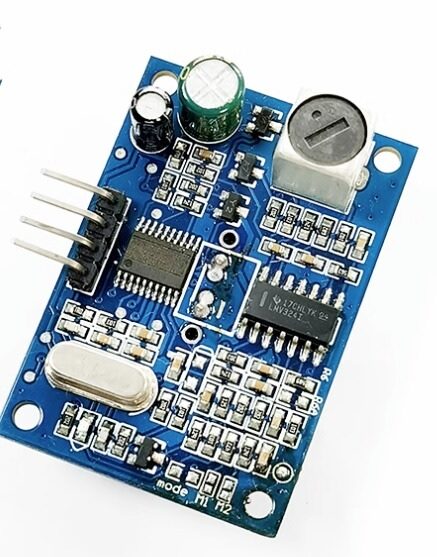
JSN-SR04T Waterproof Ultrasonic Sensor
Add distance sensing to your accelerometer-based robot or drone. Waterproof ultrasonic rangefinder works alongside any IMU for full spatial awareness.
Where to Buy in India & Prices
All three accelerometers are available in India on standard breakout boards that include voltage regulators, decoupling capacitors, and level shifters to make them 5V-Arduino-compatible:
| Sensor | Module Name | Price Range | Note |
|---|---|---|---|
| ADXL345 | GY-291 | ₹150–350 | Most common breakout |
| MPU6050 | GY-521 | ₹80–200 | Cheapest 6-DOF IMU |
| LIS3DH | Various | ₹200–450 | Less common, check stock |
Pro Tips for Accelerometer Projects
- Always calibrate your sensor. Place the sensor on a known level surface and record the baseline readings. Subtract the calibration offset from all subsequent measurements in code. A single-point calibration (zero-g offset) significantly improves accuracy.
- Use low-pass filtering. Raw accelerometer data is noisy. Apply a digital low-pass filter or running average in code to smooth readings, especially for tilt angle calculation.
- Avoid mounting near motors or power lines. Electromagnetic interference from motor PWM signals can inject noise into I2C lines. Use shielded cables or add 100Ω series resistors and 100nF pull-down capacitors on SDA/SCL near the sensor.
- For angle calculation, use both accelerometer and gyroscope. Accelerometer alone gives correct tilt in static conditions but is noisy during movement. Gyroscope alone drifts over time. A complementary or Kalman filter combining both gives stable, accurate orientation in all conditions.
- Mind the voltage levels. All three chips operate at 3.3V or lower internally. The GY-521 and GY-291 breakout boards include level shifters for 5V Arduino compatibility, but bare chips or some less common boards may not — verify before connecting to 5V I2C.
Frequently Asked Questions
Can I use multiple accelerometers on the same I2C bus?
Yes. Most accelerometers have a hardware address pin (AD0/SDO) that lets you select between two I2C addresses. The ADXL345 has addresses 0x53 and 0x1D. The MPU6050 has 0x68 and 0x69. The LIS3DH has 0x18 and 0x19. This allows two of the same sensor on one I2C bus. For more than two, use an I2C multiplexer (TCA9548A).
Do I need level shifting to use these sensors with Arduino Uno (5V)?
Most breakout boards (GY-291, GY-521) include a 3.3V voltage regulator and level shifter on the board, making them safe to use with 5V Arduino Uno. However, always verify this for the specific board you purchase — some cheap clones omit the level shifting. Connecting a 3.3V-only sensor directly to 5V I2C will damage it over time.
What is the difference between accelerometer and gyroscope?
An accelerometer measures linear acceleration (in m/s² or g) along each axis, which can be used to calculate tilt angle relative to gravity. A gyroscope measures angular velocity (in degrees per second) — how fast the sensor is rotating around each axis. To get absolute orientation accurately, you need both: accelerometer for long-term reference (no drift) and gyroscope for fast, smooth rotation tracking (low noise during movement).
Which accelerometer is best for a self-balancing robot?
The MPU6050 is the clear winner for self-balancing robots. The combined accelerometer and gyroscope data, processed through the onboard DMP or a complementary filter, gives stable and fast orientation measurements essential for the PID control loop. The gyroscope is critical — without it, the accelerometer alone cannot respond fast enough to dynamic tilting.
How do I convert raw accelerometer values to degrees (tilt angle)?
Use the arctangent of the gravitational component ratios. For example, roll angle = atan2(AccY, AccZ) × 180/π, and pitch angle = atan2(-AccX, sqrt(AccY² + AccZ²)) × 180/π. In Arduino, use the atan2() function from math.h. Note: this method works well only when the sensor is stationary — for dynamic tilt measurement, combine with gyroscope using a complementary filter.
Is the MPU6050 still recommended, or should I use a newer IMU?
The MPU6050 is a decade-old design and has been officially discontinued by InvenSense (TDK), but it remains widely available in India at very low prices and has the most extensive Arduino tutorial ecosystem of any IMU. For new designs, newer options like the ICM-20948 (9-DOF with magnetometer) or BMI088 offer better performance. However, for learning and budget projects, the MPU6050 still delivers excellent value in 2025 and the abundant code examples make it the most beginner-friendly choice.
Shop Accelerometers and IMU Sensors in India
Find ADXL345, MPU6050, LIS3DH modules and a full range of motion sensing components at Zbotic.in. All stocked in India for fast delivery — no waiting weeks for international shipping.
Conclusion
Choosing between the ADXL345, MPU6050, and LIS3DH comes down to your project’s specific requirements. The MPU6050 wins on features-per-rupee and is the best choice for any project requiring gyroscope data — drones, balancing robots, and gimbals. The ADXL345 is the most battle-tested pure accelerometer with excellent hardware gesture detection, ideal for moderate-complexity tilt and vibration applications. The LIS3DH excels when battery life is paramount, making it the smart choice for wearable and IoT projects that need to run for months on a single cell.
For Indian hobbyists and students just getting started with motion sensing, the MPU6050 on the GY-521 board is the recommended first purchase — low cost, huge community support, and learning both accelerometer and gyroscope principles simultaneously. Once you’re comfortable with IMU fundamentals, exploring the ADXL345 and LIS3DH will broaden your sensor toolkit and prepare you for more advanced professional-grade projects.





Add comment