
Fuel Gauge IC MAX17048: Battery Level Monitoring for Arduino Projects
If you’ve ever built a battery-powered Arduino project and wondered exactly how much charge is left, the fuel gauge IC MAX17048 is the answer to your problem. This tiny yet powerful chip gives you accurate, real-time battery level readings for your Arduino projects without draining precious battery power itself. Whether you’re building a wearable gadget, a portable sensor node, or a wireless IoT device, understanding and using the MAX17048 can transform your project from a rough prototype into a polished, production-ready product.
What is the MAX17048 Fuel Gauge IC?
The MAX17048 is a compact 1-cell lithium-ion or lithium-polymer battery fuel gauge IC made by Maxim Integrated (now part of Analog Devices). Unlike simple voltage dividers that give you a rough estimate of battery level, the MAX17048 uses a sophisticated algorithm called ModelGauge to accurately estimate the state of charge (SOC) as a percentage — exactly like the battery indicator on your smartphone.
The IC communicates over I2C (just two wires: SDA and SCL), making it extremely easy to integrate with any Arduino board. It operates on as little as 3V and draws only 23 µA of quiescent current — perfect for battery-powered devices where every milliamp matters.
Key specifications of the MAX17048:
- Operating voltage: 3.0V to 4.5V (single-cell Li-ion/LiPo)
- Communication: I2C (address 0x36)
- Accuracy: ±7.5% SOC typical
- Quiescent current: 23 µA (hibernate mode: 3 µA)
- Alert function: configurable low-battery threshold
- Package: tiny TDFN-1 (0.9mm × 1.7mm)
- Built-in battery compensation and temperature correction
The chip is available as a breakout board from various suppliers, making it easy to prototype on a breadboard with your Arduino Uno, Nano, or ESP32.
How the MAX17048 Works
Traditional battery monitoring with a simple resistor divider reads the battery terminal voltage and converts it to a percentage using a lookup table. This method is notoriously inaccurate because battery voltage varies with temperature, load current, and discharge history. The MAX17048 takes a fundamentally different approach.
ModelGauge Algorithm: The MAX17048 continuously models the electrochemical behaviour of the battery. It monitors the open-circuit voltage (OCV) and uses the battery’s charge/discharge curve to compute the true state of charge. It automatically compensates for load variations, meaning even if your circuit suddenly draws a large current spike, the reported SOC remains accurate.
ALRT Pin: The chip has an alert pin that goes low when the battery SOC drops below a configurable threshold (1% to 32%). You can connect this to an interrupt pin on your Arduino to wake it from sleep mode and warn the user — a critical feature for always-on IoT devices.
Hibernate Mode: When the battery is not being charged or discharged (or charge changes very slowly), the MAX17048 enters hibernate mode and reduces current draw to just 3 µA. It wakes up automatically when it detects activity.
The IC also has a VCELL register (12-bit ADC measuring battery voltage with 78.125 µV resolution) and an SOC register giving percentage with 1/256 % resolution — far more granular than you’ll ever need in a hobbyist project.
Pinout and Wiring with Arduino
If you’re using a MAX17048 breakout board (the most common form for hobbyists), you’ll typically have the following pins exposed:
| Breakout Pin | Connect To | Description |
|---|---|---|
| VCC | 3.3V or Battery + | Supply voltage (3.0–4.5V) |
| GND | GND | Ground |
| SDA | Arduino A4 (or SDA pin) | I2C Data |
| SCL | Arduino A5 (or SCL pin) | I2C Clock |
| ALRT | Arduino D2 (optional) | Alert interrupt (active low) |
| CELL+ | Battery positive terminal | Battery sense input |
| CELL- | Battery negative (GND) | Battery sense reference |
Important wiring notes:
- The MAX17048 must be connected directly across the battery terminals (CELL+ and CELL-). Do not place any resistance between the battery and the IC.
- If using an Arduino Uno (5V), use a logic level converter on the I2C lines, or use a 3.3V Arduino (Nano 33 IoT, Pro Mini 3.3V) to avoid damaging the IC.
- Pull-up resistors (4.7kΩ) on SDA and SCL are required. Most breakout boards include them.
- The ALRT pin is open-drain and needs a pull-up resistor (10kΩ to VCC) if you use it.
Arduino Code and Library Setup
The easiest way to use the MAX17048 with Arduino is through the SparkFun MAX1704x Arduino library, available in the Arduino Library Manager.
Step 1: Install the library
Open Arduino IDE → Sketch → Include Library → Manage Libraries → Search “MAX1704” → Install “SparkFun MAX1704x Fuel Gauge”
Step 2: Basic code to read battery level
#include <Wire.h>
#include <SparkFun_MAX1704x_Fuel_Gauge_Arduino_Library.h>

SFE_MAX1704X lipo(MAX1704X_MAX17048);

void setup() {
  Serial.begin(115200);
  Wire.begin();

  if (!lipo.begin()) {
    Serial.println("MAX17048 not found. Check wiring!");
    while (1);
  }

  lipo.quickStart();  // Reset to known state
  lipo.setThreshold(20); // Alert at 20% battery
  Serial.println("MAX17048 initialized!");
}

void loop() {
  float voltage = lipo.getVoltage();
  float soc = lipo.getSOC();
  bool alert = lipo.getAlert();

  Serial.print("Battery Voltage: ");
  Serial.print(voltage, 2);
  Serial.println(" V");

  Serial.print("State of Charge: ");
  Serial.print(soc, 2);
  Serial.println(" %");

  if (alert) {
    Serial.println("WARNING: Low battery!");
    lipo.clearAlert();
  }

  delay(1000);
}
Advanced features to explore:
lipo.getChangeRate()— returns charge/discharge rate in %/hourlipo.enableHibernate()— enables ultra-low-power hibernate modelipo.setThreshold(percent)— configures the low-battery alert thresholdlipo.reset()— triggers a full IC reset if readings are stuck
For ESP32 users, the same library works. Just initialise I2C with Wire.begin(SDA_PIN, SCL_PIN) to specify your custom I2C pins.
Practical Applications in Indian Maker Projects
The MAX17048 opens up a wide range of possibilities for battery-aware designs. Here are some practical Indian maker project ideas where this IC shines:
1. Field Agriculture Sensor Node: Farmers across Maharashtra, Punjab, and UP are increasingly using IoT sensors to monitor soil moisture, temperature, and humidity. A sensor node powered by a single 18650 cell can use the MAX17048 to report battery level over LoRa or GSM, so the farmer gets a WhatsApp alert when it’s time to recharge — before the node goes dark and data is lost.
2. Portable Air Quality Monitor: With increasing awareness of air pollution in Indian cities, portable PM2.5 monitors are popular DIY projects. Embedding a MAX17048 allows the device to display battery percentage on an OLED screen alongside AQI data — just like a commercial product.
3. Solar-Charged Weather Station: A rooftop weather station with a LiPo battery and small solar panel benefits enormously from accurate SOC readings. You can log battery health data alongside weather readings to understand charging patterns through Indian monsoon vs. summer seasons.
4. Wearable Health Tracker: Whether it’s a pulse oximeter or a step counter using an MPU-6050, wearables powered by LiPo cells need proper battery indication. The MAX17048’s tiny footprint and I2C interface make it ideal for cramped PCB layouts.
5. GPS Tracker for Vehicles/Assets: A hidden GPS tracker in a vehicle needs to last days or weeks on a single charge. The MAX17048 can trigger the ESP32/SIM800L to send a low-battery alert via SMS or MQTT before the device dies.
Tips and Tricks for Accurate Readings
Tip 1: Use quickStart() after powerup
After connecting a fresh battery, call lipo.quickStart(). This forces the MAX17048 to re-measure the OCV and recalibrate its SOC estimate. Without this, the IC might report incorrect SOC for the first few minutes after power-on.
Tip 2: Avoid reading during heavy load
If your circuit draws large pulse currents (e.g., during WiFi transmission on ESP8266/ESP32), the battery voltage sags temporarily. The ModelGauge algorithm compensates, but for the most stable readings, take them during low-current periods or implement a rolling average in your code.
Tip 3: Match the battery chemistry
The MAX17048 is optimised for standard Li-ion and LiPo cells with a nominal 3.7V and full-charge 4.2V. If you’re using LiFePO4 cells (3.2V nominal, 3.6V full), the SOC readings will be wildly inaccurate. Use the MAX17048G variant or a different IC for LiFePO4.
Tip 4: Hibernate mode for sleep cycles
For projects with deep sleep cycles (common in Indian IoT deployments on cellular networks where data is sent once per hour), enable hibernate mode. The IC will use only 3 µA between readings, adding weeks to battery life.
Tip 5: Use the ALRT interrupt
Don’t poll the SOC constantly. Connect ALRT to an interrupt pin and configure a low-battery threshold. This way, the MCU can sleep and only wake on a low-battery event — a huge power saving strategy.
Recommended Products from Zbotic
To build your MAX17048-based battery monitoring project, you’ll need quality batteries, holders, and charging modules. Here are our top picks:

1 x 18650 Battery Holder with 18.4MM Bore Diameter – Pack of 4
Sturdy single-cell 18650 holder with standard bore diameter. Perfect for prototyping MAX17048 circuits with a single Li-ion cell.
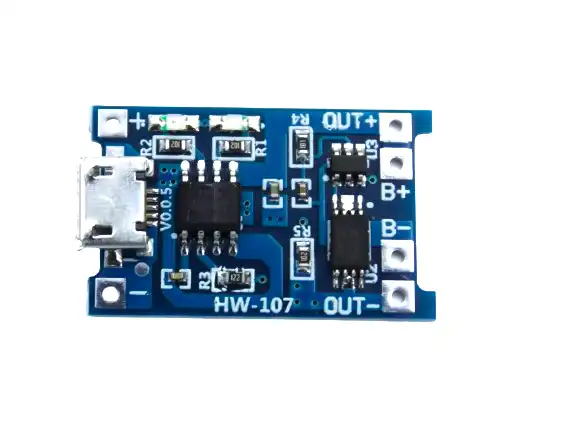
TP4056 1A Li-Ion Battery Charging Board Micro USB with Protection
Affordable and reliable charging module for single-cell Li-ion batteries. Includes over-voltage, under-voltage, and short-circuit protection.

18650 5V 1A/2A Lithium Battery Digital Display Charging Module Dual USB
All-in-one charging and boost module with digital display. Great for portable power bank projects where you need both charging and 5V output.

1S 12A 3.6V BMS Battery Protection Board for Li-ion Cell
Essential BMS board to protect your Li-ion cell from overcharge, over-discharge, and short circuits. Use alongside the MAX17048 for a complete battery management system.
Frequently Asked Questions
Q1: Can the MAX17048 work with LiPo batteries?
Yes, the MAX17048 is designed for both Li-ion and LiPo single-cell batteries. Both have the same voltage range (3.0V discharged to 4.2V fully charged), so the IC works identically with either chemistry.
Q2: What is the difference between MAX17048 and MAX17043?
The MAX17043 is an older version with fewer features. The MAX17048 adds a hibernate mode for lower quiescent current, configurable alert threshold, and a charge/discharge rate register. For new designs, always choose the MAX17048.
Q3: Does the MAX17048 work with 3.7V 18650 batteries?
Yes, standard 18650 Li-ion cells (nominal 3.7V, max 4.2V) are perfectly compatible. The MAX17048 was specifically designed for this voltage range.
Q4: How accurate is the MAX17048 SOC reading?
The datasheet specifies ±7.5% SOC accuracy under typical conditions. In practice, after the initial quickStart calibration and a few charge/discharge cycles, many users report ±3–5% accuracy — more than sufficient for battery level indicators.
Q5: Can I use the MAX17048 with an ESP8266 or ESP32?
Absolutely. Both run at 3.3V I2C levels, which is compatible with the MAX17048. Just connect SDA/SCL to the appropriate GPIO pins and initialize with Wire.begin(SDA_PIN, SCL_PIN). The SparkFun library works with both platforms.
Start Monitoring Your Battery Today
The MAX17048 is one of those components that upgrades every battery-powered project from “experimental prototype” to “professional product”. Accurate battery state of charge, ultra-low power consumption, simple I2C communication, and configurable alerts make it an indispensable tool for serious makers. Whether you’re deploying sensor nodes across a farm, building a portable test instrument, or designing a wearable device, integrating the MAX17048 will save you from the frustration of unexpectedly dead batteries.
Pair it with quality 18650 cells, a solid BMS board, and a reliable TP4056-based charging module from Zbotic, and you have a complete, professional-grade battery management solution for any single-cell Li-ion project. Start building smarter, battery-aware projects today!






Add comment