
Understanding ESP32 power consumption profiling is one of the most critical skills for building battery-powered IoT devices. The difference between a device that lasts 3 days on a battery and one that lasts 3 years often comes down to how well you profile and optimise power usage. In this comprehensive guide, we will explore every power mode of the ESP32, teach you how to accurately measure current consumption with both hardware and software tools, and show you practical techniques to extend battery life by 10x or more in real Indian IoT deployments.
Why Power Profiling Matters for Indian IoT Projects
India’s IoT deployment landscape has unique power challenges that make profiling especially important:
- Grid unreliability: In tier-2 and tier-3 cities, power cuts of 4–8 hours are common. IoT nodes need battery backup that can bridge these outages without daily charging.
- Solar-powered remote deployments: Agricultural IoT in states like Maharashtra, Punjab, and Karnataka often relies on small solar panels. Accurate power profiling determines the minimum viable solar panel size.
- Battery logistics: Replacing batteries in 50 nodes scattered across a large factory every 6 months is expensive and operationally disruptive. Extending battery life to 2+ years changes the economics.
- Heat effects: Indian ambient temperatures of 35–45°C in summer accelerate battery discharge. Your profiling must account for thermal effects on battery capacity.
ESP32 Power Modes: A Complete Reference
The ESP32 has five main power modes, each representing a different balance between functionality and power consumption:
| Mode | CPU | WiFi/BT | Current Draw | Wakeup Sources |
|---|---|---|---|---|
| Active (240 MHz) | On (both cores) | On | 160–260 mA | N/A (always on) |
| Active (160 MHz) | On (both cores) | Off | ~100 mA | N/A (always on) |
| Modem Sleep | On | Periodically off | 15–30 mA avg | Timer, GPIO |
| Light Sleep | Paused | Periodically on | 0.8–2 mA | Timer, GPIO, UART, Touch |
| Deep Sleep | Off | Off | 5–20 µA | Timer, EXT0, EXT1, Touch, ULP |
| Hibernation | Off | Off | ~2.5 µA | EXT0 only, timer |
Note that these are theoretical minimum values from Espressif’s datasheet. Real-world measurements are typically 20–40% higher due to voltage regulator losses on development boards, GPIO state leakage, and peripheral current draw from sensors, LEDs, and onboard components.
Deep Sleep in Detail
Deep sleep is the workhorse of battery-powered IoT. In deep sleep mode, the main CPU, digital peripherals, most RAM, and the WiFi/BT radio are completely powered off. Only the RTC controller, RTC memory (8KB), RTC peripherals, and ULP coprocessor remain active. The state of regular SRAM is lost — the device essentially reboots when it wakes up, executing code from setup() again.
To preserve data across deep sleep cycles, use RTC memory:
// Variables in RTC memory survive deep sleep
RTC_DATA_ATTR int bootCount = 0;
RTC_DATA_ATTR float lastTemperature = 0;
RTC_DATA_ATTR bool wifiNetworkIndex = 0;

void setup() {
  bootCount++; // Persists across sleep cycles!
  Serial.printf("Boot count: %dn", bootCount);
  // ... rest of setup
}
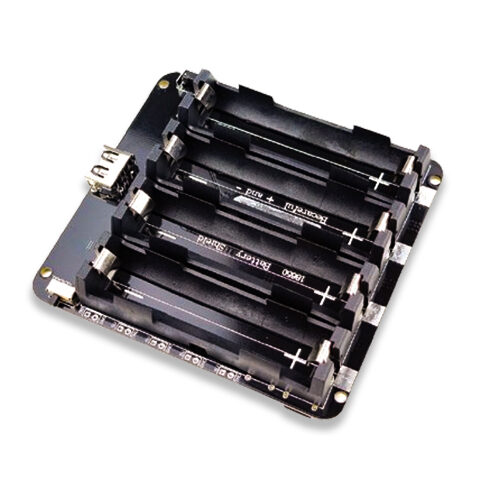
4 x 18650 Lithium Battery Shield V8/V9 for ESP32/ESP8266
For longer battery life in field deployments, this 4-cell 18650 shield provides up to 40,000 mAh capacity (with 10,000 mAh cells). The built-in on/off switch and USB charging make it ideal for remote IoT nodes.
Hardware Methods to Measure ESP32 Current Draw
Accurate power profiling requires proper current measurement. Here are the best approaches from simple to advanced:
Method 1: USB Power Meter (Simplest)
A USB power meter (like UM25C, available for under ₹500 on Zbotic) measures voltage, current, and power from a USB connection. This is great for measuring average current in different operating modes but cannot capture fast transients. Perfect for a quick benchmark of your firmware’s average power consumption.
Limitation: USB meters typically update at 1–2 Hz, missing the fast current spikes during WiFi transmission (which last only milliseconds but can be 500+ mA).
Method 2: Current Shunt Resistor + Oscilloscope
Insert a small shunt resistor (0.1Ω) in series with the ESP32’s power supply. Measure the voltage across it with an oscilloscope. I = V/R. A 1V peak on a 0.1Ω shunt means 10A — but for ESP32, you will see millivolt readings corresponding to milliamp currents. This method captures transients at full oscilloscope bandwidth (>1 MHz), revealing the exact current profile of WiFi packets, CPU bursts, and ADC conversions.
Method 3: Nordic Power Profiler Kit II (PPK2)
The Nordic PPK2 is a dedicated power measurement tool (~₹4,500) that measures current from 0.2 µA to 1A with high resolution and streams data to the nRF Connect Power Profiler software in real time. It provides excellent visualisation of deep sleep current, wakeup transitions, and transmission bursts. This is the professional choice for serious power profiling work and is popular among Indian IoT developers working on battery-powered products.
Method 4: Measuring Deep Sleep Current
Deep sleep current (5–20 µA) is too small for most USB meters. Use a precision multimeter in µA mode, inserted in series between the battery and the ESP32’s 3.3V input (bypassing the development board’s LDO regulator, which adds its own quiescent current of 5–15 µA). Note: Always measure at the 3.3V supply level, not the USB/battery input level, to isolate ESP32 chip consumption from regulator losses.
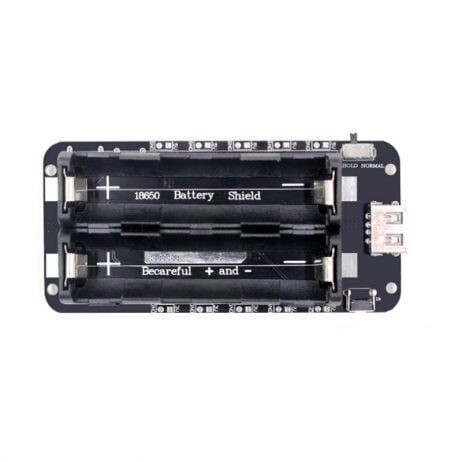
2 x 18650 Battery Shield V8 – 5V/3A, 3V/1A for ESP32
A well-designed battery shield is essential for accurate power measurements. This V8 shield provides stable regulated output with minimal ripple, ensuring your current measurements reflect ESP32 consumption, not supply noise.
Software-Based Power Profiling Techniques
Estimating Power with ESP-IDF Power Manager
ESP-IDF includes a Power Management component that automatically adjusts CPU frequency based on load and manages modem sleep. Enable it in your project:
#include "esp_pm.h"

void configurePowerManagement() {
  // Enable automatic light sleep when WiFi is off and CPU is idle
  esp_pm_config_esp32_t pm_config = {
    .max_freq_mhz = 240,  // Maximum CPU frequency
    .min_freq_mhz = 10,   // Minimum CPU frequency (XTAL/4 = 10 MHz)
    .light_sleep_enable = true  // Auto light sleep when idle
  };

  esp_err_t ret = esp_pm_configure(&pm_config);
  if (ret == ESP_OK) {
    Serial.println("Power management configured");
  }
}

// Query current CPU frequency
void printPowerState() {
  Serial.printf("CPU freq: %d MHzn", getCpuFrequencyMhz());
  Serial.printf("Free heap: %d bytesn", ESP.getFreeHeap());
  Serial.printf("WiFi status: %sn",
    WiFi.status() == WL_CONNECTED ? "Connected" : "Disconnected");
}
Timing-Based Power Estimation
If you cannot do hardware measurements, use timing data to estimate average power consumption:
// Power profile constants (mA, from datasheet + measurement calibration)
const float ACTIVE_240MHZ_WIFI_MA = 240.0;
const float ACTIVE_80MHZ_NO_WIFI_MA = 68.0;
const float LIGHT_SLEEP_MA = 0.8;
const float DEEP_SLEEP_MA = 0.010; // 10 µA

struct PowerProfile {
  float wakeup_ms;       // Time to boot, connect WiFi, send data
  float active_ma;       // Current during active phase
  float sleep_period_s;  // Deep sleep duration
  float sleep_ma;        // Sleep current

  float averageCurrentMA() {
    float wake_s = wakeup_ms / 1000.0;
    float total_s = wake_s + sleep_period_s;
    float charge_wake = active_ma * wake_s;
    float charge_sleep = sleep_ma * sleep_period_s;
    return (charge_wake + charge_sleep) / total_s;
  }

  // Returns battery life in hours
  float batteryLifeHours(float battery_mah) {
    return battery_mah / averageCurrentMA();
  }
};

void calculateBatteryLife() {
  PowerProfile profile = {
    .wakeup_ms = 2500,     // 2.5s awake (boot + WiFi connect + send)
    .active_ma = 240.0,    // 240 mA while WiFi active
    .sleep_period_s = 300, // 5 minutes deep sleep
    .sleep_ma = 0.010      // 10 µA deep sleep
  };

  float avg_ma = profile.averageCurrentMA();
  float battery_3000mah_life = profile.batteryLifeHours(3000) / 24.0; // days

  Serial.printf("Average current: %.3f mAn", avg_ma);
  Serial.printf("3000mAh battery life: %.1f daysn", battery_3000mah_life);
}
Practical Power Optimization Strategies
1. Use Static IP to Skip DHCP
DHCP negotiation adds 300–1200ms to WiFi connection time. During this time, the WiFi radio is at full power. Assigning a static IP saves ~500ms of WiFi-on time per cycle. At 240 mA during WiFi active state, 500ms saved = 120 µAh saved per cycle. Over 1,000 daily cycles, that is 120 mAh/day — meaningful over a year of operation.
// Use static IP to skip DHCP (saves ~500ms WiFi-on time)
IPAddress staticIP(192, 168, 1, 100);
IPAddress gateway(192, 168, 1, 1);
IPAddress subnet(255, 255, 255, 0);
IPAddress dns1(8, 8, 8, 8);

WiFi.config(staticIP, gateway, subnet, dns1);
WiFi.begin(ssid, password);
2. WiFi Quick Connect with Stored Credentials
On wakeup from deep sleep, avoid scanning all channels. Store the channel and BSSID of the last successful connection in RTC memory and pass them to WiFi.begin():
RTC_DATA_ATTR uint8_t savedBSSID[6] = {0};
RTC_DATA_ATTR uint8_t savedChannel  = 0;

void quickConnectWiFi(const char* ssid, const char* password) {
  WiFi.begin(ssid, password, savedChannel,
             savedBSSID[0] ? savedBSSID : nullptr, true);
  // If quick connect fails, fall back to normal scan connect
}

void saveConnectionInfo() {
  if (WiFi.status() == WL_CONNECTED) {
    savedChannel = WiFi.channel();
    memcpy(savedBSSID, WiFi.BSSID(), 6);
  }
}
3. Reduce WiFi TX Power
The default ESP32 WiFi TX power is 20 dBm (100 mW). If your node is within 5 metres of the router, you can reduce this to 8 dBm (6.3 mW) — a 16x reduction in transmit power — saving ~60 mA during transmission bursts.
// Reduce TX power after WiFi connection
// Values: 8 (2dBm), 20 (5dBm), 28 (7dBm), 34 (8.5dBm), ... 78 (19.5dBm)
WiFi.setTxPower(WIFI_POWER_8_5dBm); // Good for ≤10m range
4. Turn Off Bluetooth When Not Needed
If your application only uses WiFi, disable Bluetooth permanently to save ~10 mA. In Arduino:
#include <esp_bt.h>

void setup() {
  // Disable Bluetooth controller and release memory
  esp_bt_controller_deinit();
  esp_bt_mem_release(ESP_BT_MODE_BTDM);
  // ... rest of setup
}

Ai Thinker ESP32-C3-01M Wi-Fi + BLE Module
If deep sleep power consumption is critical, the ESP32-C3 is worth considering over classic ESP32. Its RISC-V architecture has a lower deep sleep current (~5 µA vs 10–20 µA) and faster WiFi connection times, both beneficial for battery IoT nodes.
Battery Life Calculation for Real Projects
Let us work through a realistic calculation for a soil moisture sensor sending data every 15 minutes:
| Phase | Duration | Current | Charge (µAh) |
|---|---|---|---|
| Boot + WiFi connect | 1.5s | 220 mA | 91.7 µAh |
| Sensor read + MQTT publish | 0.3s | 160 mA | 13.3 µAh |
| WiFi disconnect + shutdown | 0.2s | 80 mA | 4.4 µAh |
| Deep sleep (14 min 58 sec) | 898s | 0.015 mA | 3.74 µAh |
Total per cycle: ~113 µAh per 15-minute cycle = 451 µAh/hour = 0.451 mAh/hour
With a 3000 mAh 18650 battery: 3000 / 0.451 = 6,652 hours = 277 days (~9 months)
Applying a 70% effective capacity factor for real-world conditions (temperature derating, aging): 194 days (~6.5 months) — excellent for an agricultural sensor in the field.
Frequently Asked Questions
What is the minimum achievable deep sleep current on an ESP32 development board?
The ESP32 chip datasheet specifies 5 µA in deep sleep. However, development boards like NodeMCU-32S and Wemos D1 Mini 32 have additional components — USB-UART chips (CP2102/CH340 typically draw 1–5 mA continuously), LDO voltage regulators (1–10 µA quiescent), and pull-up resistors on GPIO pins. The real-world deep sleep current of a typical development board is 1–10 mA unless you physically remove or disable these components. For production battery-powered products, use bare ESP32 modules (not development boards) and design your own power circuitry.
Does ESP32 S2 or S3 have better power consumption than ESP32?
Yes. The ESP32-S2 (single-core Xtensa LX7, no Bluetooth) has a deep sleep current of ~22 µA with RTC peripherals, similar to the classic ESP32. However, its active current is lower (~80 mA with WiFi) due to the single core and more efficient WiFi stack. The ESP32-C3 (RISC-V, single-core, WiFi+BT) is the best low-power option with ~5 µA deep sleep and faster WiFi connect times. For the absolute lowest power, the ESP32-H2 (802.15.4/Zigbee, no WiFi) achieves ~2 µA deep sleep.
Why does my ESP32 show 8–12 mA in deep sleep instead of 5–20 µA?
This is almost always caused by one of these issues: (1) GPIO pins left in a floating or input-pulled-high state, causing leakage current; (2) External peripherals (sensors, LEDs, display modules) that have their own power supply from the 3.3V rail and draw current regardless of ESP32 sleep state; (3) The onboard USB-UART chip (CP2102/CH340) on development boards drawing 1–5 mA. Fix by isolating the ESP32 chip from peripherals with power-gating transistors, and configure all GPIO pins to a defined state before entering deep sleep.
Can I use deep sleep with WiFi and still send data frequently?
Deep sleep is most efficient when the sleep period is much longer than the active period. As a rule of thumb, deep sleep saves power when the sleep duration is more than 30 seconds per cycle. For higher data rates (less than 30 second intervals), use modem sleep (WiFi radio sleeps between transmissions, CPU stays on) or light sleep instead. For data rates faster than 1 sample per second, always-on WiFi is necessary and deep sleep is counterproductive.
Build Long-Life Battery ESP32 Projects
Ready to build IoT nodes that last months on a single charge? Zbotic.in stocks the ESP32 modules, battery shields, and sensors you need. Our range of 18650 battery shields and ESP32-C3 modules are perfect for power-optimised IoT deployments across India.







Add comment