
Line Following Robot with Arduino – Complete Guide
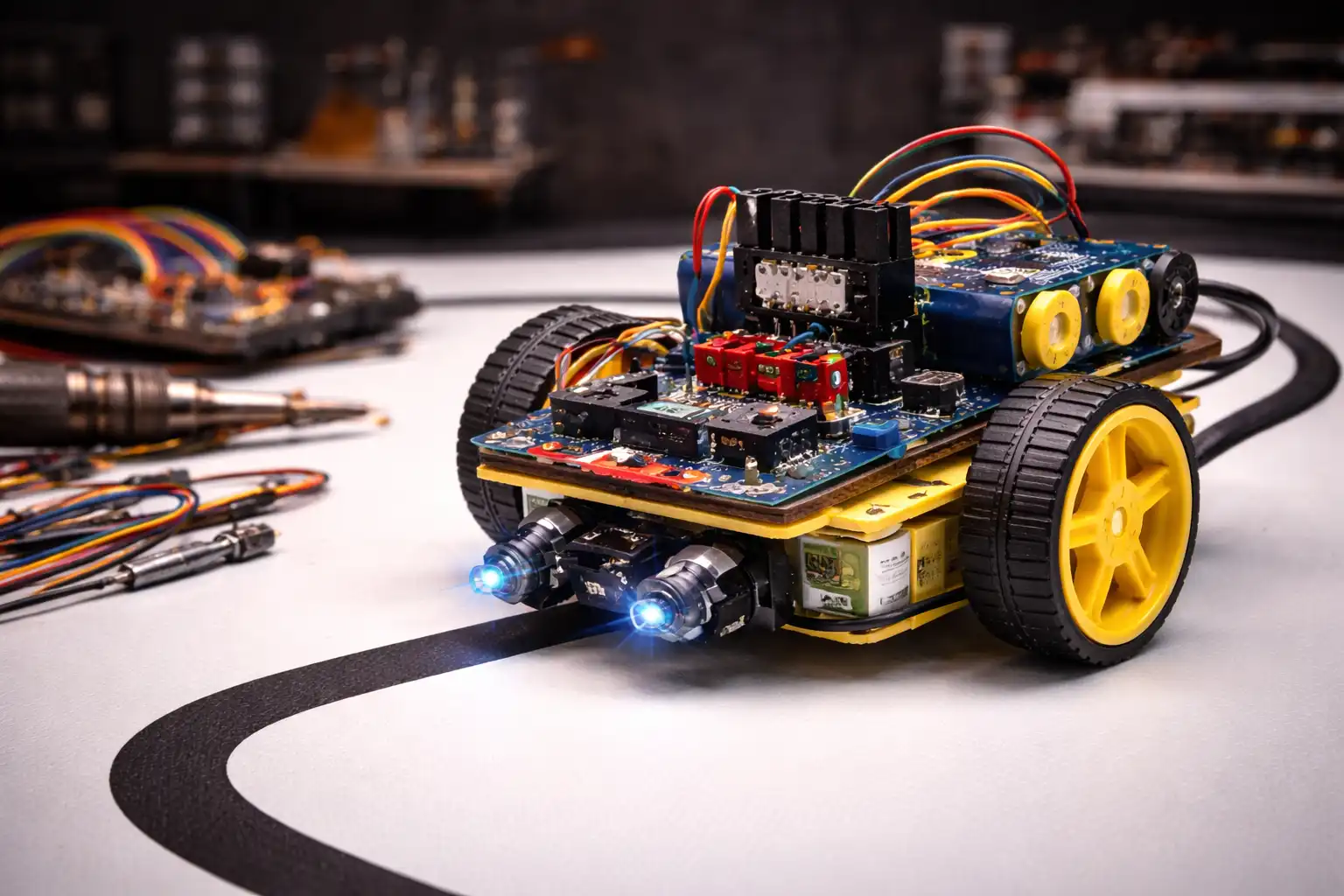
A Line Following Robot is an autonomous ground vehicle that detects and tracks a predefined path — typically a black line on a white surface — using infrared (IR) reflectance sensors.
This project uses a 5-sensor IR array with a PID (Proportional-Integral-Derivative) control algorithm to achieve smooth, accurate line tracking even through sharp curves and intersections.
(Build Time: 3–4 Hours)
1. Electronic Components Used
| Component | Qty | Purpose |
|---|---|---|
| Arduino Uno R3 | ×1 | Main microcontroller — runs PID logic |
| IR Sensor Module (TCRT5000) | ×5 | Detects black line on white surface |
| L298N Motor Driver | ×1 | Dual H-bridge for motor direction & speed |
| DC Gear Motor (6V) | ×2 | Left and right drive wheels |
| Li-Ion Battery Pack (7.4V) | ×1 | Power supply for motors + Arduino |
| Chassis Kit (2WD) | ×1 | Robot body with motor mounts |
| 100Ω Resistors | ×5 | Current limiting for IR LED emitters |
| Jumper Wires + Breadboard | ×1 set | Prototyping & sensor connections |
All components available at zbotic.in
2. Project Description
How it works:
- The 5 IR sensors are positioned across the front of the robot
- Each sensor reads the surface below — high value (~900) over black, low value (~100) over white
- A weighted error is calculated: center sensor on line = 0 error, leftward deviation = negative, rightward = positive
- The PID algorithm computes a correction value that adjusts left/right motor speeds continuously
- The L298N H-bridge motor driver handles the higher current requirements (up to 2A per channel) between the Arduino’s 5V logic and the 6V DC gear motors
Sensor Weights: S1(−2), S2(−1), S3(0), S4(+1), S5(+2)
3. Scope of Project
- Educational Foundation Covers PWM, digital I/O, sensor interfacing, and real-time control loops — core skills for any embedded systems engineer.
- Industrial AGV Prototyping Mirrors the core logic of Automated Guided Vehicles used in warehouses and factories — a direct career-relevant prototype.
- Robotics Competitions Forms the base for competition robots (Robocon, TechFest). PID tuning and sensor optimization can push speeds to 1.5–2 m/s.
- Control Systems Research PID parameter tuning (Kp, Ki, Kd) provides a tangible platform for studying classical control theory and system response.
- Upgrade Path to AI Can be extended with camera-based computer vision (OpenCV + Raspberry Pi) to replace IR sensors with ML-based line detection.
- Delivery & Logistics Bots Add an RFID reader and servo-driven payload bay to build a simple autonomous delivery system for tabletop logistics demos.
4. Code
Before uploading: Tune Kp, Ki, Kd for your specific motors and track. Start with Kp=25, Ki=0, Kd=10 and adjust incrementally.
// ================================================
// Line Following Robot — PID Controller
// Board    : Arduino Uno R3
// zbotic.in | Intermediate Level
// ================================================

// ── PIN DEFINITIONS ──────────────────────────────
#define IR_S1   A0   // Leftmost sensor
#define IR_S2   A1
#define IR_S3   A2   // Center sensor
#define IR_S4   A3
#define IR_S5   A4   // Rightmost sensor

// L298N Motor Driver Pins
#define ENA     5    // PWM — Left motor speed
#define IN1     6    // Left motor direction A
#define IN2     7    // Left motor direction B
#define IN3     8    // Right motor direction A
#define IN4     9    // Right motor direction B
#define ENB     10   // PWM — Right motor speed

// ── PID TUNING PARAMETERS ────────────────────────
float Kp = 25.0;   // Proportional gain
float Ki = 0.8;    // Integral gain
float Kd = 10.0;   // Derivative gain

const int BASE_SPEED   = 150;  // 0–255 PWM base speed
const int MAX_SPEED    = 220;
const int MIN_SPEED    = 0;
const int IR_THRESHOLD = 500;  // Analog threshold (black line)

// ── PID STATE VARIABLES ──────────────────────────
float error      = 0;
float prevError  = 0;
float integral   = 0;
float derivative = 0;

const int sensorWeight[5] = {-2, -1, 0, 1, 2};

// ── SETUP ────────────────────────────────────────
void setup() {
  Serial.begin(9600);
  pinMode(IN1, OUTPUT); pinMode(IN2, OUTPUT);
  pinMode(IN3, OUTPUT); pinMode(IN4, OUTPUT);
  pinMode(ENA, OUTPUT); pinMode(ENB, OUTPUT);
  Serial.println("Line Follower PID — zbotic.in");
}

// ── READ SENSORS → WEIGHTED ERROR ─────────────────
float readError() {
  int sensorVal[5];
  int sensorPins[5] = {IR_S1, IR_S2, IR_S3, IR_S4, IR_S5};
  int weightedSum = 0;
  int sensorCount = 0;

  for (int i = 0; i < 5; i++) {
    sensorVal[i] = analogRead(sensorPins[i]);
    bool onLine = (sensorVal[i] > IR_THRESHOLD);
    if (onLine) {
      weightedSum += sensorWeight[i];
      sensorCount++;
    }
  }

  if (sensorCount == 0) return prevError;
  return (float)weightedSum / sensorCount;
}

// ── SET MOTOR SPEEDS ──────────────────────────────
void setMotors(int leftSpeed, int rightSpeed) {
  leftSpeed  = constrain(leftSpeed,  MIN_SPEED, MAX_SPEED);
  rightSpeed = constrain(rightSpeed, MIN_SPEED, MAX_SPEED);

  digitalWrite(IN1, HIGH); digitalWrite(IN2, LOW);
  analogWrite(ENA, leftSpeed);

  digitalWrite(IN3, HIGH); digitalWrite(IN4, LOW);
  analogWrite(ENB, rightSpeed);
}

// ── MAIN LOOP ─────────────────────────────────────
void loop() {
  error      = readError();
  integral  += error;
  derivative = error - prevError;

  integral = constrain(integral, -50.0, 50.0);

  float correction = (Kp * error) + (Ki * integral) + (Kd * derivative);

  int leftSpeed  = BASE_SPEED - (int)correction;
  int rightSpeed = BASE_SPEED + (int)correction;

  setMotors(leftSpeed, rightSpeed);
  prevError = error;

  Serial.print("Err:"); Serial.print(error);
  Serial.print(" | L:"); Serial.print(leftSpeed);
  Serial.print(" | R:"); Serial.println(rightSpeed);

  delay(10);
}
5. Hardware Required
1. Arduino Uno R3 ATmega328P microcontroller, 14 digital I/O pins, 6 PWM outputs, 6 analog inputs. 16MHz clock is sufficient for a 100Hz PID loop.
2. IR Reflectance Sensor (TCRT5000) 950nm IR emitter-detector pair. Analog output: ~900 over black, ~100 over white. Operating voltage: 3.3–5V. Sensing distance: 2–8mm.
3. L298N Dual H-Bridge Motor Driver Controls 2 DC motors independently. Supply: 5–35V, up to 2A per channel. Logic: 5V TTL compatible. Built-in 5V regulator can power Arduino.
4. DC Gear Motor (6V, 200RPM) High-torque gear reduction motors with rubber wheels. 200RPM at 6V gives ~0.5 m/s linear speed — good balance of speed and controllability.
5. 7.4V Li-Ion Battery Pack (2S, 2000mAh) Provides enough voltage headroom for the L298N internal drop (~2V). Runtime ~45 minutes at moderate speed.
6. 2WD Robot Chassis Kit Acrylic/aluminum platform with motor mounts and caster wheel. Mount the IR sensor array 10–15mm above the ground on the front.
7. Breadboard + Jumper Wires 400-point breadboard for prototyping. Use dupont male-to-female wires for sensor array connections. Color-code by sensor number.
6. Frequently Asked Questions
Q: Why does my robot oscillate left-right excessively?
A: Your Kp (proportional gain) is too high. The correction is overshooting — the robot turns too hard in response to small errors. Start with Kp=10 and increase in steps of 5. Also verify your motors respond symmetrically — an unbalanced motor causes consistent drift.
Q: My robot goes straight but misses sharp 90° turns. What should I fix?
A: Two things help: (1) Increase Kp so corrections are more aggressive at large errors. (2) Reduce BASE_SPEED — running at full speed gives the PID controller less time to react. A BASE_SPEED of 100–120 is better for complex tracks with tight curves.
Q: Can I use digital IR sensors instead of analog TCRT5000 modules?
A: Yes, but the code changes significantly. Digital sensors return only 0 or 1, so you lose the gradient information used by the weighted PID approach. You’ll need a lookup-table approach mapping each binary sensor combination to a fixed correction value. Analog is strongly recommended for smooth PID control.
Q: What is the best track design for testing the robot?
A: Use 19–25mm wide black electrical tape on white chart paper or PVC sheet. The line width should be slightly narrower than the sensor array spread. Start with a simple oval or figure-8, then introduce sharp corners and S-curves only after PID tuning is complete.
Q: The robot stops when it loses the line. How do I add recovery logic?
A: When sensorCount == 0, check the lastError value — if it was strongly negative, spin left; if strongly positive, spin right. Add a timeout to stop the robot if the line isn’t found within 2 seconds.
Q: Where can I buy all components in India?
A: All components are available at zbotic.in with fast delivery across India. The complete Line Follower Kit (all components + chassis) is available as a bundle saving ~30% vs individual purchases. Orders above ₹999 get free shipping.
Published by zbotic.in – Your electronics learning partner





Add comment