
An IoT smart lock with ESP32 fingerprint sensor is one of the most impressive and practically useful home automation projects you can build. Imagine unlocking your front door with your finger, tracking who entered and when via a web dashboard, and remotely granting access to family members or house staff through your phone — all built from scratch for under ₹2,000 in components. In India, where apartment security is a top concern and fingerprint biometrics are already widespread (Aadhaar, attendance systems), this project resonates deeply. This tutorial covers the complete build: hardware wiring, fingerprint enrollment, ESP32 firmware, web interface, and Telegram notifications.
Components Required for the Smart Lock
Before we start building, let us list all the components needed. This smart lock system costs approximately ₹1,800–₹2,500 in India, a fraction of commercial smart locks that start at ₹8,000 and up.
| Component | Purpose | Approx. Cost |
|---|---|---|
| ESP32 Development Board | Main controller + Wi-Fi | ₹350–₹500 |
| R307/AS608 Fingerprint Sensor | Biometric authentication | ₹400–₹600 |
| 12V Electric Solenoid Lock | Physical locking mechanism | ₹400–₹700 |
| 5V Relay Module | Switch solenoid from ESP32 | ₹50–₹100 |
| 12V 2A Power Supply | Power solenoid | ₹200–₹300 |
| 16×2 I2C LCD | Status display | ₹100–₹150 |
| Buzzer + LED | Audio/visual feedback | ₹30–₹50 |
| Project Box / Enclosure | Housing | ₹100–₹200 |

Ai Thinker NodeMCU-32S-ESP32 Development Board – IPEX Version
The NodeMCU-32S is the perfect ESP32 board for a smart lock — dual-core reliability, strong Wi-Fi for remote access, and enough GPIO for fingerprint sensor, relay, LCD, and LEDs.
Understanding the Fingerprint Sensor (R307/AS608)
The R307 and AS608 are optical fingerprint sensors that communicate over UART (serial). They are incredibly capable for their price:
- Storage: Up to 127 fingerprint templates internally (AS608) or 150+ (R307)
- Match accuracy: FAR (False Accept Rate) < 0.001%, FRR (False Reject Rate) < 1%
- Verification time: <1 second
- Resolution: 500 DPI optical sensor
- Communication: UART at 57600 baud (adjustable)
- Voltage: 3.6V–6V, compatible with ESP32’s 3.3V logic
The sensor stores fingerprint templates internally in its own flash memory. Your ESP32 only needs to send commands and receive match/no-match responses — it does not need to process the fingerprint image itself. This simplifies firmware significantly.
Required Arduino Library
Install Adafruit Fingerprint Sensor Library from the Arduino Library Manager. It provides a clean API for all operations: enroll, search, delete, empty database.
Circuit Wiring and Lock Mechanism
Complete wiring connections:
| Component Pin | ESP32 Pin | Notes |
|---|---|---|
| Fingerprint TX | GPIO16 (RX2) | Sensor TX → ESP32 RX |
| Fingerprint RX | GPIO17 (TX2) | Sensor RX → ESP32 TX |
| Fingerprint VCC | 3.3V | Some sensors prefer 5V — check spec |
| Fingerprint GND | GND | Common ground |
| Relay IN | GPIO26 | Active LOW typically |
| Relay VCC/GND | 5V / GND | Separate 5V for relay coil |
| Solenoid Lock | Relay COM/NO | Powered by 12V external supply |
| Buzzer | GPIO25 | With transistor driver for 5V buzzer |
Important safety note: The solenoid lock requires 12V at 1-2A when energized. Never power it directly from the ESP32 or relay module’s signal side. Always use the relay’s NC/NO contacts to switch the 12V supply. Add a freewheeling diode across the solenoid to suppress back-EMF spikes.
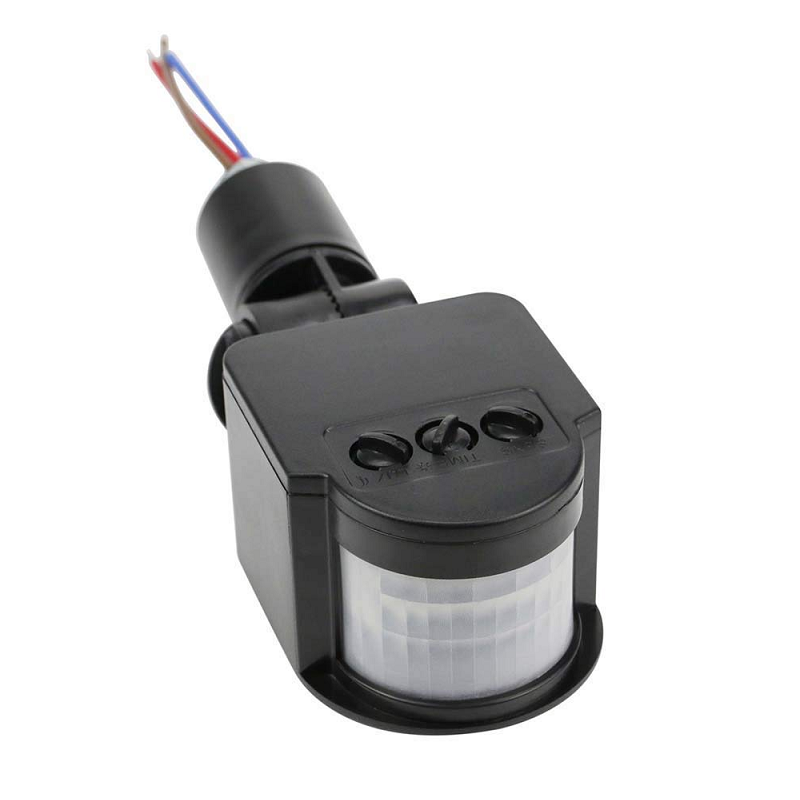
AC 220V Security PIR Human Body Motion Sensor Detector
Add a PIR motion sensor to your smart lock entrance to detect someone approaching and wake up the fingerprint scanner — saving power and reducing response time.
Fingerprint Enrollment and Management
Before the lock can recognize anyone, you must enroll fingerprints. The AS608/R307 sensor requires two scans of each finger to create a reliable template. Here is the enrollment sketch:
#include <Adafruit_Fingerprint.h>

// Use Hardware Serial 2 on ESP32
HardwareSerial mySerial(2);
Adafruit_Fingerprint finger = Adafruit_Fingerprint(&mySerial);

void setup() {
  Serial.begin(115200);
  mySerial.begin(57600, SERIAL_8N1, 16, 17); // RX=16, TX=17
  finger.begin(57600);

  if (finger.verifyPassword()) {
    Serial.println("Fingerprint sensor found!");
  } else {
    Serial.println("Sensor not found :(");
    while (1) delay(1);
  }
}

uint8_t enrollFinger(uint8_t id) {
  Serial.printf("Enrolling ID #%dn", id);

  // First scan
  Serial.println("Place finger...");
  while (finger.getImage() != FINGERPRINT_OK);
  if (finger.image2Tz(1) != FINGERPRINT_OK) return -1;
  Serial.println("Remove finger");
  delay(2000);

  // Second scan
  Serial.println("Place same finger again...");
  while (finger.getImage() != FINGERPRINT_OK);
  if (finger.image2Tz(2) != FINGERPRINT_OK) return -2;

  // Create model and store
  if (finger.createModel() != FINGERPRINT_OK) return -3;
  if (finger.storeModel(id) != FINGERPRINT_OK) return -4;

  Serial.printf("Fingerprint ID #%d stored!n", id);
  return id;
}

void loop() {
  if (Serial.available()) {
    int id = Serial.parseInt();
    if (id > 0 && id <= 127) {
      enrollFinger(id);
    }
  }
}
Complete ESP32 Smart Lock Firmware
The main lock firmware handles fingerprint scanning in a loop, unlocks the door on match, logs access events, and runs a web server for remote management:
#include <Arduino.h>
#include <WiFi.h>
#include <WebServer.h>
#include <Adafruit_Fingerprint.h>
#include <Preferences.h>
#include <time.h>

const char* ssid = "YourWiFiSSID";
const char* password = "YourWiFiPass";
const int RELAY_PIN = 26;
const int BUZZER_PIN = 25;
const int GREEN_LED = 27;
const int RED_LED = 14;
const int LOCK_OPEN_DURATION_MS = 3000; // Lock stays open for 3 seconds

HardwareSerial fpSerial(2);
Adafruit_Fingerprint finger(&fpSerial);
WebServer server(80);
Preferences prefs;

// Access log (in-memory, last 20 entries)
struct AccessLog {
  uint8_t fingerprintId;
  bool granted;
  time_t timestamp;
};
AccessLog accessLog[20];
int logIndex = 0;

void openLock() {
  Serial.println("ACCESS GRANTED — Unlocking");
  digitalWrite(RELAY_PIN, LOW);  // Energize solenoid (LOW = active)
  digitalWrite(GREEN_LED, HIGH);
  tone(BUZZER_PIN, 2000, 200);
  delay(LOCK_OPEN_DURATION_MS);
  digitalWrite(RELAY_PIN, HIGH); // Lock again
  digitalWrite(GREEN_LED, LOW);
}

void denyAccess() {
  Serial.println("ACCESS DENIED");
  digitalWrite(RED_LED, HIGH);
  // Three rapid beeps
  for (int i = 0; i < 3; i++) {
    tone(BUZZER_PIN, 500, 100);
    delay(200);
  }
  delay(1000);
  digitalWrite(RED_LED, LOW);
}

void logAccess(uint8_t id, bool granted) {
  struct tm timeinfo;
  getLocalTime(&timeinfo);
  accessLog[logIndex % 20] = {id, granted, time(nullptr)};
  logIndex++;
}

void checkFingerprint() {
  uint8_t p = finger.getImage();
  if (p != FINGERPRINT_OK) return;

  p = finger.image2Tz();
  if (p != FINGERPRINT_OK) return;

  p = finger.fingerFastSearch();

  if (p == FINGERPRINT_OK) {
    Serial.printf("Match! ID: %d, Confidence: %dn", finger.fingerID, finger.confidence);
    logAccess(finger.fingerID, true);
    openLock();
  } else {
    Serial.println("No match found");
    logAccess(0, false);
    denyAccess();
  }
}

void setupWebServer() {
  // Remote unlock endpoint (protect with auth token in production!)
  server.on("/unlock", HTTP_POST, []() {
    String token = server.arg("token");
    // In production: validate token against stored value in NVS
    if (token == "your-secret-token") {
      logAccess(255, true); // ID 255 = remote access
      openLock();
      server.send(200, "application/json", "{"status":"unlocked"}");
    } else {
      server.send(403, "application/json", "{"status":"unauthorized"}");
    }
  });

  server.on("/log", HTTP_GET, []() {
    String json = "[";
    int count = min(logIndex, 20);
    for (int i = 0; i < count; i++) {
      int idx = (logIndex - count + i) % 20;
      if (i > 0) json += ",";
      json += "{"id":" + String(accessLog[idx].fingerprintId);
      json += ","granted":" + String(accessLog[idx].granted ? "true" : "false");
      json += ","time":" + String(accessLog[idx].timestamp) + "}";
    }
    json += "]";
    server.send(200, "application/json", json);
  });

  server.begin();
}

void setup() {
  Serial.begin(115200);
  fpSerial.begin(57600, SERIAL_8N1, 16, 17);
  finger.begin(57600);

  pinMode(RELAY_PIN, OUTPUT);
  pinMode(BUZZER_PIN, OUTPUT);
  pinMode(GREEN_LED, OUTPUT);
  pinMode(RED_LED, OUTPUT);
  digitalWrite(RELAY_PIN, HIGH); // Start locked

  WiFi.begin(ssid, password);
  while (WiFi.status() != WL_CONNECTED) delay(500);
  Serial.println("IP: " + WiFi.localIP().toString());

  configTime(5 * 3600 + 30 * 60, 0, "pool.ntp.org");
  setupWebServer();

  if (finger.verifyPassword()) {
    Serial.println("Smart Lock Ready!");
  } else {
    Serial.println("ERROR: Fingerprint sensor not found!");
  }
}

void loop() {
  server.handleClient();
  checkFingerprint();
  delay(50);
}
Ai Thinker ESP32 CAM Development Board WiFi+Bluetooth with AF2569 Camera Module
Upgrade your smart lock with an ESP32-CAM to capture a photo of every person who attempts to unlock the door. Send failed attempts to Telegram immediately for enhanced security.
Web Dashboard and Telegram Alerts
Telegram Bot Integration
Integrate a Telegram bot using the Universal Telegram Bot library to receive real-time security alerts:
- Successful unlock: “Door unlocked by fingerprint ID 3 (Jayesh) at 9:04 AM”
- Failed attempt: “ALERT: Unrecognized fingerprint attempt at 11:30 PM” + photo from ESP32-CAM
- Remote unlock via chat: Send “/unlock” in Telegram to open the door from anywhere in India
- Battery low alert: If using battery backup, notify when voltage drops below threshold
User Name Mapping
Store a mapping of fingerprint IDs to names in NVS or SPIFFS to make logs readable:
// In NVS:
// "fp_name_1" = "Jayesh"
// "fp_name_2" = "Priya"
// "fp_name_3" = "Ramu Kaka"

String getUserName(uint8_t id) {
  prefs.begin("users", true);
  String name = prefs.getString(("fp_name_" + String(id)).c_str(), "Unknown");
  prefs.end();
  return name;
}
Frequently Asked Questions
Is a fingerprint smart lock secure enough for home use in India?
For residential use, the AS608/R307 fingerprint sensor provides excellent security — far better than a traditional key lock which can be picked. The sensor has a FAR (False Accept Rate) of less than 0.001%, meaning a random person has only a 1-in-100,000 chance of accidentally matching. For additional security, add a PIN code fallback and Telegram notifications for failed attempts. Also consider physical reinforcement of the door frame, as the weak point of most locks is not the lock itself but the door jamb.
What happens during a power failure?
This is the most critical safety consideration. You have two options: (1) Fail-secure: The solenoid lock remains locked when power fails — more secure but you cannot enter. (2) Fail-safe: The solenoid lock opens when power fails — fire-safety requirement for egress doors. For front doors: use fail-secure with a key override for emergencies. Add a UPS or 18650 battery backup to power the ESP32 and solenoid during power cuts (very common in India).
Can I add a PIN code as a backup authentication method?
Absolutely. Add a 4×4 keypad matrix to the ESP32 and implement PIN code authentication as a fallback for wet fingers, cuts, or gloves. Store hashed PINs in NVS (never store plain-text PINs). A 6-digit PIN with 3-attempt lockout provides reasonable security.
How do I remotely let in a guest while I am at the office?
Through the web interface or Telegram bot, you can (1) click “Remote Unlock” to temporarily open the door for 5 seconds, or (2) add a temporary fingerprint remotely by enabling “enrollment mode” via the API, letting the guest place their finger on the device. You can also issue single-use time-limited access tokens sent via SMS.
Can this lock work with the apartment intercom system?
Yes, with some additional integration work. Connect the ESP32 to the intercom’s doorbell circuit to detect door rings. When someone rings, the ESP32 sends you a Telegram notification with an ESP32-CAM image. You can then remotely unlock the main gate intercom relay via Telegram command. Several Indian apartment buildings have been upgraded this way by hobbyists.
Secure Your Home with DIY IoT Smart Lock Components
Zbotic.in supplies quality ESP32 boards, sensors, camera modules, and accessories for your smart home security projects. Build smarter, safer homes with Indian-made maker ingenuity. Fast shipping to all major cities including Mumbai, Delhi, Bangalore, Chennai, Hyderabad, and Pune.





Add comment