
An e-paper display with ESP32 is the ultimate combination for an ultra-low-power IoT dashboard project. E-paper (also called e-ink) displays only consume power when the image changes — perfect for battery-operated sensors, smart agriculture monitors, price tags, or indoor weather stations. When combined with the ESP32’s deep sleep capability, you can build an IoT dashboard that runs for months on a single 18650 cell. This project guide covers everything: choosing the right e-paper module, wiring, libraries, displaying sensor data, and implementing deep sleep for maximum battery life.
What is an E-Paper Display?
E-paper (electronic paper) displays work on the principle of electrophoresis — charged black and white particles suspended in a fluid migrate when an electric field is applied. Unlike LCD or OLED displays, e-paper is bistable: the image remains on screen with zero power draw after the update cycle completes. Only refreshing (changing) the image draws current.
This property makes e-paper ideal for applications where the displayed information changes infrequently — weather updates every 15 minutes, sensor readings every hour, or static price tags that only update a few times a day.
Common e-paper display types available in India:
- 1.54-inch (200×200): Compact, good for wearables and badges
- 2.13-inch (250×122): Standard size used in smart shelf labels
- 2.9-inch (296×128): Excellent for IoT dashboards
- 4.2-inch (400×300): Large enough for multi-parameter displays
- 7.5-inch (800×480): Big dashboard panels (available in colour: black/white/red or B/W/Y)
Why ESP32 for E-Paper IoT Projects?
The ESP32 is the ideal companion for e-paper displays for several reasons:
- Deep sleep current: As low as 10 μA in deep sleep mode — negligible drain
- Built-in WiFi: Fetch live data from APIs, MQTT brokers, or local servers without additional hardware
- Hardware SPI: Fast SPI peripheral drives e-paper with minimal CPU overhead
- RTC memory: Store data across deep sleep cycles without writing to flash
- Timer wakeup: Wake on a precise schedule using the internal RTC timer
A typical IoT dashboard cycle: ESP32 wakes → connects to WiFi → fetches sensor/API data → updates e-paper → enters deep sleep for 15 minutes. Total active time: ~3–5 seconds. With a 2000 mAh 18650 battery, this runs for 4–8 months.
Choosing the Right E-Paper Module
The Waveshare series is the most popular and well-supported in the maker community. Key factors to consider:
- Size: Bigger screens have more pixels but slower refresh (2.9″ refreshes in ~2s, 7.5″ in ~4s)
- Colour: Black & white only (fastest), or tricolour (black/white/red or yellow) — tricolour takes 15–30 seconds to refresh!
- Partial refresh: Some panels support partial refresh (updating only a region) in ~0.3 seconds — great for clocks
- Interface: SPI is standard; some have HAT shields for Raspberry Pi
- Operating voltage: 3.3V logic — directly compatible with ESP32
Recommended for beginners in India: The 2.9-inch Waveshare e-paper module (296×128 pixels) — a good balance of size, speed, and affordability. It supports partial refresh and works well with the GxEPD2 library.
Wiring E-Paper to ESP32
E-paper modules use SPI communication with a few control pins. Standard wiring for Waveshare 2.9-inch to ESP32:
| E-Paper Pin | ESP32 Pin | Function |
|---|---|---|
| VCC | 3.3V | Power |
| GND | GND | Ground |
| DIN/MOSI | GPIO 23 | SPI Data |
| CLK/SCK | GPIO 18 | SPI Clock |
| CS | GPIO 5 | Chip Select |
| DC | GPIO 17 | Data/Command |
| RST | GPIO 16 | Reset |
| BUSY | GPIO 4 | Busy signal |
Critical: Always monitor the BUSY pin. Never send new commands while BUSY is high — the display is still updating and ignoring this will corrupt your image.
GxEPD2 Library Setup
The GxEPD2 library by ZinggJM is the best choice for e-paper with ESP32. It supports virtually all Waveshare and GDEW panels, partial updates, and has an Adafruit GFX compatible API:
- Install GxEPD2 from Arduino Library Manager
- Install Adafruit GFX Library (dependency)
- Select your display model in the example sketch
#include <GxEPD2_BW.h>
#include <Adafruit_GFX.h>
#include <Fonts/FreeMonoBold9pt7b.h>

// 2.9-inch Waveshare (DEPG0290BN)
GxEPD2_BW<GxEPD2_290_DEPG0290BN, GxEPD2_290_DEPG0290BN::HEIGHT>
  display(GxEPD2_290_DEPG0290BN(5, 17, 16, 4)); // CS, DC, RST, BUSY

void setup() {
  display.init(115200);
  display.setRotation(1);
  display.setFont(&FreeMonoBold9pt7b);
  display.setTextColor(GxEPD_BLACK);
  display.firstPage();
  do {
    display.fillScreen(GxEPD_WHITE);
    display.setCursor(10, 30);
    display.print("Hello, Zbotic!");
  } while (display.nextPage());
  display.hibernate();
}
void loop() {}
The display.hibernate() call at the end puts the e-paper controller into low-power mode — essential before putting ESP32 to deep sleep.
Displaying Sensor Data
Build a weather station displaying temperature, humidity, and pressure from a BME280 sensor:
void updateDisplay(float temp, float hum, float pres) {
  display.setPartialWindow(0, 0, display.width(), display.height());
  display.firstPage();
  do {
    display.fillScreen(GxEPD_WHITE);
    display.setCursor(5, 20);
    display.print("Temp: "); display.print(temp,1); display.println(" C");
    display.setCursor(5, 45);
    display.print("Hum:  "); display.print(hum,1); display.println(" %");
    display.setCursor(5, 70);
    display.print("Pres: "); display.print(pres,0); display.println(" hPa");
  } while (display.nextPage());
}
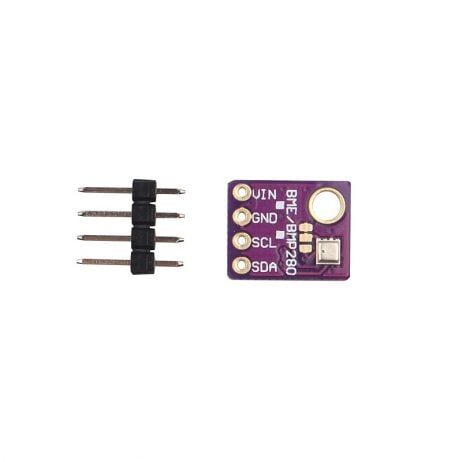
GY-BME280-5V Temperature and Humidity Sensor
Triple-sensor (temp, humidity, pressure) via I2C — ideal data source for your e-paper IoT weather dashboard.
Deep Sleep and Battery Optimisation
The key to a long-lasting e-paper IoT device is aggressive power management. Here is the complete sleep cycle pattern:
#define uS_TO_S_FACTOR 1000000ULL
#define TIME_TO_SLEEP  900  // 15 minutes

void goToSleep() {
  display.hibernate();          // E-paper low power mode
  WiFi.disconnect(true);        // Disconnect WiFi
  WiFi.mode(WIFI_OFF);          // Turn off radio
  esp_sleep_enable_timer_wakeup(TIME_TO_SLEEP * uS_TO_S_FACTOR);
  esp_deep_sleep_start();
}
Power consumption breakdown for a typical setup:
- Active (WiFi on, fetching data): ~160 mA for ~3 seconds = ~0.13 mAh per cycle
- Updating e-paper: ~20 mA for ~2 seconds = ~0.011 mAh per cycle
- Deep sleep (ESP32 + e-paper hibernated): ~0.015 mAh per 15-minute sleep period
- Total per hour (4 cycles): ~0.57 + 0.044 + 0.06 = ~0.67 mAh/hour
- 2000 mAh 18650: 2000 ÷ 0.67 ≈ 2,985 hours = ~124 days!
WiFi IoT Dashboard with API Data
Use the ESP32’s WiFi to fetch live data from OpenWeatherMap or any local MQTT broker and display it on the e-paper:
#include <HTTPClient.h>
#include <ArduinoJson.h>

void fetchWeather() {
  HTTPClient http;
  http.begin("http://api.openweathermap.org/data/2.5/weather?q=Mumbai,IN&appid=YOUR_KEY&units=metric");
  int code = http.GET();
  if (code == 200) {
    StaticJsonDocument<1024> doc;
    deserializeJson(doc, http.getString());
    float temp = doc["main"]["temp"];
    float hum = doc["main"]["humidity"];
    updateDisplay(temp, hum, 0);
  }
  http.end();
}
This creates a battery-powered WiFi weather panel that silently updates itself every 15 minutes — visible from across the room, readable in bright sunlight, and completely self-contained.

DHT11 Digital Relative Humidity and Temperature Sensor Module
Budget-friendly temperature and humidity sensor — a great starting point for your e-paper IoT dashboard project.

Capacitive Soil Moisture Sensor
Pair with ESP32 and e-paper to build a solar-powered smart garden monitor — check soil moisture from the display without touching the device.

MQ-135 Air Quality/Gas Detector Sensor Module
Monitor indoor air quality and display AQI readings on an e-paper screen — perfect for office or classroom IoT dashboards.
Frequently Asked Questions
Q1: How long does an e-paper display last on a battery?
With ESP32 deep sleep and updates every 15 minutes, a 2000 mAh 18650 battery lasts approximately 3–5 months. With updates every hour, it can last over a year. Actual life depends on WiFi connection time and update frequency.
Q2: Can I display images and icons on e-paper?
Yes. Use Adafruit GFX bitmap functions or the GxEPD2 library’s drawBitmap() method. Convert weather icons or logos to monochrome XBM/BMP format using image2cpp tool. Keep images small to save RAM.
Q3: Why does my e-paper display have a ghosting effect?
Ghosting happens when the previous image leaves faint traces. Perform a full refresh (not partial) periodically — every 5–10 partial updates — to clear ghost images. GxEPD2 handles this automatically if you call a full refresh occasionally.
Q4: Can e-paper work without a microcontroller — just power?
No. E-paper requires active driving to change images. However, once set, the image persists indefinitely without power. Only an update cycle requires power.
Q5: Is e-paper visible in direct sunlight?
Yes — e-paper has excellent sunlight readability, similar to printed paper. It does not have a backlight so it is NOT visible in complete darkness without an external light source. This makes it ideal for outdoor/solar IoT applications.
Get sensors, ESP32 boards, and all electronics components from Zbotic.in — India’s trusted maker store with pan-India delivery.






Add comment