
The DS18B20 waterproof temperature sensor is one of the most popular and widely used components in the Arduino ecosystem — and for good reason. Its combination of high accuracy, digital output, parasite power support, multi-drop bus capability, and waterproof housing makes it the ideal choice for measuring liquid temperatures in aquariums, hydroponics systems, water heaters, sous-vide cookers, swimming pools, and industrial processes. In this comprehensive tutorial, we cover everything from basic wiring to running multiple DS18B20 sensors on a single wire, with complete working Arduino code throughout.
What Is the DS18B20 Sensor?
The DS18B20 is a digital thermometer IC manufactured by Maxim Integrated (now Analog Devices). It measures temperature with 9 to 12-bit resolution over a range of -55°C to +125°C, communicating with the host microcontroller using Dallas Semiconductor’s 1-Wire protocol — meaning a single data wire handles all communication.
In its waterproof probe form, the DS18B20 IC is sealed inside a stainless steel tube (typically 6mm diameter, 30–50mm length) with a 1 metre or longer cable. This probe can be fully immersed in water, oil, food liquids, and many chemicals without damage, making it vastly more practical than the bare TO-92 plastic IC package for liquid measurement applications.
The DS18B20 has become so ubiquitous that it is now found in commercial products including sous-vide cookers, aquarium controllers, hydroponics systems, industrial chillers, and home automation sensors.
Specifications and Features
- Temperature range: -55°C to +125°C (-67°F to +257°F)
- Accuracy: ±0.5°C from -10°C to +85°C
- Resolution: Programmable 9, 10, 11, or 12-bit (0.5°C / 0.25°C / 0.125°C / 0.0625°C)
- Supply voltage: 3.0V to 5.5V (or parasite power from data line)
- Interface: 1-Wire (single data pin)
- Conversion time: 94ms (9-bit) to 750ms (12-bit)
- Unique 64-bit ROM ID: Each sensor has a factory-programmed unique address
- Multi-drop: Up to 127 sensors on a single bus
- Waterproof probe: Stainless steel probe, typically rated IP67 or IP68
- Cable: 3-wire (usually red=VCC, black=GND, yellow=DATA)
Waterproof Module vs Bare IC
You can buy the DS18B20 in two forms:
Bare IC (TO-92 package)
The small 3-pin transistor-style package. Suitable for PCB integration, air temperature measurement, or embedding in resin/epoxy potted assemblies. Not suitable for direct immersion in liquids.
Waterproof probe module
The DS18B20 IC sealed in a stainless steel probe with PVC-jacketed cable. Available in 1m, 2m, 3m, and 5m cable lengths. IP67 or IP68 rated depending on supplier. The preferred choice for all liquid temperature measurement projects.
Wire colour coding: The standard waterproof probe has 3 wires, but colours vary by manufacturer:
- Most common: Red = VDD (power), Black = GND, Yellow = DQ (data)
- Some: Red = VDD, Black/Blue = GND, White/Yellow = DQ
- Always verify with a multimeter if uncertain — connecting wrong wires will damage the sensor
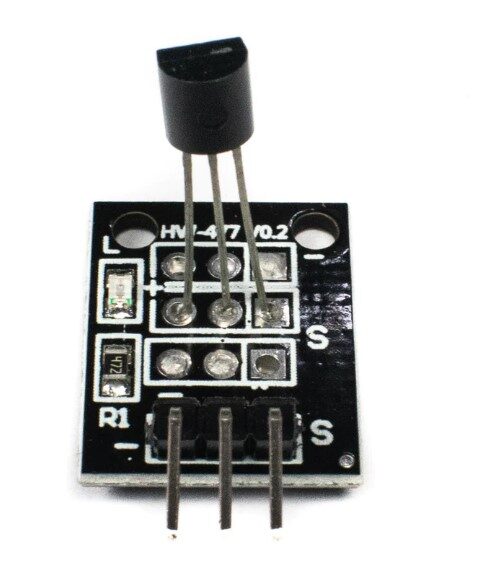
DS18B20 Temperature Sensor Module
The versatile DS18B20 temperature sensor module — perfect for liquid temperature measurement in aquariums, hydroponics, and water monitoring projects with Arduino.
Understanding the 1-Wire Protocol
1-Wire is a communication protocol designed by Dallas Semiconductor that allows multiple devices to share a single bidirectional data line plus ground. Here is how it works at a high level:
- Reset pulse: The master (Arduino) pulls the data line LOW for at least 480µs, then releases it. Each sensor responds with a presence pulse (LOW for 60–240µs).
- ROM commands: The master sends a ROM command to address one specific sensor (by its 64-bit unique ID) or all sensors simultaneously (broadcast).
- Function commands: After addressing, the master sends function commands like “Convert T” (start temperature conversion) or “Read Scratchpad” (read the temperature registers).
- Data exchange: The master and sensor exchange data bit by bit, with the master generating all timing slots.
The Arduino OneWire library handles all this timing automatically. You simply call the library functions and get temperature values back.
Wiring DS18B20 to Arduino
The standard (external power) wiring for a single DS18B20 waterproof probe:
- Red wire (VDD) → Arduino 5V (or 3.3V)
- Black wire (GND) → Arduino GND
- Yellow wire (DQ / Data) → Arduino digital pin D4
- 4.7 kΩ pull-up resistor between DQ and VDD (critical — 1-Wire requires this)
The 4.7 kΩ pull-up resistor is mandatory. The 1-Wire bus is open-drain — the sensor can only pull the line low, not drive it high. The pull-up resistor provides the HIGH state. Without it, you will get no readings or erratic values. Many DS18B20 modules include this resistor on the board; waterproof probes typically do not.
For cable lengths over 10 metres, reduce the pull-up to 2.2 kΩ. For very long runs (50+ metres), use a dedicated 1-Wire bus driver IC.
Required Libraries
Install two libraries via Arduino IDE Library Manager (Sketch → Include Library → Manage Libraries):
- OneWire by Jim Studt, Tom Pollard, Robin James et al. — handles the 1-Wire protocol timing
- DallasTemperature by Miles Burton — high-level wrapper for DS18B20 and DS18S20 sensors
These libraries are free, actively maintained, and work with Arduino Uno, Nano, Mega, ESP8266, ESP32, and virtually any Arduino-compatible platform.
Basic Temperature Reading Code
A complete, well-commented sketch for reading a single DS18B20:
// DS18B20 Waterproof Temperature Sensor - Basic Reading
// Zbotic.in - Sensors & Measurement Tutorial
// Libraries required: OneWire, DallasTemperature

#include <OneWire.h>
#include <DallasTemperature.h>

const int ONE_WIRE_BUS = 4;  // Data pin (DQ) connected to D4

OneWire oneWire(ONE_WIRE_BUS);
DallasTemperature sensors(&oneWire);

void setup() {
  Serial.begin(9600);
  sensors.begin();  // Start the DS18B20 library
  int deviceCount = sensors.getDeviceCount();
  Serial.print("DS18B20 sensors found: ");
  Serial.println(deviceCount);
}

void loop() {
  // Request temperature conversion from all sensors on the bus
  sensors.requestTemperatures();

  // Read temperature in Celsius from first sensor (index 0)
  float tempC = sensors.getTempCByIndex(0);
  float tempF = sensors.getTempFByIndex(0);

  // Check for error condition (-127°C means sensor not found)
  if (tempC == DEVICE_DISCONNECTED_C) {
    Serial.println("Error: Sensor disconnected or no pull-up resistor!");
    return;
  }

  Serial.print("Temperature: ");
  Serial.print(tempC, 2);
  Serial.print("°C  |");
  Serial.print(tempF, 2);
  Serial.println("°F");

  delay(1000);
}

DS18B20 Programmable Resolution Sensor IC
The bare DS18B20 IC for PCB integration, custom enclosures, or resin-potting applications where the standard waterproof probe form factor is too large.
Multiple Sensors on One Bus
One of the DS18B20’s most powerful features is the ability to connect multiple sensors on a single data pin. Each sensor has a unique 64-bit ROM address that allows the Arduino to address them individually. This is invaluable for:
- Monitoring temperature at multiple depths in a water tank
- Tracking inlet and outlet temperatures in a heat exchanger to calculate efficiency
- Multi-zone aquaculture pond monitoring with a single Arduino
- Temperature gradient measurement in soil or stratified storage tanks
Finding sensor addresses
First, run this address-discovery sketch to find each sensor’s unique address:
// DS18B20 Address Discovery Sketch
#include <OneWire.h>
#include <DallasTemperature.h>

OneWire oneWire(4);
DallasTemperature sensors(&oneWire);
DeviceAddress sensorAddr;

void setup() {
  Serial.begin(9600);
  sensors.begin();
  int count = sensors.getDeviceCount();
  Serial.print(count);
  Serial.println(" sensors found on bus:");

  for (int i = 0; i < count; i++) {
    if (sensors.getAddress(sensorAddr, i)) {
      Serial.print("Sensor ");
      Serial.print(i);
      Serial.print(" address: { ");
      for (int j = 0; j < 8; j++) {
        if (sensorAddr[j] < 16) Serial.print("0");
        Serial.print(sensorAddr[j], HEX);
        if (j < 7) Serial.print(", ");
      }
      Serial.println(" }");
    }
  }
}
void loop() {}
Reading multiple sensors by address
// DS18B20 - Reading Multiple Sensors by Address
#include <OneWire.h>
#include <DallasTemperature.h>

OneWire oneWire(4);
DallasTemperature sensors(&oneWire);

// Paste addresses from discovery sketch:
DeviceAddress probe1 = { 0x28, 0xFF, 0x64, 0x1E, 0xAA, 0xBB, 0xCC, 0xDD };
DeviceAddress probe2 = { 0x28, 0xFF, 0x12, 0x34, 0x56, 0x78, 0x9A, 0xBC };

void setup() {
  Serial.begin(9600);
  sensors.begin();
  // Set both sensors to 12-bit resolution
  sensors.setResolution(probe1, 12);
  sensors.setResolution(probe2, 12);
}

void loop() {
  sensors.requestTemperatures();

  float temp1 = sensors.getTempC(probe1);
  float temp2 = sensors.getTempC(probe2);

  Serial.print("Inlet: ");
  Serial.print(temp1, 2);
  Serial.print("°C | Outlet: ");
  Serial.print(temp2, 2);
  Serial.print("°C | Delta: ");
  Serial.print(temp1 - temp2, 2);
  Serial.println("°C");

  delay(1000);
}
Parasite Power Mode
In parasite power mode, the DS18B20 draws its operating power from the data line itself, eliminating the need for a separate VDD power wire. Only two wires are needed: DQ (data) and GND. This is useful in tight spaces or where running a third wire is difficult.
Wiring for parasite power:
- Red wire (VDD) → Connect to GND (not to VCC!)
- Black wire (GND) → Arduino GND
- Yellow wire (DQ) → Arduino D4 with 4.7 kΩ pull-up to VCC
In code, pass true to the parasitePowerMode parameter when calling sensors.requestTemperatures():
// Parasite power requires strong pull-up during conversion
sensors.setWaitForConversion(false); // Non-blocking
sensors.requestTemperatures();
// Hold bus HIGH for 750ms during conversion (for 12-bit)
delay(750);
float temp = sensors.getTempCByIndex(0);
Important: Parasite power cannot drive multiple sensors simultaneously at 12-bit resolution. For multi-sensor setups, use external power mode.
Configuring Resolution
Higher resolution gives more precise readings but takes longer to convert:
- 9-bit: 0.5°C resolution, 94ms conversion — fastest, suitable for room temperature monitoring
- 10-bit: 0.25°C resolution, 188ms conversion
- 11-bit: 0.125°C resolution, 375ms conversion
- 12-bit: 0.0625°C resolution, 750ms conversion — slowest, most precise — best for precise aquarium or brewing control
sensors.setResolution(12); // Set all sensors to 12-bit
sensors.setResolution(probe1, 9); // Set specific sensor to 9-bit
The resolution setting is stored in the DS18B20’s onboard EEPROM and persists through power loss, so you only need to set it once (though re-setting it in setup() each time ensures correct operation).
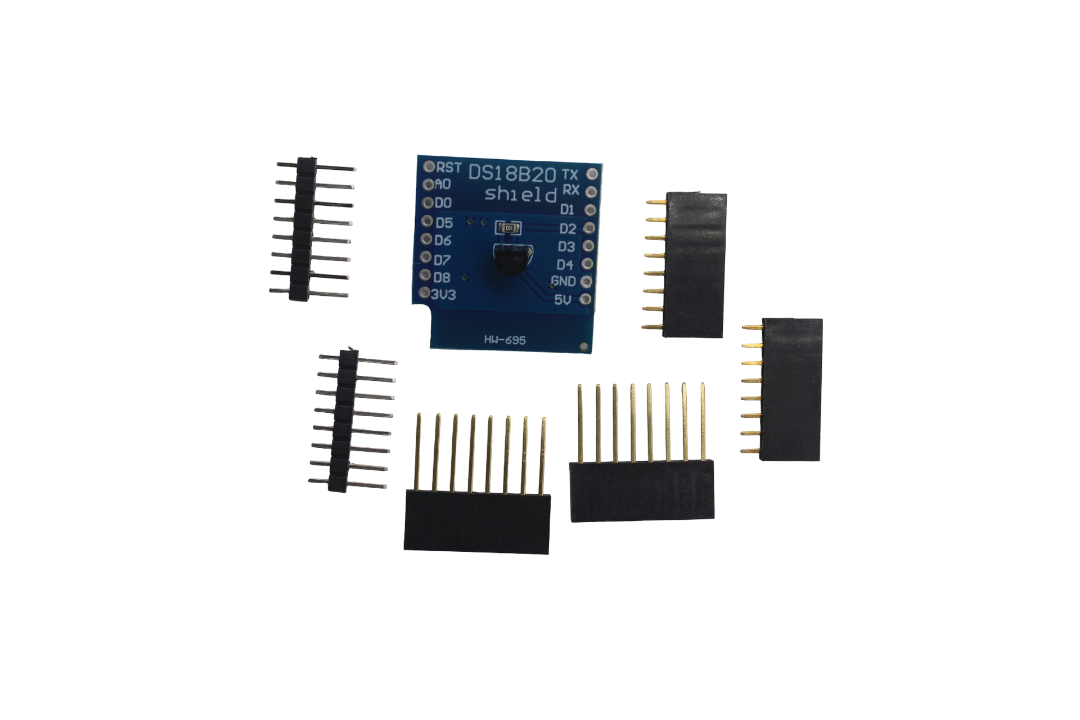
DS18B20 Module for D1 Mini
A plug-and-play DS18B20 module designed specifically for the Wemos D1 Mini, with built-in pull-up resistor and connector — perfect for WiFi-connected water temperature monitoring projects.
Practical Project Ideas
Aquarium temperature monitor with alert
Aquariums require stable temperature for fish health. Connect a DS18B20 probe (immersed in the tank) to an Arduino with an ESP8266 WiFi module. When temperature drifts outside the target range (e.g., 26°C ± 1°C for tropical fish), send a Telegram message alert. Display current temperature on an OLED screen mounted outside the tank.
Sous-vide temperature controller
Sous-vide cooking requires precise water temperature (±0.1°C) for long-duration cooking. Use a DS18B20 probe in a waterproof housing in the water bath, Arduino PID library for control logic, and a solid-state relay (SSR) to control the immersion heater. A rotary encoder and LCD set the target temperature.
Solar water heater monitoring
Place DS18B20 probes at the solar collector inlet, collector outlet, storage tank top, and storage tank bottom. Log all four temperatures to calculate collector efficiency, stratification quality, and daily energy collected. ESP8266 + Thingspeak provides cloud logging and graphing.
Hydroponics nutrient solution temperature
Nutrient solution temperature affects root oxygen uptake and nutrient uptake rates. Monitor solution temperature and activate a cooling pad or aquarium chiller via relay when temperature exceeds 22°C (above which pathogen growth accelerates and DO drops).
Pipe freeze protection
Mount DS18B20 probes on outdoor water pipes in cold climates. When pipe temperature drops below 2°C, activate a heat tape via relay to prevent freezing. This simple system pays for itself in avoiding burst pipe repairs.
Troubleshooting Common Issues
Reading returns -127°C
This is the library’s error code for a disconnected or unresponsive sensor. Check:
- Is the 4.7 kΩ pull-up resistor present and connected between DQ and VCC?
- Is the DQ wire connected to the correct Arduino pin (matching your
ONE_WIRE_BUSconstant)? - Is VCC connected to 5V (not 3.3V if the sensor needs 5V)?
- Run the address discovery sketch — if it finds 0 sensors, the wiring is the issue
Reading returns 85°C
85°C is the power-on reset value of the DS18B20 temperature register. If you read 85°C immediately after calling requestTemperatures(), the conversion has not completed. Add a delay matching the resolution’s conversion time (750ms for 12-bit).
Erratic or noisy readings
- Pull-up resistor value may be wrong for cable length — try 2.2 kΩ instead of 4.7 kΩ for long cables
- Cable running parallel to power wires picks up interference — reroute or use shielded cable
- Add 100nF decoupling capacitor between VDD and GND close to the sensor
Multiple sensors giving same reading
Using getTempCByIndex() with index numbers is unreliable for multi-sensor setups — the order can change between readings. Always use unique device addresses from the discovery sketch and address sensors by their ROM address using getTempC(deviceAddress).

DHT11 Temperature & Humidity Sensor Module
For ambient air temperature and humidity monitoring alongside your DS18B20 liquid temperature sensor — a classic Arduino sensor combination for comprehensive environment monitoring.
Frequently Asked Questions
Can the DS18B20 waterproof probe measure temperature in salt water or corrosive liquids?
The standard stainless steel (304 SS) waterproof probe can handle brief exposure to mildly saline water, but prolonged immersion in seawater or corrosive chemicals can cause corrosion at the cable entry point. For saltwater aquariums or chemical environments, look for 316L stainless steel probes, or protect the cable entry with epoxy potting compound. PTFE-jacketed probes are available for highly aggressive chemical environments.
How many DS18B20 sensors can I connect to one Arduino pin?
The 1-Wire protocol theoretically supports 127 devices per bus. In practice, with short cable lengths (under 10 metres total bus length) and the standard 4.7 kΩ pull-up, 10–20 sensors work reliably. For more sensors or longer cables, use a lower value pull-up resistor (2.2 kΩ), a dedicated 1-Wire bus driver, or split sensors across multiple Arduino pins with separate OneWire instances.
What is the difference between DS18B20 and DS18S20?
The DS18S20 is an older version with fixed 9-bit (0.5°C) resolution, while the DS18B20 offers programmable 9 to 12-bit resolution. The DS18B20 is almost always preferred for new projects due to its higher precision. The DallasTemperature library supports both, but the DS18B20 is now the standard recommendation and is what you will find in most Arduino starter kits and waterproof probe products.
Why does my DS18B20 read 0.5°C higher than expected?
Self-heating from the sensor’s own power consumption can cause a slight reading offset in still-water applications. This is more pronounced at higher voltages. Ensure the probe is in contact with well-circulated liquid for accurate readings. Also verify you are in 12-bit mode for full resolution — 9-bit mode rounds to the nearest 0.5°C which can appear as a consistent offset. The ±0.5°C specification accuracy tolerance is also a factor.
Can I extend the DS18B20 cable beyond 1 metre?
Yes. The 1-Wire bus can work over cable runs of 100 metres or more with the right setup. For runs beyond 5 metres, reduce the pull-up resistor to 2.2 kΩ. For very long runs (50+ metres), use shielded twisted pair cable and a 1-Wire bus driver chip (DS2480B). Avoid running 1-Wire cables parallel to mains electrical cables — electrical interference will cause CRC errors and missed readings.
Get Your DS18B20 Temperature Sensor from Zbotic
We stock DS18B20 waterproof probes, bare ICs, and D1 Mini modules — along with all the supporting components you need for temperature monitoring projects. Zbotic.in delivers across India with fast shipping and expert support for makers and engineers alike.






Add comment