
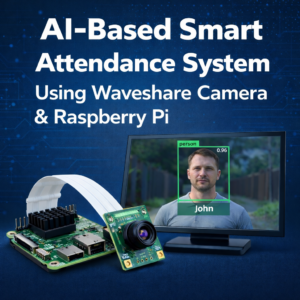
AI-Based Smart Attendance System Using Waveshare Camera & Raspberry Pi

Introduction
Manual attendance systems are outdated. What if attendance could be marked automatically using face recognition AI?
In this project, we build an AI-Based Smart Attendance System Using Waveshare Camera & Raspberry Pi that:
- Detects faces in real time
- Recognizes registered students/employees
- Marks attendance automatically
- Stores data in CSV or cloud
- Sends optional alerts
All required hardware is available at zbotic.
Why Use Waveshare Camera for Face Recognition?
Waveshare camera modules provide:
✔ High image clarity (IMX219 / IMX477)
✔ Raspberry Pi CSI compatibility
✔ Low latency capture
✔ Reliable Linux driver support
✔ Industrial-grade quality
Perfect for AI-based vision systems.
Components Required (Available on Zbotic)
Components Required (Available on Zbotic.in)
1️⃣ Raspberry Pi 4 Model B
(4GB or 8GB recommended)
👉 Raspberry Pi 4 Model B (4GB/8GB)
2️⃣ Waveshare IMX219 Camera Module
Best for beginner AI projects
👉 Waveshare IMX219 Camera Module for Raspberry Pi
3️⃣ Waveshare IMX477 Camera (Optional High-Quality Upgrade)
👉 Waveshare IMX477 High-Quality Camera Module
4️⃣ MicroSD Card (32GB+)
👉 MicroSD Card for Raspberry Pi Projects
5️⃣ 5V Power Adapter
👉 Raspberry Pi 5V Power Supply Adapter
6️⃣ Optional: Waveshare 7 HDMI Touch Display
👉 Waveshare 7-inch HDMI Touch Display
How AI Smart Attendance System Works
- Waveshare camera captures live video.
- Face detection identifies human faces.
- Face recognition compares with stored dataset.
- If matched:
- Name displayed
- Attendance recorded
- Timestamp saved
- Optional: Send attendance to cloud or Google Sheet.
This is called Edge AI Attendance System.
Hardware Setup
Connect Waveshare Camera to Raspberry Pi
• Insert ribbon cable into CSI port
• Blue side facing Ethernet port
• Enable camera using:
sudo raspi-config
Enable Camera → Reboot
Software Installation
Install Required Libraries
sudo apt update
sudo apt install python3-opencv
pip3 install face-recognition
pip3 install numpy pandas
Official OpenCV Docs:
https://docs.opencv.org/
Face Recognition Library:
https://github.com/ageitgey/face_recognition
Basic Face Recognition Attendance Code
import cv2
import face_recognition
import os
import numpy as np
import pandas as pd
from datetime import datetime
known_face_encodings = []
known_face_names = []
# Load images from dataset folder
for filename in os.listdir("dataset"):
    image = face_recognition.load_image_file(f"dataset/{filename}")
    encoding = face_recognition.face_encodings(image)[0]
    known_face_encodings.append(encoding)
    known_face_names.append(os.path.splitext(filename)[0])
cap = cv2.VideoCapture(0)
while True:
    ret, frame = cap.read()
    rgb_frame = frame[:, :, ::-1]
    face_locations = face_recognition.face_locations(rgb_frame)
    face_encodings = face_recognition.face_encodings(rgb_frame, face_locations)
    for face_encoding, face_location in zip(face_encodings, face_locations):
        matches = face_recognition.compare_faces(known_face_encodings, face_encoding)
        name = "Unknown"
        if True in matches:
            match_index = matches.index(True)
            name = known_face_names[match_index]
            now = datetime.now()
            dt_string = now.strftime("%H:%M:%S")
            with open("attendance.csv", "a") as f:
                f.write(f"{name},{dt_string}n")
        top, right, bottom, left = face_location
        cv2.rectangle(frame, (left, top), (right, bottom), (0,255,0), 2)
        cv2.putText(frame, name, (left, top-10),
                    cv2.FONT_HERSHEY_SIMPLEX, 0.9, (0,255,0), 2)
    cv2.imshow("Smart Attendance", frame)
    if cv2.waitKey(1) & 0xFF == ord('q'):
        break
cap.release()
cv2.destroyAllWindows()
Applications
• School & College Attendance
• Office Entry System
• Factory Worker Monitoring
• Coaching Institute Attendance
• Lab Access Control
Advanced Upgrade Ideas
You can enhance this system with:
✔ Mask detection
✔ RFID integration
✔ Cloud database integration
✔ SMS notification
✔ Web dashboard
✔ Multi-camera support
Frequently Asked Questions (FAQs)
1️⃣ What is an AI-Based Smart Attendance System?
An AI-Based Smart Attendance System uses face recognition technology to automatically detect and identify individuals through a camera and mark their attendance without manual input.
2️⃣ Which Waveshare camera is best for face recognition projects?
For most projects, the Waveshare IMX219 Camera Module is sufficient.
For higher image clarity and professional deployments, the Waveshare IMX477 High-Quality Camera is recommended.
3️⃣ Can Raspberry Pi handle face recognition smoothly?
Yes ✅
Raspberry Pi 4 (4GB or 8GB) can handle real-time face recognition using optimized libraries like OpenCV and the face_recognition Python library.
Performance depends on:
- Camera resolution
- Lighting conditions
- Dataset size
4️⃣ Does this attendance system require internet?
No ❌ (Not mandatory)
The system can work completely offline since face recognition runs locally on Raspberry Pi.
Internet is only required if:
- You want cloud backup
- Remote monitoring
- Google Sheet integration
5️⃣ How is attendance data stored?
Attendance can be stored in:
- CSV file
- Excel format
- MySQL database
- Cloud database
- Google Sheets
The basic version stores data in a CSV file with name and timestamp.
6️⃣ Is this project suitable for final-year engineering students?
Yes ✅
This project is ideal for:
- BE/BTech Final Year
- Diploma Mini Project
- AI/ML Specialization
- Robotics & IoT Lab
It demonstrates:
- Computer vision
- Embedded AI
- Real-time data processing
- Edge AI implementation
7️⃣ Can this system detect unknown persons?
Yes.
If a face is not found in the stored dataset, it will be labeled as “Unknown” and attendance will not be marked. You can also configure alerts for unknown detection.
8️⃣ Can this system be upgraded for real-time notifications?
Yes 🚀
You can integrate:
- Telegram bot alerts
- Email notifications
- SMS alerts
- Cloud dashboard
- Entry/exit logging
9️⃣ What lighting conditions are required for accurate face recognition?
For best accuracy:
- Use proper indoor lighting
- Avoid strong backlight
- Keep camera at eye level
- Maintain 1–2 meter distance
High-resolution Waveshare cameras improve accuracy significantly.
🔟 Where can I buy genuine Waveshare camera modules in India?
You can buy 100% genuine Waveshare camera modules and Raspberry Pi accessories from: zbotic
Why Buy Waveshare Products from Zbotic?
✔ 100% Genuine Products
✔ Fast Shipping Across India
✔ Bulk & Institutional Orders
✔ Technical Support
✔ Competitive Pricing
Shop Now: zbotic
Final Thoughts
If you’re looking to build a modern AI attendance solution that is:
- Contactless
- Smart
- Automated
- Scalable
Then AI-Based Smart Attendance System Using Waveshare Camera is the perfect innovation project.
Start building today with genuine components from Zbotic.







Add comment