
Table of Contents
- Why Medical-Grade Temperature Accuracy Matters
- TMP117 Sensor Overview and Key Specs
- TMP117 vs DHT11, DS18B20, LM35, BME280
- Hardware and Breakout Boards
- Wiring to Arduino and Raspberry Pi
- Arduino Code with Adafruit TMP117 Library
- Python Code for Raspberry Pi
- Alert Thresholds and Low-Power Alert Mode
- EEPROM Calibration Offset
- Medical and Industrial Applications
- Frequently Asked Questions
Why Medical-Grade Temperature Accuracy Matters
Temperature is the most widely measured physical parameter in the world, yet most hobbyist sensors sacrifice accuracy for cost. A DHT11 claims ±2°C accuracy — that is fine for monitoring whether a room is “warm” or “cool”, but completely inadequate for any medical, pharmaceutical, or precision industrial application where a 0.5°C error can matter enormously.
Consider human body temperature: the clinically significant range between hypothermia and hyperthermia spans only about 6°C (35°C to 41°C). Within that range, a difference of 0.5°C distinguishes a mild fever from a normal temperature. If your thermometer can be off by ±2°C, it is medically useless.
The TMP117 from Texas Instruments solves this problem. It achieves ±0.1°C maximum accuracy across the clinical temperature range (37°C ± 0.5°C) without requiring any user calibration, making it one of the most accurate I²C temperature sensors available at hobbyist-accessible price points. This guide shows you exactly how to use it.
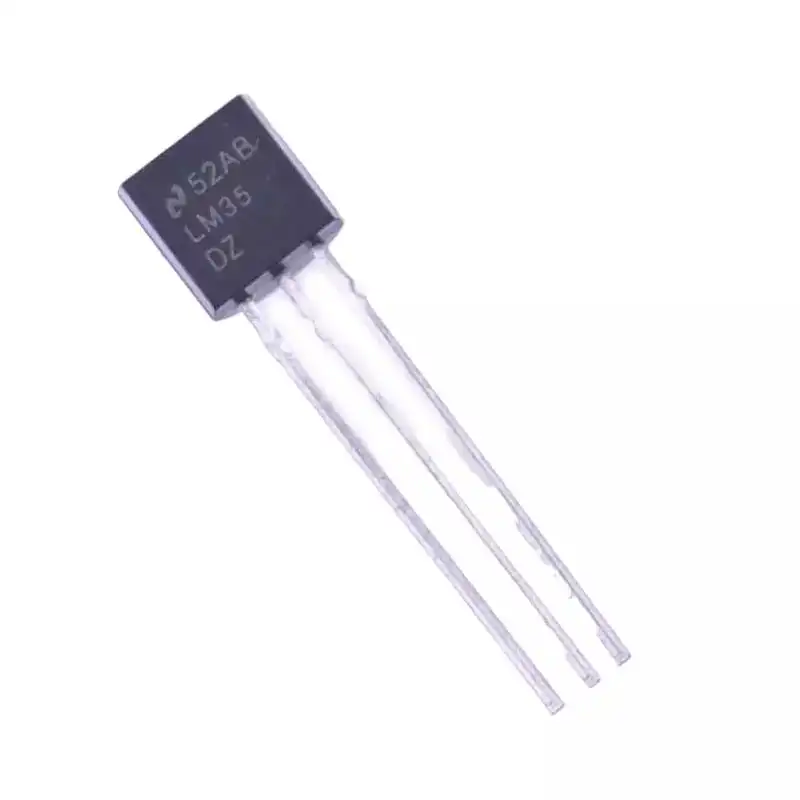
LM35 Temperature Sensors
A classic analog temperature sensor with ±1.5°C accuracy — still useful for non-critical measurements where simplicity beats precision.
TMP117 Sensor Overview and Key Specs
The TMP117 is a digital temperature sensor with an I²C interface, a 16-bit ADC, and factory-calibrated accuracy. Here are the full specifications you need to know before designing a system around it:
| Parameter | Value |
|---|---|
| Temperature Range | -55°C to +150°C |
| Accuracy (0°C to 70°C) | ±0.1°C (maximum) |
| Accuracy (-20°C to 70°C) | ±0.2°C (maximum) |
| Resolution | 0.0078125°C (1/128°C) per LSB |
| Supply Voltage | 1.7V to 5.5V |
| Interface | I²C (400 kHz Fast Mode) |
| I²C Address | 0x48, 0x49, 0x4A, or 0x4B (selectable) |
| Conversion Time | 15.5ms (single shot) to 16s (8× averaging) |
| Active Current | 3.5 µA average at 1Hz |
| Shutdown Current | 250 nA |
| NIST-Traceable Calibration | Yes |
| Package | 2mm × 2mm WSON (no SOT-23 option) |
The most remarkable figure is the 3.5 µA average active current at 1Hz measurement rate. This means a coin cell battery (typically 220 mAh) can power the TMP117 alone for over 7 years, making it ideal for wireless remote sensors.
The NIST-traceable factory calibration means every TMP117 has been individually calibrated against a reference standard and the calibration offset burned into on-chip EEPROM. You do not need to calibrate it yourself.
TMP117 vs DHT11, DS18B20, LM35, BME280
| Sensor | Accuracy | Interface | Best For |
|---|---|---|---|
| DHT11 | ±2°C | 1-wire custom | Basic room monitoring |
| DHT22 | ±0.5°C | 1-wire custom | HVAC, weather stations |
| DS18B20 | ±0.5°C | 1-Wire (Dallas) | Pipeline, aquarium, multi-point |
| LM35 | ±1.5°C | Analog | Analog circuits, legacy designs |
| BME280 | ±1.0°C | I²C / SPI | Weather (temp + humidity + pressure) |
| TMP117 | ±0.1°C | I²C | Medical, pharma, precision industrial |
The TMP117 is approximately 5× more accurate than the DS18B20 and 20× more accurate than the DHT11. It costs more than these sensors but dramatically less than professional laboratory thermocouples with similar accuracy specifications.

DS18B20 Programmable Resolution Temperature Sensor
The industry-standard 1-Wire sensor for multi-point measurement — run dozens of sensors on a single wire. Accurate to ±0.5°C at 12-bit resolution.
Hardware and Breakout Boards
The TMP117 bare IC is a 2mm × 2mm WSON package — impossible to solder by hand without reflow equipment. For prototyping, use a breakout board such as the Adafruit TMP117 Breakout (ID: 4821) or the SparkFun TMP117 Qwiic board. These breakouts bring out VCC, GND, SDA, SCL, and the ALERT pin to standard 0.1″ headers.
I²C Address Selection
The TMP117 supports four I²C addresses by connecting the ADD0 pin to different voltages:
- ADD0 to GND → 0x48 (default)
- ADD0 to V+ → 0x49
- ADD0 to SDA → 0x4A
- ADD0 to SCL → 0x4B
This lets you put four TMP117 sensors on a single I²C bus — useful for measuring temperature at multiple points in a medical device or environmental chamber.
Wiring to Arduino and Raspberry Pi
Arduino Uno
TMP117 VCC   →  Arduino 3.3V (or 5V — sensor accepts both)
TMP117 GND   →  Arduino GND
TMP117 SDA   →  Arduino A4 (SDA)
TMP117 SCL   →  Arduino A5 (SCL)
TMP117 ALERT →  Arduino D2 (optional, for alert interrupts)
Add 4.7 kΩ pull-up resistors between SDA and 3.3V, and between SCL and 3.3V, if your breakout board does not already include them.
Raspberry Pi
TMP117 VCC   →  Pi Pin 1  (3.3V)
TMP117 GND   →  Pi Pin 6  (GND)
TMP117 SDA   →  Pi Pin 3  (GPIO2/SDA)
TMP117 SCL   →  Pi Pin 5  (GPIO3/SCL)
Enable I²C on the Pi via sudo raspi-config → Interfacing Options → I²C → Enable.
Arduino Code with Adafruit TMP117 Library
Installation
In Arduino IDE, go to Sketch → Include Library → Manage Libraries. Search for “TMP117” and install the Adafruit TMP117 library (also install Adafruit BusIO if prompted).
Basic Temperature Reading
#include <Adafruit_TMP117.h>
#include <Wire.h>

Adafruit_TMP117 tmp117;

void setup() {
  Serial.begin(115200);
  while (!Serial) delay(10);

  if (!tmp117.begin()) {
    Serial.println("Failed to find TMP117. Check wiring!");
    while (1) delay(10);
  }
  Serial.println("TMP117 found.");
}

void loop() {
  sensors_event_t temp_event;
  tmp117.getEvent(&temp_event);

  Serial.print("Temperature: ");
  Serial.print(temp_event.temperature, 4); // 4 decimal places
  Serial.println(" °C");

  delay(500);
}
Averaged Readings for Maximum Accuracy
The TMP117 can average multiple internal readings (1, 8, 32, or 64 samples) before reporting. More averages = lower noise = higher effective accuracy, at the cost of slower update rate.
#include <Adafruit_TMP117.h>
#include <Wire.h>

Adafruit_TMP117 tmp117;

void setup() {
  Serial.begin(115200);
  tmp117.begin();

  // Set averaging to 64 samples (slowest, most accurate)
  // Conversion cycle becomes approximately 8 seconds
  tmp117.setAveragedSamples(TMP117_AVERAGE_64X);

  Serial.println("TMP117 ready with 64x averaging.");
}

void loop() {
  if (tmp117.dataReady()) {
    sensors_event_t event;
    tmp117.getEvent(&event);
    Serial.print("Averaged temp: ");
    Serial.print(event.temperature, 4);
    Serial.println(" °C");
  }
  delay(100); // Poll for data-ready flag
}
Python Code for Raspberry Pi
import board
import adafruit_tmp117
import time

i2c = board.I2C()
sensor = adafruit_tmp117.TMP117(i2c)

while True:
    temp = sensor.temperature
    print(f"Temperature: {temp:.4f} °C")
    time.sleep(1)
Install prerequisites: pip3 install adafruit-circuitpython-tmp117
Logging to CSV for Data Analysis
import board, adafruit_tmp117, csv, time
from datetime import datetime

i2c = board.I2C()
sensor = adafruit_tmp117.TMP117(i2c)

with open('temperature_log.csv', 'w', newline='') as csvfile:
    writer = csv.writer(csvfile)
    writer.writerow(['Timestamp', 'Temperature_C'])

    print("Logging... Press Ctrl+C to stop.")
    try:
        while True:
            temp = sensor.temperature
            ts = datetime.now().isoformat()
            writer.writerow([ts, f"{temp:.4f}"])
            csvfile.flush()
            print(f"{ts}: {temp:.4f} °C")
            time.sleep(5)
    except KeyboardInterrupt:
        print("Logging stopped.")
Alert Thresholds and Low-Power Alert Mode
The TMP117 has programmable high and low temperature alert thresholds stored in EEPROM. When temperature crosses a threshold, the ALERT pin asserts. This allows the microcontroller to sleep in its lowest power state and only wake up when temperature goes out of range — critical for battery-powered devices.
#include <Adafruit_TMP117.h>
#include <Wire.h>

Adafruit_TMP117 tmp117;
const int ALERT_PIN = 2;
volatile bool alertFlag = false;

void alertISR() { alertFlag = true; }

void setup() {
  Serial.begin(115200);
  tmp117.begin();

  // Set alert limits for body temperature monitoring
  tmp117.setHighThreshold(38.0);  // Alert if above 38°C (fever)
  tmp117.setLowThreshold(36.0);   // Alert if below 36°C (hypothermia risk)

  pinMode(ALERT_PIN, INPUT);
  attachInterrupt(digitalPinToInterrupt(ALERT_PIN), alertISR, FALLING);

  Serial.println("Alert mode configured: 36.0 - 38.0 °C");
}

void loop() {
  if (alertFlag) {
    alertFlag = false;
    sensors_event_t event;
    tmp117.getEvent(&event);
    float t = event.temperature;
    Serial.print("ALERT! Temperature out of range: ");
    Serial.print(t, 2);
    Serial.println(" °C");

    if (t > 38.0) Serial.println("Fever threshold exceeded!");
    if (t < 36.0) Serial.println("Hypothermia threshold exceeded!");
  }
  // MCU can sleep here in real application
  delay(100);
}
EEPROM Calibration Offset
Even though the TMP117 is factory-calibrated, your specific application may introduce systematic offsets. For example, if the sensor is mounted inside an enclosure where self-heating shifts readings by 0.15°C, you can correct this by programming a calibration offset into the TMP117’s onboard EEPROM:
// Write a -0.15°C offset to correct for self-heating in enclosure
// This offset is retained across power cycles (stored in EEPROM)
tmp117.setTemperatureOffset(-0.15);

// Verify:
float offset = tmp117.getTemperatureOffset();
Serial.print("Programmed offset: ");
Serial.println(offset, 4);
The EEPROM has an endurance limit of approximately 50,000 write cycles. For static calibration offsets that are set once and never changed, this is no concern at all.
Medical and Industrial Applications
1. Clinical Thermometer Reference Design
The TMP117 is explicitly recommended by Texas Instruments for clinical thermometer applications. With the sensor mounted on a surface that makes thermal contact with the skin (such as under the armpit or on the forehead using a thermal interface material), it achieves accuracy sufficient for clinical screening. NIST traceability satisfies regulatory requirements in medical device documentation.
2. Pharmaceutical Cold Chain Monitoring
Vaccines, insulin, and other biologics must be stored within strict temperature bands (typically 2–8°C). A TMP117 with its ±0.1°C accuracy and alert functionality, combined with a data logger and GPRS modem, creates a compliant cold chain monitor that can alert logistics staff instantly if a refrigerator malfunction threatens the contents.
3. Server Room Environmental Monitoring
Data centres require temperature monitoring at multiple rack heights to detect thermal stratification. Four TMP117 sensors on a single I²C bus (using the four selectable addresses) can map a full server rack from top to bottom. The ultra-low power consumption means even a USB port can power the entire monitoring array.
4. PCB Thermal Profiling
During electronics manufacturing, soldering profiles require precise temperature curves. Mounting TMP117 sensors at critical points on a PCB being profiled through a reflow oven gives detailed temperature maps. The 0–150°C range covers typical lead-free solder reflow temperatures.

DHT11 Digital Relative Humidity and Temperature Sensor Module
Need humidity alongside temperature? The DHT11 adds RH measurement at a budget price — suitable for HVAC control where ±2°C accuracy is acceptable.
Frequently Asked Questions
Is the TMP117 suitable for skin-contact temperature measurement?
Yes, with appropriate thermal design. The sensor must make good thermal contact with the surface being measured. Use thermal interface material or thermal tape between the sensor and skin. When measuring surface skin temperature, remember that skin temperature is typically 2–4°C below core body temperature. The TMP117’s ±0.1°C accuracy is better than required for most clinical screening thresholds.
How does TMP117 compare to PT100 RTD sensors in accuracy?
A laboratory-grade PT100 RTD with a precision signal conditioner achieves ±0.01°C or better — about 10× more accurate than the TMP117. However, PT100 systems require a precision current source, a high-resolution ADC, and careful lead resistance compensation. The TMP117 integrates all of this in a 2mm package at a fraction of the cost and complexity. For most medical and industrial applications that need better than ±0.5°C, the TMP117 is the correct engineering choice.
Can I use TMP117 to measure liquid temperature?
Yes, but the bare IC is not waterproof. Encapsulate the sensor in a thermally conductive epoxy, or mount the breakout board in a waterproof housing with a thermal window. Alternatively, pair a DS18B20 (which is available in a waterproof stainless steel probe) for immersion applications where ±0.5°C is acceptable.
What is the conversion time of the TMP117?
In single-shot mode with no averaging, the TMP117 completes a conversion in about 15.5ms. With 64× averaging (for maximum noise reduction), each result takes about 1 second. In continuous mode at 1Hz with 8× averaging, the sensor reports every 500ms. All of these are far faster than most applications require, so averaging is almost always worth enabling.
Does the TMP117 need calibration after installation?
No, for most applications. The factory NIST-traceable calibration is sufficient. However, if your enclosure introduces a systematic self-heating error (which it will if components near the sensor dissipate power), measure the offset and program it into the EEPROM calibration register using the setTemperatureOffset() function. This compensation is persistent across power cycles.
Can multiple TMP117 sensors share the same I²C bus?
Yes, up to four TMP117 sensors can share a single I²C bus by configuring each to a different address (0x48, 0x49, 0x4A, 0x4B) using the ADD0 pin. For more than four sensors, use an I²C multiplexer such as the TCA9548A, which expands to 32 sensors on a single bus pair.
Need precision temperature sensing for your next project? Zbotic carries a wide range of temperature sensors from basic LM35 to high-accuracy modules, plus all the I²C components and breakout boards you need. Ships across India. Shop Temperature Sensors at Zbotic →






Add comment