
SIM800L Not Responding: AT Command Fix & Power Supply Tips
If your SIM800L not responding fix AT command search brought you here, you are in good company. The SIM800L is arguably the most popular GSM/GPRS module in India for SMS alerts, IoT data logging, and cellular communication projects — but it is also one of the most frustrating to get working for the first time. The root cause of 90% of SIM800L problems is not code or wiring — it is inadequate power supply. This comprehensive troubleshooting guide will walk you through every possible cause of SIM800L failures, AT command diagnostics, and the definitive power supply solution to get your module working reliably.
SIM800L Module Overview
The SIM800L is a compact quad-band GSM/GPRS module from SIMCom that supports 850/900/1800/1900 MHz frequency bands. In India, it works on 900/1800 MHz (used by all major carriers: Airtel, Jio, Vi, BSNL). It is controlled entirely via AT commands through a serial UART interface — the same command set originally designed for dial-up modems in the 1990s but still in widespread use for cellular modules.
The module can:
- Send and receive SMS messages
- Make and receive voice calls
- Establish GPRS data connections for HTTP requests
- Provide TCP/IP connectivity via AT commands
- Report GPS coordinates when paired with a GPS module (SIM808 variant)
The SIM800L comes in a tiny 24mm × 24mm SMD package, but the breakout modules (sometimes called SIM800L EVB) add a micro SIM socket, LED indicators, and power filtering capacitors. Despite these additions, power supply remains the Achilles heel of nearly every SIM800L deployment.
The #1 Fix: Power Supply Requirements
The SIM800L requires 3.4V to 4.4V — it cannot run from the Arduino’s 3.3V or 5V pins directly. When searching for a cellular connection, the module draws up to 2A peak current in bursts of a few milliseconds. This is not a continuous 2A — the average during a call or GPRS session is 200-400mA — but those 2A spikes will crash any underpowered supply.
What happens when power is insufficient:
- Module powers on but does not respond to AT commands
- Module responds to AT initially but crashes during network registration
- Module connects to network, then resets unexpectedly after a few seconds
- Status LED blinks rapidly (indicates network search drawing high current)
- Module responds “ERROR” or “NO CARRIER” to all AT commands
The correct power solution: Use a dedicated Li-Po or Li-ion battery (3.7V nominal, ideal for SIM800L) as the power source, or use a DC-DC buck converter set to 4.0V from your 5V supply — but with at least 2A current capability. A large capacitor (470µF–1000µF, 6.3V) across the VCC and GND pins of the SIM800L is also essential to handle those 2A transient spikes.
What NOT to use:
- Arduino 5V or 3.3V pins (both are current-limited to 150-500mA)
- AMS1117-3.3 or 7805 linear regulators (insufficient current capacity and wrong voltage)
- USB power from a laptop or cheap phone charger (current-limited, voltage drops under load)
- A standard 5V/1A phone charger adapter (just barely enough for the module alone, nothing for Arduino)
Recommended power setup:
Option 1 (Best for breadboard projects):
  18650 Li-ion cell (3.7V, 2000mAh+) → SIM800L VCC/GND directly
  + 1000µF capacitor across SIM800L VCC/GND

Option 2 (Best for 5V systems):
  5V (2A+) supply → XL4016 or LM2596 buck converter → set output to 4.0V
  → SIM800L VCC/GND
  + 470µF capacitor across SIM800L VCC/GND

Option 3 (Dedicated module):
  TP4056 LiPo charger module → 18650 cell → SIM800L
  (Charges via USB, powers SIM800L from cell)
Correct Wiring to Arduino
The SIM800L UART operates at 2.8V–3.6V logic levels. Arduino Uno/Nano use 5V logic. A voltage divider on the TX line from Arduino to SIM800L is required to avoid damaging the module over time. The SIM800L’s TX to Arduino RX is fine without level shifting since 2.8V logic HIGH is detected as HIGH by Arduino’s 5V logic.
SIM800L Wiring to Arduino Nano/Uno:

SIM800L VCC  → 3.7-4.2V (Li-ion cell) + 1000µF cap to GND
SIM800L GND  → Common GND (Arduino GND + battery negative together)
SIM800L RXD  → Arduino Pin 11 (SoftSerial TX) via voltage divider:
               Pin 11 → 1kΩ → SIM800L RXD
                               ↕
                             2.2kΩ
                               ↕
                              GND
SIM800L TXD  → Arduino Pin 10 (SoftSerial RX) directly
SIM800L RST  → Arduino Pin 9 (optional, for hardware reset)

IMPORTANT: Common GND between Arduino and battery is essential!
If you are using a 3.3V Arduino (Zero, Due, MKR series, or ESP32/ESP8266), no voltage divider is needed — wire RXD/TXD directly. Set your SoftwareSerial baud rate to 9600 (the SIM800L default).
Essential AT Commands and Testing
AT commands are the language you use to communicate with the SIM800L. Start with the simplest test and work your way up systematically. Open the Serial Monitor at 9600 baud (with the sketch below running) and type these commands:
Test communication:       AT          → Expected: OK
Check SIM status:         AT+CPIN?    → Expected: +CPIN: READY
Check signal strength:    AT+CSQ      → Expected: +CSQ: 18,0  (10-31 = good signal)
Network registration:     AT+CREG?    → Expected: +CREG: 0,1 or 0,5
Operator name:            AT+COPS?    → Expected: +COPS: 0,0,"Airtel"
Set SMS text mode:        AT+CMGF=1   → Expected: OK
Send SMS test:            AT+CMGS="+919876543210" → wait for >, type message, Ctrl+Z
AT command passthrough sketch for testing:
#include <SoftwareSerial.h>

#define SIM_RX 10
#define SIM_TX 11

SoftwareSerial simSerial(SIM_RX, SIM_TX);

void setup() {
  Serial.begin(9600);
  simSerial.begin(9600);
  Serial.println("SIM800L AT Test - Type commands and press Enter");
  delay(1000);
  simSerial.println("AT");
}

void loop() {
  // Forward from Serial Monitor to SIM800L
  if (Serial.available()) {
    simSerial.write(Serial.read());
  }
  // Forward from SIM800L to Serial Monitor
  if (simSerial.available()) {
    Serial.write(simSerial.read());
  }
}
Upload this sketch. Open Serial Monitor. Set baud to 9600, set line ending to “Both NL & CR”. Type AT and press Enter. If you get OK, the module is alive and communicating. If there is no response, go back to the power supply section.
Common Error Codes and Fixes
No response to AT: Power issue 90% of the time. Verify voltage at SIM800L VCC pin with a multimeter while the module is running — it should be between 3.4V and 4.4V. Voltage dipping below 3.4V during GSM registration means your power supply cannot deliver sufficient current. Add the 1000µF capacitor and/or use a dedicated battery/converter.
+CPIN: NOT INSERTED: SIM card is not detected. Check that the card is inserted correctly with the gold contacts facing down. Try removing and re-inserting. Some SIM800L modules have tight SIM sockets — press firmly until it clicks. Ensure you are using a micro SIM card; standard SIMs need a SIM cutter.
+CSQ: 0,0 (zero signal strength): No antenna connected or antenna is broken. The SIM800L has a tiny IPEX/U.FL connector for the antenna — the small helical antenna that usually comes with the module must be firmly connected. If you are indoors, move near a window. Signal below +CSQ: 5 will cause registration failures.
+CREG: 0,2 (searching) or 0,3 (registration denied): This is the most common issue in India after power problems. Possible causes: (1) SIM card not activated or no balance, (2) 2G/GPRS not supported by carrier in your area (Jio is VoLTE-only, SIM800L is 2G — Jio SIMs will NOT work), (3) APN not set for data, (4) SIM card locked (needs PIN entry). Note: Jio SIM cards do not work with SIM800L — Jio shut down its 2G network entirely. Use Airtel, Vi, or BSNL.
“AT+CMGS” gives ERROR: Either not in SMS text mode (AT+CMGF=1 first) or SMS service centre number not set. Check with AT+CSCA?. Set manually with AT+CSCA="+919140000002" (Airtel) or check your carrier’s SMSC number.
Module resets after a few seconds: Classic undervoltage during network registration. The module draws 2A bursts and if the supply voltage drops below 3.4V, the module resets itself. Solve with a bigger capacitor, a stronger power supply, or a dedicated LiPo battery.
SIM Card and Network Registration Problems
India-specific network considerations every SIM800L user needs to know:
Which carriers work with SIM800L:
- Airtel: Works well. Good 2G coverage. Use APN:
airtelgprs.com - Vi (Vodafone-Idea): Works. Declining 2G coverage in some cities. APN:
portalnmms - BSNL: Works. Best 2G coverage in rural India. APN:
bsnlnet - Jio: DOES NOT WORK. Jio is 4G VoLTE-only. No 2G/3G network.
If your SIM registers but GPRS data does not work, set the APN correctly:
AT+SAPBR=3,1,"Contype","GPRS"
AT+SAPBR=3,1,"APN","airtelgprs.com"   // Change to your carrier's APN
AT+SAPBR=1,1                           // Open GPRS bearer
AT+SAPBR=2,1                           // Check IP (should show an IP address)
Working Arduino Code to Send SMS
Here is a production-tested sketch for sending SMS alerts with the SIM800L — the most common use case in IoT temperature/moisture monitors in India:
#include <SoftwareSerial.h>

#define SIM_RX 10
#define SIM_TX 11

SoftwareSerial sim(SIM_RX, SIM_TX);

bool sendAT(const char* cmd, const char* expected, unsigned long timeout = 2000) {
  sim.println(cmd);
  unsigned long start = millis();
  String response = "";
  while (millis() - start < timeout) {
    while (sim.available()) {
      response += (char)sim.read();
    }
    if (response.indexOf(expected) != -1) return true;
  }
  Serial.print("CMD: "); Serial.print(cmd);
  Serial.print(" | Response: "); Serial.println(response);
  return false;
}

bool sendSMS(const char* number, const char* message) {
  if (!sendAT("AT", "OK")) { Serial.println("Module not responding"); return false; }
  if (!sendAT("AT+CMGF=1", "OK")) { Serial.println("SMS mode failed"); return false; }

  String cmd = "AT+CMGS="";
  cmd += number;
  cmd += """;
  sim.println(cmd);
  delay(1000);

  if (sim.find(">")) {
    sim.print(message);
    sim.write(26);  // Ctrl+Z to send
    delay(5000);    // Wait for SMS to send
    return true;
  }
  return false;
}

void setup() {
  Serial.begin(9600);
  sim.begin(9600);
  delay(3000);  // Wait for SIM800L to boot

  Serial.println("Sending SMS...");
  if (sendSMS("+919876543210", "Hello from Arduino! Sensor reading: 28.5C")) {
    Serial.println("SMS sent successfully!");
  } else {
    Serial.println("SMS failed.");
  }
}

void loop() {
  // Add sensor reading and conditional SMS logic here
}
Recommended Hardware from Zbotic
Get everything you need for your SIM800L project from Zbotic:
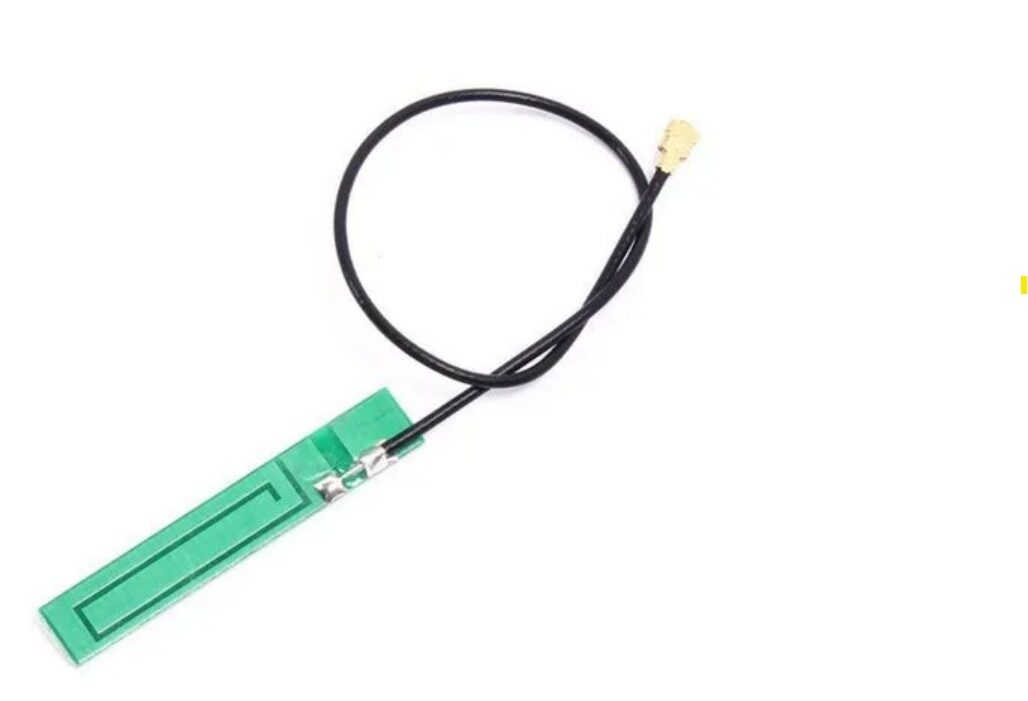
15cm 3dBi GSM/GPRS/3G PCB Antenna with IPEX Connector
The right antenna makes all the difference for SIM800L signal strength. This 3dBi antenna with IPEX/U.FL connector fits directly onto the SIM800L module’s antenna socket.
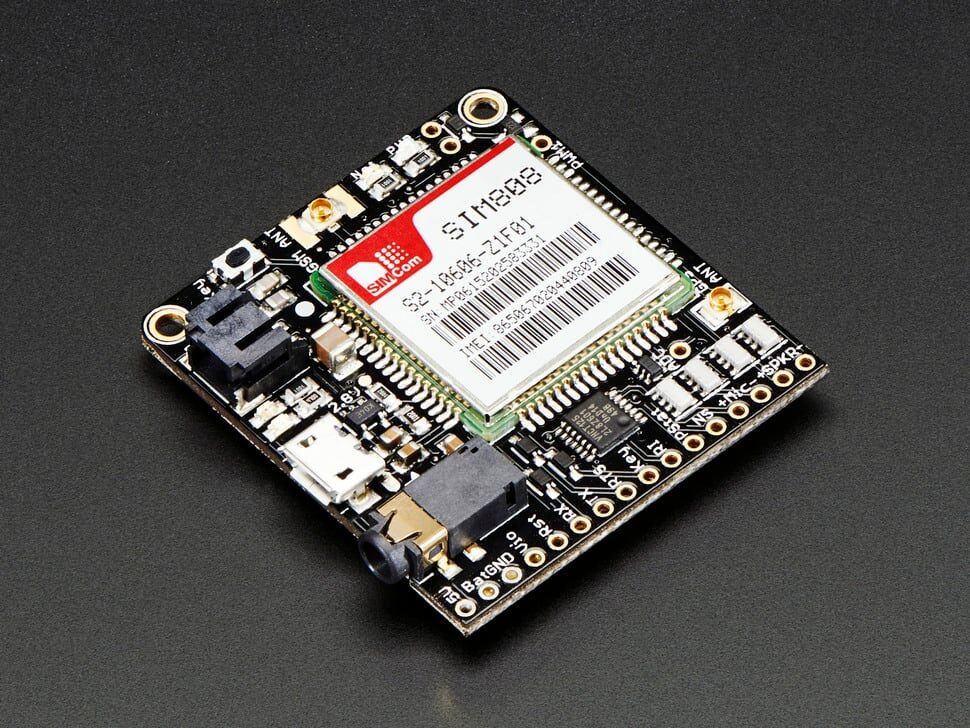
Adafruit FONA 808 – Mini Cellular GSM + GPS Breakout
A premium alternative to bare SIM800L modules — the FONA 808 has proper power filtering, a LiPo connector, and combines GSM with GPS in one professional breakout board.
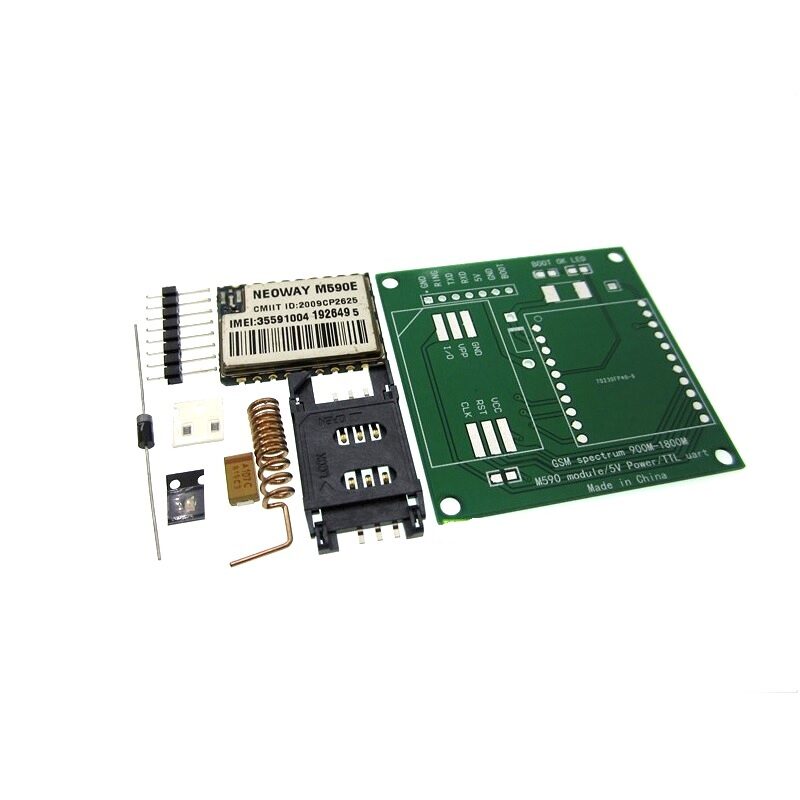
DIY GSM/GPRS M590E Module Kit
A capable alternative to SIM800L for SMS-only projects. The M590E is known for easier power requirements and reliable AT command response — great when power supply is limited.

0.96 Inch I2C OLED LCD Module White SSD1306
Display the SIM800L connection status, signal strength, and SMS count on a compact OLED — essential for field-deployed IoT devices where you can’t connect a serial monitor.

Ai Thinker ESP32 CAM Development Board WiFi+Bluetooth
Combine ESP32’s WiFi with SIM800L’s cellular fallback — when WiFi is unavailable, the SIM800L sends SMS alerts. Perfect for remote sensor monitoring with dual connectivity.
Frequently Asked Questions
Q1: My SIM800L Status LED blinks once every 3 seconds — is that normal?
Yes, that is the desired behaviour. One blink every 3 seconds means the module is registered to a GSM network and is in standby mode. If the LED blinks rapidly (once per second or faster), the module is actively searching for a network — this is normal for up to 60 seconds after power-on. If it never slows down to 3-second blinks, check your SIM card, antenna, and signal strength with AT+CSQ.
Q2: Does Jio SIM work with SIM800L?
No. Jio operates exclusively on 4G LTE VoLTE — it shut down all 2G and 3G services. The SIM800L is a 2G module only and cannot connect to Jio’s network at all. Use an Airtel, Vi (Vodafone-Idea), or BSNL SIM card. Even a basic prepaid SIM with minimal recharge works for SMS-only projects (SMS service is included in all Indian plans).
Q3: How do I change the SIM800L baud rate if I do not know what it is currently set to?
Try sending AT at different baud rates (1200, 2400, 4800, 9600, 19200, 38400, 57600, 115200) until you get a response. Alternatively, the SIM800L supports auto-baud detection — send AT three times at different rates until it responds. Once connected, set a fixed baud with AT+IPR=9600 and save it with AT&W. 9600 bps is the most reliable for SoftwareSerial on Arduino.
Q4: Can the SIM800L receive SMS messages? How do I read them with Arduino?
Yes. Set SMS text mode (AT+CMGF=1), enable SMS notifications (AT+CNMI=1,2,0,0,0), and the module will send +CMT: "+919876543210","timestamp"nMessage text over UART whenever an SMS arrives. Parse this in your Arduino sketch to trigger actions based on SMS content — useful for remote control of irrigation pumps, inverters, or security alerts in areas with no internet.
Q5: How do I reduce power consumption for a battery-powered SIM800L project?
The SIM800L has a sleep mode. Send AT+CSCLK=2 to enable slow clock mode, which reduces current from ~18mA (registered, idle) to ~1mA (sleep). The UART is disabled in sleep mode — wake it with a DTR pin toggle or by sending a serial byte. For deep sleep projects, use the RTC alarm to wake the MCU, which then wakes the SIM800L, sends data, confirms receipt, and puts both back to sleep. Battery life of weeks is achievable with careful sleep management.
Shop GSM antennas, the Adafruit FONA 808, and all communication modules at Zbotic’s Communication & Wireless Modules — fast delivery across India, genuine components.





Add comment