
Nylon (Polyamide, PA) is one of the most mechanically capable materials available for desktop FDM 3D printing. It combines high strength, impact toughness, flexibility, and wear resistance into a single material — making it the go-to choice for functional parts like gears, brackets, living hinges, cable ties, and mechanical components that need to survive real-world use. However, nylon is also one of the most demanding filaments to print successfully, particularly in India where humidity is high. This complete nylon filament 3D printing guide covers everything an Indian maker needs to know.
1. Types of Nylon Filament: PA6, PA12, PA-CF
Not all nylon filaments are the same. The most common types available in India are:
PA6 (Nylon 6)
The most widely printed nylon variety. PA6 offers excellent tensile strength (~80 MPa), high impact resistance, and good chemical resistance. It prints at higher temperatures (240–260°C) and warps more than PA12 due to higher moisture absorption. Best for mechanical parts where maximum strength is needed.
PA12 (Nylon 12)
Lower moisture absorption than PA6, which makes it significantly easier to print consistently in humid Indian conditions. Slightly lower strength than PA6, but better dimensional stability and easier bed adhesion. Prints at 240–260°C. PA12 is the recommended starting point for first-time nylon printers in India.
PA-CF (Carbon Fibre Reinforced Nylon)
Carbon fibre reinforced nylon combines nylon’s toughness with CF’s stiffness and light weight. It prints with much less warping than plain nylon, making it more accessible. However, CF particles are abrasive — you must use a hardened steel nozzle. Prints at 250–270°C. Popular for drone frames, structural brackets, and lightweight mechanical parts.
PA-GF (Glass Fibre Reinforced Nylon)
Similar to PA-CF but slightly more flexible and less stiff. Also requires a hardened nozzle. Good for applications needing a balance of strength and toughness.

Bambu Lab Hotend with Hardened Steel Nozzle – 0.4mm
Nylon and especially PA-CF require hardened steel nozzles — brass nozzles wear out in hours with abrasive filaments. This Bambu Lab hotend assembly is ready for engineering materials.
2. Why Nylon Is Difficult to Print
Nylon presents three main challenges compared to PLA or PETG:
- Extreme moisture sensitivity: Nylon is the most hygroscopic common filament. It absorbs moisture rapidly — wet nylon pops, bubbles, and produces weak, ugly prints. In coastal Indian cities, an open spool can absorb damaging levels of moisture in just 2–4 hours.
- High warping: Nylon shrinks significantly as it cools, causing parts to lift from the bed, especially at corners. An enclosure that traps heat is practically mandatory for anything larger than 5×5 cm.
- High printing temperature: 240–260°C nozzle temperature requires an all-metal hotend. PTFE-lined hotends should NOT be used above 240°C continuously — the PTFE degrades and releases fumes.
3. Printer and Hardware Requirements
All-Metal Hotend: Mandatory
To print nylon reliably at 240–260°C, you need an all-metal hotend with no PTFE in the melt zone. Hotends like the V6 all-metal, Mosquito, Dragon, or Bambu Lab’s hardened hotend are all suitable. Remove or replace any PTFE-lined heatbreak before attempting nylon prints at sustained high temperatures.
Hardened Steel Nozzle: Required for PA-CF/GF
If you are printing carbon fibre or glass fibre reinforced nylon, you need a hardened steel or ruby-tipped nozzle. Brass nozzles wear down in as little as 5–10 hours with abrasive materials, causing the nozzle diameter to enlarge and print quality to drop dramatically.
Enclosure
An enclosure keeping the chamber at 40–50°C dramatically reduces warping and improves layer adhesion on large nylon prints. A purpose-built enclosure printer (Bambu Lab X1C, Creality K1 Max) or a DIY cardboard/IKEA Lack enclosure all work.
Dry Box or In-Line Dryer
Printing nylon directly from a drybox or in-line filament dryer is strongly recommended in India. This eliminates moisture pickup between the spool and hotend during multi-hour prints.

3D Printer Stainless Steel Nozzle – 0.4mm
Stainless steel nozzles offer better heat resistance and durability than brass for high-temperature materials like nylon. A worthwhile upgrade for any printer regularly printing engineering filaments.
4. Printing Settings for Nylon
Here is a recommended settings table for PA6 and PA12:
| Setting | PA6 | PA12 |
|---|---|---|
| Nozzle Temperature | 240–260°C | 240–255°C |
| Bed Temperature | 70–90°C | 60–80°C |
| Print Speed | 30–50 mm/s | 30–60 mm/s |
| Layer Height | 0.2–0.3 mm | 0.2–0.3 mm |
| Cooling Fan | 0–20% | 0–30% |
| Retraction (Direct) | 3–5 mm | 3–4 mm |
| Walls | 3–4 | 3–4 |
| Infill | 30–60% | 30–50% |
| Enclosure Temp | 40–50°C | 35–45°C |
Fan Speed: Keep It Low
Unlike PLA which benefits from maximum cooling, nylon prints best with minimal or zero part cooling fan. Rapid cooling increases warping and reduces inter-layer bonding. Use 0% fan for the first 10–15 layers minimum, then increase to 10–20% maximum if needed for bridging.
5. Enclosure: Why It Is Non-Negotiable for India
Nylon warps because it contracts significantly as it cools. When printing nylon in open air — especially in an air-conditioned room — the top layers cool faster than the bottom layers, creating internal stresses that lift the part from the bed.
An enclosure solves this by maintaining an elevated ambient temperature (40–50°C) throughout the print. This allows all layers to cool at roughly the same rate and dramatically reduces warping, especially on large flat parts.
DIY Enclosure Options
- Cardboard box: Works surprisingly well for short prints. Tape cardboard around your printer, leaving just enough gaps for ventilation. Free and effective for testing.
- IKEA Lack table enclosure: A popular community build using stacked IKEA Lack tables with polycarbonate panels. Around ₹3,000–₹5,000 in total materials.
- Commercial enclosure tent: Several sellers on Amazon India sell printer tent enclosures for ₹1,500–₹3,000. Not as good as rigid enclosures but better than nothing.
If you own a Bambu Lab X1C or similar enclosed printer, you are already well-equipped for nylon printing.
6. Moisture: The Biggest Challenge in India
This is the most critical section of this guide for Indian makers. Nylon is extraordinarily hygroscopic. A freshly opened, perfectly dry spool of nylon can absorb enough moisture in just 2–4 hours in Mumbai or Chennai during monsoon to produce noticeable print quality degradation.
Consequences of Wet Nylon
- Loud popping, crackling, or hissing from the hotend
- Steam and foamy extrusion visible at the nozzle
- Severe stringing and poor surface quality
- Drastically reduced tensile strength (wet PA6 can be 30–40% weaker)
- Poor layer adhesion and delamination
Drying Protocol for India
Before every print session, dry your nylon filament:
- PA6: 80°C for 6–12 hours in a food dehydrator or oven
- PA12: 70°C for 4–8 hours
- PA-CF/GF: 80°C for 6–10 hours
Use an oven thermometer to verify oven temperature accuracy — most home ovens are off by ±10°C. The filament should extrude silently after proper drying. If you still hear popping after 8 hours, dry for another 4 hours.
Printing From a Drybox
For multi-hour nylon prints in India, print directly from an airtight container with the spool inside and silica gel alongside it, with just the filament path exiting through a small hole (sealed around the filament with tape or a proper fitting). This prevents moisture re-absorption during the print itself.

Filament Dust Filter / Cleaner Block – 1.75mm
A filament cleaner block removes dust and small particles before they reach the hotend — especially useful for nylon prints where any contamination can cause nozzle jams at high temperatures.
7. Bed Adhesion Strategies
Nylon’s high shrinkage makes bed adhesion one of its biggest challenges. These strategies work reliably for Indian conditions:
PEI (Polyetherimide) Sheets
A smooth or textured PEI sheet at 70–90°C provides good adhesion for PA12 and moderate PA6 adhesion. PEI is the easiest solution for most printers. Parts release well once the bed cools.
Garolite (G10) Sheet
Garolite is the gold standard for nylon bed adhesion. Nylon bonds extremely well to G10/FR4 PCB material. Cut a piece of G10 to fit your bed, clamp it in place, and heat to 60–80°C. This is the method professional and industrial users swear by.
Glue Stick on Glass
A generous layer of PVA glue stick (Fevistik works well) on a glass bed at 80°C provides reliable nylon adhesion. Apply a fresh coat before each print and wash off with water after.
Dimafix / ABS Slurry
Dimafix adhesive spray is another reliable option. ABS slurry (dissolved ABS in acetone) applied to a glass bed also works for nylon — the rough surface it leaves provides mechanical bonding.
Brim Strategy
Always use a brim of at least 10–15 mm width for nylon parts, especially anything with small contact footprints or tall thin walls. The brim massively increases bed adhesion area and prevents corners from lifting.
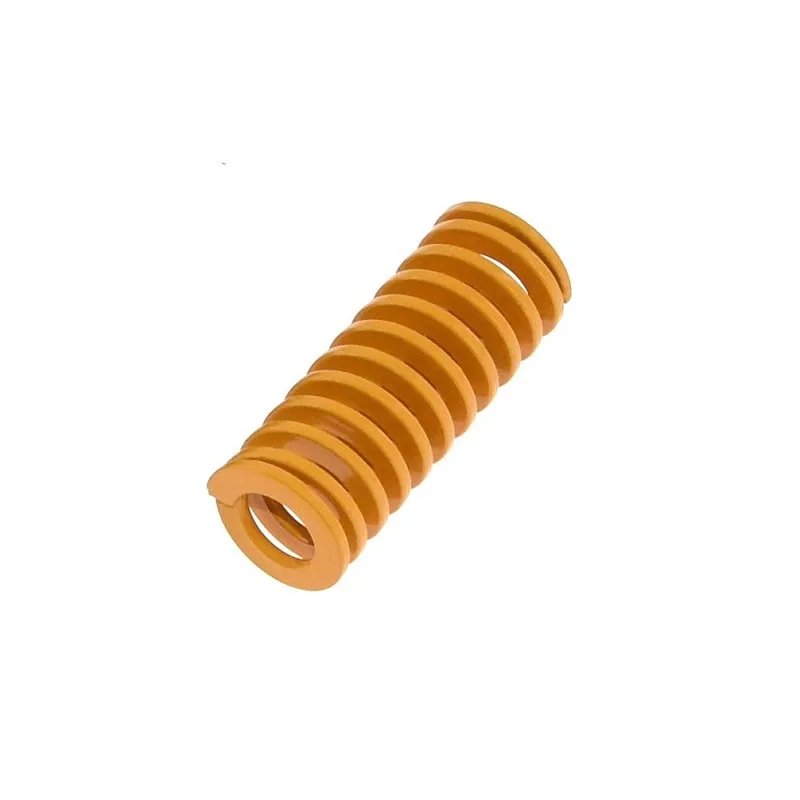
3D Printer Parts Spring for Heated Bed MK3 / CR-10
Stiff bed springs prevent the bed from sagging at high nylon print temperatures (70–90°C), maintaining consistent first-layer height throughout the print.
8. Post-Processing Nylon Parts
Moisture Conditioning (Annealing in Humid Air)
Freshly printed nylon parts are drier and slightly more brittle than their final state. Leaving them in ambient air for 24–48 hours allows them to absorb a small amount of atmospheric moisture, which actually improves impact toughness by plasticising the polymer chains. This is called moisture conditioning, and it is a standard industrial practice with nylon components.
Annealing for Dimensional Stability
Heat-anneal nylon parts at 80°C for 1–2 hours to relieve internal print stresses. This improves strength by 10–20% and stabilises dimensions if the part will be exposed to elevated temperatures in service. Use sand or salt as a support medium to prevent deformation during annealing.
Painting and Finishing
Nylon is difficult to paint without priming first. Sand the surface with 120–400 grit, apply a plastic-compatible primer, then paint. Nylon resists most adhesives — use two-part epoxy or cyanoacrylate with an activator for bonding nylon parts.
9. Troubleshooting Nylon Printing Problems
Warping / Parts Lifting from Bed
Fix: Add a brim (15mm), increase bed temperature, use Garolite or PEI bed surface, add an enclosure to keep chamber at 40–50°C, and avoid running any cooling fan for the first 20 layers.
Popping / Bubbling During Extrusion
Fix: Dry the filament at 80°C for 6–12 hours. This is almost always the cause. Do not proceed with printing until the extrusion is silent.
Delamination / Layer Splitting
Fix: Increase nozzle temperature by 5–10°C. Reduce cooling fan speed to 0%. Add enclosure. Increase extrusion width slightly (105% flow).
Clogged Nozzle
Fix: Perform a cold pull at 90–100°C to remove carbonised material. If printing PA-CF/GF, check for nozzle wear — abrasive materials enlarge the nozzle diameter over time. Replace with a hardened steel nozzle.
Excessive Stringing
Fix: Lower temperature by 5°C. Increase retraction distance by 0.5mm. Enable wipe before retraction. Dry the filament — wet filament strings badly.
10. Best Applications for Nylon in India
- Gears and mechanical drives: Nylon’s self-lubricating properties make it ideal for gear sets, cams, and driven parts in light machinery.
- Cable ties and clamps: The flexibility and strength of nylon make custom cable management ties trivial to print.
- Drone frames (PA-CF): Carbon fibre nylon competes with injection-moulded quality for FPV drone frame arms and structural elements.
- Jigs and fixtures: Workshop jigs that need to survive repeated mechanical contact.
- Living hinges: Nylon’s fatigue resistance allows very thin (0.4–0.6mm) living hinges to flex thousands of times without cracking.
- Automotive and agricultural parts: Replacement clips, brackets, and housings in vehicles and farm equipment.
Frequently Asked Questions
Do I need an enclosure to print nylon in India?
For small parts (under 5×5 cm), you can sometimes get away without an enclosure if you use a large brim and good bed adhesion. For anything larger, an enclosure is essentially mandatory in India because the thermal gradient between the hot bed and cool ambient air causes severe warping. A DIY cardboard enclosure costing nothing is better than printing nylon in open air.
How often do I need to dry nylon filament in India?
In coastal Indian cities during monsoon, dry nylon before every single print session. Even inland cities with moderate humidity (Pune, Bengaluru, Hyderabad) should dry nylon that has been exposed to air for more than 8–12 hours. In dry winter months, nylon stored in airtight containers with fresh silica gel can last several days between drying cycles.
Can I print nylon on a stock Ender 3?
The stock Ender 3 has a PTFE-lined hotend limited to around 240°C safely. PA12 can be printed at 240°C making it technically possible, but the stock extruder and bed (60°C max) make it very challenging. For reliable nylon printing, upgrade to an all-metal hotend (Creality Spider or similar), replace the bed spring with stiffer ones, add an enclosure, and buy a direct drive extruder. PA12 is your best chance on a modified Ender 3.
What is the difference between PA6 and PA12 for 3D printing?
PA6 is stronger and stiffer but absorbs significantly more moisture, making it harder to print in India’s humid climate. PA12 absorbs far less moisture and has better dimensional stability — making it considerably easier to print consistently. For most makers, PA12 is the better starting point. PA6 is worth the effort when maximum tensile strength is required and you have proper drying equipment.
How do I know if my nylon is wet before printing?
Extrude a small amount at your target temperature and listen and watch. Dry nylon extrudes smoothly and silently with a consistent diameter. Wet nylon pops, crackles, or makes a hissing sound, and the extruded strand is foamy or bubbly. Even slight moisture causes fine surface bubbles that show up on print surfaces. When in doubt, dry it — there is no downside to extra drying.
Upgrade Your Printer for Engineering Filaments
Zbotic stocks hardened nozzles, all-metal hotend components, thermistors, and bed accessories to prepare your printer for nylon and other demanding engineering filaments. Explore our full range.


Add comment