
Table of Contents
- Introduction
- What Is ExpressLRS?
- Choosing Your ELRS Hardware
- Flashing ELRS Firmware
- Transmitter Module Setup
- Receiver Setup and Binding
- Flight Controller Configuration
- Using the ELRS Lua Script
- Packet Rate and Power Settings
- Indian Frequency Regulations
- Recommended Products
- Frequently Asked Questions
- Conclusion
Introduction
If you’ve been flying drones or RC planes in India, you’ve probably heard the buzz around ExpressLRS — the open-source, ultra-low latency radio control link that has taken the FPV and long-range drone community by storm. Whether you’re a Betaflight freestyle pilot looking to shave milliseconds off your control latency, or a long-range fixed-wing flyer wanting to push your aircraft to 50km without losing link, ELRS delivers remarkable performance at a fraction of the cost of proprietary systems.
But setting up ELRS from scratch can be intimidating. There’s firmware flashing, frequency band choices, binding procedures, and flight controller configuration — all of which can trip up newcomers. This comprehensive guide walks you through every step of an ELRS setup, from choosing hardware to your first bound flight, written specifically for the Indian drone building community.
By the end of this guide, you’ll understand exactly why ELRS has become the radio link of choice for serious Indian FPV pilots and autonomous drone builders alike.
What Is ExpressLRS?
ExpressLRS (ELRS) is an open-source radio control protocol designed from the ground up for two goals: minimum latency and maximum range. It was created by community developers and released publicly in 2021, quickly becoming one of the most adopted RC protocols worldwide.
How ELRS Differs from Traditional RC Protocols
Traditional RC protocols like SBUS, PPM, and even FrSky’s ACCESS work well but have inherent latency limitations. SBUS introduces 6–7ms of serial frame latency. FrSky’s ACCST protocol runs at 50Hz or 150Hz with latencies of 6–18ms. ExpressLRS, by contrast, achieves:
- Packet rates up to 1000Hz (1ms between packets) — the fastest RC link available
- Over-the-air (OTA) latency as low as 1ms at 500Hz 915MHz
- Range of 50km+ in ideal conditions at lower packet rates and higher power
- Open source — firmware runs on cheap ESP32/SX127x/SX1280 hardware
- Bidirectional telemetry — RSSI, SNR, link quality, and flight controller telemetry back to the transmitter
The Technology Behind ELRS
ELRS uses a combination of LoRa (Long Range) modulation and FLRC (Fast Long Range Communication) modulation depending on the packet rate. At lower packet rates (50Hz, 100Hz), LoRa modulation provides exceptional range and penetration. At higher packet rates (500Hz, 1000Hz), FLRC modulation is used for low-latency response with reduced range but still far beyond typical FPV distances.
The link operates on either 900MHz or 2.4GHz bands, each with different characteristics:
- 900MHz: Better penetration through foliage and buildings, longer range, but larger antenna. Ideal for long-range fixed-wing and cross-country flights.
- 2.4GHz: Compact antennas, higher packet rates (up to 1000Hz), better for racing and freestyle. Still achieves impressive range of 20–40km.
Choosing Your ELRS Hardware
Transmitter Options
You need an ELRS transmitter module or a radio with ELRS built in. The main options are:
External ELRS modules: These mount in the JR module bay of compatible transmitters (RadioMaster Boxer, TX16S, Jumper T20, etc.). Examples include the RadioMaster Ranger Micro (900MHz) and RadioMaster Nano (2.4GHz). This approach lets you use your existing radio with ELRS.
ELRS internal module radios: Radios like the RadioMaster Pocket, RadioMaster TX12 MKII, and Jumper T-Lite V2 come with ELRS built into the radio itself, eliminating the need for an external module.
EdgeTX compatibility: All modern ELRS setups recommend EdgeTX (the successor to OpenTX) as the radio firmware. EdgeTX provides the Lua script interface needed to configure ELRS parameters from the radio screen.
Receiver Options
ELRS receivers come in several form factors:
- Nano receivers: Tiny PCB receivers (e.g., BetaFPV ELRS Nano Receiver) weighing 0.9g. Perfect for 1S–2S whoops and micro drones.
- Standard receivers: RadioMaster RP receivers, Matek ELRS receivers. These offer better RF performance and antenna options for 3–7 inch builds.
- PWM receivers: For fixed-wing or traditional RC applications where you need direct servo control without a flight controller.
- Diversity receivers: Two antennas, automatic selection of the stronger signal. Reduces dropout from antenna orientation issues.
For Indian builders: RadioMaster, BetaFPV, and Matek ELRS hardware is available and compatible with 900MHz and 2.4GHz bands.
Frequency Band Decision for India
Both 900MHz and 2.4GHz are usable in India for RC use under the general-purpose ISM band exemptions. However, 2.4GHz is generally more practical for most Indian FPV builders because:
- Compact antenna size fits racing/freestyle drone profiles
- Higher packet rates support competitive racing
- Less congestion than Wi-Fi in most Indian field environments
For long-range applications (agricultural monitoring, long-range fixed-wing), 900MHz is the better choice due to superior obstacle penetration and range.
Flashing ELRS Firmware
ELRS firmware is released on GitHub (https://github.com/ExpressLRS/ExpressLRS/releases). You’ll flash firmware to both your transmitter module and receiver. The easiest method is using the ExpressLRS Configurator desktop application.
Installing ExpressLRS Configurator
- Download the latest ExpressLRS Configurator from the GitHub releases page for your OS (Windows/Mac/Linux).
- Install and launch the application.
- Select your device category (transmitter/receiver) and specific hardware model from the dropdown menus.
Setting Your Binding Phrase
This is the most important step. ELRS uses a binding phrase instead of traditional bind buttons. The binding phrase is a text string you choose (e.g., “zbotic-elrs-2024”) that gets compiled into the firmware. Any transmitter and receiver flashed with the same binding phrase will automatically bind to each other — no button pressing needed.
Important rules for your binding phrase:
- Make it unique — avoid common phrases that other pilots might use
- Both TX and RX must have the same phrase
- Changing the phrase requires reflashing the firmware
- The phrase is hashed, so two different phrases never accidentally bind
Flashing a Transmitter Module via USB
- In ELRS Configurator, select your transmitter hardware.
- Enter your binding phrase in the BINDING PHRASE field.
- Set regulatory domain: for India, select ISM_2400 (2.4GHz) or AU_433 / IN_866 for 900MHz band. Note: India uses 865–867MHz for sub-GHz ISM, so technically select the closest matching option and verify local regulations.
- Connect the module via USB (or put your radio in passthrough mode for internal modules).
- Click BUILD & FLASH.
Flashing a Receiver via WiFi (Easiest Method)
Modern ELRS receivers support WiFi flashing, which is much easier than UART flashing:
- Power up the receiver WITHOUT it being bound (or hold the bind button on initial power).
- After ~60 seconds without a valid connection, the receiver enters WiFi mode.
- Connect your phone/laptop to the WiFi network “ExpressLRS RX” (password: expresslrs).
- Navigate to 10.0.0.1 in your browser.
- Upload the firmware .bin file or paste your build URL.
- The receiver flashes and reboots automatically.
Flashing via UART (Betaflight Passthrough)
For receivers already installed in a drone:
- Connect the flight controller to Betaflight Configurator via USB.
- In ELRS Configurator, select the receiver and your TX method as “Betaflight Passthrough”.
- Enter the binding phrase and build settings.
- Click FLASH — Betaflight Configurator passes the firmware through the FC’s UART to the receiver.
Transmitter Module Setup
Installing the ELRS Lua Script
The ELRS Lua script is what you use to configure ELRS settings from your radio’s screen in real time. To install:
- Download the ELRS Lua script from the ELRS GitHub releases page.
- Copy
elrsV3.luato the/SCRIPTS/TOOLS/folder on your radio’s SD card. - Long-press the SYS button on your EdgeTX radio → navigate to Tools → ELRS.
Model Match Feature
ELRS Model Match is a safety feature that prevents accidentally arming the wrong drone. Each model in your EdgeTX model list gets a Model ID (0–63). The TX checks that the bound RX has the same Model ID before allowing control. Enable this in the Lua script or via configurator settings.
Switch Configuration
ELRS uses a unique channel packing system. The standard configuration provides:
- 4 channels for AETR (Aileron, Elevator, Throttle, Rudder) at full resolution
- Additional AUX channels (AUX1–AUX12) for switches and dials
In EdgeTX, configure your switches to AUX channels via the MIXES screen. AUX1 is typically ARM, AUX2 is flight mode, AUX3 is beeper/buzzer, etc. Match these to your Betaflight modes tab configuration.
Receiver Setup and Binding
With matching binding phrases flashed to both TX and RX, binding is automatic. Power up both and they bind within seconds — the receiver LED changes from blinking to solid.
Receiver Wiring
ELRS receivers connect to the flight controller via UART (serial). The wiring is:
- RX TX pad → FC RX pin (UART on the FC)
- RX RX pad → FC TX pin
- RX 5V → FC 5V
- RX GND → FC GND
Important: The RX’s TX connects to the FC’s RX, and vice versa (cross-connection). This is standard UART wiring but confuses beginners frequently.
Antenna Positioning
The ELRS receiver antenna must be positioned away from carbon fibre and metal components, which block RF. Best practices:
- Route antenna wire through a small hole in the frame’s bottom plate
- Position the antenna vertically downward (omnidirectional pattern is strongest horizontally)
- For diversity receivers, angle the two antennas at 90° to each other
- Keep antenna away from ESC, battery leads, and video transmitter
Flight Controller Configuration
Betaflight Configuration for ELRS
- In Betaflight Configurator → Ports tab: Enable Serial RX on the UART connected to your ELRS receiver.
- In Configuration tab → Receiver section: Set Receiver Mode to Serial-based receiver (SPEKSAT, SBUS, SUMD) and Serial Receiver Provider to CRSF.
- Enable CRSF (this is the protocol ELRS uses — same as TBS Crossfire).
- Save and reboot.
After rebooting, check the Receiver tab in Betaflight. You should see channel values moving when you move the sticks. Verify the channel order matches AETR (or whatever you’re using) and adjust Channel Map if needed.
ArduPilot Configuration for ELRS
- Connect to Mission Planner → Full Parameter List.
- Set
SERIAL_X_PROTOCOL = 23(RCIN) for the serial port connected to ELRS receiver. - Set
SERIAL_X_BAUD = 416(this is 416000 baud, what ELRS uses — select 416 from the dropdown). - Set
RC_PROTOCOLS = 536(enables CRSF protocol). - Reboot and verify RC input on the Radio Calibration page.
Telemetry Configuration
One of ELRS’s best features is bidirectional telemetry. Your radio can display battery voltage, RSSI, LQ (link quality), flight mode, GPS coordinates, and more — all via the CRSF telemetry stream. In Betaflight, enable Telemetry in the Configuration tab. In ArduPilot, set CRSF_RATE_TELEMETRY to control telemetry update frequency.

3DR 100mW Radio Telemetry 915MHz for Pixhawk
For ArduPilot-based builds, a dedicated telemetry radio for Mission Planner communication. Pairs with ELRS for RC control while 3DR telemetry handles ground station data.

3DR Mini Radio Telemetry 433MHz 500mW
Compact 433MHz telemetry module for Pixhawk and APM. Use alongside ELRS for a complete autonomous drone system with both RC control and ground station telemetry.
Using the ELRS Lua Script
The ELRS Lua script is your primary interface for adjusting ELRS settings without reflashing. Access it from your radio’s Tools menu. Key settings you can change in flight:
Packet Rate
This controls how often the TX sends data to the RX. Higher rates = lower latency but shorter range. Options at 2.4GHz: 50Hz, 100Hz, 150Hz, 250Hz, 333Hz, 500Hz, D250, D500, F500, F1000. Options at 900MHz: 25Hz, 50Hz, 100Hz, 200Hz, 250Hz.
For FPV racing/freestyle: Use 500Hz for minimal latency.
For long-range cruising: Drop to 50Hz or 100Hz for maximum range.
TX Power
Adjustable from 10mW to 2000mW depending on hardware (most modules max out at 250mW or 1W). Use minimum power needed for your flight — lower power reduces interference to other pilots and extends battery life of the TX. Dynamic Power mode automatically adjusts TX power based on link quality.
Dynamic Power
Enable this for the best of both worlds: the TX starts at minimum power and ramps up only when link quality drops. This is excellent for India where spectrum sharing is important and you want to extend transmitter battery life.
Packet Rate and Power Settings for Different Use Cases
| Use Case | Band | Packet Rate | Power |
|---|---|---|---|
| FPV Racing | 2.4GHz | 500Hz | 25–100mW |
| FPV Freestyle | 2.4GHz | 250Hz | 50–250mW |
| Long-Range Fixed Wing | 900MHz | 50Hz | 500–1000mW |
| Agricultural Drone | 900MHz | 100Hz | 100–250mW |
| Indoor/Close Range | 2.4GHz | 250–500Hz | 10–25mW |
Indian Frequency Regulations
India’s wireless spectrum is regulated by the Wireless Planning and Coordination (WPC) wing under the Ministry of Communications. For RC and drone use:
- 2.4GHz (2400–2483.5MHz): Exempt from licensing for low-power devices under the De-licensing rules. Maximum power of 20dBm (100mW) EIRP without license. Most ELRS use at 100mW or below is technically compliant.
- 900MHz / 868MHz: The 865–867MHz band is designated for RFID/SRD use in India. Its applicability to RC control systems is less clear. Many Indian pilots use it under the general ISM/SRD exemptions, but exercise caution for commercial operations.
- DGCA compliance: Your drone’s RC link is separate from DGCA airspace regulations, but commercial drone operations still need UIN and UAOP where applicable.
For most hobby and semi-professional use at 2.4GHz with 100mW output, ELRS falls within India’s de-licensing exemptions. For commercial operations, consult a wireless consultant or the WPC directly.

35A 4-in-1 Brushless ESC for FPV Racing
A compact 4-in-1 ESC supporting 2-5S LiPo. Works seamlessly with Betaflight on ELRS-controlled racing and freestyle drones. Simplifies wiring and reduces weight on performance builds.

100A Multirotor ESC Power Distribution Board
High-current PDB supporting up to 100A for heavy-lift multirotor builds. Pairs with ArduPilot and ELRS for professional surveillance and agricultural drone platforms.
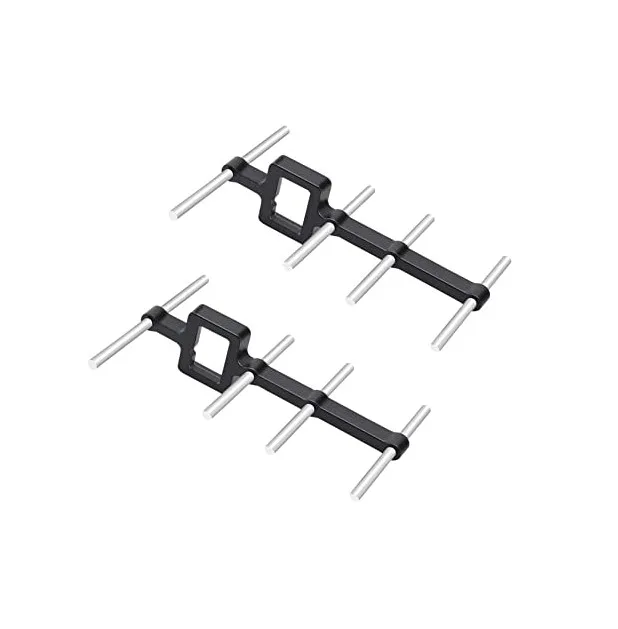
2.4GHz Yagi-UDA Drone Signal Booster
Directional Yagi antenna for 2.4GHz that dramatically increases ELRS range for long-distance operations. Essential for fixed-wing long-range missions or agricultural drone operations in large fields.
Frequently Asked Questions
Do I need to reflash ELRS if I change my binding phrase?
Yes. The binding phrase is compiled into the firmware during the build process. To change it, you must rebuild and reflash both the transmitter module and all receivers you want to use with it. This is why choosing a good unique phrase from the start saves effort.
Can I use ELRS with a FrSky or Spektrum transmitter?
You can use ELRS with any radio that has a JR module bay — including many FrSky radios. You’ll need an external ELRS module that fits in the JR bay. However, you’ll also want EdgeTX or OpenTX to run the ELRS Lua script for configuration. Some FrSky radios support OpenTX, making this feasible.
What is link quality (LQ) and what numbers are acceptable?
Link quality is a percentage indicating how many packets are being successfully received. At 100Hz packet rate, LQ 100 means all 100 packets per second arrived. Generally: LQ above 70 is fine for casual flying, above 90 is good for technical flying, and below 50 warrants returning to home or reducing distance. ELRS shows LQ on the OSD if configured.
Does ELRS support failsafe?
Yes. ELRS supports failsafe on the receiver — you can configure it to hold last position, go to preset values, or cut to zero. In Betaflight, configure the flight controller’s failsafe mode (RTH, land, disarm) independently. Both layers of failsafe work together for a safe recovery from link loss.
Is ELRS better than TBS Crossfire?
For most use cases in India, ELRS is the better choice today. It’s open-source (no vendor lock-in), significantly cheaper, offers higher packet rates (1000Hz vs Crossfire’s 150Hz), and has a massive community. Crossfire still has an edge in extreme long-range reliability at 868/915MHz. For new builds, ELRS is the recommended choice.
Conclusion
ExpressLRS has fundamentally changed what’s possible with RC radio control links. The combination of sub-millisecond latency, kilometre-scale range, and open-source accessibility has made it the go-to radio protocol for serious Indian drone builders — from Mumbai-based FPV racers to agricultural drone operators in Gujarat’s cotton fields.
Setting up ELRS correctly requires attention to a few key steps: choosing the right frequency band for your use case, flashing both TX and RX with a matching binding phrase, configuring CRSF on your flight controller, and tuning packet rate and power for your flying style. Follow this guide and you’ll have a rock-solid, ultra-low latency radio link that’ll outperform any proprietary system at a fraction of the cost.
Browse Zbotic’s full drone components collection for ESCs, flight controllers, antennas, and everything else you need to complete your ELRS-equipped build.


Add comment