
Understanding ESP32 wakeup sources for deep sleep is essential for building battery-powered IoT devices that last weeks or months on a single charge. The ESP32’s deep sleep mode reduces power consumption from ~240mA (active) to just 10-150µA, making it transformative for field-deployed sensors, remote monitoring systems, and wearable devices. But to wake up and take a reading at the right moment, you need to configure the correct wakeup source.
This tutorial covers all major ESP32 deep sleep wakeup sources in detail — external GPIO wakeup, timer-based wakeup, touch pad wakeup, and ULP co-processor wakeup — with working Arduino code examples and practical guidance for real battery-powered IoT deployments in India.
ESP32 Deep Sleep: Power States and Consumption
The ESP32 has five power modes: Active, Modem Sleep, Light Sleep, Deep Sleep, and Hibernation. For battery-powered applications, Deep Sleep is the most commonly used:
| Power Mode | Current Draw | CPU | Wi-Fi/BT | RTC |
|---|---|---|---|---|
| Active | ~240mA | Running | Active | Running |
| Modem Sleep | ~20mA | Running | Off (between beacons) | Running |
| Light Sleep | ~0.8mA | Paused | Off | Running |
| Deep Sleep | 10–150µA | Off | Off | Running |
| Hibernation | ~5µA | Off | Off | Timer only |
During Deep Sleep, only the RTC (Real-Time Clock) module, RTC memory, and the configured wakeup source circuitry remain powered. The main CPU, RAM, Wi-Fi/Bluetooth modem, and most peripherals are completely powered off. When the wakeup condition triggers, the ESP32 essentially reboots — your setup() function runs again, but RTC memory retains its content.
A typical battery-powered ESP32 sensor node running on a 3000mAh 18650 cell, sleeping 95% of the time and waking for 5 seconds every 5 minutes to take a reading and post MQTT, can run for 6-12 months without a recharge.

2 x 18650 Lithium Battery Shield for Arduino/ESP32/ESP8266
Power your ESP32 deep-sleep sensor node with two 18650 cells — includes built-in 5V boost converter and charging circuit, perfect for field deployments.
Timer Wakeup: Periodic Sensor Polling
Timer wakeup is the simplest and most common wakeup method. The RTC timer triggers a wakeup after a specified number of microseconds. It’s perfect for periodic sensor readings — check temperature every 10 minutes, log soil moisture every hour, etc.
#include <Arduino.h>
#include "driver/rtc_io.h"

#define uS_TO_S_FACTOR 1000000ULL  // Microseconds to seconds
#define TIME_TO_SLEEP  300         // Sleep 5 minutes (300 seconds)

RTC_DATA_ATTR int bootCount = 0;   // Persists across deep sleep cycles

void setup() {
  Serial.begin(115200);
  bootCount++;
  Serial.printf("Boot #%dn", bootCount);

  // Print wakeup reason
  esp_sleep_wakeup_cause_t wakeup_reason = esp_sleep_get_wakeup_cause();
  if (wakeup_reason == ESP_SLEEP_WAKEUP_TIMER) {
    Serial.println("Woke up from timer");
  }

  // --- Do your work here ---
  // Read sensors, connect Wi-Fi, publish MQTT, then sleep
  takeSensorReadingAndPublish();

  // Configure timer wakeup
  esp_sleep_enable_timer_wakeup(TIME_TO_SLEEP * uS_TO_S_FACTOR);

  Serial.println("Going to sleep...");
  Serial.flush();
  esp_deep_sleep_start();
}

void loop() {
  // Never reached with deep sleep
}
The RTC timer is accurate to within a few milliseconds per minute — suitable for all typical IoT polling intervals. For 1-second accuracy over hours, it’s perfectly adequate.

DHT11 Digital Relative Humidity and Temperature Sensor Module
The classic sensor for battery-powered ESP32 timer-wakeup nodes — low cost, simple one-wire protocol, reads both temperature and humidity in one shot before going back to sleep.
External GPIO Wakeup: Event-Driven Wake
GPIO wakeup lets the ESP32 sleep indefinitely and wake only when an external signal (like a PIR motion sensor, door sensor, or button) changes state. This is ideal for alarm systems and event-driven applications where you don’t want to poll periodically but react instantly to an event.
ESP32 has two GPIO wakeup mechanisms:
- ext0: Single GPIO wakeup — wakes on a specific logic level (HIGH or LOW) on one GPIO pin
- ext1: Multiple GPIO wakeup — wakes when any selected GPIO in a bitmask changes to HIGH or LOW simultaneously
Important hardware note: Only RTC GPIO pins can be used for deep sleep wakeup. On ESP32-WROOM, these are GPIO 0, 2, 4, 12-15, 25-27, 32-39. GPIO 36-39 are input-only with no internal pull-up/down — use external pull resistors.
// ext0 example: Wake when GPIO 33 goes HIGH (PIR sensor output)
#define WAKEUP_PIN GPIO_NUM_33

void setup() {
  Serial.begin(115200);

  esp_sleep_wakeup_cause_t wakeup_reason = esp_sleep_get_wakeup_cause();

  if (wakeup_reason == ESP_SLEEP_WAKEUP_EXT0) {
    Serial.println("Motion detected! Woke from GPIO");
    // Send alert, take photo, etc.
    handleMotionEvent();
  }

  // Configure ext0: wake when GPIO 33 is HIGH
  esp_sleep_enable_ext0_wakeup(WAKEUP_PIN, 1); // 1 = HIGH level

  // Hold GPIO 33 low internally during sleep (optional)
  // rtc_gpio_pulldown_en(WAKEUP_PIN);

  esp_deep_sleep_start();
}

// ext1 example: Wake when any of GPIO 25, 26, 27 goes HIGH
// Bitmask = (1ULL << 25) | (1ULL << 26) | (1ULL << 27)
void setup_ext1() {
  uint64_t mask = (1ULL << GPIO_NUM_25) | (1ULL << GPIO_NUM_26);
  esp_sleep_enable_ext1_wakeup(mask, ESP_EXT1_WAKEUP_ANY_HIGH);
  esp_deep_sleep_start();
}
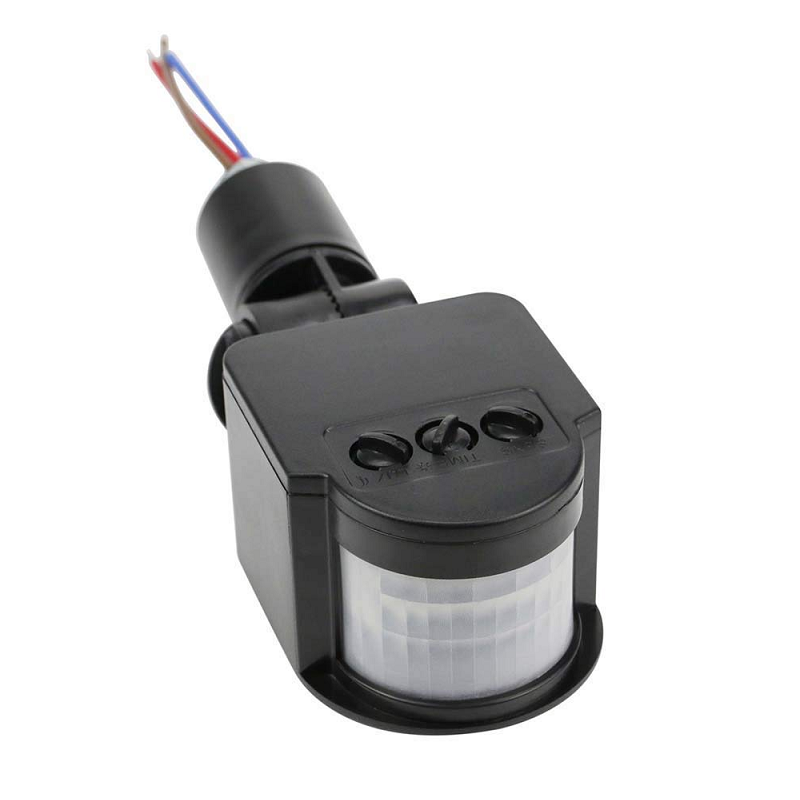
AC 220V Security PIR Human Body Motion Sensor Detector
A PIR sensor that outputs a trigger signal when motion is detected — pair it with ESP32 ext0 GPIO wakeup for an ultra-low-power security alert system.
Touch Pad Wakeup
The ESP32 has 10 capacitive touch sensing channels (T0-T9) on GPIO 0, 2, 4, 12-15, 27, 32, 33. Touch wakeup triggers when the capacitance on a touch pin changes beyond a threshold — essentially when a finger touches a bare wire, copper pad, or conductive object connected to the pin.
// Touch wakeup example
void setup() {
  Serial.begin(115200);

  if (esp_sleep_get_wakeup_cause() == ESP_SLEEP_WAKEUP_TOUCHPAD) {
    touch_pad_t touchPin = esp_sleep_get_touchpad_wakeup_status();
    Serial.printf("Touch detected on T%dn", touchPin);
  }

  // Calibrate touch threshold (read baseline first, then subtract ~30%)
  touchAttachInterrupt(T0, NULL, 40); // T0 = GPIO4, threshold 40

  esp_sleep_enable_touchpad_wakeup();
  esp_deep_sleep_start();
}
Touch wakeup is excellent for user interfaces without physical buttons — a custom IoT device with metal touch pads, a smart mirror, or a capacitive-touch panel that wakes the ESP32 when touched. No mechanical switches means no wear or water ingress issues — important for outdoor Indian deployments.
ULP Co-Processor Wakeup
The ULP (Ultra-Low Power) co-processor is a small processor that continues running during deep sleep while the main CPU is off. It can read from certain peripherals (ADC, I2C in ESP32-S3) and wake the main CPU only when a specific condition is met.
Use cases for ULP wakeup:
- Threshold-based ADC monitoring: Wake CPU only when a soil moisture sensor drops below threshold — saves waking up every 5 minutes to check
- Custom logic: Count pulses from a flow meter and wake CPU when a certain volume threshold is crossed
- Motion detection: Read an accelerometer continuously and wake CPU on significant movement
ULP programming requires either FSM (Finite State Machine) assembly or, more conveniently, the ulptool extension for Arduino IDE. It’s an advanced topic, but it can reduce average power to 20-30µA — useful for deployments where even weekly battery swaps aren’t feasible.
Saving State Across Sleep Cycles with RTC Memory
RTC memory (8KB total: 4KB instruction + 4KB data) is the only RAM that survives deep sleep. Use the RTC_DATA_ATTR macro to store variables in RTC slow memory:
RTC_DATA_ATTR int bootCount = 0;          // Wake cycle counter
RTC_DATA_ATTR float lastTemperature = 0;  // Previous reading
RTC_DATA_ATTR uint8_t failCount = 0;      // Wi-Fi failure counter
RTC_DATA_ATTR time_t lastNTPSync = 0;     // Last NTP sync timestamp

void setup() {
  bootCount++;

  // Skip NTP sync if we synced recently (within 1 hour)
  // lastNTPSync persists across sleep cycles!
  if (time(NULL) - lastNTPSync > 3600) {
    syncNTP();
    lastNTPSync = time(NULL);
  }

  float temp = readDHT22();
  // Only publish if temperature changed significantly
  if (abs(temp - lastTemperature) > 0.5) {
    publishMQTT(temp);
    lastTemperature = temp;
  }

  esp_sleep_enable_timer_wakeup(300 * 1000000ULL);
  esp_deep_sleep_start();
}

DHT20 SIP Packaged Temperature and Humidity Sensor
The improved DHT20 uses I2C interface and a SIP package — faster startup than DHT11/DHT22, making it ideal for deep-sleep nodes where you want to minimize active time.
Real-World Battery IoT Examples
1. Agricultural Soil Moisture Monitor (Rajasthan, Maharashtra)
ESP32 + capacitive soil moisture sensor, sleeping 15 minutes between readings. On wake, reads moisture, temperature (DS18B20), and battery voltage, then publishes to Blynk via Wi-Fi. A 4×18650 battery pack lasts 3-4 months between charges.
2. Cold Chain Temperature Logger (Pharmaceutical)
ESP32 + DS18B20 waterproof temperature probe, waking every 2 minutes to log temperature to SPIFFS and alert via MQTT if temperature exceeds threshold. Critical for Indian pharma cold storage compliance (GDP guidelines).
3. Forest Fire Early Warning
ESP32 + BME280 (temperature, humidity, pressure) deployed in forest areas, using a solar panel + LiFePO4 battery. Timer wakeup every 10 minutes. If temperature exceeds 45°C and humidity drops below 15%, a BLE beacon + LoRa alert is triggered.
Frequently Asked Questions
Why does my ESP32 not wake from deep sleep on GPIO?
The most common cause is using a non-RTC GPIO pin. Only pins on the RTC domain (0, 2, 4, 12-15, 25-27, 32-39) can wake from deep sleep. Also check that the pin state matches your configured wake level — if using ext0 with level=HIGH, ensure the pin actually transitions to HIGH when the trigger occurs.
Can ESP32 maintain Wi-Fi connection across deep sleep?
No. Deep sleep disconnects Wi-Fi. On wakeup, the ESP32 must reconnect. To speed up reconnection, use WiFi.begin(ssid, password, channel, bssid) with the BSSID and channel saved in RTC memory from the last successful connection — this can cut connection time from 2-3 seconds to under 1 second.
How accurate is the RTC timer for deep sleep?
The ESP32 RTC oscillator is an internal 150kHz oscillator, which drifts up to ±5% over temperature. For a 5-minute sleep, that’s ±15 seconds of drift. If you need accurate timestamps, always sync to NTP on each wakeup before reading time-sensitive data.
What is the minimum deep sleep time in ESP32?
Theoretically, as short as a few microseconds, but practically there’s no benefit below ~50ms — boot-up time after wakeup is 200-500ms including RTC calibration. For periods shorter than 1 second, consider Light Sleep instead, which has a much faster resume time (~1ms) and still saves significant power.
Build Battery-Powered IoT with ESP32 from Zbotic
Find everything you need for deep-sleep ESP32 projects at Zbotic.in — ESP32 boards, DHT sensors, DS18B20 probes, BME280 modules, and 18650 battery shields. Fast delivery across India.





Add comment