
Maximising ESP32 deep sleep battery life is the single most important skill for building remote IoT sensors that last months or years on a single charge. Without deep sleep, an ESP32 in WiFi active mode draws 80–240 mA — a 2000 mAh 18650 cell would be flat in under 24 hours. With deep sleep optimised correctly, the same battery can power a sensor that transmits data every 10 minutes for over a year. This guide covers everything you need to know about ESP32 deep sleep modes, wake sources, RTC memory, and calculating real-world battery life for your specific use case.
ESP32 Power Modes Explained
The ESP32 has five power modes, each trading functionality for lower current draw:
| Mode | Typical Current | What Works |
|---|---|---|
| Active (WiFi Tx) | 160–260 mA | Full CPU + WiFi transmitting |
| Active (WiFi idle) | 60–80 mA | Full CPU + WiFi connected |
| Modem Sleep | 3–20 mA | CPU + WiFi beacons only |
| Light Sleep | 0.8–1 mA | RTC + ULP, RAM retained, fast wake |
| Deep Sleep | 10–150 µA | RTC + ULP only, full wake |
| Hibernation | 2.5 µA | RTC timer only, no ULP |
Deep sleep is the most commonly used power-saving mode for remote sensor nodes. In deep sleep, the main CPU and most peripherals are powered off. Only the RTC (Real Time Clock) domain stays alive, which includes a small amount of SRAM (RTC slow memory and RTC fast memory) and the ULP (Ultra Low Power) coprocessor.
Important note about deep sleep current: The figures in the table refer to the ESP32 chip itself. Your actual system current will be higher because of LDO regulators, USB-to-UART chips, LEDs, and other components on the development board. The AMS1117 LDO on cheap development boards alone consumes 3–5 mA in quiescent current. For truly battery-efficient designs, use bare ESP32 modules with a low-quiescent-current LDO like the MCP1700 (1.6 µA Iq).
Deep Sleep Basics and Wake Sources
Entering deep sleep in Arduino code is a single function call:
esp_deep_sleep_start();
When the ESP32 wakes from deep sleep, it performs a full boot — the setup() function runs again from scratch (unlike light sleep, which resumes from where it paused). The wake reason can be checked at the start of setup() using:
esp_sleep_wakeup_cause_t wakeupReason = esp_sleep_get_wakeup_cause();
switch (wakeupReason) {
  case ESP_SLEEP_WAKEUP_TIMER:   Serial.println("Timer wakeup"); break;
  case ESP_SLEEP_WAKEUP_EXT0:   Serial.println("GPIO EXT0 wakeup"); break;
  case ESP_SLEEP_WAKEUP_EXT1:   Serial.println("GPIO EXT1 wakeup"); break;
  case ESP_SLEEP_WAKEUP_TOUCHPAD: Serial.println("Touchpad wakeup"); break;
  case ESP_SLEEP_WAKEUP_ULP:    Serial.println("ULP wakeup"); break;
  default: Serial.println("Power-on reset"); break;
}
The available wake sources are:
- Timer (RTC): Wake after a fixed time period — most common for periodic sensor readings
- EXT0: Wake when a single GPIO reaches a specified level (HIGH or LOW)
- EXT1: Wake when any or all of a set of RTC-capable GPIOs change state
- Touch: Wake on capacitive touch detection
- ULP: Wake triggered by the ULP coprocessor program
Timer Wakeup: Periodic Sensor Readings
Timer wakeup is the workhorse of battery-powered IoT sensors. Here is a complete pattern for a remote sensor that wakes every 10 minutes, reads a temperature sensor, sends data via WiFi, and goes back to sleep:

DHT20 SIP Packaged Temperature and Humidity Sensor
The DHT20 uses I2C and has very low power draw compared to older DHT11 modules — ideal for battery-powered deep sleep sensor nodes that wake periodically for readings.
#include <WiFi.h>
#include <HTTPClient.h>

#define SLEEP_DURATION_US  (10 * 60 * 1000000ULL) // 10 minutes in microseconds
const char* ssid = "Your_SSID";
const char* password = "Your_Password";
const char* serverURL = "http://yourserver.com/api/data";

void sendData(float temp, float humidity) {
  WiFi.begin(ssid, password);
  unsigned long startTime = millis();
  while (WiFi.status() != WL_CONNECTED && millis() - startTime < 10000) {
    delay(100);
  }
  if (WiFi.status() == WL_CONNECTED) {
    HTTPClient http;
    http.begin(serverURL);
    http.addHeader("Content-Type", "application/json");
    String body = "{"temp":" + String(temp,1) + ","hum":" + String(humidity,1) + "}";
    http.POST(body);
    http.end();
    WiFi.disconnect(true);
    WiFi.mode(WIFI_OFF);
  }
}

void setup() {
  Serial.begin(115200);
  // Read sensor (replace with actual sensor code)
  float temperature = 29.0;
  float humidity = 55.0;
  sendData(temperature, humidity);
  // Configure timer wakeup and sleep
  esp_sleep_enable_timer_wakeup(SLEEP_DURATION_US);
  Serial.println("Entering deep sleep for 10 minutes...");
  Serial.flush();
  esp_deep_sleep_start();
}

void loop() {
  // Never reached
}
Notice that the entire program logic is in setup() — there is no loop, because the board resets on each wake cycle. This is the correct pattern for deep-sleep sensor nodes.
Optimisation tip: Reconnecting to WiFi from scratch on every wake cycle takes 2–4 seconds. You can speed this up dramatically by storing the WiFi channel and BSSID in RTC memory and using WiFi.begin(ssid, password, channel, bssid) — this reduces reconnection time to under 500ms.
GPIO and Touch Wakeup
For event-driven applications — a door sensor, a water leak detector, a button-triggered device — GPIO wakeup is more appropriate than timer wakeup. The ESP32 stays in deep sleep indefinitely until the GPIO changes state.
// Wake when GPIO 33 goes HIGH (e.g., PIR sensor trigger)
esp_sleep_enable_ext0_wakeup(GPIO_NUM_33, 1); // 1 = HIGH level wakes
esp_deep_sleep_start();

// OR: Wake when any of multiple GPIOs go LOW (e.g., door switch)
uint64_t pinMask = (1ULL << GPIO_NUM_32) | (1ULL << GPIO_NUM_33);
esp_sleep_enable_ext1_wakeup(pinMask, ESP_EXT1_WAKEUP_ANY_HIGH);
esp_deep_sleep_start();
Important: Only RTC-capable GPIO pins support EXT0 and EXT1 wakeup. On the original ESP32, these are GPIOs 0, 2, 4, 12–15, 25–27, and 32–39. Check your specific ESP32 variant’s datasheet.
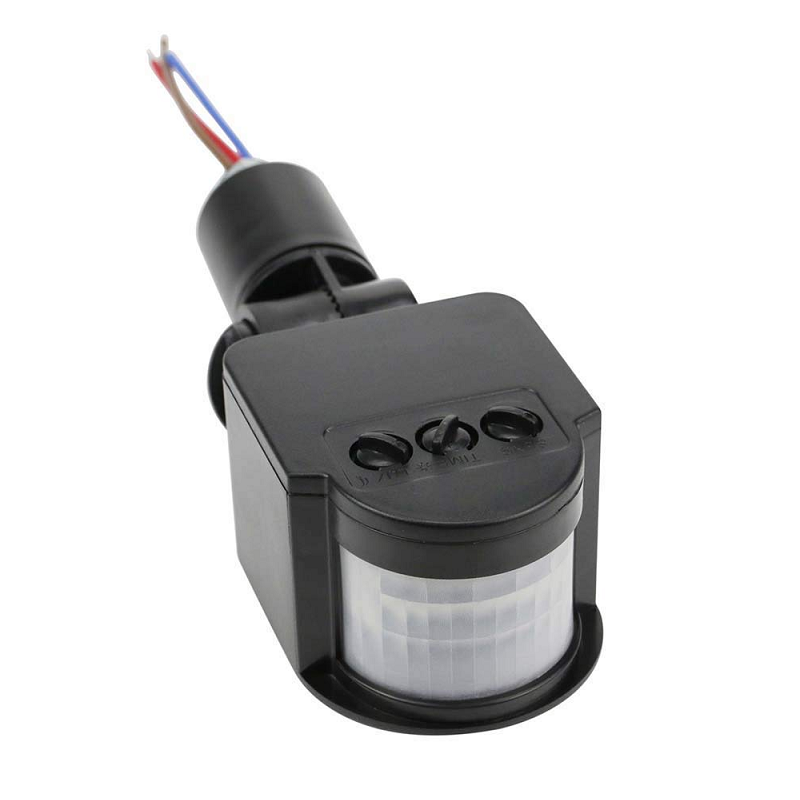
AC 220V Security PIR Human Body Motion Sensor Detector
A PIR motion sensor that triggers a HIGH output on detection — pair it with GPIO EXT0 wakeup on an ESP32 to build an ultra-low-power motion-triggered alert system.
RTC Memory: Preserving Data Across Deep Sleep
Deep sleep wipes main SRAM. The only memory that survives a deep sleep cycle is the RTC slow memory (8KB) and RTC fast memory (8KB). To use RTC memory, declare variables with the RTC_DATA_ATTR attribute:
RTC_DATA_ATTR int bootCount = 0;
RTC_DATA_ATTR float lastTemperature = 0.0;
RTC_DATA_ATTR uint8_t wifiChannel = 0;
RTC_DATA_ATTR uint8_t wifiBSSID[6];

void setup() {
  bootCount++;  // Increments on every wake cycle
  Serial.printf("Boot count: %d, Last temp: %.1fn", bootCount, lastTemperature);
  // ... read sensor, update lastTemperature, send data...
}
Practical uses for RTC memory in sensor nodes:
- Boot counter: Track how many times the node has woken up for logging
- WiFi credentials cache: Store channel and BSSID for fast reconnection
- Threshold tracking: Remember the last sent value to only transmit when the reading has changed significantly (delta-encoding)
- Batch collection: Collect 10 readings in RTC memory before connecting to WiFi once to send all 10 — drastically reduces the number of WiFi connections
ULP Coprocessor: The Secret Weapon
The ULP (Ultra Low Power) coprocessor is a small 8MHz processor that can run simple programs while the main ESP32 cores are in deep sleep. It consumes only about 150 µA while running. The ULP can:
- Read ADC values from analog sensors
- Read/write RTC GPIO pins
- Access RTC slow memory
- Wake the main CPU only when a threshold condition is met
A classic ULP use case: monitor a soil moisture sensor continuously. The ULP reads the ADC every 10 seconds. If the moisture drops below a threshold, it wakes the main CPU, which then connects to WiFi and sends an irrigation alert. If moisture is normal, the ULP goes back to sleep — the main CPU never wakes and WiFi is never used, saving enormous amounts of energy.
ULP programming in Arduino uses the esp32/ulp.h library or the ESP-IDF ULP assembly API. The ulptool Python package (available on GitHub) simplifies ULP programming by compiling a C-like dialect to ULP assembly.
Real Battery Life Calculations
Let us calculate actual battery life for a practical example: an outdoor temperature sensor using an ESP32 module (bare, not dev board), BME280 sensor, waking every 15 minutes to send data via WiFi.
| Phase | Duration | Current | Charge Used |
|---|---|---|---|
| Boot + sensor read | 200 ms | 80 mA | 4.44 µAh |
| WiFi connect + send | 1500 ms | 150 mA | 62.5 µAh |
| WiFi disconnect + sleep setup | 100 ms | 40 mA | 1.11 µAh |
| Deep sleep (14.97 minutes) | 897 seconds | 15 µA | 3.74 µAh |
| Total per cycle (15 min) | 900 seconds | Average 5.3 µA | 71.8 µAh |
Cycles per hour: 4. Charge per hour: 4 × 71.8 µAh = 287 µAh/hour = 0.287 mAh/hour.
Battery capacity (2x 18650 at 2000 mAh each): 4000 mAh.
Estimated battery life: 4000 / 0.287 = 13,936 hours ≈ 580 days ≈ 19 months.
In practice, subtract 20–30% for battery aging, temperature effects, and occasional WiFi retries. You would still expect well over 12 months of field life from this configuration.

2 x 18650 Lithium Battery Shield for Arduino, ESP32, ESP8266
Power your deep-sleep ESP32 remote sensor with this dual 18650 battery shield — provides both 5V and 3.3V rails and includes onboard USB charging for field maintenance.
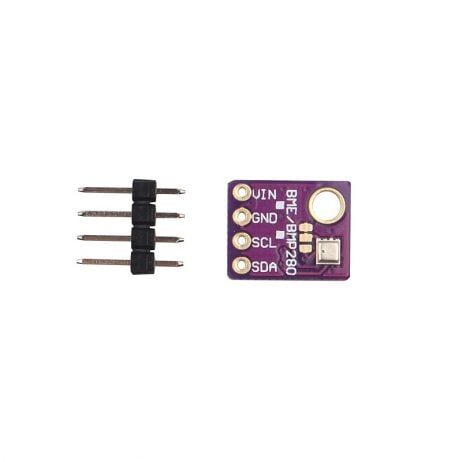
GY-BME280-5V Temperature and Humidity Sensor
The BME280 supports forced mode — where it takes one reading and then powers down automatically — making it perfectly matched to the ESP32’s deep sleep duty cycle pattern.
Frequently Asked Questions
Why is my ESP32 deep sleep current much higher than the datasheet says?
The datasheet current (5–10 µA) refers to the bare chip only. Development boards add significant quiescent current from: onboard LDO regulators (AMS1117 draws 5–10 mA quiescent), USB-to-UART bridge chips (CP2102, CH340 draw 1–5 mA in standby), and power LEDs. For true deep sleep efficiency, use a bare ESP32 module with a low-quiescent LDO regulator and no unnecessary peripherals.
Can I use GPIO pins during deep sleep?
Only RTC-domain GPIO pins remain configurable during deep sleep. These can be held HIGH or LOW to keep external circuits in a known state (e.g., keeping a sensor powered down). Use rtc_gpio_hold_en(GPIO_NUM_X) before entering sleep to maintain the GPIO state through the sleep cycle.
What is the difference between deep sleep and hibernation?
Hibernation (esp_sleep_pd_config(ESP_PD_DOMAIN_RTC_SLOW_MEM, ESP_PD_OPTION_OFF)) disables the RTC slow memory and the ULP coprocessor, reducing current to around 2.5 µA. The tradeoff is that RTC_DATA_ATTR variables are lost and only the RTC timer can be used as a wakeup source. Use hibernation for extreme battery conservation when you only need timer-based wakeup and no ULP processing.
How do I prevent my ESP32 from losing WiFi connection configuration in deep sleep?
Store the WiFi BSSID and channel number in RTC memory using RTC_DATA_ATTR variables. On the first boot, connect normally and save these values. On subsequent wakes, use WiFi.begin(ssid, password, channel, bssid, true) to reconnect using the cached values — this skips the channel scan phase and reduces reconnection time from 3–4 seconds to under 500ms.
Can the ESP32-C3 use deep sleep the same way as the original ESP32?
Yes, the ESP32-C3 fully supports deep sleep with timer and GPIO wakeup sources. However, the ESP32-C3 does not have a dedicated ULP coprocessor. Instead, it supports a simplified LP (Low Power) core in some SDK versions, but the full ULP assembly programming is an original ESP32 feature. For ULP-intensive applications, use the original ESP32.
Build Long-Life Remote Sensors with ESP32
Get all the components for your battery-powered ESP32 deep sleep sensor project — modules, battery shields, temperature sensors and more — available now at Zbotic with fast shipping across India.






Add comment