
Choosing the right display driver IC — SSD1306 vs ILI9341 vs ST7789 — is one of the most important decisions in any embedded display project. These three chips cover nearly every use case from the smallest OLED data logger to the most colorful touchscreen handheld device. This guide compares all three across resolution, color, speed, memory requirements, and power consumption so you can make a confident choice for your next build.
Quick Overview of Each Driver IC
Before diving into the details, here is a one-line summary of each display driver IC:
- SSD1306 — 128×64 monochrome OLED, I2C/SPI, ultra-low power, no backlight, perfect for small data displays
- ILI9341 — 240×320 color TFT (2.4–2.8 inch), SPI, 65K colors, the most documented color display in the Arduino ecosystem
- ST7789 — 240×240 or 240×320 color TFT (1.3–2.0 inch), SPI, 262K colors, faster and more compact than ILI9341
All three are widely available in the Indian market and supported by the Adafruit GFX library, making code migration between them relatively easy.
SSD1306: The OLED Champion
The SSD1306 is the most popular display IC in the maker world by sheer unit volume. It drives a 128×64 (or 128×32) pixel monochrome OLED panel. Because each pixel is self-emitting, there is no backlight — unlit pixels draw zero current, making it phenomenally power efficient.
Technical Specifications
- Resolution: 128×64 pixels (most common), 128×32 (0.91 inch)
- Colors: 1-bit monochrome (on/off)
- Interface: I2C (400 kHz) or SPI (10 MHz)
- Supply voltage: 3.3 V to 5 V (with onboard 3.3 V LDO on most modules)
- Display current: 2–20 mA (scales with lit pixels)
- Viewing angle: 160° (OLED advantage)
- Frame buffer RAM: built-in (1 KB on-chip)
When SSD1306 Excels
The SSD1306 is the correct choice when you need to display text, numbers, and simple icons in a compact form factor. It is ideal for: battery-operated devices (weather stations, wearables, data loggers), I2C bus sharing with other sensors, projects where black text on a dark background looks stunning (OLED contrast is near-infinite), and situations where you have no more than 6–8 text rows of data to display.
Limitations
No color. Period. If your project needs even a two-color display, SSD1306 is not the answer. At 128×64 pixels it also has limited resolution for graphics-heavy interfaces. The I2C variant is limited to two devices at a time (addresses 0x3C and 0x3D).
// SSD1306 with Adafruit library (I2C)
#include <Adafruit_SSD1306.h>

Adafruit_SSD1306 display(128, 64, &Wire, -1);

void setup() {
  display.begin(SSD1306_SWITCHCAPVCC, 0x3C);
  display.clearDisplay();
  display.setTextSize(1);
  display.setTextColor(SSD1306_WHITE);
  display.setCursor(0, 0);
  display.println(F("Zbotic SSD1306"));
  display.display();
}
ILI9341: The Color TFT Workhorse
The ILI9341 has been the go-to color TFT controller for Arduino projects since around 2013. It drives 2.4-inch and 2.8-inch TFT LCD panels at 240×320 pixels with 16-bit RGB565 color (65,536 colors). Most 2.4-inch TFT touch shields for Arduino use the ILI9341 paired with an XPT2046 or STMPE610 resistive touch controller.
Technical Specifications
- Resolution: 240×320 pixels
- Colors: 16-bit RGB565 (65,536 colors)
- Interface: 4-wire SPI (up to 10 MHz on Arduino, 80 MHz on ESP32)
- Supply voltage: 3.3 V logic (5 V tolerant via level shifter on most modules)
- Backlight: required (LED backlight, typically 50–100 mA)
- Touch: optional (XPT2046 resistive or GT911 capacitive variants exist)
- Frame buffer RAM: 172 KB on-chip (no external RAM needed)
When ILI9341 Excels
The ILI9341 is the best choice when you need a touchscreen, a large display area (2.4–2.8 inch), maximum library compatibility, or a shield-form-factor that drops directly onto an Arduino Uno. It has the deepest library support of any color TFT IC — Adafruit, LVGL, TFT_eSPI, and ArduinoGraphics all support it natively.
Limitations
The ILI9341 is larger than the ST7789 variants. At 8 MHz SPI on an Uno, a full-screen redraw takes about 200 ms — too slow for video but fine for dashboards updated every second. The backlight adds ~80 mA of constant power drain regardless of display content.
// ILI9341 with Adafruit library
#include <Adafruit_ILI9341.h>
#include <Adafruit_GFX.h>

#define TFT_CS  10
#define TFT_DC   9
#define TFT_RST  8

Adafruit_ILI9341 tft(TFT_CS, TFT_DC, TFT_RST);

void setup() {
  tft.begin();
  tft.setRotation(1); // landscape
  tft.fillScreen(ILI9341_BLACK);
  tft.setTextColor(ILI9341_CYAN);
  tft.setTextSize(3);
  tft.setCursor(10, 100);
  tft.print("ILI9341 Ready");
}
ST7789: Modern High-Resolution TFT
The ST7789 is a newer TFT controller that drives 1.3-inch (240×240) and 2.0-inch (240×320) high-resolution IPS panels. The key advantage over ILI9341 is the IPS panel technology: wider viewing angles (~170° vs ~140°), more accurate colors, and no color shift when viewed from the side.
Technical Specifications
- Resolution: 240×240 (1.3-inch round-corner) or 240×320 (2.0-inch)
- Colors: 18-bit (262,144 colors) in theory; 16-bit RGB565 in practice
- Interface: 4-wire SPI (up to 62.5 MHz)
- Supply voltage: 3.3 V logic (NOT 5 V tolerant without level shifter)
- Viewing: IPS panel — 170° horizontal and vertical
- Frame buffer RAM: 240 KB on-chip
- Backlight: required (lower power than ILI9341 backlight)
When ST7789 Excels
The ST7789 is the best choice for ESP32 and other 3.3 V microcontrollers. Its IPS panel looks significantly better from off-axis angles — critical for wearables, wall displays, and desktop instruments. The 240×240 round-corner variant fits round enclosures and watch-face projects. With ESP32 at 40 MHz SPI, a full-screen redraw takes under 10 ms — enabling smooth animations.
Limitations
The ST7789 is strictly 3.3 V logic — applying 5 V without a level shifter will damage it. It lacks built-in touch support (no touch variant exists; you need a separate touch controller breakout). The 240×240 variant leaves blank areas in landscape mode.
// ST7789 240x240 with Adafruit library (ESP32)
#include <Adafruit_ST7789.h>
#include <Adafruit_GFX.h>

#define TFT_CS  15
#define TFT_DC  2
#define TFT_RST 4

Adafruit_ST7789 tft(TFT_CS, TFT_DC, TFT_RST);

void setup() {
  tft.init(240, 240);
  tft.setRotation(2);
  tft.fillScreen(ST77XX_BLACK);
  tft.setTextColor(ST77XX_WHITE);
  tft.setTextSize(2);
  tft.setCursor(20, 100);
  tft.print("ST7789 IPS Ready");
}
Side-by-Side Comparison
| Specification | SSD1306 | ILI9341 | ST7789 |
|---|---|---|---|
| Panel type | OLED | TFT LCD | IPS TFT LCD |
| Resolution | 128×64 | 240×320 | 240×240 or 240×320 |
| Colors | Monochrome | 65,536 (16-bit) | 65,536 (16-bit) |
| Interface | I2C or SPI | SPI | SPI |
| Max SPI speed | 10 MHz | 10–80 MHz | 62.5 MHz |
| 5 V tolerant | Yes (with LDO) | Yes (with level shifter) | No (3.3 V only) |
| Backlight needed | No (self-emissive) | Yes | Yes |
| Power (display on) | 2–20 mA | 80–150 mA | 60–120 mA |
| Touch support | No | Yes (XPT2046) | No (external) |
| Viewing angle | 160° | 140° | 170° (IPS) |
| Typical use case | Battery devices, small data | Touchscreen HMI, shields | ESP32 projects, wearables |
Which Display Driver Should You Choose?
Choose SSD1306 when:
- Battery life is critical (wearables, IoT sensors, field instruments)
- You only need to display text, numbers, and simple status icons
- Your enclosure is tiny (0.96-inch OLED is just 27×27 mm)
- You are already using I2C for sensors and want a shared bus
- Your Arduino has limited flash and RAM (SSD1306 library fits in 2 KB RAM)
Choose ILI9341 when:
- You need a touchscreen interface
- You want the largest display area (2.4–2.8 inch)
- You are using an Arduino Uno/Mega shield form factor
- You want maximum library/tutorial availability
- Your project needs to display tables, charts, or images with full color
Choose ST7789 when:
- You are using ESP32, ESP8266, or any 3.3 V MCU
- Viewing angle matters (wall display, shared instrument panel)
- You want a compact high-resolution display (1.3-inch 240×240)
- You need fast refresh for animations (40 MHz SPI on ESP32)
- You are building a watch or round-display wearable project
Wiring and Library Tips
TFT_eSPI Library: For ESP32 and ESP8266 projects, the TFT_eSPI library by Bodmer outperforms the Adafruit library by 3–10× due to DMA SPI transfers. It supports SSD1306, ILI9341, and ST7789 through a single configuration file (User_Setup.h). A single fillScreen() call on ILI9341 takes under 30 ms with TFT_eSPI vs 200 ms with Adafruit on ESP32.
LVGL Integration: If you need a proper GUI framework with buttons, sliders, and lists, LVGL (Light and Versatile Graphics Library) supports all three display ICs through a thin driver layer. It runs well on ESP32 with ILI9341 or ST7789.
Sharing the SPI Bus: All three TFT modules can share the SPI bus (SCK, MOSI) with other SPI devices like SD cards, NRF24L01, or BME280. Each device gets its own CS pin. The SSD1306 SPI variant can also share the SPI bus. I2C SSD1306 shares the I2C bus with no CS pin needed.
Recommended Products from Zbotic
Pair your display module with these quality sensors from Zbotic for complete, well-rounded projects:
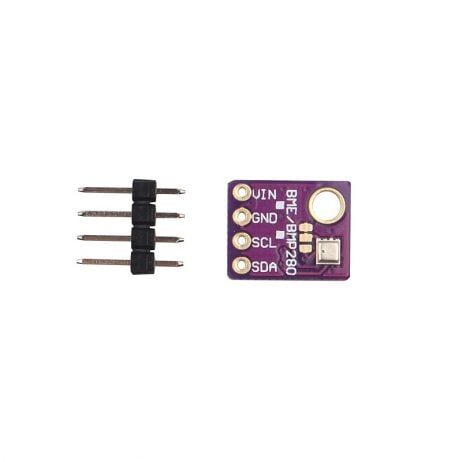
GY-BME280-5V Temperature, Humidity & Pressure Sensor
5V-compatible BME280 for Arduino Uno + ILI9341 projects. Share the I2C bus for a clean wiring setup and display pressure, temperature, and humidity on your color TFT.

LM35 Temperature Sensor
Classic analog temperature sensor. Read the voltage on an Arduino analog pin and display the result on any of the three display ICs compared in this guide.

MQ-135 Air Quality Sensor Module
Monitor indoor air quality and display CO2/VOC levels on a color ILI9341 or ST7789 TFT. A great real-world application for any of the three display drivers.

INA219 Bi-directional Current & Power Monitor
Measure voltage and current over I2C and display live power consumption on a color TFT. Perfect for battery monitoring dashboards with ILI9341 or ST7789.

DHT11 Temperature & Humidity Sensor Module
Affordable and beginner-friendly sensor to show on any display. Works great as the data source for first SSD1306, ILI9341, or ST7789 dashboard projects.
Frequently Asked Questions
Q: Can the SSD1306 display any color at all?
No. The SSD1306 drives a monochrome OLED — every pixel is either fully on or fully off. Some 0.96-inch OLED modules are manufactured with a two-color panel (typically the top 16 rows in yellow and the remaining 48 rows in blue), but this is a fixed physical layout, not software-controlled color. If you need color, switch to ILI9341 or ST7789.
Q: Is ILI9341 or ST7789 better for an ESP32 project?
ST7789 with an IPS panel is generally better for ESP32 projects. It supports higher SPI speeds (up to 62.5 MHz vs ILI9341’s effective 40 MHz on ESP32), its IPS panel has far better viewing angles, and modern breakout boards for the ST7789 are more compact. The only exception is if you need a resistive touchscreen — then use ILI9341 paired with XPT2046.
Q: My SSD1306 shows gibberish or all pixels lit. What is wrong?
The most common causes are: wrong I2C address (try both 0x3C and 0x3D), missing pull-up resistors on SDA/SCL (use 4.7 kΩ), SDA and SCL swapped, or the power supply brownout during OLED init. Call display.begin() in setup and check the return value — it returns false if the device is not found at the given address.
Q: Can I use ILI9341 and SSD1306 together in the same project?
Yes. Use the ILI9341 on the SPI bus (with its own CS pin) and the SSD1306 on the I2C bus. Both can run simultaneously since they use different physical interfaces. Just make sure your Arduino has enough RAM for both framebuffers — on a Uno this will be very tight (ILI9341 Adafruit library alone uses most of the 2 KB RAM in direct-drive mode).
Q: What is the difference between ILI9341 and ILI9488?
The ILI9488 drives larger 3.5-inch 320×480 panels with 18-bit color. It uses an 8-bit parallel interface on most breakout boards, not SPI, which makes it significantly faster for full-screen updates but requires 8 Arduino data pins. The Adafruit library supports ILI9488 via the MCUFRIEND_kbv library for parallel interface boards.
Find Your Perfect Display Module at Zbotic
Whether you need a tiny OLED for a wearable or a full-color IPS TFT for a dashboard instrument, Zbotic stocks a wide range of display modules with fast delivery across India.







Add comment