
Building an ESP32 BLE beacon with iBeacon protocol is one of the most practical and exciting applications of Bluetooth Low Energy in IoT. Indoor location tracking — where GPS signals cannot penetrate — is a challenge solved elegantly by BLE beacons. Museums, shopping malls, warehouses, hospitals, and manufacturing floors across India are adopting beacon-based systems for asset tracking, proximity marketing, and wayfinding. And with an ESP32, you can build your own beacon for a fraction of the cost of commercial alternatives.
What Is iBeacon and How Do BLE Beacons Work?
iBeacon is a standard introduced by Apple in 2013 that defines how BLE devices advertise themselves for proximity detection. A BLE beacon continuously broadcasts small advertising packets — typically every 100 to 1000 milliseconds — that any BLE-capable device (smartphone, another ESP32, a Raspberry Pi) in range can detect.
The key concept is RSSI (Received Signal Strength Indicator). As you move closer to a beacon, the RSSI value increases (becomes less negative). By measuring RSSI, a scanning device can estimate its distance from the beacon. With three or more beacons, trilateration can be used to calculate a 2D or 3D position — this is the basis of indoor positioning systems (IPS).
There are several beacon standards:
- iBeacon — Apple’s standard; widely supported on iOS and Android
- Eddystone — Google’s open standard; supports URL, UID, and TLM (Telemetry) frame types
- AltBeacon — Open-source alternative to iBeacon
This tutorial focuses on iBeacon because it has the broadest compatibility, but the ESP32 code can be adapted for Eddystone-URL with minor changes.
iBeacon Packet Structure Explained
Understanding the iBeacon advertising packet structure helps you configure your ESP32 correctly. An iBeacon packet contains:
| Field | Size | Purpose |
|---|---|---|
| UUID | 16 bytes | Identifies the organisation or deployment zone |
| Major | 2 bytes | Identifies a group (e.g., floor or building) |
| Minor | 2 bytes | Identifies individual beacon in the group |
| TX Power | 1 byte | Calibrated RSSI at 1 metre — used for distance calculation |
In a shopping mall deployment, you might use a single UUID for the entire mall, Major numbers for each floor (1, 2, 3…), and Minor numbers for each individual beacon location on that floor. A visitor’s app detects all beacons in range, identifies the strongest signal, and shows the visitor their approximate location on an indoor map.
Turning Your ESP32 Into an iBeacon Transmitter
The ESP32’s BLE stack fully supports custom advertising packets, making it straightforward to implement iBeacon. The Arduino ESP32 BLE library provides the tools needed.

Ai Thinker ESP32-C3-01M Wi-Fi + BLE Module
A compact and affordable ESP32-C3 module with Bluetooth 5.0 LE — perfect for a small, low-power BLE iBeacon transmitter node.
Here is the complete Arduino sketch to make your ESP32 advertise as an iBeacon:
#include <BLEDevice.h>
#include <BLEUtils.h>
#include <BLEBeacon.h>
#include <BLEAdvertising.h>

#define BEACON_UUID "8EC76EA3-6668-48DA-9866-75BE8BC86F4D"

BLEAdvertising *pAdvertising;

void setBeacon() {
  BLEBeacon oBeacon;
  oBeacon.setManufacturerId(0x004C); // Apple manufacturer ID for iBeacon
  oBeacon.setProximityUUID(BLEUUID(BEACON_UUID));
  oBeacon.setMajor(1);    // Floor 1
  oBeacon.setMinor(101);  // Beacon #101
  oBeacon.setSignalPower(-59); // TX power at 1 metre (calibrate for your module)

  BLEAdvertisementData oAdvertisementData;
  oAdvertisementData.setFlags(0x1A);
  std::string strServiceData = "";
  strServiceData += (char)26;  // Beacon data length
  strServiceData += (char)0xFF;
  strServiceData += oBeacon.getData();
  oAdvertisementData.addData(strServiceData);

  BLEAdvertisementData oScanResponseData;
  oScanResponseData.setName("ZboticBeacon");

  pAdvertising->setAdvertisementData(oAdvertisementData);
  pAdvertising->setScanResponseData(oScanResponseData);
}

void setup() {
  Serial.begin(115200);
  BLEDevice::init("ZboticBeacon");
  pAdvertising = BLEDevice::getAdvertising();
  setBeacon();
  pAdvertising->setAdvertisementType(ADV_NONCONN_IND); // Non-connectable beacon
  pAdvertising->start();
  Serial.println("iBeacon advertising started!");
  esp_sleep_enable_timer_wakeup(0); // Beacon runs indefinitely
}

void loop() {
  delay(10000); // Beacon runs in background
}
Important note: The manufacturer ID 0x004C is Apple’s company identifier. Including it is what makes the advertisement recognisable as an iBeacon by iOS and Android apps. Without it, the packet is just a generic BLE advertisement.
ESP32 as BLE Scanner: Reading RSSI Values
The scanner side is equally important. Here is an ESP32 sketch that scans for BLE devices and prints their MAC address, name, and RSSI:
#include <BLEDevice.h>
#include <BLEScan.h>
#include <BLEAdvertisedDevice.h>

const char* TARGET_UUID = "8ec76ea3-6668-48da-9866-75be8bc86f4d";
BLEScan* pBLEScan;

class MyAdvertisedDeviceCallbacks: public BLEAdvertisedDeviceCallbacks {
  void onResult(BLEAdvertisedDevice advertisedDevice) {
    if (advertisedDevice.haveServiceUUID() || advertisedDevice.haveName()) {
      Serial.printf("Device: %s | RSSI: %d dBmn",
        advertisedDevice.getAddress().toString().c_str(),
        advertisedDevice.getRSSI());
    }
  }
};

void setup() {
  Serial.begin(115200);
  BLEDevice::init("");
  pBLEScan = BLEDevice::getScan();
  pBLEScan->setAdvertisedDeviceCallbacks(new MyAdvertisedDeviceCallbacks());
  pBLEScan->setActiveScan(true);
  pBLEScan->setInterval(100);
  pBLEScan->setWindow(99);
}

void loop() {
  pBLEScan->start(3, false); // Scan for 3 seconds
  pBLEScan->clearResults();
  delay(2000);
}
RSSI-Based Indoor Positioning
Converting RSSI values to distance requires the Log-Distance Path Loss model. The formula is:
distance = 10 ^ ((TX_Power – RSSI) / (10 * n))
Where:
- TX_Power is the calibrated RSSI at 1 metre (stored in the iBeacon packet, typically -59 to -70 dBm)
- RSSI is the measured signal strength at the scanning device
- n is the path loss exponent (2.0 for free space, 2.5–3.5 for typical indoor environments)
In Arduino C:
float calculateDistance(int rssi, int txPower) {
  if (rssi == 0) return -1.0;
  float ratio = txPower * 1.0 / rssi;
  if (ratio < 1.0) {
    return pow(ratio, 10);
  } else {
    return (0.89976) * pow(ratio, 7.7095) + 0.111;
  }
}
RSSI-based ranging has inherent variability of ±1–2 metres due to multipath reflections, human body absorption, and interference. For better accuracy, use Kalman filtering or a moving average over multiple RSSI readings before computing distance.
Real-World Project Ideas for Indian Makers
Here are practical BLE beacon applications well-suited for the Indian context:
1. Warehouse Asset Tracking
Attach ESP32 beacons (powered by 18650 batteries) to pallets, equipment trolleys, or storage racks. Fixed scanner nodes at key locations log when tagged assets enter/exit zones. This is significantly cheaper than RFID and covers much longer ranges.
2. Factory Floor Safety Zones
Place beacons around dangerous machinery. Workers’ safety wristbands (BLE scanners) detect when they enter a hazard zone and vibrate or trigger an alarm — no infrastructure beyond the beacons is needed.
3. School/College Attendance
A fixed ESP32 beacon in each classroom advertises a unique Minor number. Students’ phones (using a simple app or a Flutter PWA) detect the classroom beacon and auto-mark attendance when the RSSI indicates they are within 5 metres.

2 x 18650 Lithium Battery Shield for Arduino, ESP32, ESP8266
Power your ESP32 BLE beacon nodes from two 18650 cells with this battery shield — provides stable 5V/3.3V output and onboard charging for long-term beacon deployments.
4. Retail Proximity Marketing
A beacon near a product shelf triggers a notification on a customer’s phone (via a store app) with a discount coupon when they walk close. This is widely used in Indian supermarkets and electronics retailers.
Battery Optimisation for Beacon Nodes
A BLE beacon that is only advertising (not scanning or connecting) can run for months or even years on a coin cell if optimised correctly. Here are the key techniques:
- Non-connectable advertising: Use
ADV_NONCONN_INDmode instead of connectable advertising. This prevents connection requests and reduces processing overhead. - Increase advertising interval: The default 100ms interval means 10 beacons per second. For static asset tracking where position changes slowly, 500ms or even 1000ms is sufficient and cuts power use dramatically.
- Reduce TX power: Call
BLEDevice::setPower(ESP_PWR_LVL_N12)to reduce transmit power to -12 dBm. For indoor deployments within 10 metres, this is sufficient. - Disable WiFi: If your beacon only needs BLE, call
WiFi.mode(WIFI_OFF)to shut down the WiFi radio completely.
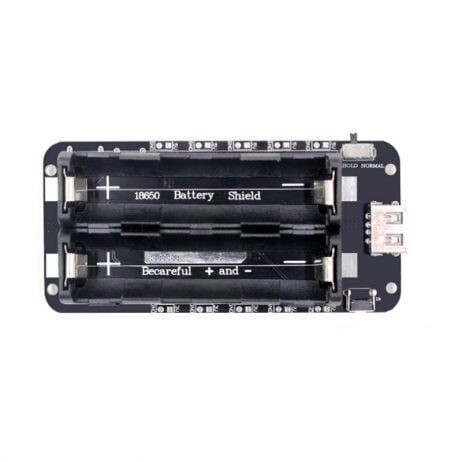
2 x 18650 Lithium Battery Shield V8 – 5V/3A 3V/1A for ESP32
The V8 battery shield supports both Micro USB charging and dual 18650 cells, providing months of battery life for a continuously advertising ESP32 BLE beacon.
Frequently Asked Questions
What is the range of an ESP32 iBeacon?
Indoors, typical BLE beacon range is 10–30 metres depending on obstacles, walls, and transmission power. At maximum TX power with a clear line of sight, an ESP32 BLE beacon can reach up to 80–100 metres. For indoor positioning accuracy within 2–5 metres, beacons should be placed roughly every 5–10 metres apart.
Can I detect an iBeacon using an Android phone without a custom app?
You need at minimum a BLE scanner app like nRF Connect or Beacon Scanner. For user-facing proximity features (notifications, location-based content), you need a custom app that uses the Android Beacon Library (for iBeacon decoding) or the Google Nearby API.
What is the difference between iBeacon and Eddystone?
iBeacon is Apple’s standard and is the most widely supported format for iOS proximity detection. Eddystone is Google’s open standard and supports multiple frame types, including Eddystone-URL which can trigger a Chrome notification with a web link without any app installed. ESP32 can implement both formats.
How many beacons do I need for room-level accuracy?
For room-level detection (which room you are in), one beacon per room is sufficient. For sub-room positioning accurate to 2–3 metres, you need at least 3 beacons per area arranged in a triangle. Trilateration with 3 beacon RSSI readings gives a 2D position estimate.
Can the ESP32 act as both a beacon and a scanner simultaneously?
Not truly simultaneously, as BLE advertising and scanning use the same radio. However, the ESP32 BLE stack can alternate between advertising and scanning very rapidly (duty cycling), making it appear simultaneous for slow-update applications. For high-frequency scanning alongside beaconing, it is better to use two separate ESP32 modules.
Build Your Indoor Positioning System Today
Get all the ESP32 modules, BLE boards, and battery shields you need for your iBeacon project from Zbotic — India’s go-to electronics components store.






Add comment