
Building a smart pet feeder with ESP32 DIY is one of the most rewarding IoT home automation projects you can undertake — and one of the most practical. Whether you are a software engineer in Bangalore who works long hours, or a family in Delhi that travels on weekends, an automated pet feeder ensures your dog or cat is fed on schedule even when you are away. In this comprehensive guide, we will build a fully functional Wi-Fi-connected pet feeder with scheduled dispensing, remote control via a web interface, portion control, and feeding history logs.
Components and Materials List
Here is everything you need for this smart pet feeder project. Most components are available at Zbotic.in with fast delivery across India:
Electronics
- ESP32 development board — the brain of the feeder
- DS3231 RTC module — accurate timekeeping even without internet (optional if always connected)
- Servo motor (MG996R or SG90) — to drive the dispensing mechanism
- DHT11/DHT22 sensor — optional, to monitor food storage temperature/humidity
- HC-SR04 ultrasonic sensor — to detect if food bowl is full
- 5V buzzer — to alert when food is low
- 16×2 LCD with I2C adapter — to display next feeding time and status
- 18650 battery shield + batteries — for backup power during power cuts (common in India)
- 5V 2A USB power supply
Mechanical/Structural
- Food-grade plastic container (2-3 litre) for food hopper
- 3D printed or PVC pipe auger/screw mechanism
- Food bowl (stainless steel)
- Velcro or brackets for mounting

Ai Thinker NodeMCU-32S-ESP32 Development Board – IPEX Version
The NodeMCU-32S is an excellent choice for the smart pet feeder — strong Wi-Fi, plenty of GPIO for servo + sensors + display, and runs reliably 24/7.
Mechanical Design: The Food Dispenser Mechanism
The most important part of a pet feeder is the dispensing mechanism. There are three popular approaches for DIY builds:
Option 1: Rotating Drum (Easiest)
A cylinder with cutout compartments rotates to drop a measured portion of food. Drive it with a servo motor. One rotation = one feeding. This works well with kibble-type dry pet food commonly used in India (Pedigree, Royal Canin, etc.).
Option 2: Auger Screw (Most Reliable)
An auger screw is turned by a servo or DC motor inside a tube. Food is pushed forward and drops out the end. Rotation time = portion size. More consistent for different food sizes and shapes. Can be 3D-printed easily.
Option 3: Gravity + Servo Flap (Simplest)
A flap at the bottom of the hopper is held closed by a servo. Open the flap for a set duration, food falls out, close flap. Simple but portion control is less precise.
For this tutorial, we will implement Option 1 (Rotating Drum) as it requires no 3D printing and can be built with an old PVC cap or kitchen container.
Servo Motor Connection to ESP32
Connect the servo motor to the ESP32:
- Servo Red wire → 5V (use external power supply, not 3.3V from ESP32)
- Servo Brown/Black wire → GND
- Servo Orange/Yellow wire → GPIO18 (PWM-capable pin)
- Connect ESP32 GND to servo power supply GND (common ground)

2 x 18650 Lithium Battery Shield for Arduino, ESP32, ESP8266
Power failures are common in India. Add this battery shield to your pet feeder to ensure your pets are fed even during power cuts. Supports simultaneous charging and output.
Circuit Wiring and Connections
Here is the full wiring summary for the smart pet feeder:
| Component | ESP32 Pin | Notes |
|---|---|---|
| Servo Motor Signal | GPIO18 | Use external 5V supply for power |
| DHT11 Data | GPIO4 | 10K pull-up to 3.3V |
| HC-SR04 Trig | GPIO5 | Bowl level detection |
| HC-SR04 Echo | GPIO19 | Use voltage divider (5V→3.3V) |
| Buzzer | GPIO21 | Low-level active |
| LED Status | GPIO2 (built-in) | Blink patterns for status |
ESP32 Firmware: Scheduling and Web Server
The firmware implements: (1) NTP time sync for accurate scheduling, (2) configurable feeding schedules stored in NVS, (3) a web server for remote control, and (4) automatic dispensing at scheduled times.
#include <Arduino.h>
#include <WiFi.h>
#include <WebServer.h>
#include <ESP32Servo.h>
#include <Preferences.h>
#include <time.h>
#include <ArduinoJson.h>

// Config
const char* ssid = "YourWiFi";
const char* password = "YourPassword";
const int SERVO_PIN = 18;
const int BUZZER_PIN = 21;

Servo feederServo;
WebServer server(80);
Preferences prefs;

// Schedule: up to 4 feeding times per day
struct FeedingSchedule {
  int hour;
  int minute;
  int portionRotations;  // How many rotations = how much food
  bool enabled;
};

FeedingSchedule schedule[4];
bool lastFedFlag[4] = {false};

void dispenseFood(int rotations) {
  Serial.printf("Dispensing food: %d rotationsn", rotations);
  tone(BUZZER_PIN, 1000, 200); // Beep to alert pet
  delay(500);

  for (int i = 0; i < rotations; i++) {
    feederServo.write(0);
    delay(500);
    feederServo.write(180);
    delay(500);
  }
  feederServo.write(90); // Rest position
  Serial.println("Dispensing complete");
}

void checkSchedule() {
  struct tm timeinfo;
  if (!getLocalTime(&timeinfo)) return;

  int currentHour = timeinfo.tm_hour;
  int currentMin = timeinfo.tm_min;

  for (int i = 0; i < 4; i++) {
    if (!schedule[i].enabled) continue;

    if (currentHour == schedule[i].hour && currentMin == schedule[i].minute) {
      if (!lastFedFlag[i]) {
        lastFedFlag[i] = true;
        dispenseFood(schedule[i].portionRotations);
      }
    } else {
      lastFedFlag[i] = false;
    }
  }
}

void setup() {
  Serial.begin(115200);
  feederServo.attach(SERVO_PIN);
  feederServo.write(90);
  pinMode(BUZZER_PIN, OUTPUT);

  WiFi.begin(ssid, password);
  while (WiFi.status() != WL_CONNECTED) delay(500);
  Serial.println("IP: " + WiFi.localIP().toString());

  // Sync time with NTP (India timezone: UTC+5:30)
  configTime(5 * 3600 + 30 * 60, 0, "pool.ntp.org", "time.google.com");

  // Load saved schedule from NVS
  prefs.begin("feeder", true);
  prefs.getBytes("schedule", schedule, sizeof(schedule));
  prefs.end();

  // Default schedule if nothing saved
  if (schedule[0].hour == 0 && schedule[0].minute == 0) {
    schedule[0] = {7, 0, 2, true};   // 7:00 AM, 2 rotations
    schedule[1] = {13, 0, 2, true};  // 1:00 PM, 2 rotations
    schedule[2] = {19, 0, 3, true};  // 7:00 PM, 3 rotations
    schedule[3] = {0, 0, 0, false};  // Disabled
  }

  // Web server routes
  server.on("/feed", HTTP_POST, []() {
    int portions = server.arg("portions").toInt();
    if (portions < 1 || portions > 5) portions = 1;
    dispenseFood(portions);
    server.send(200, "text/plain", "Feeding complete");
  });

  server.begin();
  Serial.println("Smart Pet Feeder Ready!");
}

void loop() {
  server.handleClient();
  checkSchedule();
  delay(1000);
}
Web Interface for Remote Control
Add a simple web interface so you can control the feeder from your phone’s browser while on the same Wi-Fi network. For remote control from anywhere, set up port forwarding or use a service like Cloudflare Tunnel or ngrok.
The web interface should include:
- “Feed Now” button with portion size selector (1x, 2x, 3x)
- Schedule editor — set up to 4 daily feeding times with portion amounts
- Status display — last feeding time, Wi-Fi strength, uptime
- Feeding log — last 10 feedings with timestamps (stored in SPIFFS)

DHT11 Digital Relative Humidity and Temperature Sensor Module
Monitor the temperature and humidity inside your pet feeder to ensure food stays fresh. Alert yourself if conditions exceed safe thresholds for your pet’s food.
Enhancements: Camera, Weight Sensor, Telegram Bot
Add an ESP32 CAM to Watch Your Pet Eat
Mount an ESP32-CAM module near the food bowl to capture a photo or short video each time food is dispensed. Get a notification on Telegram with a photo of your pet eating. This feature is incredibly popular among Indian pet owners who travel for work.
Telegram Bot Integration
Use the Universal Telegram Bot library to send feeding notifications and accept remote commands:
- Send a Telegram message every time the feeder dispenses food
- Reply to “/feed” command with immediate dispensing
- Reply to “/status” with last feeding time and Wi-Fi signal strength
- Alert when food level is low (detected by ultrasonic sensor)
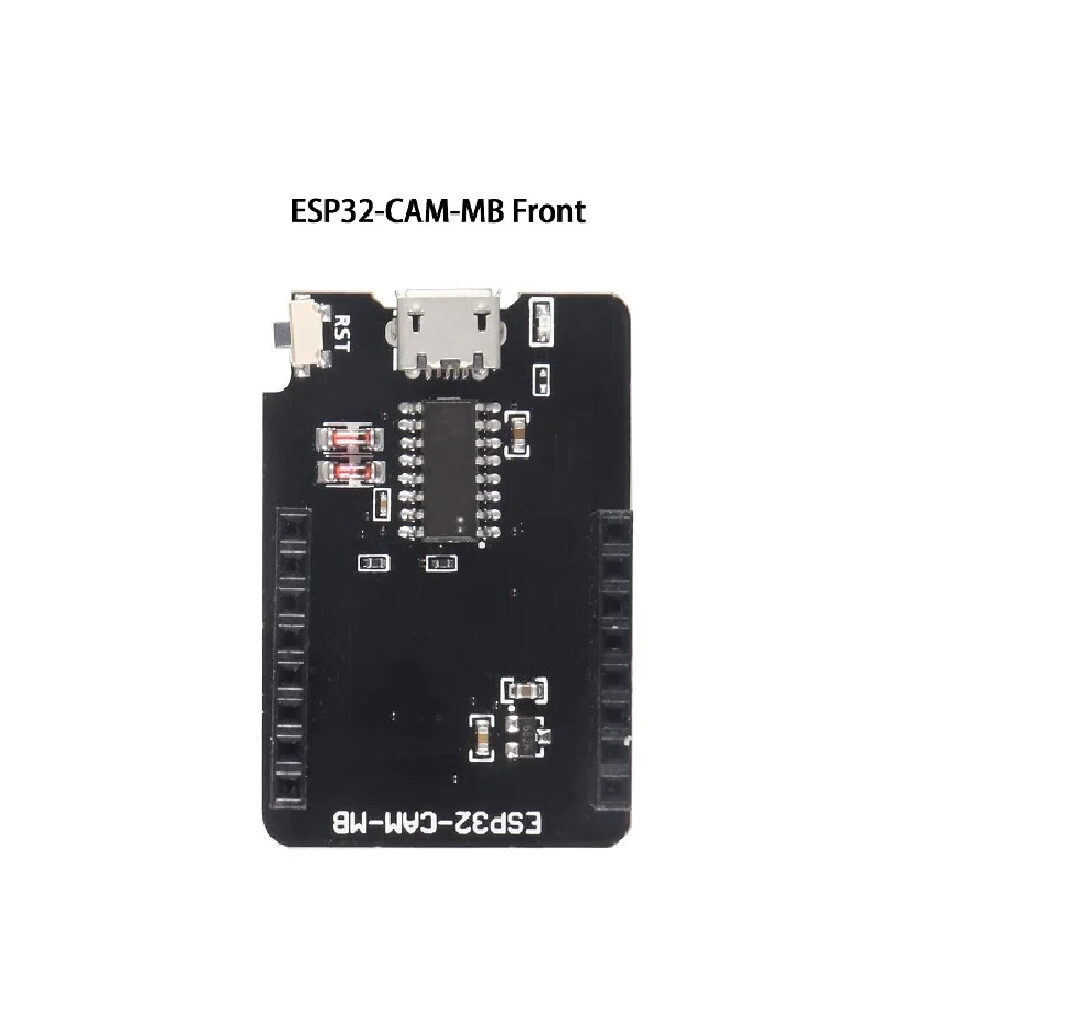
ESP32-CAM-MB MICRO USB Download Module for ESP32 CAM
Add a camera to your pet feeder to capture photos when food is dispensed. Send the images to your phone via Telegram to see your pet eating in real time.
Frequently Asked Questions
Is this pet feeder safe to use with my pet’s food?
Use only food-grade plastic or stainless steel components that come in contact with food. The servo and electronics should be sealed away from the food path. Avoid exposed metal that could rust. Clean the food hopper and bowl regularly — the electronics make automation easy, but hygiene requires your attention.
What if the Wi-Fi goes down? Will my pet still be fed?
Yes! The schedule is stored in NVS (non-volatile memory) and the ESP32 uses the onboard RTC or the saved NTP time. Once the schedule is programmed, the feeder operates autonomously without internet. Wi-Fi is only needed for remote control and notifications, not for basic operation.
How accurate is the portion control?
With a rotating drum mechanism, one rotation delivers a consistent amount — typically 20-50 grams depending on kibble size and drum dimensions. For precise weight-based feeding, add a load cell (HX711 module) under the food bowl and have the ESP32 keep dispensing until the target weight is reached.
Can this work for cats and dogs both?
Yes, with different hopper and dispenser sizes. For cats eating dry kibble, a small auger or drum mechanism works well. For larger dogs needing bigger portions, scale up the container and use a more powerful motor (like NEMA 17 stepper with A4988 driver) for a high-torque auger.
How long does the battery backup last?
Two 18650 cells (7.4V, ~5000mAh combined) powering an ESP32 + servo will last approximately 8-12 hours depending on feeding frequency. For longer backup, use 4x 18650 cells with the V9 battery shield. This is sufficient for most Indian power cut durations.
Build Your Smart Pet Feeder Today
Zbotic.in has all the components you need — ESP32 boards, sensors, battery shields, and more. Give your pets the care they deserve even when you are not home. Fast shipping across India with quality-checked components.





Add comment