
Table of Contents
- What Is ESC Calibration and Why Does It Matter?
- Signs That Your ESCs Need Calibration
- Types of ESC Firmware
- Safety Precautions Before Calibration
- Method 1: All-at-Once ESC Calibration
- Method 2: Individual ESC Calibration
- Method 3: ESC Calibration via Betaflight (FPV Drones)
- Method 4: ESC Calibration via Mission Planner (ArduPilot)
- Verifying Calibration Success
- Troubleshooting ESC Calibration Issues
- ESC Maintenance and Care
- Frequently Asked Questions
What Is ESC Calibration and Why Does It Matter?
ESC calibration is the process of teaching each Electronic Speed Controller (ESC) on your drone the full range of throttle input from your RC transmitter — specifically, the PWM (Pulse Width Modulation) signal values that correspond to minimum throttle and maximum throttle. Without calibration, each ESC may interpret these signals slightly differently, resulting in motors that don’t all spin up at the same time or at the same speed.
Think of it this way: if your transmitter sends a signal of 1000 microseconds (µs) for minimum throttle and 2000 µs for maximum throttle, but your ESCs were factory-set for a different range (say, 1100–1900 µs), your drone will not respond correctly. It may not arm, the motors may spin at different speeds at the same throttle position, or you may lose control at high throttle.
In India, where many drone builders source ESCs and flight controllers from multiple suppliers (sometimes with different firmware defaults), calibration is an absolutely critical step in every new build and after every ESC replacement. It takes less than 5 minutes to do, but skipping it can lead to crashes, property damage, or injury.
Signs That Your ESCs Need Calibration
Watch for these symptoms — they all point to ESC calibration problems:
- Drone drifts or tilts at hover: One motor is spinning faster than the others at the same throttle input.
- Motors spin up at different times: When you raise throttle from zero, some motors start spinning before others — audible as a staggered “brrrp” sound.
- One or more motors spin at idle (disarmed): The ESC’s low-throttle threshold is miscalibrated.
- Drone won’t arm: Some flight controllers check for consistent ESC behaviour during arming. Calibration issues can cause arming failures.
- Lost control at high throttle: If the ESC thinks full throttle is reached before your transmitter stick is at the top, response becomes non-linear and dangerous.
- After replacing an ESC: Always recalibrate any time you install a new or different ESC — even if it is the same model.
Types of ESC Firmware
Different ESC firmware use different calibration methods. Knowing which firmware your ESC runs helps you follow the correct procedure:
- SimonK / BLHeli_S: Traditional calibration by setting high/low throttle endpoints manually. Most budget ESCs and many drone kit ESCs in India run this firmware.
- BlHeli_32: Advanced firmware supporting DSHOT digital protocol. With DSHOT, no calibration is needed because it is a digital signal with no analogue ambiguity. The calibration steps below apply only if you are using PWM, not DSHOT.
- AM32: Open-source firmware similar to BlHeli_32. DSHOT support, same principle applies.
- APD / Castle / Hobbywing proprietary: These often have their own dedicated calibration programs or automatic calibration modes.
Note: If your ESC uses DSHOT (digital protocol configured in Betaflight or Ardupilot), you do NOT need ESC calibration — DSHOT is immune to PWM range differences. This guide applies to PWM-based ESC setups, which are still very common in ArduPilot/Pixhawk builds and older FPV rigs in India.

100A Multirotor ESC Power Distribution Battery Board
A heavy-duty power distribution board with integrated current sensing for multirotor drones. Clean power distribution is essential for consistent ESC performance — voltage spikes from poor wiring are a common cause of ESC calibration drift and motor desync.
Safety Precautions Before Calibration
ESC calibration involves powering up your drone and commanding the motors — always follow these safety steps:
- Remove all propellers. This is non-negotiable. During calibration, motors will spin. Propellers at full spin can cause serious injury.
- Place the drone on a stable, flat surface. A landing pad is ideal.
- Ensure no one else is near the drone during the process.
- Use a LiPo battery that is adequately charged (above 3.7V per cell) but do not use a battery that is damaged or puffy.
- Keep your RC transmitter on and failsafe configured before connecting the battery.
- If using a LiPo, connect via an XT60 connector carefully — never short-circuit the leads.
Method 1: All-at-Once ESC Calibration
This is the standard method for drones where all ESCs are connected to a flight controller (Pixhawk, APM, NAZE32, etc.) and receive their signal from the FC, which in turn takes it from the receiver.
Step 1: Prepare Your Transmitter
Power on your RC transmitter. Move the throttle stick to its maximum position (all the way up). This is important — the transmitter must be at full throttle before you connect power.
Step 2: Power the Drone
Connect the LiPo battery to the drone. Within a few seconds, you will hear the startup tones from all ESCs, followed by two beeps — this signals that the ESCs have registered the HIGH throttle endpoint.
Step 3: Lower Throttle
Immediately after the two beeps, move the throttle stick to its minimum position (all the way down). You will hear a long beep or a series of beeps (the exact pattern depends on ESC firmware and number of LiPo cells). This confirms that the ESCs have registered the LOW endpoint as well.
Step 4: Arming
The ESCs are now calibrated. To arm (if applicable for your setup), perform your normal arming sequence. All motors should spin up smoothly and at the same speed when throttle is raised from zero.
Step 5: Verify Motor Response
With propellers still off, slowly raise the throttle from minimum to about 30%. All four (or more) motors should spin up simultaneously and at the same audible RPM. If one starts later or spins slower, that individual ESC may need calibration again or has a different throttle curve setting.
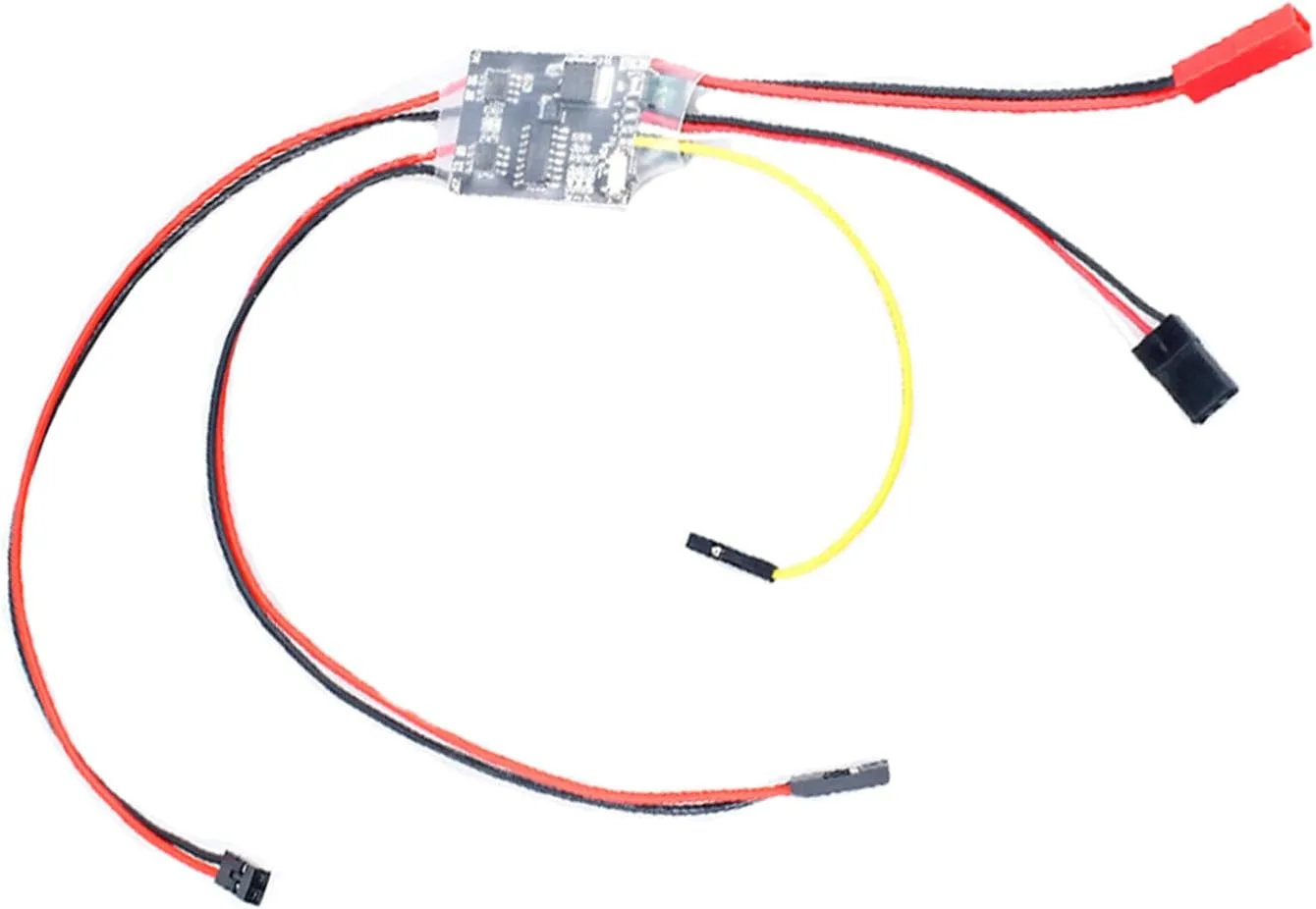
2S-6S Dual Way Brushed ESC Bidirectional Speed Controller
A dual-channel bidirectional brushed ESC supporting 2S–6S batteries. Useful for ground vehicles and specialty drone applications requiring reversible motor control. Standard PWM endpoint calibration applies to this ESC as well.
Method 2: Individual ESC Calibration
Use this method when you need to calibrate a single ESC (after replacement) or when you want to calibrate each ESC separately for maximum precision. This method connects each ESC directly to your receiver (bypassing the flight controller).
Step 1: Disconnect the Motor from the Flight Controller
Unplug the signal wire of the ESC you want to calibrate from the flight controller’s servo output. Keep the power and ground wires connected.
Step 2: Connect ESC Signal to Receiver Channel
Plug the ESC’s signal wire directly into Channel 3 (throttle channel) of your RC receiver. This gives you direct control of the ESC via your transmitter stick.
Step 3: Set High Throttle
Set the throttle stick to maximum on your transmitter. Connect the battery. The ESC will power up and register the high endpoint (you’ll hear the startup tone and then two beeps).
Step 4: Set Low Throttle
Move the throttle stick to minimum. The ESC will beep again to confirm the low endpoint is set. The calibration is stored in the ESC’s non-volatile memory.
Step 5: Repeat for All ESCs
Reconnect this ESC to the flight controller and repeat for each ESC on the drone. When all are done, reconnect everything to the FC and test with the all-at-once verification procedure.
Method 3: ESC Calibration via Betaflight (FPV Drones)
Betaflight (the standard firmware for FPV racing and freestyle drones) has a built-in ESC calibration tool. Note: if you are using DSHOT protocol in Betaflight, you can skip calibration entirely. This method applies only to OneShot, MultiShot, or standard PWM output modes.
- Connect your drone to a computer via USB. Open Betaflight Configurator.
- Go to the Motors tab.
- Enable the Motor Test mode (check the safety checkbox).
- Set all motor sliders to zero.
- Open the ESC/Motor Features section. Look for the Calibrate ESC button (available in some Betaflight builds).
- Alternatively, use the manual method: with Betaflight set to output max throttle signal, connect battery, let ESCs register high point, then use Betaflight to set min throttle, let ESCs register low point.
Recommended approach for Betaflight: Switch to DSHOT300 or DSHOT600 in the Configuration tab and avoid PWM calibration entirely. DSHOT is available on virtually all modern F4 and F7 flight controllers used in Indian FPV builds.
Method 4: ESC Calibration via Mission Planner (ArduPilot)
For Pixhawk and APM-based drones running ArduCopter, Mission Planner provides a guided ESC calibration wizard:
- Open Mission Planner and connect to your flight controller via USB (do NOT connect via telemetry for this — use USB).
- Navigate to Setup > Mandatory Hardware > ESC Calibration.
- Read the on-screen warnings and check all safety boxes.
- Click Calibrate ESCs. Mission Planner will instruct you to disconnect the battery and then reconnect it at the right moment.
- When prompted, connect the battery with the throttle at maximum (as set by the wizard).
- Wait for the beeps, then lower throttle as instructed. The wizard will confirm completion.
- After calibration, perform a motor test in Setup > Mandatory Hardware > Motor Test to verify all motors spin up correctly.
ArduPilot note: ArduCopter 4.0+ supports DSHOT on suitable hardware (Pixhawk 4, Cube, Matek H743, etc.). Switching to DSHOT in ArduCopter eliminates the need for ESC calibration entirely, just like in Betaflight.

30A Brushed ESC No Brake
A reliable 30A brushed motor ESC for RC cars, boats, and brushed motor drone applications. Simple PWM input with standard throttle range calibration. Budget-friendly option for beginners building their first brushed-motor project.
Verifying Calibration Success
After calibration, perform these checks to confirm everything is working correctly:
Motor Sync Test (Props Off)
Arm the drone and slowly raise throttle from minimum. All motors must start spinning simultaneously. Raise to 30% throttle — all motors should sound the same pitch. Vary throttle slowly and listen for any motor that sounds louder, quieter, or starts hunting (unstable RPM). Any difference indicates a calibration issue on that ESC.
Hover Test (Props On, Outdoors)
In a safe outdoor location, reattach propellers (double-check orientation: CW/CCW correct positions). Hover the drone at about 1 metre. It should maintain altitude with minimal pitch or roll correction from the flight controller. Excessive drift in one direction suggests one motor is running faster than its diagonal pair.
Mission Planner Motor Test
In Mission Planner, go to Optional Hardware > Motor Test. Spin each motor individually at a set throttle percentage (e.g., 5–10%). All four should produce similar-sounding RPMs at the same throttle percentage. This is the most accurate comparison method.
Troubleshooting ESC Calibration Issues
ESC Does Not Beep During Calibration
- Check that the ESC’s signal wire is properly connected and the transmitter is actually at full throttle before connecting battery.
- Check battery voltage — ESCs won’t respond to very low voltage batteries.
- Verify signal wire polarity (brown/black = GND, red = 5V, orange/white = signal).
Motors Still Spin at Different Speeds After Calibration
- Repeat calibration for the offending ESC using the individual method.
- Check if the ESC firmware has different throttle curves set in its configuration software (BLHeli Suite / ESC Configurator).
- Inspect for damaged motor windings — a partially shorted motor will always behave differently regardless of ESC calibration.
Drone Won’t Arm After Calibration
- Check ArduPilot’s pre-arm checks in Mission Planner. Common causes: GPS no fix, compass uncalibrated, ESC throttle not at bottom.
- Make sure throttle is at minimum before attempting to arm.
- Review the pre-arm failure messages in Mission Planner’s HUD.
One Motor Spins Up Immediately at Arm, Others Don’t
- The calibration for that ESC’s low throttle endpoint is incorrect — the ESC thinks minimum throttle is higher than it is. Recalibrate individually.
ESC Maintenance and Care
To get the best life from your ESCs and maintain consistent calibration:
- Avoid water and moisture: India’s monsoon season is brutal on ESC circuits. Conformal coat your ESCs with electronics lacquer if flying in humid conditions.
- Monitor heat: ESCs that run hot will eventually desync. Ensure adequate airflow in your drone frame, and use ESC ratings appropriate for your motor’s current draw.
- Check solder joints: Loose motor phase wire solder joints cause intermittent desync — check after any crash.
- Update firmware carefully: Updating ESC firmware (via BLHeli Suite or BLHeli32 Suite) can reset calibration. Always recalibrate after any firmware update.
- Recalibrate after LiPo changes: If you switch between 4S and 6S batteries, the ESC behaviour may change slightly at higher voltages. Recalibrate when changing battery cell count permanently.

35A V2.1 2-5S 4-in-1 Brushless ESC for RC Drone FPV Racing
A high-performance 4-in-1 brushless ESC supporting DSHOT600 digital protocol — which means zero calibration needed. Rated at 35A continuous per motor on 2S–5S, perfect for 5-inch freestyle and racing builds with modern flight controllers.
Frequently Asked Questions
Q: How often should I calibrate my ESCs?
A: Once correctly calibrated, ESC calibration typically holds indefinitely unless you change your transmitter, change battery voltage, update ESC firmware, or replace an ESC. There is no need for routine recalibration if nothing has changed.
Q: Can I calibrate ESCs without a transmitter?
A: Yes — for ArduPilot drones, Mission Planner handles calibration via USB without requiring transmitter input for some ESC firmware types. For individual calibration, a transmitter is required.
Q: My drone is stable but always drifts in one direction. Is ESC calibration the issue?
A: Drift can be caused by ESC calibration, compass calibration, frame levelling, or GPS drift in position-hold modes. First check compass and accelerometer calibration in Mission Planner. If those are correct, recheck ESC calibration and motor balance.
Q: What is the difference between ESC calibration and ESC configuration?
A: ESC calibration sets the PWM range (min/max throttle endpoints). ESC configuration (via BLHeli Suite) involves deeper settings like brake strength, timing, demag compensation, and motor direction. Configuration changes can affect throttle linearity and may require recalibration of endpoints.
Q: If I use DSHOT, do I still need to calibrate ESCs?
A: No. DSHOT is a digital protocol that communicates exact RPM values rather than analogue PWM pulses. There is no throttle endpoint ambiguity and therefore no calibration step required. Switch to DSHOT if your hardware supports it — it is more reliable and gives better motor response.
Q: Is ESC calibration different for brushed and brushless motors?
A: The procedure is the same for both brushed and brushless ESCs running PWM input. The difference is in the hardware — brushed ESCs control motor speed by varying voltage, while brushless ESCs use commutation timing. Both require the same throttle range calibration for consistent response.
Conclusion
ESC calibration is one of the most fundamental steps in building and setting up a drone. It takes less than five minutes to complete correctly, but it is the difference between a stable, responsive drone and one that crashes on the first flight. Whether you are building a racing FPV quad, an agricultural survey drone, or an ArduPilot autonomous platform, calibrate your ESCs before the first flight and after any ESC replacement or firmware update.
Modern ESC technology — particularly DSHOT-compatible 4-in-1 ESC stacks — has largely eliminated the need for manual calibration on new builds. But understanding the underlying principle ensures you can diagnose and fix any throttle response issue that arises in the field, anywhere in India.
Shop for quality ESCs, power distribution boards, brushless motors, and drone accessories at Zbotic — India’s go-to store for drone builders.
Find brushless and brushed ESCs, 4-in-1 stacks, power distribution boards, and more at zbotic.in. Trusted by drone builders across India with fast nationwide delivery.


Add comment