
The ESP32 SPIFFS file system lets you store web pages, HTML, CSS, JavaScript, and configuration files directly on the ESP32’s flash memory — no SD card, no external storage needed. SPIFFS (Serial Peripheral Interface Flash File System) turns the ESP32 from a simple microcontroller into a self-contained web server capable of serving rich, multi-file web applications entirely from its own storage. This tutorial covers everything from formatting SPIFFS to uploading files and building a fully functional IoT dashboard served straight from the chip.
What is SPIFFS and Why Use It?
SPIFFS is a lightweight file system designed specifically for microcontrollers with SPI NOR flash storage. It was included in the ESP Arduino core since early versions and allows the ESP32 to maintain a simple flat file structure (no subdirectory support) within a dedicated partition of the 4 MB (or larger) flash chip.
The practical advantage is enormous: instead of embedding your entire web interface as C string literals in your firmware (which makes code unreadable and bloats the compiled binary), you can store your index.html, style.css, app.js, and even JSON configuration files as separate files in SPIFFS. The firmware then serves these files over HTTP just like a real web server would.
This separation of concerns — logic in firmware, UI in SPIFFS — makes development much more productive. You can update the web interface by re-uploading SPIFFS files without reflashing the firmware. You can iterate on your dashboard HTML/CSS in a text editor and push it to the ESP32 in seconds.
SPIFFS vs LittleFS: Which Should You Use in 2026?
This is an important question for 2026. The ESP32 Arduino core deprecated SPIFFS in favour of LittleFS starting with core version 2.x. LittleFS is more robust, supports directory structures, handles power-loss scenarios better, and has better wear-levelling. If you are starting a new project, use LittleFS.
| Feature | SPIFFS | LittleFS |
|---|---|---|
| Directory support | No (flat only) | Yes |
| Power-loss safe | Partial | Full copy-on-write |
| Wear levelling | Basic | Advanced |
| Status (2026) | Deprecated | Recommended |
| Arduino API | SPIFFS.h |
LittleFS.h |
| Upload tool | ESP32 SPIFFS Upload | arduino-littlefs-upload |
The code examples in this tutorial use LittleFS but the API is nearly identical to SPIFFS — you just swap SPIFFS.begin() for LittleFS.begin() and SPIFFS.open() for LittleFS.open(). Legacy tutorials using SPIFFS are still widely available and the concepts are identical.
Understanding Flash Partitions on ESP32
A typical ESP32 with 4 MB flash uses a partition table to divide storage between different purposes. The default Arduino partition scheme allocates roughly:
- ~1.3 MB for the firmware (app partition)
- ~1.5 MB for SPIFFS/LittleFS
- Small partitions for NVS (non-volatile storage) and OTA data
For a 4 MB flash chip, 1.5 MB of file storage is enough to hold a complete web dashboard with HTML, CSS, JS, and even some icons — typically 50–200 files. If you need more, consider using the “No OTA (2MB APP / 2MB SPIFFS)” partition scheme in the Arduino IDE Tools menu, which gives you 2 MB of SPIFFS but sacrifices OTA update capability.
To check available space at runtime:
Serial.println(LittleFS.totalBytes());
Serial.println(LittleFS.usedBytes());

30Pin ESP32 Expansion Board with Type-C USB and Micro USB Dual Interface
This expansion board breaks out all 30 pins of the ESP32 with clear labelling and dual USB interfaces — perfect for SPIFFS web server projects where you need to connect sensors and access USB simultaneously.
Uploading Files to SPIFFS with Arduino IDE
The workflow for uploading files to SPIFFS involves a special tool that communicates over the same serial connection used for flashing firmware:
- Install the arduino-littlefs-upload plugin (for Arduino IDE 2.x) from GitHub. For Arduino IDE 1.x, use the older ESP32FS plugin.
- Create a folder named data inside your sketch folder. For example, if your sketch is
MyWebServer/MyWebServer.ino, createMyWebServer/data/. - Place all your web files inside the
datafolder:index.html,style.css,script.js, etc. - Connect your ESP32 and close the Serial Monitor (it conflicts with the upload tool).
- In Arduino IDE 2.x: Press Ctrl+Shift+P, type “Upload LittleFS”, and select the command. In IDE 1.x: Tools → ESP32 Sketch Data Upload.
- The tool will compile the file system image and flash it to the SPIFFS partition. The process takes 30–90 seconds depending on file sizes.
After upload completes, your files are accessible from the firmware using the standard file API.
Building a Web Server that Serves SPIFFS Files
Here is a minimal but complete web server that serves any file from LittleFS and handles file-not-found gracefully:
#include <WiFi.h>
#include <ESPAsyncWebServer.h>
#include <LittleFS.h>

const char* SSID = "YourSSID";
const char* PASS = "YourPassword";

AsyncWebServer server(80);

String getContentType(String filename) {
  if (filename.endsWith(".html")) return "text/html";
  if (filename.endsWith(".css"))  return "text/css";
  if (filename.endsWith(".js"))   return "application/javascript";
  if (filename.endsWith(".json")) return "application/json";
  if (filename.endsWith(".png"))  return "image/png";
  if (filename.endsWith(".ico"))  return "image/x-icon";
  return "text/plain";
}

void setup() {
  Serial.begin(115200);
  if (!LittleFS.begin(true)) { // true = format if mount fails
    Serial.println("LittleFS mount failed!");
    return;
  }
  WiFi.begin(SSID, PASS);
  while (WiFi.status() != WL_CONNECTED) delay(500);
  Serial.println("IP: " + WiFi.localIP().toString());

  // Serve index.html at root
  server.on("/", HTTP_GET, [](AsyncWebServerRequest *req) {
    req->send(LittleFS, "/index.html", "text/html");
  });

  // Serve any file from LittleFS
  server.onNotFound([](AsyncWebServerRequest *req) {
    String path = req->url();
    if (LittleFS.exists(path)) {
      req->send(LittleFS, path, getContentType(path));
    } else {
      req->send(404, "text/plain", "File not found");
    }
  });

  // API endpoint: return sensor JSON
  server.on("/api/sensors", HTTP_GET, [](AsyncWebServerRequest *req) {
    String json = "{"temperature":" + String(28.5) + ","humidity":" + String(65) + "}";
    req->send(200, "application/json", json);
  });

  server.begin();
}

void loop() { /* AsyncWebServer runs in background */ }
This uses the ESPAsyncWebServer library, which is non-blocking and far more efficient than the basic WiFiServer approach. Install it and its dependency AsyncTCP via PlatformIO or manually from GitHub.
Complete IoT Dashboard Example with Sensor Data
Create the following files in your sketch’s data/ folder, then upload with the SPIFFS tool:
data/index.html:
<!DOCTYPE html>
<html>
<head>
  <meta charset="UTF-8">
  <meta name="viewport" content="width=device-width, initial-scale=1">
  <title>ESP32 Dashboard</title>
  <link rel="stylesheet" href="style.css">
</head>
<body>
  <h1>ESP32 Sensor Dashboard</h1>
  <div class="card">
    <h2>Temperature: <span id="temp">--</span> °C</h2>
    <h2>Humidity: <span id="hum">--</span> %</h2>
  </div>
  <script src="app.js"></script>
</body>
</html>
data/app.js:
setInterval(async () => {
  const res = await fetch('/api/sensors');
  const data = await res.json();
  document.getElementById('temp').textContent = data.temperature.toFixed(1);
  document.getElementById('hum').textContent = data.humidity.toFixed(1);
}, 2000);
Open a browser, navigate to the ESP32’s IP address, and you will see a live dashboard that updates every 2 seconds by polling the /api/sensors endpoint. No cloud involved, no subscriptions, no latency — pure local LAN.

DHT20 SIP Packaged Temperature and Humidity Sensor
The DHT20 is a newer, more accurate sensor that communicates via I2C — great for SPIFFS dashboard projects where you want reliable, calibrated environmental data.
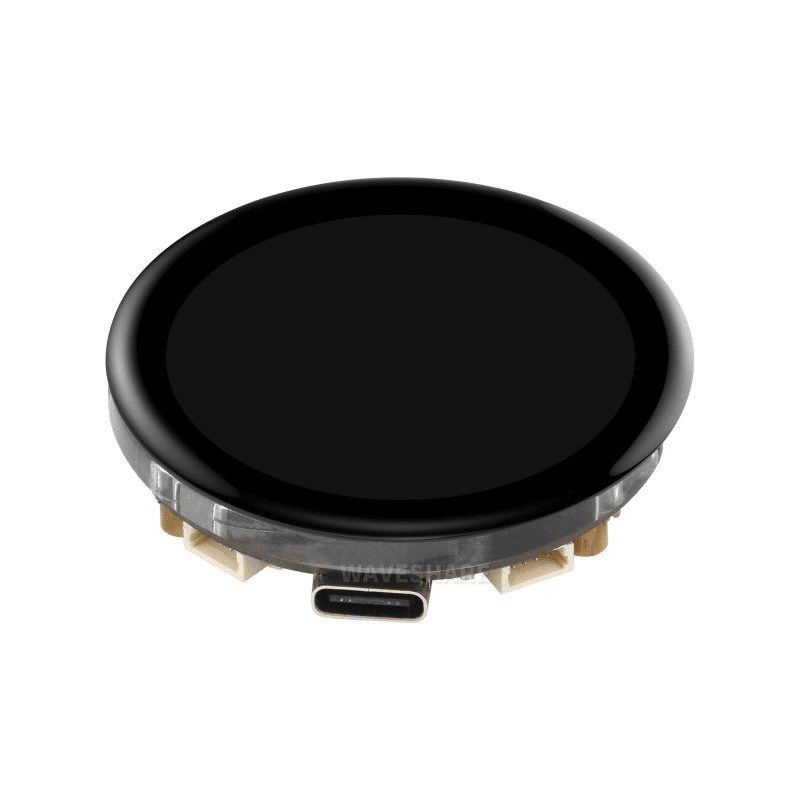
Waveshare ESP32-S3 1.43inch AMOLED Display Development Board
An ESP32-S3 board with a stunning 466×466 round AMOLED display — pair SPIFFS with LVGL to render beautiful local dashboards directly on the screen.
Tips for Efficient SPIFFS Usage
- Minify HTML/CSS/JS: Run your files through a minifier before uploading. This can reduce file sizes by 30–50%, freeing up flash for more content.
- Gzip compression: ESPAsyncWebServer can serve
.gzfiles transparently. Gzip your HTML files and rename them toindex.html.gz— modern browsers accept gzip automatically and you can fit much larger web apps in the same flash space. - Cache-Control headers: Set long cache headers for static assets (CSS, JS) so browsers do not re-download them on every visit. Add
response.addHeader("Cache-Control", "max-age=86400"). - JSON config files: Store device configuration (MQTT server, thresholds, API keys) as a JSON file in LittleFS. Read it on boot, edit it from the web UI, save it back. This eliminates the need to reflash for configuration changes.
- Avoid frequent writes: Flash memory has limited write cycles (~100,000 per sector). Cache values in RAM and write to LittleFS only when values genuinely change, not on every sensor reading.
Frequently Asked Questions
Can I use SPIFFS/LittleFS with the ESP32-C3?
Yes, LittleFS works identically on ESP32-C3, ESP32-S2, ESP32-S3, and ESP32-H2 — all use the same flash memory architecture. Just use LittleFS.h and the same upload tool. The partition size depends on the module’s total flash capacity.
What happens to SPIFFS data when I upload new firmware?
Uploading new firmware (OTA or via USB) does NOT erase the SPIFFS/LittleFS partition. They are separate partitions. Only running the “Upload Sketch Data” tool will overwrite SPIFFS. This is very convenient — you can update firmware without losing your stored configuration files or web assets.
How do I update SPIFFS files remotely (OTA)?
You can implement a file upload endpoint in your web server that accepts multipart form data and writes files to LittleFS. Alternatively, use the AsyncElegantOTA library which provides both firmware and SPIFFS OTA update capability via a browser-based interface.
Is LittleFS faster than SPIFFS?
LittleFS generally has better write performance and more consistent read speeds, especially as the filesystem fills up. SPIFFS can slow down significantly when near-full because it needs to do garbage collection more frequently. For web server use, both are fast enough for most projects.
Conclusion
The ESP32 SPIFFS (and its successor LittleFS) file system is a game-changer for IoT web server projects. By storing your web pages and configuration files on-device, you create truly self-contained IoT nodes that serve rich interfaces over local Wi-Fi without any cloud dependency. The workflow — design HTML locally, upload via Arduino IDE tool, view in browser — is fast and developer-friendly. Whether you are building a home energy monitor, a greenhouse controller, or an industrial parameter display, SPIFFS-backed web servers on ESP32 deliver professional results at hobbyist costs.





Add comment