
ESP32 NTP time sync is one of the most practical features you can add to any IoT project. Whether you are building a data logger, a scheduled automation system, or a digital clock, getting accurate time without an RTC module saves both cost and complexity. The ESP32’s built-in Wi-Fi makes it perfectly suited for fetching time directly from NTP (Network Time Protocol) servers on the internet — no extra hardware needed.
In this comprehensive guide, we will walk you through everything you need to know about syncing time on the ESP32 using NTP, including how to handle Indian Standard Time (IST, UTC+5:30), how to display it, and how to keep it accurate over long runtimes.
What is NTP and How Does It Work?
Network Time Protocol (NTP) is an internet protocol used to synchronise the clocks of computers and embedded devices to a reference time source. NTP servers are maintained by government agencies, universities, and large tech companies around the world and provide time accurate to within a few milliseconds of Coordinated Universal Time (UTC).
When your ESP32 connects to an NTP server, it sends a small UDP packet to port 123 of the server. The server responds with a timestamp, and the ESP32’s NTP client calculates the round-trip delay and adjusts the received timestamp to get the most accurate local time. The whole exchange takes just a few milliseconds over a typical Wi-Fi connection.
The ESP32 stores the fetched time in its internal SNTP (Simple NTP) system, which then increments the time counter using the CPU’s internal timer. While not as accurate as a dedicated RTC chip over very long periods, re-syncing every hour or so keeps the time accurate to well within a second — more than enough for most IoT applications.
India uses a single time zone, IST (Indian Standard Time), which is UTC+5:30. Unlike many countries, India does not observe Daylight Saving Time, which makes NTP configuration simpler — you just set a fixed offset of +5 hours and 30 minutes and never have to worry about DST transitions.
Why Use NTP Instead of an RTC Module?
RTC (Real-Time Clock) modules like the DS3231 and DS1307 are excellent for battery-backed timekeeping when internet connectivity is not available. However, for Wi-Fi connected ESP32 projects, NTP offers several advantages:
- Zero additional cost: No extra module to purchase, no I2C wiring, no batteries to replace.
- Always accurate: NTP servers are synchronized to atomic clocks. An RTC module can drift by several seconds per day without periodic calibration.
- No drift over time: Even after months of operation, your ESP32 will show the correct time as long as it can reach the internet periodically.
- Simplified BOM: Fewer components means fewer points of failure and a simpler PCB layout.
- Automatic DST handling: While not relevant in India, NTP with proper timezone rules handles DST automatically for international projects.
The only scenario where you still need an RTC is when the device must keep time during extended periods without Wi-Fi connectivity — for example, a field data logger in a remote area. For home automation, smart switches, energy monitors, and similar always-connected devices, NTP is the better choice.

Ai Thinker NodeMCU-32S ESP32 Development Board – IPEX Version
A reliable ESP32 development board with dual-core processor and built-in Wi-Fi perfect for NTP time sync projects. Easy to use with Arduino IDE and MicroPython.
Setting Up NTP on ESP32 with Arduino IDE
The ESP32 Arduino core includes the esp_sntp.h library (and the higher-level time.h interface), so you do not need to install any additional libraries. Here is a complete example sketch that connects to Wi-Fi and syncs time via NTP:
#include <WiFi.h>
#include <time.h>

// Replace with your network credentials
const char* ssid     = "YourWiFiSSID";
const char* password = "YourWiFiPassword";

// NTP server and timezone for IST (UTC+5:30)
const char* ntpServer    = "pool.ntp.org";
const long  gmtOffset_sec = 19800;  // 5.5 * 3600 = 19800 seconds
const int   daylightOffset_sec = 0; // India has no DST

void printLocalTime() {
  struct tm timeinfo;
  if (!getLocalTime(&timeinfo)) {
    Serial.println("Failed to obtain time");
    return;
  }
  Serial.println(&timeinfo, "%A, %B %d %Y %H:%M:%S");
}

void setup() {
  Serial.begin(115200);

  // Connect to Wi-Fi
  Serial.print("Connecting to ");
  Serial.println(ssid);
  WiFi.begin(ssid, password);
  while (WiFi.status() != WL_CONNECTED) {
    delay(500);
    Serial.print(".");
  }
  Serial.println("nWiFi connected!");

  // Init and get the time
  configTime(gmtOffset_sec, daylightOffset_sec, ntpServer);

  // Wait for time to be set
  Serial.println("Waiting for NTP time sync...");
  time_t now = time(nullptr);
  while (now < 8 * 3600 * 2) {
    delay(500);
    Serial.print(".");
    now = time(nullptr);
  }
  Serial.println();
  printLocalTime();
}

void loop() {
  delay(5000);
  printLocalTime();
}
Upload this sketch, open the Serial Monitor at 115200 baud, and within a few seconds you will see the current Indian Standard Time printed. The key function here is configTime(gmtOffset_sec, daylightOffset_sec, ntpServer), which initialises the SNTP client and sets the timezone offset.
Understanding the Key Parameters
- gmtOffset_sec: The offset from UTC in seconds. For IST (UTC+5:30), this is 5×3600 + 30×60 = 19800 seconds.
- daylightOffset_sec: Daylight saving time offset in seconds. Set to 0 for India since we do not observe DST.
- ntpServer: The NTP server hostname.
pool.ntp.orgautomatically routes your request to the nearest available server. You can also usetime.google.comortime.cloudflare.comas alternatives.
Configuring IST (UTC+5:30) Timezone
For more advanced timezone handling — especially if you want to use the POSIX timezone string format which gives you more control — you can use the setenv() and tzset() functions:
// Advanced timezone configuration using POSIX string
// IST-5:30 means IST is 5 hours 30 minutes ahead of UTC
setenv("TZ", "IST-5:30", 1);
tzset();

// Initialize SNTP
sntp_setoperatingmode(SNTP_OPMODE_POLL);
sntp_setservername(0, "pool.ntp.org");
sntp_setservername(1, "time.google.com");  // Backup server
sntp_init();
The POSIX timezone format IST-5:30 tells the system that IST (Indian Standard Time) is 5 hours and 30 minutes ahead of UTC (note: in POSIX format, a positive number means the timezone is east of UTC, so the sign convention is the opposite of what you might expect).
Using two NTP servers (primary and backup) is a good practice for production IoT deployments. If pool.ntp.org is temporarily unreachable, the ESP32 will fall back to time.google.com.

30Pin ESP32 Expansion Board with Type-C USB and Micro USB
Expand your ESP32 project with this convenient breakout board that provides easy access to all GPIO pins — ideal for NTP clock and data logging projects.
Displaying and Formatting Time
Once you have synced the time, you can use the standard C strftime() function to format it in any way you like. Here are some useful format strings for Indian applications:
struct tm timeinfo;
getLocalTime(&timeinfo);

char timeStr[64];

// Full date and time: "Wednesday, 11 March 2026 14:30:45"
strftime(timeStr, sizeof(timeStr), "%A, %d %B %Y %H:%M:%S", &timeinfo);

// Short date: "11/03/2026"
strftime(timeStr, sizeof(timeStr), "%d/%m/%Y", &timeinfo);

// Time only: "02:30:45 PM"
strftime(timeStr, sizeof(timeStr), "%I:%M:%S %p", &timeinfo);

// ISO 8601 format: "2026-03-11T14:30:45"
strftime(timeStr, sizeof(timeStr), "%Y-%m-%dT%H:%M:%S", &timeinfo);

// Get individual components
int hour   = timeinfo.tm_hour;   // 0-23
int minute = timeinfo.tm_min;    // 0-59
int second = timeinfo.tm_sec;    // 0-60
int day    = timeinfo.tm_mday;   // 1-31
int month  = timeinfo.tm_mon + 1; // 1-12 (tm_mon is 0-indexed)
int year   = timeinfo.tm_year + 1900; // Years since 1900
Displaying on an OLED or LCD Display
For projects with a display module, you can combine NTP time with an Adafruit SSD1306 OLED or similar display. The time string from strftime() can be passed directly to the display library’s print function. This makes building a stylish desk clock or wall clock surprisingly straightforward — just ESP32, a display, and power supply.
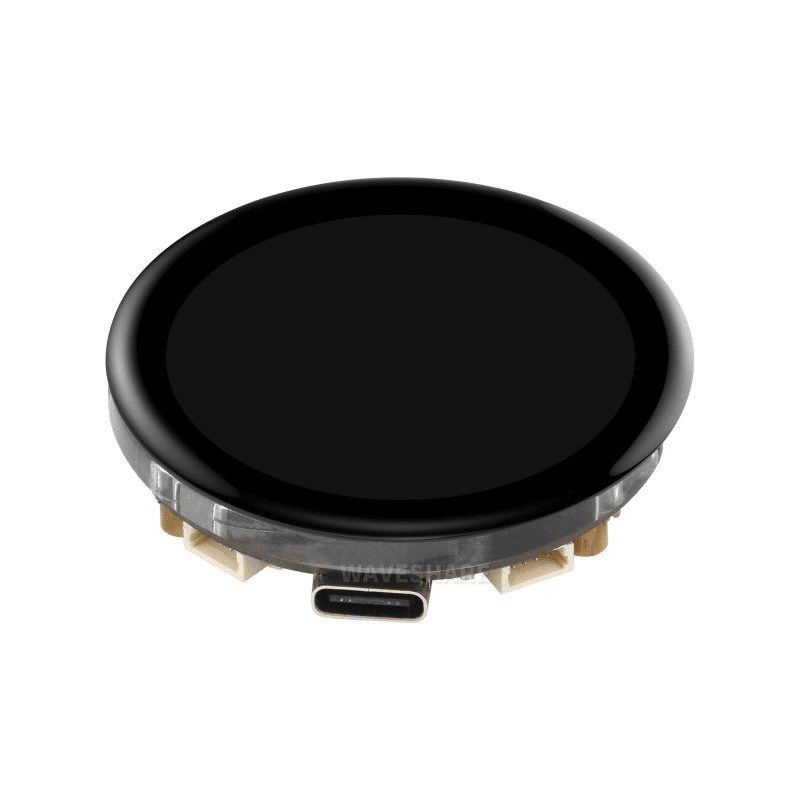
Waveshare ESP32-S3 1.43inch AMOLED Display Development Board
Build a stunning NTP-synced digital clock with this all-in-one ESP32-S3 board featuring a sharp 466×466 round AMOLED display — no separate display module needed.
Practical Applications in Indian IoT Projects
NTP time sync opens up a wide range of practical project possibilities that are particularly relevant in the Indian context:
1. Scheduled Relay Control for Appliances
Use NTP time to automatically turn on/off a relay at specific times — for example, turning on a water pump at 6:00 AM and switching it off at 7:00 AM, or activating a geyser before your morning bath. This eliminates the need for a mechanical timer and can be controlled remotely over Wi-Fi.
2. Time-Stamped Data Logging
If you are logging sensor data (temperature, humidity, energy consumption) to SD card, SPIFFS, or a cloud database, accurate timestamps are essential for meaningful analysis. NTP provides millisecond-accurate timestamps that can be stored in ISO 8601 format for compatibility with databases and spreadsheets.
3. Prayer Time / Alarm Systems
Build a custom alarm system that triggers at pre-programmed times. Combined with a buzzer or small speaker, an NTP-synced ESP32 can serve as a prayer time reminder, medication reminder, or shift-change alarm for small factories.
4. Solar Tracking Systems
For solar panel projects, knowing the precise time and date allows you to calculate the sun’s position and angle your panels accordingly. This is particularly useful for rooftop solar installations in Indian homes.
5. CCTV Timestamp Overlay
If you are using an ESP32-CAM for a surveillance project, overlaying the current date and time (from NTP) on the camera feed adds professional-grade timestamping to your footage without the cost of a dedicated DVR system.

Ai Thinker ESP32 CAM Development Board WiFi+Bluetooth
Combine NTP time sync with camera functionality — perfect for time-stamped surveillance projects. Includes the AF2569 camera module and on-board Wi-Fi.
Troubleshooting Common NTP Issues
Time Not Syncing After Restart
If your ESP32 shows incorrect time after a restart, check the following: First, make sure Wi-Fi is fully connected before calling configTime(). The NTP client requires internet access to fetch the initial time. Add a brief check loop after WiFi.begin() to wait for WL_CONNECTED status.
Time Drifts After Several Hours
The ESP32’s internal timer can drift slightly over time. The SNTP client automatically re-syncs every hour by default. If you need more frequent syncing (e.g., for high-precision logging), use sntp_set_sync_interval() to set the re-sync interval in milliseconds.
getLocalTime() Returns False
This usually means the initial NTP sync has not completed yet. Add a longer timeout in your startup loop, or use a callback function with sntp_set_time_sync_notification_cb() to know exactly when the sync is complete.
Wrong Timezone / Time Off by 5:30
Double-check that gmtOffset_sec is set to 19800 (not 5.5 or 5*3600). A common mistake is using 5.5 * 3600 which in integer arithmetic becomes 19800 correctly, but using just 5 * 3600 = 18000 gives you UTC+5 without the extra 30 minutes.
NTP Blocked by Firewall
NTP uses UDP port 123. If your router or ISP blocks this port, you will not be able to reach NTP servers. In this case, use an HTTP-based time API as a fallback, or switch to a different NTP server that may not be blocked.
Frequently Asked Questions
Can I use NTP without an internet connection?
Standard NTP requires internet access to reach public time servers. However, for local network deployments you can set up a local NTP server (using a Raspberry Pi or router firmware like OpenWRT) and point your ESP32 at the local server’s IP address. This is useful in industrial settings or where internet access is restricted.
How accurate is ESP32 NTP time sync?
After the initial sync, ESP32 NTP accuracy is typically within 50-100 milliseconds of actual UTC time over a home Wi-Fi network. For most IoT applications (scheduling, logging, timestamps), this is more than sufficient. If you need sub-millisecond accuracy, you would need a dedicated GPS or PTP (Precision Time Protocol) solution.
Does the ESP32 keep time when Wi-Fi disconnects?
Yes — once NTP syncs the time, the ESP32 continues counting using its internal timer even if Wi-Fi disconnects. The time will gradually drift (typically a few seconds per hour) but remains usable. When Wi-Fi reconnects, the SNTP client will automatically re-sync and correct any drift.
Can I use this with deep sleep?
When the ESP32 enters deep sleep, it loses the synced time stored in RAM. You have two options: (1) Re-sync via NTP each time the device wakes up (adds a few seconds to wake time), or (2) Store the epoch timestamp in RTC memory before sleeping and restore it on wake, then re-sync periodically.
Which NTP server is best to use in India?
For Indian projects, in.pool.ntp.org routes your request to NTP servers geographically closest to India, giving slightly lower latency. time.google.com and time.cloudflare.com are also excellent alternatives with very high reliability.
Start Your ESP32 NTP Project Today
Find all the ESP32 boards, sensors, and accessories you need for your time-synced IoT projects at Zbotic — India’s trusted electronics components store.







Add comment