
Imagine a wireless motion sensor that runs for two years on a single set of batteries — no wiring, no charging, just set it and forget it. With an ESP32 low power motion detector battery design using deep sleep modes, passive infrared (PIR) sensors, and smart wake-up logic, this is completely achievable. In this guide, we’ll design and build a battery-powered ESP32 motion detector from scratch, optimizing every aspect of power consumption to maximize battery life in typical Indian home or office conditions.
Understanding Power Budget and Battery Life
Before writing a single line of code, let’s think about power. An ESP32 low power motion detector battery project lives or dies by how carefully you manage current draw. Here’s the math:
A standard 18650 Li-Ion cell has a capacity of approximately 2500–3000mAh. Two cells in parallel give you 5000–6000mAh. To last 2 years (17,520 hours), your average current draw must be:
5000mAh ÷ 17,520 hours = 0.285mA average
That’s only 285 microamps average! Let’s see where current is consumed:
| State | Current Draw | Duration (typical) |
|---|---|---|
| Deep Sleep | 10–20 µA | 99.9% of time |
| Wake-up + PIR check | 40–80 mA | 50ms |
| Wi-Fi connect + send | 160–260 mA | 1–3 seconds |
| PIR sensor (always on) | 50–80 µA | Always |
The key insight: if motion events are rare (say, 10 alerts per day, each requiring a 2-second Wi-Fi transmission), the average current is dominated by deep sleep current. Keep deep sleep current below 100µA and Wi-Fi transmission brief, and 2-year battery life becomes realistic.
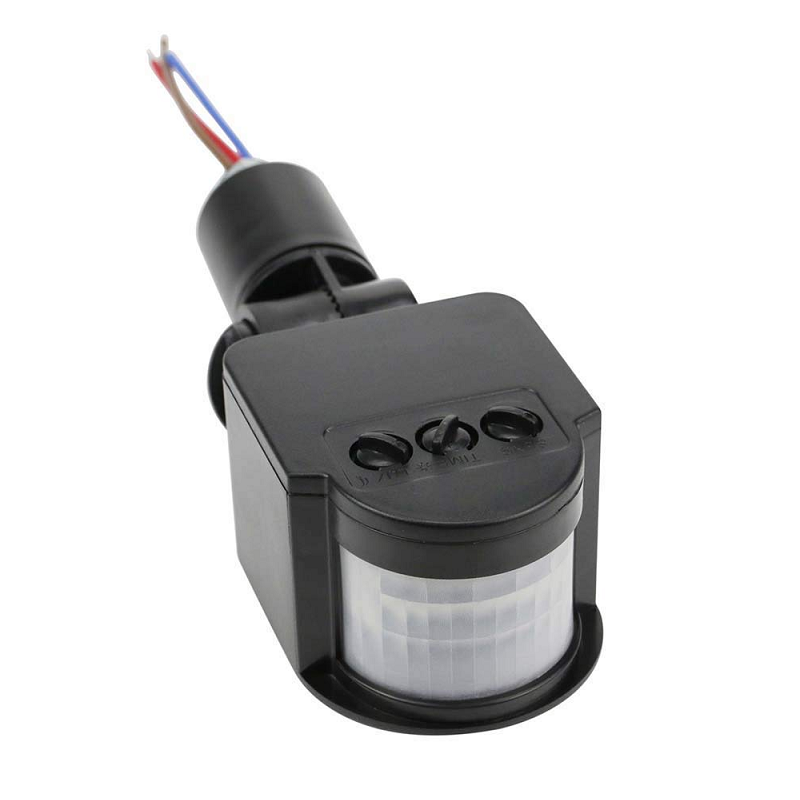
AC 220V Security PIR Human Body Motion Sensor Detector Coil LED Light Switch
A high-sensitivity PIR motion sensor for detecting human presence — the ideal trigger input for your ESP32 low-power motion alert system.
ESP32 Sleep Modes Explained
The ESP32 has several power modes. Understanding them is critical for battery-powered design:
Active Mode
Both cores running, Wi-Fi active. Current draw: 160–260mA. This is the normal operating state — never stay here when idle on battery.
Modem Sleep
CPU runs normally but Wi-Fi radio is turned off between beacon intervals. Useful for maintaining Wi-Fi connection with reduced power. Current: 20–68mA. Still too high for our use case.
Light Sleep
CPU paused, RAM retained, peripherals mostly off. Wake-up by timer or GPIO in ~1ms. Current: 0.8–1mA. RAM content is preserved, so you can resume where you left off.
Deep Sleep (Our Target)
Everything off except RTC memory and RTC peripherals. Wake-up by timer, GPIO (ext0/ext1), ULP coprocessor, or touch sensor. Current: 10–20µA typical (5µA minimum with external crystal removed). RAM content is lost, but 8KB RTC RAM is preserved. This is the mode we’ll use for our motion detector.
Hibernation Mode
Even more aggressive than deep sleep — RTC memory disabled too. Only GPIO or timer can wake. Current: ~2.5µA. Used only when no RAM retention is needed at all.
Hardware Design for Minimum Power
Hardware choices matter as much as firmware for ultra-low-power design. Here are the key decisions:
Choosing the Right ESP32 Board
Avoid development boards with onboard USB-to-serial chips (CP2102, CH340) — these draw 5–20mA even when the ESP32 is in deep sleep. For production builds, use a bare ESP32 module (like ESP32-WROOM-32 or ESP32-C3) with your own power regulation. For prototyping, measure the specific board’s sleep current before committing.
Power Regulation
The onboard 3.3V regulator on most dev boards is a linear LDO. At 3.7V input, LDO efficiency is about 89% — acceptable. However, if running from a 5V USB power bank, the LDO wastes 34% of your energy as heat. Use a buck converter (switching regulator) for any supply voltage above 3.6V for maximum efficiency.
PIR Sensor Selection
Standard HC-SR501 PIR modules draw 65µA quiescent, which is perfect for our application. The PIR output goes HIGH when motion is detected — we connect this to the ESP32’s EXT_WAKEUP0 GPIO and keep the ESP32 in deep sleep until the PIR fires.

2 x 18650 Lithium Battery Shield for Arduino/ESP32/ESP8266
Power your ESP32 motion sensor with two 18650 cells for up to 2 years of battery life — this shield includes overcharge protection and a 5V USB output for convenient charging.
PIR Sensor External Wake-Up Configuration
The most power-efficient architecture is PIR-triggered wake-up using ESP32’s EXT0 (external wakeup on a single pin). Here’s how to wire it:
- PIR VCC → 3.3V (or switch-controlled via a GPIO to power off PIR completely between long sleep periods)
- PIR GND → GND
- PIR OUT → GPIO 33 (RTC-capable GPIO — must use GPIO 0, 2, 4, 12-15, 25-27, 32-39 for wake-up)
The PIR has a built-in delay (typically 3 seconds) and sensitivity potentiometer. Adjust these to avoid false triggers from air currents or animals.
Firmware: Ultra-Low-Power Motion Alert Code
#include <Arduino.h>
#include <WiFi.h>
#include <HTTPClient.h>
#include "esp_sleep.h"

#define PIR_PIN 33
const char* ssid      = "YOUR_WIFI";
const char* password  = "YOUR_PASSWORD";
const char* serverUrl = "http://192.168.1.100:1880/motion-alert";

// RTC memory survives deep sleep
RTC_DATA_ATTR int bootCount = 0;
RTC_DATA_ATTR int motionCount = 0;

void sendAlert() {
  WiFi.begin(ssid, password);
  int retries = 0;
  while (WiFi.status() != WL_CONNECTED && retries < 20) {
    delay(100);
    retries++;
  }
  if (WiFi.status() == WL_CONNECTED) {
    HTTPClient http;
    http.begin(serverUrl);
    http.addHeader("Content-Type", "application/json");
    String body = "{"event":"motion","count":" + String(motionCount) + "}";
    http.POST(body);
    http.end();
  }
  WiFi.disconnect(true);
  WiFi.mode(WIFI_OFF);
}

void setup() {
  bootCount++;
  esp_sleep_wakeup_cause_t wakeup = esp_sleep_get_wakeup_cause();
  if (wakeup == ESP_SLEEP_WAKEUP_EXT0) {
    motionCount++;
    sendAlert();
  }
  // Configure wake-up on PIR HIGH signal
  esp_sleep_enable_ext0_wakeup((gpio_num_t)PIR_PIN, 1);
  // Enter deep sleep — wakes ONLY when PIR triggers
  esp_deep_sleep_start();
}

void loop() {
  // Never reached — deep sleep restarts from setup()
}
This firmware boots, checks why it woke up, sends an alert if it was a PIR trigger, then immediately goes back to deep sleep. The active time is 1–3 seconds for Wi-Fi (when motion detected) or <50ms for other wake-up causes. The rest of the time, the ESP32 draws only 10–15µA.
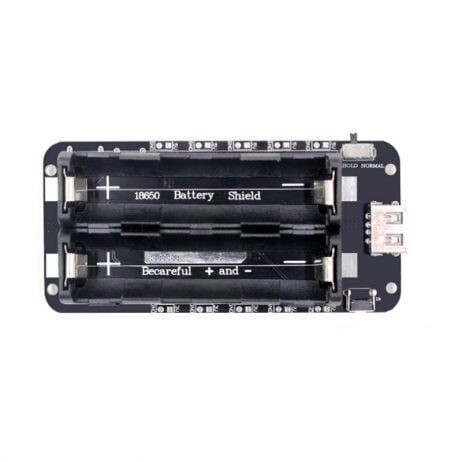
2 x 18650 Lithium Battery Shield V8 – 5V/3A with Micro USB
Designed for ESP32 deep sleep projects, this battery shield supports high peak currents during Wi-Fi transmission and has low quiescent current when idle.
Advanced Optimizations for 2-Year Battery Life
Use Static IP Instead of DHCP
DHCP negotiation adds 200–500ms to every Wi-Fi connection, consuming extra energy. Configure a static IP in your router’s DHCP reservation table and hardcode it in the firmware. This alone saves 30–50% of the energy spent on Wi-Fi connection time.
Store Wi-Fi BSSID and Channel in RTC Memory
The ESP32’s Wi-Fi reconnection is faster when it knows the BSSID and channel of the access point. Store these in RTC_DATA_ATTR variables after the first connection, and use WiFi.begin(ssid, password, channel, bssid) on subsequent boots. This reduces connection time from 1–3 seconds to under 400ms.
Use MQTT with Persistent Session
Instead of HTTP POST, use MQTT with a persistent session (clean session = false). The broker remembers your client’s subscription, so reconnection is faster. Combined with QoS 1 for reliable delivery, this is the most efficient approach for periodic sensor data.
Temperature-Based Battery Monitoring
Indian summers can push temperatures to 45°C+ in some regions. Li-Ion batteries lose about 20% capacity at 45°C versus 25°C. Plan your battery sizing with a 30% margin for thermal derating if the device will be deployed in hot environments like attics, utility rooms, or outdoor enclosures.
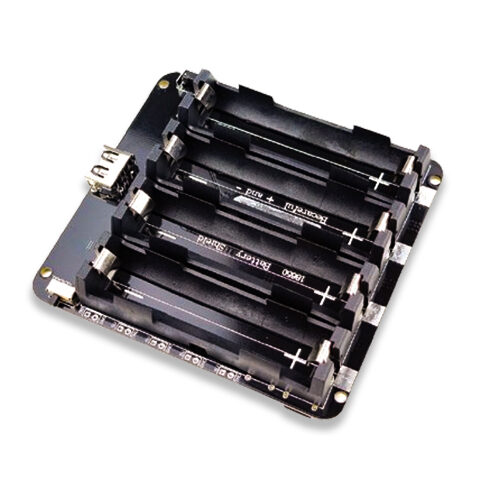
4 x 18650 Lithium Battery Shield V8/V9 for ESP32/ESP8266 with On-Off Button
For 3+ year battery life targets or high-traffic areas, this 4-cell shield doubles capacity — with an onboard on/off switch for easy deployment and maintenance.
Frequently Asked Questions
What is the actual deep sleep current of a typical ESP32 dev board?
This varies significantly by board. A bare ESP32-WROOM-32 module draws 5–15µA in deep sleep. However, most development boards with onboard USB-UART chips and power LEDs draw 1–5mA in deep sleep — completely ruining battery life. Always measure with a multimeter or current probe, or choose a bare module for battery applications.
Can I use ESP32-C3 instead of ESP32 for even lower power?
Yes. The ESP32-C3 (RISC-V based) has excellent deep sleep power characteristics — around 5µA versus 10–20µA for standard ESP32. It also supports Wi-Fi 6 (802.11ax) for faster connections. The tradeoff is fewer GPIO pins and only a single core, but for a simple motion detector, the ESP32-C3 is a great choice.
How do I handle Wi-Fi connection failures on battery power?
Add a retry limit in the firmware: if Wi-Fi doesn’t connect within 3 seconds, abort, store the event in RTC memory, and go back to deep sleep. On the next motion event or a scheduled daily wake-up, attempt to send all stored events. This prevents the device from draining the battery trying endlessly to connect to a temporarily unavailable network.
Will PIR sensor work reliably during Indian monsoon and winter?
Standard HC-SR501 PIR sensors work from 0°C to 50°C, covering all Indian climates. Humidity only affects PCB tracks, not the sensor element itself — conformal coating the PCB prevents corrosion in high-humidity coastal or monsoon environments. The PIR dome is weatherproof from the front by design.
Find all components for your ultra-low-power ESP32 project at Zbotic.in — battery shields, PIR sensors, ESP32 boards, and more. Fast shipping across India.





Add comment