
Drone Mapping Guide: How to Survey Land with ArduPilot in India
Drone mapping is transforming how land surveys are conducted across India. From agricultural field mapping in Punjab to urban planning surveys in Bengaluru, drones equipped with ArduPilot flight controllers are delivering centimetre-level accuracy at a fraction of the cost of traditional surveying methods. Whether you are a civil engineer, farmer, or drone enthusiast looking to enter the professional mapping space, this comprehensive guide will walk you through everything you need to know about drone mapping in India using ArduPilot.
1. What Is Drone Mapping and Why Does It Matter in India?
Drone mapping, also called UAV photogrammetry or aerial surveying, involves flying a drone along a pre-planned grid pattern while capturing overlapping photos. These images are then stitched together using photogrammetry software to produce high-resolution 2D orthomosaic maps, 3D terrain models (DTM/DSM), and point clouds.
In India, the relevance of drone mapping has exploded due to several government initiatives. The SVAMITVA scheme aims to map every rural habitation using drones, and the PM-Kisan programme is increasingly using aerial data for crop health monitoring. The Survey of India has partnered with drone companies to complete geospatial surveys across hundreds of districts.
Traditional land surveys using total stations and theodolites can take weeks for a 100-hectare area. A drone mapping mission can cover the same area in under two hours with comparable or better accuracy. This makes drone mapping not just a technological upgrade but an economic necessity for India’s rapidly developing infrastructure and agriculture sectors.
2. Hardware Requirements for a Mapping Drone
Choosing the right hardware is the foundation of a successful mapping operation. For professional land surveys in India, you need a platform that offers stable flight, long endurance, and reliable GPS positioning.
Frame and Airframe
For mapping missions, a fixed-wing or large multirotor with a minimum 15-minute flight time is preferred. Hexacopter and octocopter frames offer redundancy — critical when flying over populated farmlands. The EFT agricultural drone frames are well-suited for this purpose, offering sturdy build quality and space for payload cameras.
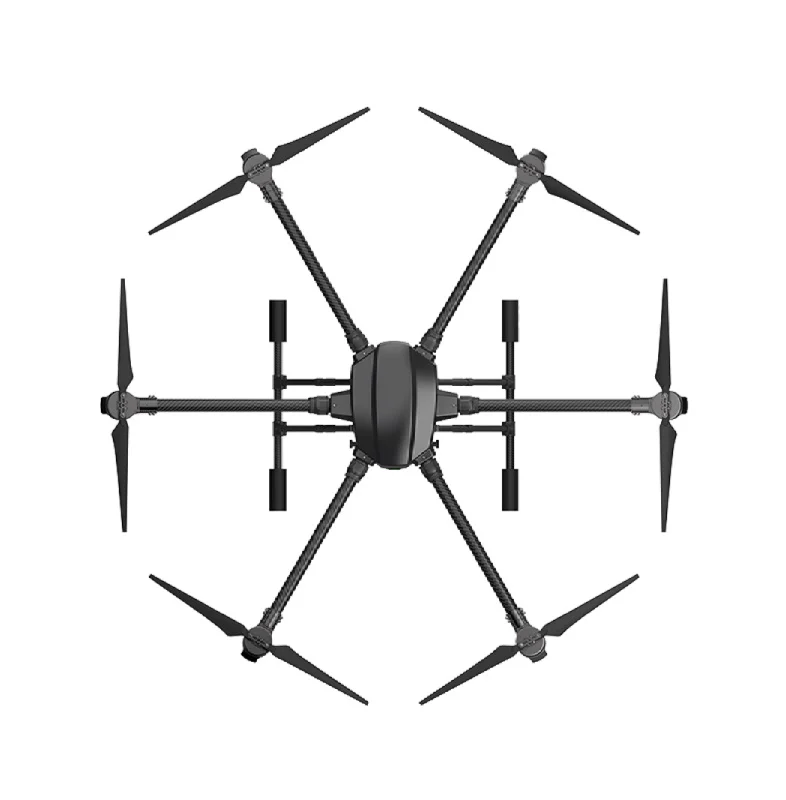
EFT 6120 Multifunction Surveillance Drone Frame
A robust hexacopter frame designed for surveillance and mapping applications. Its foldable arms make transport easy across Indian terrain, and the wide motor spacing ensures stability in gusty conditions common to surveying environments.
View on ZboticFlight Controller
ArduPilot runs on Pixhawk-series flight controllers. The Pixhawk 4, Cube Orange, and Pixhawk 6C are the most popular choices in India for professional mapping builds. These controllers support the full ArduCopter and ArduPlane firmware stack needed for autonomous grid missions.
GPS and Telemetry
A high-quality GPS with compass is non-negotiable for mapping. Use a u-blox M8N or M9N GPS module mounted on a tall mast to minimise magnetic interference. For ground station communication, 915MHz telemetry radio modules work well across India (ISM band, no special license needed up to the permitted power levels).

3DR 100mW Radio Telemetry 915MHz For APM PX4 Pixhawk
The industry-standard 915MHz telemetry pair for ArduPilot systems. Provides reliable MAVLink communication between your drone and Mission Planner on the ground over distances up to 1km line-of-sight.
View on ZboticCamera
For mapping, you need a camera with a global shutter or fast electronic shutter to avoid motion blur at survey speeds. Sony RX0 II, Sony A6000, and the MicaSense Altum (for multispectral agricultural surveys) are popular choices. For beginners, a GoPro Hero set to fixed interval shooting can produce decent results for small areas.
Power Distribution
A good power distribution board (PDB) is crucial to provide clean, stable power to all components during the long flights required for mapping.
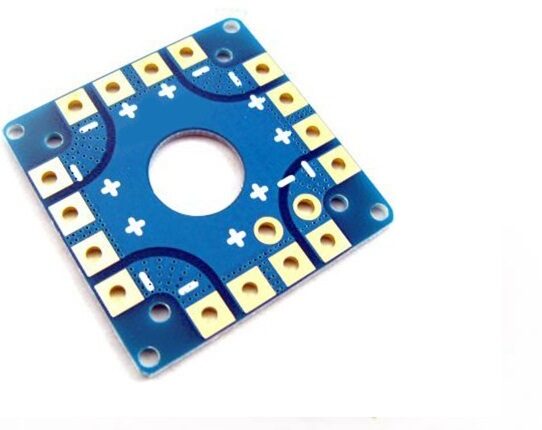
100A Multirotor ESC Power Distribution Battery Board
Rated at 100A continuous, this PDB is ideal for hexa and octocopter mapping rigs. Includes integrated current sensing for real-time battery monitoring through the ArduPilot flight controller.
View on Zbotic3. Setting Up ArduPilot for Mapping Missions
ArduPilot is the world’s most advanced open-source autopilot, maintained by a massive global community. For mapping, you will primarily use ArduCopter for multirotor builds or ArduPlane for fixed-wing surveys.
Initial Configuration
- Flash Firmware: Use Mission Planner or QGroundControl to flash the latest stable ArduCopter firmware to your Pixhawk. For mapping, 4.4.x or later is recommended.
- Accelerometer Calibration: Perform the 6-position accelerometer calibration on a flat, stable surface. Do this indoors, away from vibrations.
- Compass Calibration: Fly to an open area free from metal objects. Run the onboard compass calibration. With an M8N GPS, the external compass should be set as primary.
- ESC Calibration: Calibrate all ESCs simultaneously using ArduPilot’s all-at-once method via Mission Planner.
- Radio Calibration: Map your transmitter channels. For mapping drones, assign a switch to trigger camera shutter output via the flight controller’s relay pin.
Key ArduPilot Parameters for Mapping
| Parameter | Value | Purpose |
|---|---|---|
| WP_YAW_BEHAVIOR | 1 | Always face direction of travel |
| WPNAV_SPEED | 500–800 cm/s | Survey speed (5–8 m/s) |
| CAM_TRIGG_DIST | Calculated | Distance-based shutter triggering |
| RTL_ALT | 5000 cm | Safe RTL altitude (50m) above trees |
Vibration Damping
Excessive vibrations are the number one enemy of clean aerial photography. Mount your flight controller on anti-vibration standoffs.
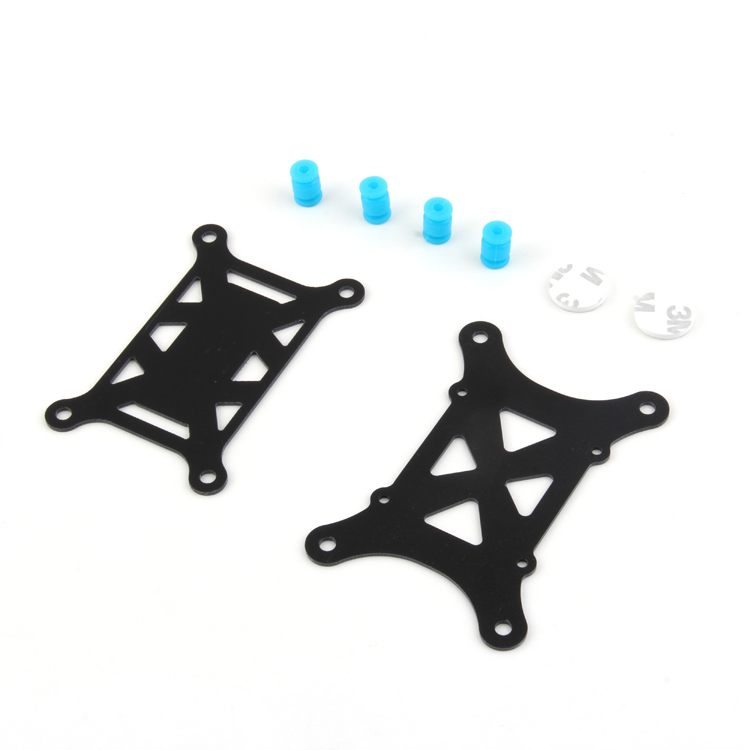
Anti-Vibration Shock Absorber for APM/KK/MWC/PixHawk
Gel-based vibration damping mount specifically designed for APM and Pixhawk flight controllers. Keeps IMU noise below the ArduPilot accepted threshold for reliable altitude hold and GPS-assisted flight.
View on Zbotic4. Planning Your Survey Mission with Mission Planner
Mission Planner is the primary ground control station (GCS) used with ArduPilot. It has a dedicated Survey Grid tool that automates most of the mission planning work.
Step-by-Step Mission Planning
Step 1: Define the Survey Area
Open Mission Planner and navigate to the Flight Plan tab. Use the Polygon tool to draw the boundary of your survey area directly on the map. Google Maps satellite imagery is loaded automatically if you have internet. For rural areas in India with poor connectivity, pre-download offline maps using the Load Kml/KMZ function from a boundary file provided by the land owner or revenue department.
Step 2: Configure Survey Grid Parameters
Right-click inside your polygon and select Auto WP > Survey (Grid). Key parameters to configure:
- Altitude: 60–120m AGL is typical for 3–5cm GSD (ground sampling distance)
- Overlap: 80% frontal, 70% lateral for photogrammetry. Higher overlap = better 3D models but more photos.
- Speed: Match to your camera’s shutter speed capability (5–8 m/s is standard)
- Camera: Select your camera profile or enter sensor width, focal length manually
Step 3: Calculate GSD
GSD (Ground Sampling Distance) is the size of one pixel on the ground. For cadastral surveys, aim for GSD < 3cm. The formula is:
GSD (cm/pixel) = (Flight Altitude (m) × Sensor Width (mm)) / (Focal Length (mm) × Image Width (pixels)) × 100
Step 4: Add Ground Control Points (GCPs)
GCPs are physical markers placed on the ground before the flight, with their precise GPS coordinates measured using a DGPS or RTK GPS receiver. For surveys in India that require legal accuracy (e.g., for land records), a minimum of 5 GCPs per 50 hectares is recommended. Without GCPs, your map will have 2–5m absolute accuracy; with GCPs and RTK, you can achieve 2–3cm.
Step 5: Upload and Verify
Upload the mission to the flight controller and verify it in simulation mode. Check that the total flight time fits within your battery capacity with a 20% reserve minimum.
5. Executing the Survey Flight
On the day of the survey, follow this checklist for a professional and safe mapping operation.
Pre-Flight Checklist
- Check NOTAM (Notice to Airmen) on the DGCA Digital Sky portal for your area
- Verify all propellers are tight, balanced, and free of damage
- Confirm GPS has 3D lock with HDOP < 2.0 (aim for < 1.5)
- Set up GCP markers before flight (fluorescent A4 cloth squares work well)
- Record GCP coordinates with your RTK GPS or a CORS-corrected DGPS
- Verify telemetry link is established with Mission Planner
- Check battery voltage — never launch below 90% capacity for a mapping mission
- Brief any assistants on the safety perimeter and emergency procedures
Launch and Monitoring
Arm the drone in Loiter mode. Switch to Auto mode after confirming GPS lock is stable. The drone will automatically execute the survey grid. Monitor the mission on Mission Planner, watching for:
- Battery voltage — set failsafe to RTL at 20% remaining
- GPS satellite count — alert at below 8 satellites
- Altitude maintenance — check for EKF errors in the HUD
- Camera shutter trigger log — MAVLink camera feedback messages confirm each photo
Wind Considerations for India
India’s varied geography creates unique wind challenges. In coastal Maharashtra and Tamil Nadu, sea breeze can reach 6–8 m/s by afternoon. In Rajasthan and Gujarat, desert thermals cause strong vertical gusts from 11am onwards. Always fly mapping missions in the morning, ideally between sunrise and 10am. The ArduPilot wind estimation parameter (EKF2_WIND_PNOISE) helps compensate for crosswind effects on survey accuracy.
6. Post-Processing: Creating Orthomosaic Maps
After landing, the real work begins. Photogrammetry software uses Structure from Motion (SfM) algorithms to reconstruct the survey area from your overlapping photos.
Popular Photogrammetry Software for Indian Users
- Agisoft Metashape: Industry standard. Professional edition ~USD 3,499 or educational ~USD 549. Runs locally on Windows/Linux.
- DroneDeploy: Cloud-based, subscription model. Easy to use for beginners. Good for agricultural analysis.
- OpenDroneMap (ODM): Free, open-source alternative. Runs locally or via WebODM interface. Excellent for budget-conscious Indian operators.
- Pix4D: Professional-grade with excellent accuracy, popular among surveyors and civil engineers in India.
OpenDroneMap Workflow (Free Option)
- Install WebODM using Docker:
git clone https://github.com/OpenDroneMap/WebODM && cd WebODM && ./webodm.sh start - Create a new project and upload all images
- Import GCP coordinates in the required format (EPSG:4326 for WGS84)
- Set processing options: High accuracy preset, PC Quality: High
- Process takes 30min to 4 hours depending on image count and PC specs
- Export orthomosaic as GeoTIFF and point cloud as LAS for use in CAD/GIS software
Deliverables for Indian Survey Use Cases
Depending on the application, your post-processing output will vary:
- Agricultural Surveys: NDVI maps from multispectral imagery, crop stress index overlays
- Revenue/Land Records: Georeferenced orthomosaic in EPSG:43N (Indian projection), area calculations per parcel
- Infrastructure: 3D terrain models for road design, DSM/DTM in AutoCAD-compatible DXF format
- Construction: Volumetric calculations for cut-and-fill estimates, stockpile volumes
7. DGCA Regulations for Drone Mapping in India
India’s drone regulatory framework, governed by DGCA (Directorate General of Civil Aviation), has evolved significantly with the Drone Rules 2021 and subsequent amendments. Understanding these rules is essential before conducting any commercial mapping operation.
Drone Categories
- Nano (< 250g): Minimal regulation, no UIN needed, good for hobby mapping
- Micro (250g–2kg): UIN required, allowed in Green zones without permission
- Small (2–25kg): Most mapping drones fall here. UIN + UAOP required for commercial use
Mandatory Requirements for Commercial Mapping
- UIN (Unique Identification Number): Register your drone on the Digital Sky portal
- UAOP (UAS Operator Permit): Required for Small and above categories outside Green zones
- Remote Pilot Certificate (RPC): Commercial mapping pilots must hold an RPC from a DGCA-approved training organisation
- Airspace clearance: Check the Digital Sky App before every flight. Green = permitted, Yellow = requires permission, Red = prohibited
- Insurance: Third-party liability insurance mandatory for commercial operations
Special permissions are required for mapping near international borders (no-fly within 25km), around airports (CTR/ATZ), and over populated areas. The government has notified several drone corridors for beyond visual line of sight (BVLOS) operations; check the latest gazette notifications for your state.
8. Real-World Use Cases in India
Agricultural Surveys in Punjab and Haryana
Farmers and FPOs (Farmer Producer Organisations) are using drone mapping to calculate exact acreage for MSP (Minimum Support Price) claims, crop insurance, and fertiliser requirement estimation. A single operator with a mapping drone can survey 300–500 acres per day, compared to a manual surveyor who might cover 10 acres.
SVAMITVA Scheme Surveys
The government’s SVAMITVA scheme has mapped over 3 lakh villages using drones. Local survey companies with DGCA-approved operators have seen a massive increase in drone mapping contracts. If you hold an UAOP and RPC, this is one of the highest-paying consistent work streams for drone operators in rural India today.
Mining Volume Calculations in Chhattisgarh and Jharkhand
Mining companies use drone mapping to calculate stockpile volumes and verify extraction quantities for royalty calculations. Traditional surveying of large open-pit mines used to take 2–3 days; drone mapping achieves the same in 4–6 hours.
Solar Farm Site Surveys
With India’s rapid solar capacity expansion, drone mapping is used to assess land topography, slope, and shadow analysis before solar farm installation. The 3D terrain models from ArduPilot mapping missions are directly imported into solar layout software.
9. Pro Tips for Better Mapping Results
- Use a 433MHz telemetry module in densely vegetated areas where 915MHz can face more obstruction — the lower frequency penetrates foliage better for ground station communication.
- Always fly cross-hatch (double grid) for steep terrain or 3D modelling applications. This means flying the grid in two perpendicular directions for better 3D reconstruction.
- Enable GPS logging on the camera if available (or use a hotshoe GPS logger) so each photo has precise geotag data. This reduces reliance on GCPs and speeds up processing.
- Carbon fibre propellers flex less than plastic, maintaining consistent pitch and thrust throughout the mission — important for altitude accuracy.
- Set a landing pad to mark the home point clearly, especially in agricultural fields where the take-off point can be hard to locate visually after a 30-minute mission.

110cm Diameter Fast-fold Landing Pad for RC Drone
A large, highly visible landing pad that marks your home point clearly in agricultural fields and open terrain. Folds compactly for transport in your survey kit bag.
View on Zbotic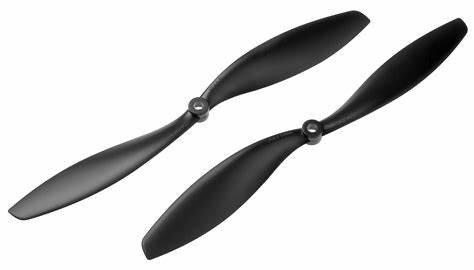
1045 Carbon Fiber Propeller CW&CCW Pair
Stiff, lightweight carbon fibre 10×4.5″ propellers ideal for survey quadcopters. Lower flex means consistent thrust output across the entire mapping mission duration.
View on Zbotic10. Frequently Asked Questions
A: For hobby and recreational mapping on your own land, a certificate is not strictly required for Nano and Micro category drones. However, for any commercial mapping work — including for clients, government tenders, or paid surveys — you must hold a valid DGCA Remote Pilot Certificate. Fines for non-compliance can reach ₹1 lakh or more.
A: Agricultural health surveys can work with 5–10cm GSD. For NDVI mapping, even 15cm GSD is acceptable. Cadastral surveys that feed into land records (patta, khata, records of rights) require 3cm GSD or better with GCPs to meet survey department accuracy standards.
A: A 5S 10,000mAh battery on a 600mm quad flying at 80m altitude with 75% overlap can typically cover 15–25 acres per battery. Agricultural hexacopters with 16,000mAh+ packs and efficient motors can cover 40–60 acres per charge. Always plan for 20% battery reserve.
A: DJI Phantom/Mavic platforms offer convenience and reliability for entry-level mapping. However, ArduPilot on custom builds offers greater flexibility: you can fly larger payloads (multispectral cameras, LiDAR), access raw flight logs, integrate with Indian CORS networks for PPK accuracy, and avoid DJI’s geo-fencing restrictions that block flights near many Indian cities.
A: OpenDroneMap (ODM) with WebODM interface is the best free option. It produces industry-standard GeoTIFF orthomosaics, point clouds, and DSM/DTM files. For cloud processing without local hardware, Autodesk ReCap offers free trial credits and works well with ArduPilot mission exports.
Ready to Build Your Drone Mapping Rig?
Zbotic stocks all the components you need — from ArduPilot-compatible flight controllers to professional-grade frames and GPS modules. Get everything delivered across India.
Shop Drone Components





Add comment