
Choosing the right stepper motor is one of the most impactful decisions you can make when building or upgrading a 3D printer in India. Whether you are printing PLA prototypes or high-temperature engineering filaments, a mismatched motor will cause missed steps, layer shifts, and failed prints. This guide covers everything you need to know to pick the best stepper motor for your 3D printer in India in 2026.
How Stepper Motors Work in 3D Printers
A stepper motor converts electrical pulses into precise mechanical rotation. Unlike DC motors that spin continuously, a stepper motor moves in discrete angular increments called steps. A typical 1.8-degree stepper motor completes 200 steps per full revolution. This predictable, open-loop motion is exactly what FDM 3D printers need to position the print head and extruder with repeatable accuracy.
In a Cartesian 3D printer, you will find stepper motors on the X-axis, Y-axis, Z-axis, and extruder (E-axis). CoreXY machines use two motors for XY motion simultaneously. Each axis demands slightly different torque and speed characteristics, which is why understanding specifications before buying matters.
The two primary winding configurations are bipolar and unipolar. Almost all modern 3D printers use bipolar motors because they deliver significantly higher torque for the same physical size. Bipolar motors have 4 wires (two coil pairs), while unipolar motors have 5 or 6 wires. Make sure you match your motor’s wiring to your driver board.
NEMA Standards: NEMA 14, NEMA 17, NEMA 23
NEMA (National Electrical Manufacturers Association) defines the faceplate dimensions of stepper motors. The number after NEMA indicates the faceplate width in tenths of an inch.
- NEMA 14 (35.2 mm): Compact and lightweight, used in bowden extruders on Ender-3-style machines or direct-drive extruders like the Orbiter and Sherpa Mini. Step angle is usually 1.8° or 0.9°.
- NEMA 17 (42.3 mm): The 3D printing industry standard. Used on X, Y, Z axes and the extruder of virtually every consumer FDM printer — Ender 3, Prusa i3 MK4, Bambu Lab A1 (partially), Voron 2.4, etc.
- NEMA 23 (57.15 mm): Larger, higher-torque motors. Rarely used in standard FDM printers but found in heavy-gantry printers, multi-material setups, and large-format machines where the X/Y gantry is heavier.
For the vast majority of DIY 3D printer builds and upgrades in India, NEMA 17 is your primary focus. The rest of this guide concentrates on NEMA 17 variants.
Key Specs to Compare Before Buying
1. Holding Torque
Holding torque (measured in kg·cm or N·m or oz·in) is the maximum torque the motor can resist when stationary and energised. For XY axes on a light-gantry printer, 40–50 N·cm (≈40–50 kg·cm × 0.1) is sufficient. For Z-axis and direct-drive extruders, you often want 45–59 N·cm or higher.
2. Step Angle
1.8° = 200 full steps/revolution — the most common and easiest to source in India. 0.9° = 400 full steps/revolution — finer native resolution, quieter at medium speeds, popular in high-resolution builds like Voron. Always confirm with the seller before purchasing.
3. Rated Current
Rated current (in Amperes per coil) determines how much current your driver must supply. Common values: 0.84 A (28BYJ-style mini), 1.2 A (light-duty NEMA 17), 1.68–2.0 A (standard NEMA 17). Higher current typically equals higher torque, but also more heat. Set your driver’s Vref appropriately — usually 60–80% of rated current to reduce heat without sacrificing torque.
4. Inductance & Resistance
Low inductance motors perform better at high speeds. If you plan to print fast (250+ mm/s), look for motors with inductance below 3 mH. Higher inductance is acceptable for Z-axis lead screws that move slowly.
5. Body Length
NEMA 17 bodies range from 20 mm (pancake) to 60 mm (long body). Longer bodies generally hold more copper winding and produce more torque. The 40–48 mm length is the sweet spot for most 3D printer applications.
6. Shaft Type
A D-shaft (flat cut on the shaft) provides a secure mechanical grip for GT2 pulleys. Ensure the shaft diameter matches your pulley bore — typically 5 mm for NEMA 17. Dual-shaft motors (shaft extends from both ends) are useful for extruders with filament sensors.

42HS48-1204A-20F NEMA17 5.6 kg-cm Stepper Motor with Detachable Cable – D-Type Shaft
48 mm body, 1.2 A rated current, D-type shaft, detachable cable — an ideal drop-in replacement for Ender 3, Creality CR-10, and custom Cartesian/CoreXY builds. The 5.6 kg·cm holding torque handles X, Y, and extruder duties comfortably.
Top Stepper Motor Picks for 3D Printers in India
Best Overall: NEMA 17 42HS48-1204A-20F (5.6 kg·cm, D-Shaft)
This is the motor we recommend for most 3D printer builds and replacements in India. The 48 mm body strikes the perfect balance between torque and weight. The D-type shaft provides positive pulley grip without set-screw slippage. The detachable cable is a bonus for CoreXY machines where cable management is critical. At 1.2 A rated current, it runs cool on an A4988 driver set to 70% current.
Ideal for: Ender 3, Ender 5, CR-10, custom Cartesian printers, CoreXY X/Y axes, direct-drive extruder upgrades.
Best for Light-Duty / Compact Extruder: 28BYJ-48 5V Stepper
The 28BYJ-48 is a geared unipolar motor that produces surprisingly high torque from a tiny form factor. It is not suitable for X/Y/Z axes, but it works as a low-cost extruder motor on very lightweight, slow-speed machines or as a filament-runout sensor mechanism. Its 5V operation and ULN2003 driver make it beginner-friendly.
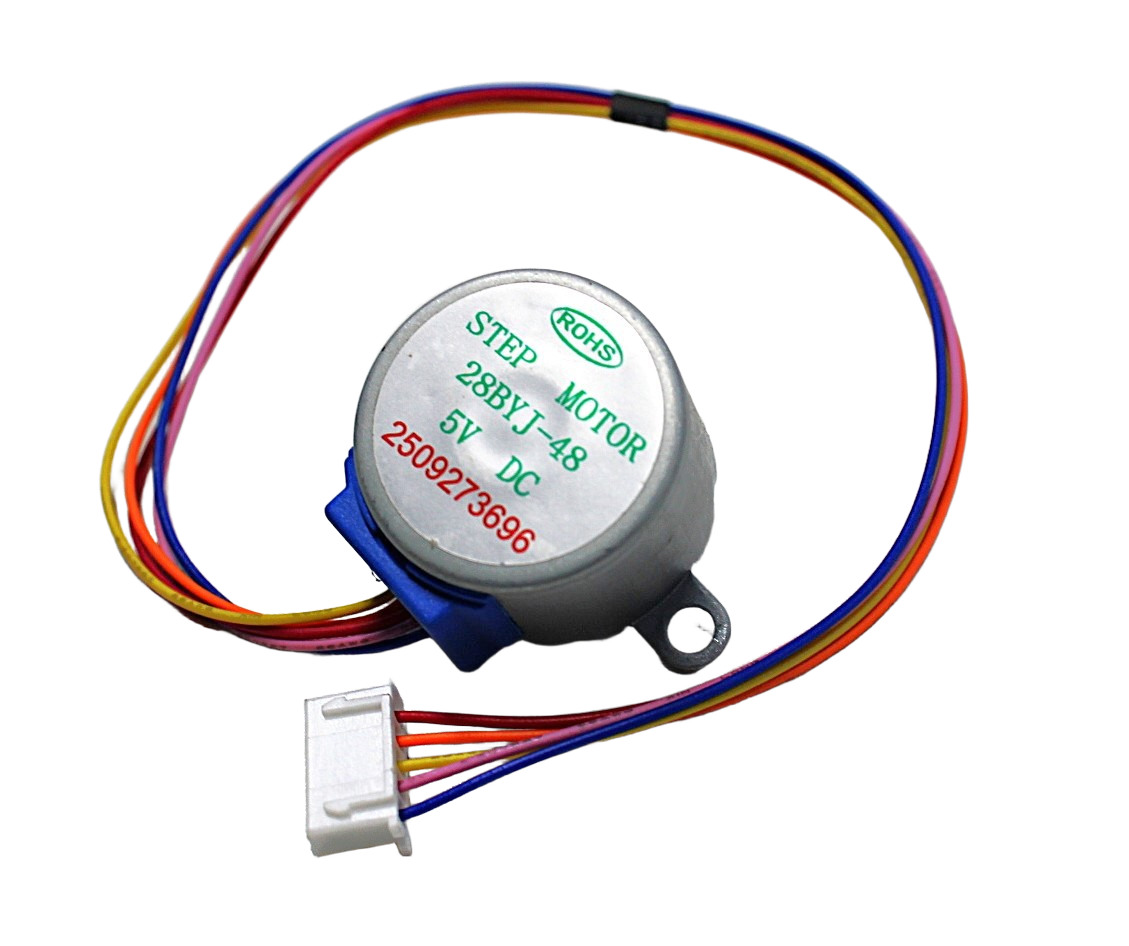
28BYJ-48 5V Stepper Motor
A beginner-friendly unipolar geared stepper. Use it for lightweight extruder mechanisms, filament changers, or educational 3D printer demonstrations. Pairs with the ULN2003 driver module.
Extruder & Z-Axis: Higher-Torque NEMA 17 Options
The Z-axis on a heavy-gantry printer (e.g., with a glass or aluminium bed) requires sustained torque rather than speed. A motor rated at 59 N·cm (6.0 kg·cm) or more is ideal. For dual Z-axis configurations, both motors should be identical to avoid binding.
High-Speed Printing: Low-Inductance NEMA 17
Machines like the Bambu Lab X1 and Voron 2.4 run at 300–500 mm/s. At these speeds, motor inductance limits current rise time, effectively reducing torque. For high-speed builds, look for NEMA 17 motors with inductance under 2 mH and match them with a 48V power supply and TMC5160 drivers.
Stepper Motor Drivers: A4988 vs TMC2209
The driver board is equally important as the motor. Here is a quick comparison:
| Feature | A4988 | TMC2209 |
|---|---|---|
| Max current | 2 A | 2 A (2.8 A peak) |
| Microstepping | Up to 1/16 | Up to 1/256 |
| Noise | Audible hum | Near-silent (StealthChop) |
| Stallguard | No | Yes (sensorless homing) |
| Cost (India) | ₹60–120 | ₹400–700 |
| Best for | Budget builds | Quiet, precision printing |

A4988 Stepper Motor Driver Controller Board – RED
The A4988 is the standard entry-level driver for 3D printers and CNC machines in India. Supports up to 1/16 microstepping, 2 A per coil, and is compatible with RAMPS 1.4, SKR boards, and Arduino-based printer controllers.
Installation & Calibration Tips
Correct Current Setting (Vref)
Over-driving a stepper motor causes overheating and skipped steps. Under-driving causes loss of torque. Set Vref using a multimeter: for the A4988, Vref = (rated current × 8 × Rsense). For a 1.2 A motor with 0.1 Ω sense resistors, Vref = 0.96 V. Aim for 70–80% of rated current for extended print runs.
Cable Wiring: Identifying Coil Pairs
A bipolar stepper motor has two coil pairs: A+/A- and B+/B-. Use a multimeter in continuity mode — the two wires that beep together form one coil pair. Incorrect wiring causes jittery motion or no movement at all. Common wire colour standards: A+=Black, A-=Green, B+=Red, B-=Blue (varies by manufacturer — always verify).
Motor Mounting
Use M3 screws into the NEMA 17 faceplate. Apply thread-lock to Z-axis motor screws if your printer vibrates. For direct-drive extruder motors, keep the motor weight in mind — heavier motors increase print ringing artefacts at high speeds. Counteract this with input shaping (available on Klipper firmware).
Steps-per-mm Calibration
After replacing a motor, recalibrate E-steps (extruder steps per mm). Mark 100 mm on your filament from the extruder entry, command 100 mm of extrusion, and measure. Adjust E-steps in firmware: new_steps = (current_steps × 100) / actual_mm_extruded. Repeat until accurate within 0.5 mm.
Where to Buy Stepper Motors in India in 2026
The 3D printing component market in India has matured significantly. Here are your reliable options:
- Zbotic.in: Stocks NEMA 17 motors with verified specifications, D-type shafts, detachable cables, and compatible A4988 driver boards. Fast shipping across India.
- Local electronics markets (Lamington Road, Mumbai; Nehru Place, Delhi; SP Road, Bangalore): Can be cheaper for bulk orders but quality is inconsistent and specifications may not be clearly stated.
- AliExpress / Taobao: Very cheap, but 3–6 week shipping, no warranty support, and high variability in motor quality (some lots run 30–40% below stated torque).
For builds where reliability matters — and in 3D printing, it always does — we strongly recommend sourcing from a verified Indian electronics store like Zbotic.in where you can read actual product datasheets and get post-purchase support.
Frequently Asked Questions
Which stepper motor is best for an Ender 3 in India?
The NEMA 17 42HS48-1204A-20F (5.6 kg·cm, 48 mm body, D-shaft) is an excellent drop-in replacement for any Ender 3 axis. It matches the torque of the stock motor with better cable management due to its detachable connector.
Is a 1.8° or 0.9° stepper motor better for 3D printing?
1.8° motors (200 steps/rev) are easier to source and work excellently for most prints. 0.9° motors (400 steps/rev) provide finer native resolution and lower vibration at mid-speeds, making them popular in high-resolution or high-speed machines like the Voron 2.4. For most makers in India, 1.8° is the practical choice.
Can I use a NEMA 23 motor on my 3D printer?
NEMA 23 motors are heavier and require higher-voltage drivers. They add unnecessary mass to gantries, increasing print ringing. They are only justified for large-format printers with very heavy beds or gantries. Stick with NEMA 17 for standard FDM 3D printers.
What happens if I set the stepper driver current too high?
Over-current causes the motor windings to overheat, which can demagnetise the rotor and permanently reduce torque. It also stresses the driver IC. Always set Vref to 60–80% of the motor’s rated current for long print sessions.
Why does my stepper motor skip steps during printing?
Skipped steps are caused by: insufficient driver current (Vref too low), mechanical obstruction (tight belts, binding lead screws), motor overheating (Vref too high), or printing too fast for the motor’s torque-speed curve. Check each factor systematically before replacing the motor.
Ready to Upgrade Your 3D Printer?
Zbotic.in stocks NEMA 17 stepper motors with verified specifications, D-type shafts, and compatible A4988 driver boards — everything you need to build or upgrade your 3D printer in India. Fast shipping, genuine components.







Add comment