
Antenna Design for NRF24L01: PCB Trace vs External Whip Antenna Guide
The NRF24L01 PCB trace antenna versus external whip antenna debate is one of the most frequently discussed topics among Indian wireless hobbyists. If you have ever built an NRF24L01 radio link and found the range to be disappointingly short — perhaps only 5–10 metres in a room when the datasheet promises 100+ metres — the antenna is often the root cause. This guide explains exactly how both antenna variants work, what determines their real-world performance, and how to choose and optimise the right option for your 2.4GHz wireless projects, whether you are building a remote-controlled drone, a wireless sensor network, or a multi-room automation system.
NRF24L01 Overview: 2.4GHz Radio Architecture
The Nordic Semiconductor NRF24L01+ is a single-chip 2.4GHz transceiver IC widely used for short-to-medium range wireless communication in embedded projects. It operates across 125 user-selectable channels in the 2.400–2.525GHz ISM band, supports data rates of 250kbps, 1Mbps, and 2Mbps, and communicates with a microcontroller via 4-wire SPI. Key specifications:
- Operating voltage: 1.9V–3.6V (NOT 5V tolerant — use level shifter with Arduino Uno)
- TX power (standard module): 0dBm (1mW) maximum
- TX power (PA+LNA module): up to +20dBm (100mW) with power amplifier
- Receiver sensitivity: -94dBm at 250kbps (standard module)
- SPI interface: up to 10MHz
- AutoACK and auto-retransmission: built into hardware
- 6 data pipes: star topology with one master and up to 6 devices
The module is available in India in two main physical variants: the standard 24mm×15mm breakout with onboard PCB trace antenna, and the larger PA+LNA version with an SMA connector for an external antenna. Understanding the antenna difference between these is essential for designing a reliable wireless system.
PCB Trace Antenna: How It Works and Its Limits
The standard NRF24L01 module uses an inverted-F trace antenna (IFA) etched directly onto the PCB. This is a length of copper trace, carefully calculated to be a specific electrical length at 2.4GHz (approximately λ/4 = 31mm in free space, but shorter on PCB due to the dielectric material’s refractive effect). The trace width, ground plane clearance, substrate material, and trace routing all affect the antenna’s radiation pattern, gain, and impedance matching.
Advantages of the PCB trace antenna:
- Low cost: No additional antenna component — the trace IS the antenna.
- Compact: The entire module fits in a 24×15mm footprint.
- No connector wear: Unlike SMA connectors that degrade after hundreds of insertion cycles.
- Consistent manufacturing: Mass-produced modules have repeatable antenna performance.
Limitations of the PCB trace antenna:
- Fixed gain: Typically 0dBi to 2dBi. The antenna is omnidirectional in the horizontal plane but has nulls in the axis perpendicular to the PCB.
- Detuning by nearby objects: Placing the module flat on a metal enclosure, near a battery, or with objects directly over the antenna trace dramatically detunes it and reduces range by 50–90%.
- Limited range: Under ideal line-of-sight conditions, expect 50–100 metres at 1Mbps. In a typical Indian home with concrete walls, expect 10–30 metres.
- Board orientation matters: The PCB must be oriented so the antenna end points toward the communicating device. Placing it in a metal box with the antenna end flush against the wall is a guaranteed range killer.
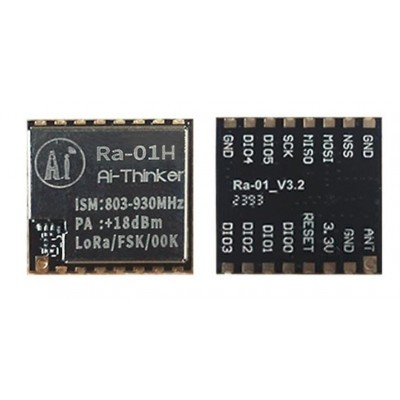
Ai Thinker LoRa Ra-01H Module
When NRF24L01 range is not enough for your project, consider the Ai Thinker Ra-01H LoRa module — it operates on 868MHz with SX1276 chipset, achieving kilometre-scale range at low data rates. Ideal for outdoor sensor networks and asset tracking in Indian rural areas.
External Whip / SMA Antenna: When to Use the PA+LNA Version
The NRF24L01+PA+LNA module adds two critical components to the standard design: a Power Amplifier (PA) that boosts the transmit power to +20dBm (100mW), and a Low Noise Amplifier (LNA) on the receive path that improves receive sensitivity. It also adds an SMA (or IPEX) connector for an external antenna.
Why external antenna range is dramatically better:
- Higher gain antenna: A simple 2.4GHz quarter-wave whip antenna (about 31mm long) in free air achieves approximately 2dBi gain. A dedicated directional Yagi antenna can reach 10–14dBi gain, which translates to over 10x the effective range compared to a PCB trace.
- PA transmit power: +20dBm vs 0dBm = 100x more transmit power. This alone can extend range from 100m to over 1km line-of-sight.
- LNA sensitivity: The RFX2401C front-end IC used in most PA+LNA modules improves receive sensitivity by 6–10dB, meaning the module can hear weaker signals from farther away.
- Positioning flexibility: The external antenna can be routed through an enclosure wall, mounted outside a metal box, or elevated above obstructions.
Important caveat for Indian hobbyists: The PA+LNA module draws significantly more current — up to 115mA during transmission versus ~11mA for the standard module. You cannot power it from the Arduino’s 3.3V pin. Use a dedicated 3.3V regulator (AMS1117-3.3 with a 470µF capacitor) capable of at least 250mA. This power issue is why many beginners find the PA+LNA module unreliable — they are not supplying adequate current.
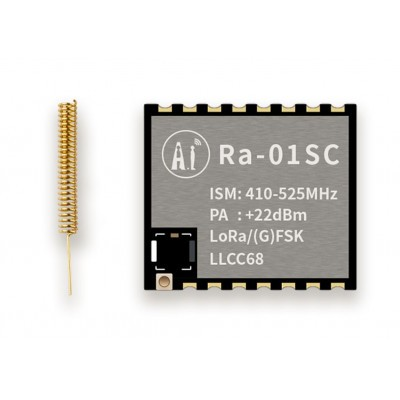
Ai Thinker LoRa Ra-01SC Module
The Ra-01SC is a compact LoRa module with IPEX antenna connector, offering sub-GHz long-range communication as an alternative when 2.4GHz NRF24L01 range is insufficient. Works with the Radiohead library for easy Arduino and ESP32 integration.
Real-World Range Comparison in Indian Environments
The following range estimates are based on typical conditions found in Indian homes and environments. These are practical numbers, not manufacturer marketing claims from anechoic chambers:
| Environment | Standard PCB Antenna | PA+LNA + External Whip |
|---|---|---|
| Open line of sight (terrace, field) | 80–120m | 800m–1.5km |
| Same room (no walls) | 15–30m | 50–100m |
| Through 2 concrete walls | 5–15m | 30–60m |
| Apartment building (3 floors) | Unreliable | Possible with good placement |
| Inside metal enclosure | Fails | Good (antenna routes outside) |
2.4GHz Interference: WiFi, Bluetooth, and Microwave Ovens
The 2.4GHz ISM band used by NRF24L01 is shared with WiFi (802.11b/g/n), Bluetooth, Zigbee, cordless phones, and microwave ovens. In any typical Indian urban apartment, there will be 10–20 WiFi networks within range — this is significant interference for NRF24L01 communication.
Channel selection strategy: WiFi channels 1, 6, and 11 in India are the most congested (these are the non-overlapping 2.4GHz WiFi channels centred at 2.412, 2.437, and 2.462GHz). NRF24L01 uses channels from 2.400GHz (channel 0) to 2.525GHz (channel 125) at 1MHz spacing. To avoid WiFi interference, use NRF24L01 channels above 100 (2.500–2.525GHz range) which are largely outside the WiFi 802.11 channels. Set radio.setChannel(108) in your RF24 library code.
Microwave ovens: When operating at 2.45GHz, a microwave oven in the same kitchen can temporarily block or severely degrade NRF24L01 communication. This is a well-known 2.4GHz ISM band problem. Design your systems with retransmission and timeout recovery logic to handle these temporary outages gracefully.
PCB Layout and Placement Tips for Better Performance
If you are designing a custom PCB that incorporates an NRF24L01 module, or simply placing the breakout module inside a project enclosure, these layout rules will maximise performance:
- Antenna keepout zone: Keep a 5mm clear area (no copper, no components, no vias) on the PCB directly beneath and around the antenna trace. Any copper close to the antenna changes its electrical length and detunes it.
- Orient the antenna away from ground planes: The PCB trace antenna radiates best when the antenna end faces away from the main PCB ground plane. Mount the module at the edge of your main PCB, not in the centre surrounded by copper pour.
- Decouple the power supply: Place a 10µF electrolytic and a 100nF ceramic capacitor on the module’s VCC pin as close to the module as possible. RF circuits are very sensitive to power supply noise.
- Short, direct SPI traces: Keep the MISO/MOSI/SCK/CSN traces short (under 5cm) and away from the antenna. Long SPI traces can radiate interference that degrades the RF performance.
- Mount externally for enclosures: If your project is inside a plastic enclosure, position the antenna end near or outside a slot or window in the enclosure wall. Even 3mm of plastic over the antenna area causes measurable signal loss.
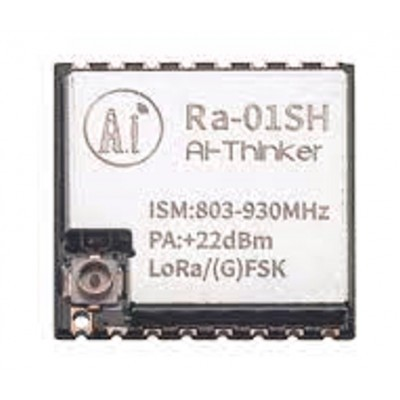
Ai Thinker LoRa Ra-01SH Spread Spectrum Wireless Module
The Ra-01SH uses LoRa spread spectrum technology for superior interference immunity compared to NRF24L01. Works at 915MHz (or 868MHz) for kilometre-scale range in smart agriculture and industrial IoT projects in India.
Choosing the Right NRF24L01 Module Variant
Here is a decision guide to help you pick the right module variant for your specific project needs:
Use the standard PCB trace antenna module when:
- Your nodes are within the same room or adjacent rooms (under 20m indoors)
- You need the smallest possible form factor
- Battery life is critical (standard module draws ~11mA TX, PA+LNA draws ~115mA TX)
- You are building a star network with many child nodes close to a central hub
Use the PA+LNA module with external antenna when:
- You need to cover multiple floors or outdoor areas
- The module will be placed inside a metal enclosure
- You are building a drone remote control system where range is critical
- You want to replace a proprietary 2.4GHz RC receiver/transmitter pair
- You are using 250kbps mode for maximum sensitivity
Consider LoRa (Ra-01/Ra-01H/Ra-01SC) instead of NRF24L01 when:
- You need kilometre-scale range with small data payloads (temperature readings, GPS coordinates)
- Your project is outdoors in India’s rural or semi-urban areas
- Low power consumption (sleep current under 10µA) is essential for a battery-powered remote sensor node

0.96 Inch I2C OLED Display (SSD1306)
Essential for NRF24L01 debugging — display received signal strength (RSSI using the RPD register), packet count, and connection status on this compact OLED. Makes range-testing your wireless link much easier than watching serial monitor output.
Frequently Asked Questions
Why is my NRF24L01 module only working at 2–3 metres when the datasheet says 100m?
The most common causes in order of likelihood: (1) Insufficient power supply — the standard NRF24L01 needs a clean 3.3V supply with good decoupling capacitors; the Arduino’s 3.3V pin is often inadequate, especially with Arduino Uno clones. (2) Antenna detuned by nearby metal or copper ground plane. (3) Both modules on the same channel with other 2.4GHz interference. (4) Code issue — ensure radio.setPALevel(RF24_PA_MAX) is called. Try an external 3.3V regulator first before replacing the module.
Does a longer external whip antenna always mean more range?
No. The ideal quarter-wave whip antenna for 2.4GHz is approximately 31mm long. A longer antenna changes the electrical resonance and can actually reduce performance unless it is designed as a half-wave or full-wave antenna. For best results, use a commercial 2.4GHz antenna (rubber duck or PCB stub) from a reputable supplier rather than a random wire.
Can I use LoRa modules on the same project as NRF24L01?
Yes. In many advanced projects, NRF24L01 handles short-range, high-frequency communication (e.g., between a robot and its handheld controller) while a LoRa module handles long-range, infrequent data backhaul to a cloud server. Both can coexist on an Arduino Mega using different SPI chip-select pins.
Is the NRF24L01 legal to use in India?
Yes. The 2.4GHz ISM band is licence-exempt in India under WPC (Wireless Planning and Coordination) rules for low-power devices. NRF24L01 modules operate well within the allowed power limits. The PA+LNA version at +20dBm (100mW) is also within the 2.4GHz WLAN/ISM power limits for short-range devices in India.
How do I increase NRF24L01 range without buying the PA+LNA version?
Reduce the data rate. At 250kbps mode, the standard NRF24L01+ has 3dB better sensitivity compared to 1Mbps mode. This doubles the theoretical range for the same transmit power. Also ensure: clean 3.3V power with decoupling capacitors, module positioned with the antenna end away from metal objects, both modules on the same channel, and retries configured (radio.setRetries(15, 15)).
Build Your Wireless Project with Confidence
Zbotic stocks NRF24L01 modules, LoRa modules, antennas, and OLED displays for all your wireless communication projects. Fast delivery across India with expert support.






Add comment