
LoRa Payload Optimization: Encode Sensor Data Compactly
Every extra byte you transmit over LoRa costs you: longer airtime means higher collision probability, faster battery drain, and less time within your duty cycle limit. Mastering LoRa payload optimization sensor data encoding is therefore not just a nice-to-have — it’s essential for any serious LPWAN deployment. Whether you’re monitoring soil moisture across Maharashtra’s farms or tracking cold-chain temperature in a Mumbai warehouse, compact payloads translate directly to longer device lifetime, lower data rates, and more reliable communication at the network’s edge. This guide covers every technique from simple integer packing to custom binary protocols.
Why Payload Size Matters So Much in LoRa
LoRa (Long Range) uses chirp spread-spectrum modulation. The key trade-off is between range/robustness and data rate. At Spreading Factor 12 (SF12), LoRa can reach 10–15 km in open terrain, but the data rate drops to just 250–300 bits per second. At that rate, a 50-byte payload takes over 1 second of airtime. The LoRaWAN fair-use policy in India (and globally under ISM band regulations) typically restricts each device to 1% duty cycle — which at 1 second per message means you can only transmit once per 100 seconds.
Halving your payload size means:
- Doubling your transmission frequency within the same duty cycle window
- Lower collision probability in dense deployments (e.g., 50 sensors in one field)
- Extended battery life: Radio TX is typically the largest energy consumer at 100–150 mA peak. Shorter airtime = less energy per message.
- Better reliability: Shorter packets are less likely to be corrupted by interference during transmission
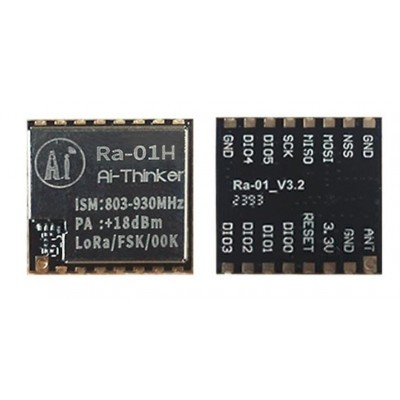
Ai Thinker LoRa Ra-01H Module
Based on Semtech SX1268, covering the 803–930 MHz band. Higher TX power (22 dBm) for extended range — ideal for agricultural sensor networks across large Indian farms.
Baseline: What ASCII and JSON Actually Cost
Before optimising, understand your starting point. A typical beginner LoRa sketch sends something like this JSON:
{"temp":28.5,"hum":72.3,"bat":3.84,"soil":456}Count the bytes: that’s 44 bytes. In contrast, the actual data content is:
- Temperature: value range -40 to +85°C, 0.1°C resolution → representable in 2 bytes (int16)
- Humidity: 0–100%, 0.1% resolution → representable in 2 bytes (uint16)
- Battery voltage: 2.5–4.2 V, 10 mV resolution → representable in 1 byte (scaled uint8)
- Soil moisture ADC: 0–4095 (12-bit) → representable in 2 bytes (uint16)
Total with binary encoding: 7 bytes instead of 44. That’s an 84% reduction. At SF10, you’ve gone from ~600 ms airtime to ~100 ms. Battery life just got 6× longer (radio energy component).
Technique 1: Integer Packing and Scaling
The foundation of payload optimisation is eliminating floating-point encoding and instead using scaled integers. The principle: multiply your float value by a power of 10 to shift the decimal, store as an integer, and reverse at the receiver.
// SENDER (Arduino/ESP32 with LoRa module)
float temperature = 28.5;  // °C
float humidity    = 72.3;  // %RH
float battery     = 3.84;  // V
uint16_t soilADC  = 456;

// Scale and cast to integers
int16_t  tempInt  = (int16_t)(temperature * 10);  // 285 → 2 bytes
uint16_t humInt   = (uint16_t)(humidity * 10);     // 723 → 2 bytes
uint8_t  batInt   = (uint8_t)((battery - 2.5) / 0.02); // maps 2.5-4.1V → 0-80, 1 byte
// soilADC already uint16

// Pack into byte buffer
uint8_t payload[7];
payload[0] = highByte(tempInt);
payload[1] = lowByte(tempInt);
payload[2] = highByte(humInt);
payload[3] = lowByte(humInt);
payload[4] = batInt;
payload[5] = highByte(soilADC);
payload[6] = lowByte(soilADC);

// Send
LoRa.beginPacket();
LoRa.write(payload, 7);
LoRa.endPacket();
// RECEIVER (Gateway or another LoRa node)
void onReceive(int packetSize) {
uint8_t buf[7];
for (int i = 0; i < 7; i++) buf[i] = LoRa.read();
int16_t tempInt = (int16_t)((buf[0] << 8) | buf[1]);
uint16_t humInt = (uint16_t)((buf[2] << 8) | buf[3]);
uint8_t batInt = buf[4];
uint16_t soilADC = (uint16_t)((buf[5] << 8) | buf[6]);
float temperature = tempInt / 10.0;
float humidity = humInt / 10.0;
float battery = 2.5 + (batInt * 0.02);
Serial.printf("Temp: %.1f°C, Hum: %.1f%%, Bat: %.2fV, Soil: %dn",
temperature, humidity, battery, soilADC);
}Technique 2: Bitfield Encoding for Boolean and Enum Data
Many IoT devices report status flags alongside sensor readings: is the door open? Is the pump running? Is the alarm triggered? Each boolean value is logically 1 bit, but if stored as a separate ASCII character or byte, it wastes 7–7.5 bits. Pack up to 8 booleans into a single byte:
// Status flags — pack into 1 byte
bool doorOpen     = true;
bool pumpRunning  = false;
bool alarmActive  = false;
bool batteryLow   = true;
bool motionDetect = false;
// bits 5-7 reserved/unused

uint8_t statusByte = 0;
if (doorOpen)     statusByte |= (1 << 0);  // bit 0
if (pumpRunning)  statusByte |= (1 << 1);  // bit 1
if (alarmActive)  statusByte |= (1 << 2);  // bit 2
if (batteryLow)   statusByte |= (1 << 3);  // bit 3
if (motionDetect) statusByte |= (1 << 4);  // bit 4
// statusByte = 0b00001001 = 0x09

// Decode at receiver:
bool rxDoorOpen     = (statusByte >> 0) & 0x01;
bool rxPumpRunning  = (statusByte >> 1) & 0x01;
bool rxAlarmActive  = (statusByte >> 2) & 0x01;
For enum values (e.g., pump speed: off/low/medium/high = 0-3), 2 bits are sufficient. Fit two enums into one byte, or mix booleans and enums in creative bit-field arrangements.
Technique 3: Cayenne Low Power Payload (LPP)
If you’re building a LoRaWAN application and need your data to be auto-decoded by a network server (The Things Network, Chirpstack, Helium), consider the Cayenne LPP format. It’s a standardised TLV (Type-Length-Value) binary format that network servers can decode automatically without custom decoders.
The Arduino CayenneLPP library (install from Library Manager) makes it trivial:
#include <CayenneLPP.h>

CayenneLPP lpp(51); // max payload size in bytes

void buildPayload() {
  lpp.reset();
  lpp.addTemperature(1, 28.5);      // Channel 1: temp, 2 bytes + 2 overhead = 4 bytes
  lpp.addRelativeHumidity(2, 72.3); // Channel 2: humidity, 1 byte + 2 overhead = 3 bytes
  lpp.addAnalogInput(3, 3.84);      // Channel 3: battery as analog, 2 bytes + 2 overhead = 4 bytes
  // Total: 11 bytes including LPP framing headers

  LoRa.beginPacket();
  LoRa.write(lpp.getBuffer(), lpp.getSize());
  LoRa.endPacket();
}
LPP adds 2 bytes per channel for the channel number and data type identifier. For 4 sensors, that’s 8 bytes of overhead versus raw binary’s 0 bytes. However, the benefit is automatic parsing in TTN/Chirpstack dashboards without writing a custom decoder. For managed LoRaWAN networks, LPP is the right trade-off. For raw point-to-point LoRa, use raw binary.
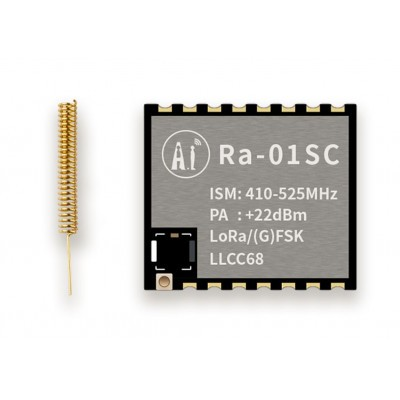
Ai Thinker LoRa Ra-01SC Module
SX1262-based LoRa module supporting 862–930 MHz for Indian ISM band deployments. Low sleep current (2.5 µA) makes it ideal for battery-powered sensor nodes transmitting optimised compact payloads.
Technique 4: Delta Encoding for Time-Series Data
If you’re batching multiple readings into a single LoRa packet (a common technique for infrequent transmission with local buffering), transmitting the full value for every reading is wasteful. Instead, transmit the first value in full and then only the difference (delta) for subsequent readings. Temperature in a controlled environment rarely changes more than ±2°C between 5-minute samples — that delta fits in a signed 4-bit nibble (range -8 to +7 in 0.5°C steps):
// Batch of 5 temperature readings over 20 minutes
// Raw: 285, 287, 286, 288, 291 (in 0.1°C units)
// Full binary: 5 × 2 bytes = 10 bytes

// Delta-encoded:
// First value: 285 (2 bytes)
// Deltas: +2, -1, +2, +3 (each fits in signed 4-bit nibble)
// Pack 2 deltas per byte: (+2,-1) = 0x21, (+2,+3) = 0x23
// Total: 2 + 2 = 4 bytes — 60% reduction for this batch!

// Encoding:
uint8_t deltaPayload[4];
deltaPayload[0] = (285 >> 8) & 0xFF;  // MSB of first value
deltaPayload[1] = 285 & 0xFF;          // LSB of first value
// Delta packing: high nibble = delta1, low nibble = delta2 (offset by 8 for signed)
deltaPayload[2] = ((2 + 8) << 4) | ((-1 + 8) & 0x0F);  // 0xA7
deltaPayload[3] = ((2 + 8) << 4) | ((3 + 8)  & 0x0F);  // 0xAB
Delta encoding shines for environmental data that changes slowly and predictably. It’s less useful for rapidly changing data like vibration or audio (use summaries — min/max/average — instead).
Spreading Factor, Data Rate & Airtime Calculator
Payload size alone doesn’t determine airtime — spreading factor (SF), bandwidth (BW), and coding rate (CR) all matter. Here’s a practical reference for the IN865 frequency band commonly used in India:
| SF | Data Rate | Airtime (10 bytes) | Airtime (50 bytes) | Max msgs/hr (1% DC) |
|---|---|---|---|---|
| SF7 | 5.47 kbps | ~56 ms | ~164 ms | ~643 |
| SF8 | 3.13 kbps | ~103 ms | ~317 ms | ~349 |
| SF9 | 1.76 kbps | ~206 ms | ~595 ms | ~175 |
| SF10 | 980 bps | ~370 ms | ~1.1 s | ~97 |
| SF12 | 250 bps | ~1.5 s | ~4.3 s | ~24 |
The takeaway: at SF12, a 10-byte payload allows 24 transmissions per hour; a 50-byte payload drops that to just 8. Every byte saved at SF12 directly extends your duty cycle budget.
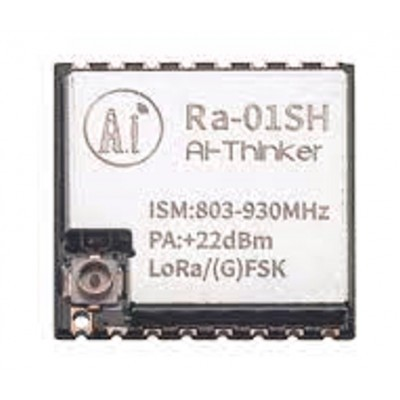
Ai Thinker LoRa Ra-01SH Spread Spectrum Wireless Module
High-frequency LoRa module for extended range deployments. SX1262 chipset with excellent sensitivity (-148 dBm) — maximise range by pairing with compact, optimised payloads using the techniques in this guide.
Frequently Asked Questions
What is the maximum LoRa payload size?
The LoRa physical layer supports up to 255 bytes. However, LoRaWAN restricts this further by data rate: at SF12/125 kHz (DR0 in AS923 or IN865), the maximum payload is 51 bytes. At SF7/125 kHz (DR5), it’s 222 bytes. Always check the regional parameters document for your specific LoRaWAN band. For raw point-to-point LoRa (no LoRaWAN), the 255-byte limit applies.
Should I use JSON or binary encoding for LoRa payloads?
JSON is only acceptable for prototyping over high-speed links. For any production LoRa deployment, use binary encoding. A four-sensor JSON payload averages 40–60 bytes; binary encoding typically achieves 6–10 bytes for the same data — an 80–90% reduction. The airtime difference at SF12 is the difference between a viable and an unviable deployment.
How do I handle negative values in binary payloads?
Use signed integer types (int8_t, int16_t). When packing into a byte array, treat the bytes as unsigned — the sign is encoded in the two’s complement representation and will decode correctly if you use the matching signed type at the receiver. For example, temperature -5.0°C scaled to -50: cast to int16_t, extract bytes, transmit, reassemble int16_t at receiver, divide by 10.0.
Can I compress my LoRa payload with LZ4 or similar?
In theory yes, but for payloads under 50 bytes, general-purpose compression algorithms add more bytes than they save due to their headers and dictionary overhead. Compression starts paying off above roughly 200 bytes. For LoRa payloads, application-specific packing (as described in this guide) always outperforms generic compression at these payload sizes.
What frequency band should I use for LoRa in India?
India uses the IN865 band (865–867 MHz) for LoRaWAN under the WPC (Wireless Planning and Coordination Wing) unlicensed ISM provisions. For point-to-point LoRa without LoRaWAN, the same IN865 band applies. Avoid using 433 MHz LoRa modules in India unless they comply with local amateur radio licensing, as 433 MHz is not part of the Indian ISM band framework for license-free operation.
Build Long-Range IoT Projects with LoRa
Shop LoRa modules, antennas, and development boards from Zbotic — fast delivery across India and expert support for your LPWAN projects.





Add comment