
If you’re building a wireless sensor network, home automation system, or industrial IoT solution, the Zigbee module Arduino XBee CC2530 combination is one of the most powerful and reliable options available to Indian makers today. Zigbee’s low power consumption, mesh networking capability, and IEEE 802.15.4 standard make it ideal for projects where dozens or even hundreds of nodes need to communicate efficiently over a local area. This guide walks you through everything from understanding the hardware to writing your first multi-node Zigbee sketch.
What Is Zigbee and Why Use It?
Zigbee is a low-power, low-data-rate wireless communication protocol based on the IEEE 802.15.4 standard. It operates in the 2.4 GHz ISM band globally and supports mesh networking natively. Each node can relay messages for other nodes, dramatically extending coverage without increasing power draw at the source device.
Key specifications at a glance:
- Frequency: 2.4 GHz (16 channels), 868/915 MHz
- Data rate: 250 kbps at 2.4 GHz
- Range: 10 to 100 m indoors, up to 1.5 km line-of-sight with PA modules
- Topology: Star, tree, mesh
- Node roles: Coordinator, Router, End Device
- Power consumption: ~30 mA active, under 1 uA sleep
For Indian hobbyists and engineers working on smart agriculture, building automation, or multi-room sensor networks, Zigbee offers a cost-effective and standards-compliant alternative to proprietary RF modules.
XBee vs CC2530: Choosing the Right Module
Two modules dominate the Zigbee ecosystem for Arduino projects: the Digi XBee series and the Texas Instruments CC2530-based modules. They serve similar purposes but have very different integration experiences.
XBee Series (Digi International)
XBee modules come with a built-in Zigbee stack (ZNet 2.5 or Zigbee Pro) and expose a clean UART interface. They support two modes: AT (transparent) mode for simple serial pass-through and API mode for structured packet-based communication. XBee 3 modules (like the XB3-24Z8CM) support Zigbee 3.0, the unified standard that replaced older Zigbee profiles.
Pros: Out-of-box Zigbee stack, XCTU configuration GUI, strong documentation, plug-and-play with Arduino using a shield. Cons: Higher cost (Rs.1,500 to Rs.4,000+ per module), requires XCTU software for initial setup.
CC2530 (Texas Instruments)
The CC2530 is a system-on-chip (SoC) combining an 8051 microcontroller with a Zigbee RF transceiver. The bare module available on Zbotic (CC2530F256) runs Z-Stack firmware from TI and communicates with Arduino via UART using AT commands, similar in concept to XBee transparent mode.
Pros: Very affordable (Rs.300 to Rs.600), widely available in India, can also run custom firmware. Cons: Needs pre-flashed Z-Stack firmware, less beginner-friendly documentation than XBee.
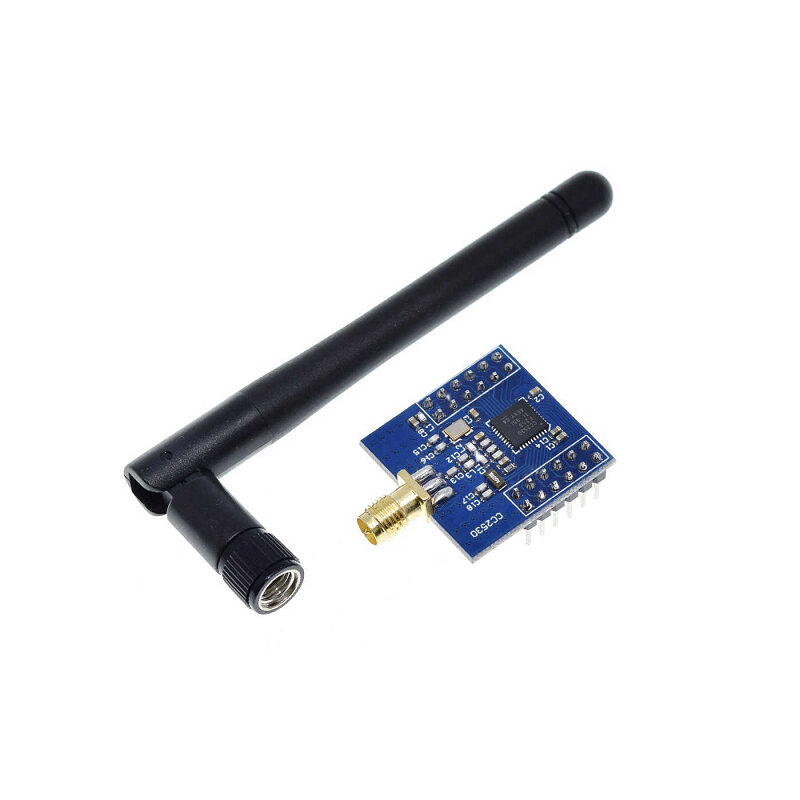
CC2530F256 Zigbee UART Wireless Core Development Board with Serial Port
TI CC2530F256 SoC-based Zigbee module with UART interface. Pre-flashable with Z-Stack for AT-command control from any Arduino or microcontroller. Ideal for building low-cost Zigbee mesh networks in India.
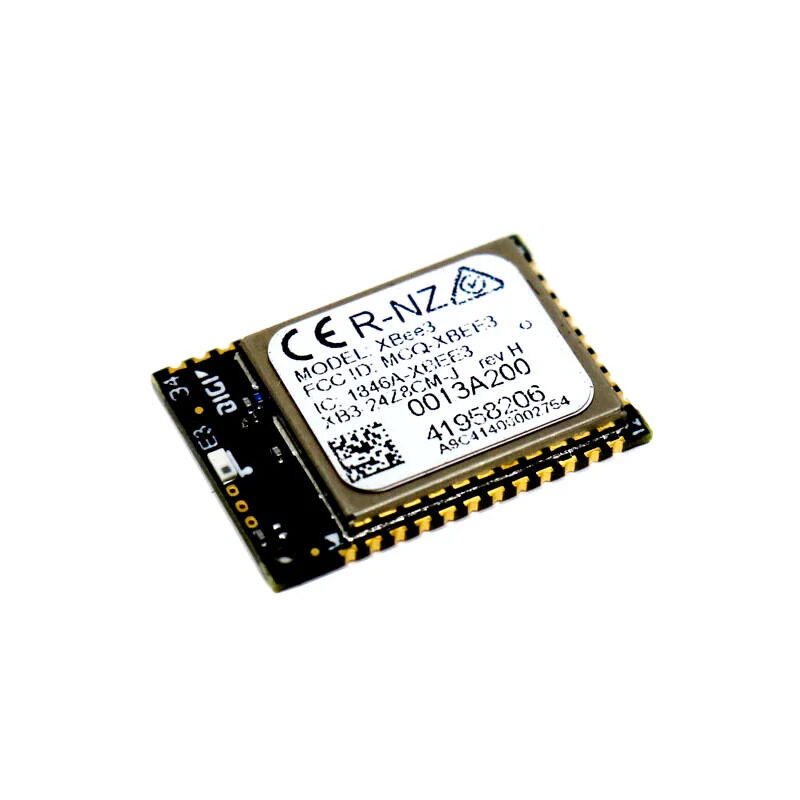
DigiKey Zigbee 3.0 Module XB3-24Z8CM-J
Digi XBee 3 Zigbee 3.0 module, the gold standard for professional Zigbee deployments. Supports AT and API modes, integrates with XCTU for easy configuration, and is compatible with all Zigbee 3.0 devices.
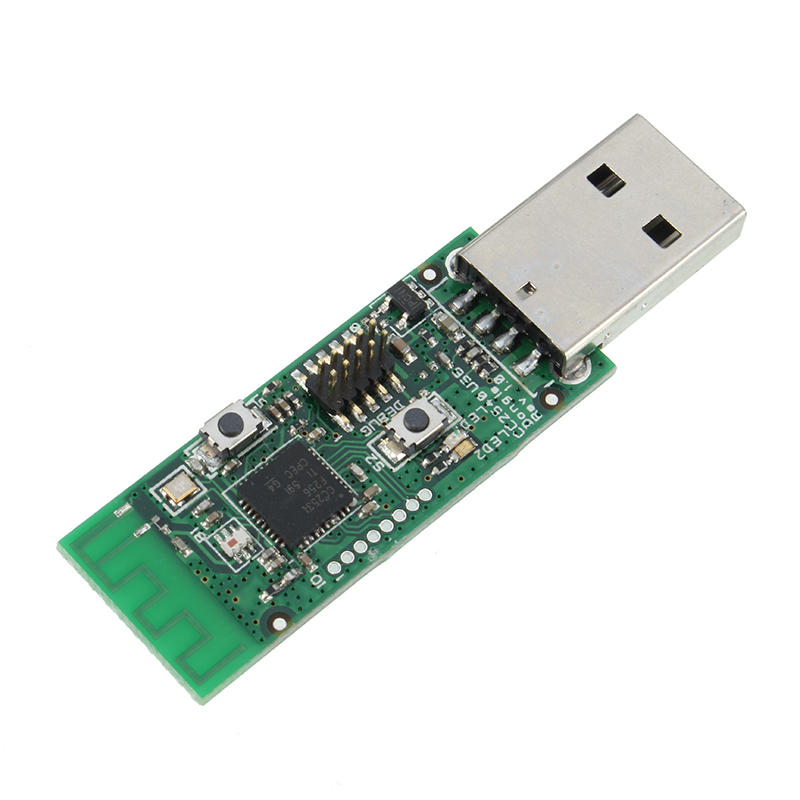
Wireless Zigbee CC2531 Sniffer Bare Board
CC2531 USB Zigbee sniffer board, perfect for debugging your Zigbee network or flashing as a Zigbee coordinator in Zigbee2MQTT setups. Essential for serious Zigbee development.
Hardware Setup and Wiring
Both XBee and CC2530 modules use 3.3V logic. When connecting to an Arduino Uno (5V), you need a level shifter or voltage divider on the TX line from Arduino to the module. The module TX pin can connect directly to Arduino RX as most Arduino inputs are 3.3V-tolerant, though a series resistor of 1kOhm is recommended.
XBee to Arduino Wiring (Software Serial)
| XBee Pin | Arduino Pin | Notes |
|---|---|---|
| VCC (pin 1) | 3.3V | Do NOT use 5V |
| GND (pin 10) | GND | Common ground |
| DOUT/TX (pin 2) | D2 (RX) | XBee TX to Arduino |
| DIN/RX (pin 3) | D3 (TX) | Via 1kOhm voltage divider |
CC2530 to Arduino Wiring
The CC2530 UART breakout board typically exposes VCC, GND, TXD, and RXD pins. The same wiring principle applies. Connect at 9600 baud by default (Z-Stack firmware default). Some modules operate at 38400 baud, so check your firmware documentation.
Configuring XBee Modules with XCTU
XCTU is Digi’s free configuration utility for XBee modules. Download it from digi.com and install it on your PC. You need an XBee USB adapter, or an Arduino acting as a USB-serial bridge with the reset pin held low.
Step 1: Set Up Coordinator
- Connect XBee to PC via USB adapter, open XCTU, and click Discover radio modules.
- In the radio configuration panel, set CE (Coordinator Enable) to 1.
- Set ID (PAN ID) to a unique value, for example 1234.
- Set SC (Scan Channels) to 1FFE to scan all 2.4 GHz channels.
- Click Write to save configuration.
Step 2: Set Up Router or End Device
- Connect the second XBee. Set CE to 0 (Router mode).
- Set the same PAN ID as the coordinator (1234).
- For AT mode, set DH (Destination High) to the coordinator SH, and DL (Destination Low) to the coordinator SL.
- In API mode, the destination address is specified per packet, giving full flexibility.
Arduino Sketch for AT Mode
#include <SoftwareSerial.h>

SoftwareSerial xbee(2, 3); // RX, TX

void setup() {
  Serial.begin(9600);
  xbee.begin(9600);
  Serial.println("XBee AT Mode Ready");
}

void loop() {
  float temp = 28.5; // Replace with real sensor reading
  xbee.print("TEMP:");
  xbee.println(temp);
  while (xbee.available()) {
    Serial.write(xbee.read());
  }
  delay(5000);
}
Using CC2530 with Arduino via UART
The CC2530F256 module with pre-flashed Z-Stack serial firmware responds to AT-style commands. Once it joins a Zigbee network, you can send and receive data over UART in a nearly identical fashion to XBee AT mode. On power-up, initialize the module with commands for PAN ID, channel, role (1 for Coordinator, 0 for End Device), and then start the network. Specific AT commands vary depending on the Z-Stack firmware variant flashed, so always refer to the datasheet provided with your CC2530 module.
Building a Zigbee Mesh Network
The real power of Zigbee comes alive when you deploy multiple router nodes. Each router extends the network reach and provides redundant paths. Here is a simple 3-node topology for a home sensor network:
- Node 1 (Coordinator): Connected to a Raspberry Pi or Arduino with Internet access. Acts as the Zigbee gateway.
- Node 2 (Router): In a central room. Relays messages between Node 1 and Node 3. Must be mains-powered.
- Node 3 (End Device): Battery-powered sensor in a remote location. Sleeps most of the time to save power.
In API mode, each packet contains the 64-bit address of the destination node. The Zigbee network layer handles routing automatically. If Node 2 fails, the stack will attempt to find an alternative route if other routers exist. For home automation projects, consider using Zigbee2MQTT with a CC2531 USB coordinator. This open-source software bridges your Zigbee network to an MQTT broker like Mosquitto, allowing integration with Home Assistant or Node-RED.
Practical Use Cases for Indian Makers
Smart Agriculture
Deploy battery-powered CC2530 end devices across a farm to monitor soil moisture, temperature, and humidity. Router nodes powered by small solar panels relay data back to a central Arduino coordinator connected to a GPRS or Wi-Fi module for cloud upload. The mesh topology ensures coverage even across large fields without expensive infrastructure.
Apartment Building Automation
Indian apartment complexes often span 10 to 20 floors. A Zigbee mesh can link every flat’s smart switches, door sensors, and energy meters back to a central management system without running dedicated RS-485 wiring. Each floor’s router extends coverage to the next.
Industrial Environmental Monitoring
Monitor machines, motors, and environmental conditions across a factory floor. Zigbee’s interference resistance using DSSS spreading makes it suitable for environments with welding equipment and heavy machinery that create RF noise.

0.96 Inch I2C OLED LCD Module 4pin White SSD1306
Display Zigbee network status, node count, and sensor readings on this compact OLED screen connected to your coordinator Arduino. Clear white-on-black display, runs on I2C with just 2 wires.
Frequently Asked Questions
Can I mix XBee and CC2530 modules in the same Zigbee network?
Yes, as long as both modules run a compatible Zigbee stack (Zigbee PRO or Zigbee 3.0) and are configured with the same PAN ID and channel, they can interoperate. The Zigbee standard is designed for multi-vendor interoperability. However, XBee’s proprietary DigiMesh protocol is NOT the same as Zigbee and cannot interoperate with CC2530.
What is the maximum number of nodes in a Zigbee network?
The Zigbee specification supports up to 65,000 nodes per network using 16-bit short addresses. Practically, most coordinator implementations perform well with a few hundred nodes. For most Indian maker and commercial projects, 20 to 50 nodes is a realistic and manageable scale.
Does Zigbee work with 3.3V only? Can I use it with a 5V Arduino?
Both XBee and CC2530 modules operate at 3.3V logic. When using a 5V Arduino, always use a logic level converter or voltage divider on the Arduino TX to module RX line. The module TX to Arduino RX line is generally safe without conversion on most Arduinos, but adding a series resistor as protection is best practice.
How do I extend Zigbee range beyond 100 metres?
Use mains-powered Router nodes at intermediate points. Each router can relay messages up to 100 m, and you can chain multiple routers to cover large distances. For true long-range line-of-sight links, consider LoRa instead, as Zigbee is optimised for dense, short-hop mesh networks rather than single long hops.
Is Zigbee legal to use in India?
Yes. The 2.4 GHz ISM band is unlicensed in India under WPC regulations, and Zigbee (IEEE 802.15.4) is a recognised standard. WPC does not require per-device registration for ISM band devices used within legal power limits. However, if you are manufacturing a product for sale in India, WPC equipment type approval is required.
Ready to Build Your Zigbee Network?
Zbotic stocks CC2530 development boards, XBee 3 modules, and CC2531 sniffers, everything you need to get your Zigbee mesh network running. Fast shipping across India with same-day dispatch from Pune.






Add comment