
Setting up a Zigbee coordinator ESP32 smart home network lets you control dozens of low-power smart home devices — lights, sensors, plugs, thermostats — from a single hub, all communicating via a robust self-healing mesh network that does not depend on Wi-Fi bandwidth or cloud servers. This guide explains how to use the ESP32 as a Zigbee coordinator or gateway, connect commercial Zigbee devices, and integrate everything with open-source home automation platforms.
Zigbee Basics: Why It Beats Wi-Fi for Smart Home
Zigbee is a wireless mesh networking protocol built on the IEEE 802.15.4 standard, operating in the 2.4 GHz band (same as Wi-Fi and Bluetooth, but using different channels). It was designed specifically for low-power, low-data-rate IoT applications — exactly what smart home sensors and actuators need.
Key advantages over Wi-Fi smart home devices:
- Massive network scale: A single Zigbee coordinator can manage 65,000+ devices. A typical Wi-Fi router struggles beyond 20-30 connected devices.
- Self-healing mesh: If one router node fails, traffic automatically reroutes through other nodes. Wi-Fi devices are direct point-to-point — if the AP goes down, devices go offline.
- Ultra-low power: Zigbee end devices (sensors, leak detectors, door sensors) run on two AAA batteries for 1-3 years. Wi-Fi IoT devices typically need constant power or recharge weekly.
- No cloud dependency: Zigbee communicates locally. Your lights don’t need to contact servers in Singapore to turn on when you flip a switch.
- No Wi-Fi congestion: Adding 30 smart switches doesn’t slow down your Netflix stream or video calls.
The main trade-off is that Zigbee requires a coordinator (hub) to manage the network. This is where the ESP32 comes in — it can act as the Zigbee coordinator or as a bridge between the Zigbee network and your Wi-Fi/Ethernet home network.
ESP32 Zigbee Roles: Coordinator, Router, End Device
A Zigbee network has three device roles:
| Role | Function | Power Mode |
|---|---|---|
| Coordinator | Forms the network, manages addresses, stores pairings. One per network. | Always powered |
| Router | Extends mesh range, relays messages. Smart plugs, bulbs are typically routers. | Always powered |
| End Device | Sensors, door contacts, remotes. Sleeps most of the time to save battery. | Sleeps, battery |
The ESP32 can be programmed for any of these roles. For a home automation hub, you want the ESP32 running as a coordinator — it manages the entire network and bridges Zigbee to your home’s IP network so software like Home Assistant can control everything via MQTT.

Ai Thinker ESP32 CAM Development Board WiFi+Bluetooth
Add a camera feed to your Zigbee smart home hub — detect who triggers a Zigbee door sensor and capture a photo automatically with this ESP32 CAM module.
Hardware Options for ESP32 Zigbee
There are two main approaches to building an ESP32 Zigbee coordinator:
Option 1 — ESP32 + External Zigbee Module (Most Common): Use a standard ESP32 for Wi-Fi/MQTT and connect a dedicated Zigbee coordinator chip via UART. The most popular coordinator chipsets are:
- CC2652R/CC2652P (Texas Instruments) — used in popular Sonoff Zigbee dongles and Zigbee2MQTT-compatible coordinators. Flash with Z-Stack firmware.
- EFR32MG21 (Silicon Labs) — used in newer HUSBZB-1 and similar USB Zigbee coordinators
In this setup, the ESP32 runs Zigbee2MQTT (a Node.js application) and communicates with the CC2652R chip over a serial UART connection. The ESP32 bridges MQTT (over Wi-Fi) ↔ Zigbee serial protocol.
Option 2 — ESP32-H2 or ESP32-C6 (Native Zigbee): Espressif’s newer chips have built-in Zigbee/Thread radio hardware. The ESP32-H2 is specifically designed for Zigbee and Thread and can act as a coordinator natively with the Espressif Zigbee SDK. This is the cleanest solution but requires more complex firmware development.
Option 3 — Pre-built USB Zigbee Coordinator with ESP32 Gateway: For most Indian makers, the easiest approach is to buy a CC2652-based USB Zigbee dongle, plug it into a Raspberry Pi or an ESP32-based Linux board, and run Zigbee2MQTT or ZHA (Zigbee Home Automation). The ESP32 acts as the Wi-Fi gateway, the dongle handles all RF.
Setting Up the Zigbee Coordinator
Here is the complete Zigbee2MQTT + ESP32 gateway setup using a CC2652-based coordinator dongle:
Step 1: Flash the coordinator firmware
Download the latest Z-Stack 3.x firmware from Koenkk’s GitHub repository. Use the CC2652R flasher tool or a CP2102 UART adapter to flash it. The Sonoff Zigbee 3.0 USB Dongle Plus comes pre-flashed and is plug-and-play.
Step 2: Set up the ESP32 as a serial bridge
If your ESP32 is running a serial bridge (connecting USB Zigbee coordinator to network Zigbee2MQTT running on another machine), use this simple sketch:
#include <Arduino.h>
#include <WiFi.h>
#include <WiFiClient.h>

// UART2 connected to Zigbee coordinator (TX→RX, RX→TX)
#define ZB_UART   Serial2
#define ZB_BAUD   115200

const char* ssid = "YourSSID";
const char* pass = "YourPassword";
const uint16_t port = 8888;

WiFiServer server(port);
WiFiClient client;

void setup() {
  Serial.begin(115200);
  ZB_UART.begin(ZB_BAUD, SERIAL_8N1, 16, 17); // RX=16, TX=17
  WiFi.begin(ssid, pass);
  while (WiFi.status() != WL_CONNECTED) delay(200);
  Serial.printf("IP: %s, Port: %dn", WiFi.localIP().toString().c_str(), port);
  server.begin();
}

void loop() {
  if (!client.connected()) {
    client = server.accept();
  }
  if (client.connected()) {
    while (client.available()) ZB_UART.write(client.read());
    while (ZB_UART.available()) client.write(ZB_UART.read());
  }
}
This turns the ESP32 into a network-accessible serial port, making the Zigbee coordinator available over TCP on port 8888.
Pairing Zigbee Devices to Your Network
Once your coordinator is running (either via Zigbee2MQTT or ZHA in Home Assistant), pairing commercial Zigbee devices is simple:
- In Zigbee2MQTT web UI: click “Permit join (all)” — this opens a 60-second window for new devices to join
- On your Zigbee device (bulb, sensor, plug): perform the factory reset/pairing action as per its manual (usually long press a button or power cycle 3-5 times)
- The device appears in Zigbee2MQTT’s devices list within a few seconds
- Rename it (e.g., “bedroom_motion”, “kitchen_switch”) — this becomes the MQTT topic
Compatible Zigbee devices that work well with ESP32-based coordinators in India:
- Sonoff ZBMINI — in-wall single switch, fits inside existing switchboards
- Aqara door/window sensor — battery-powered, 2-year life, reliable
- Aqara temperature/humidity sensor — excellent accuracy, works indoors
- IKEA TRADFRI bulbs — affordable, available in India, good color range
- Tuya-based Zigbee smart plugs — widely available on Amazon India
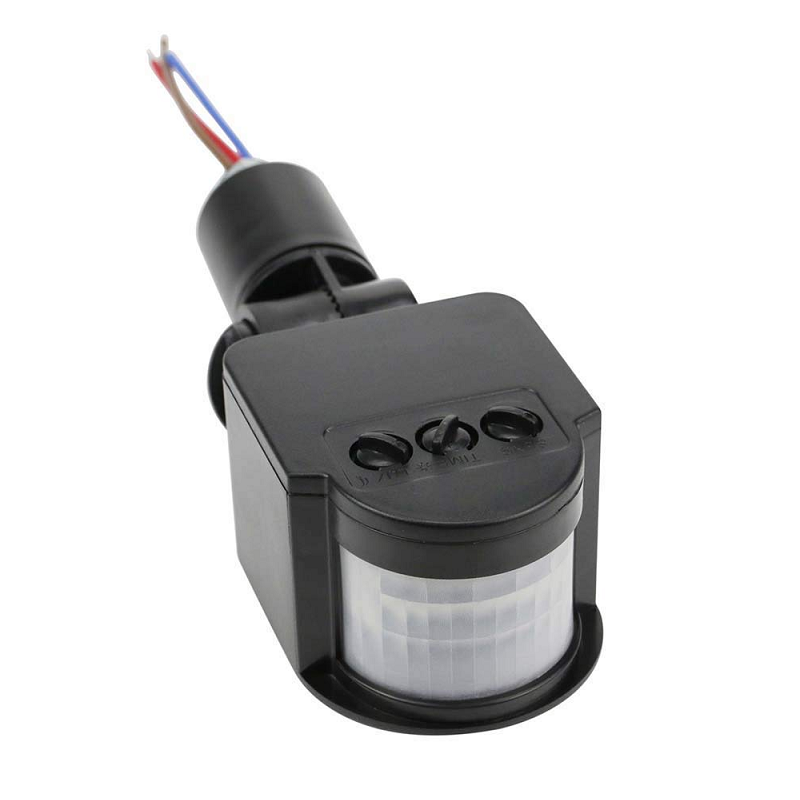
AC 220V Security PIR Human Body Motion Sensor Detector
A 220V PIR sensor that can trigger your Zigbee-connected relay when motion is detected — great for automated hallway lighting in your smart home setup.
Integrating with Home Assistant via Zigbee2MQTT
Home Assistant (running on a Raspberry Pi, mini PC, or VM) is the ideal software for managing your Zigbee smart home. The integration flow is:
Zigbee Devices ↔ Zigbee Coordinator ↔ Zigbee2MQTT ↔ MQTT Broker (Mosquitto) ↔ Home Assistant
Setup steps:
- Install Home Assistant OS on Raspberry Pi or a spare mini PC
- Install the Mosquitto MQTT broker add-on in Home Assistant
- Install the Zigbee2MQTT add-on (available in the community add-on store)
- In Zigbee2MQTT configuration, set the serial port to your coordinator (USB path or TCP address for network-attached coordinator via ESP32)
- Configure MQTT server to point to your Mosquitto broker
- Start Zigbee2MQTT — your Zigbee devices automatically appear in Home Assistant as standard entities
Once integrated, you can create powerful automations entirely locally: “When bedroom door sensor opens between 10 PM and 6 AM, turn on bedroom light at 30% brightness for 2 minutes.” All of this runs on your local network — no internet required.
Building a Zigbee Mesh for Larger Homes
Indian homes, especially multi-floor bungalows and apartments with thick RCC walls, can challenge any wireless technology. Zigbee’s mesh topology is its biggest advantage here — every powered Zigbee device (router role) extends the network range automatically.
Practical tips for Indian homes:
- Place at least one Zigbee router device (smart plug, smart bulb) on each floor to ensure full coverage
- Concrete walls reduce Zigbee range from ~100m outdoors to ~10-15m indoors per hop — plan router device placement accordingly
- Zigbee channels 15, 20, 25, and 26 overlap less with Wi-Fi 2.4 GHz channels 1, 6, and 11. Use Zigbee channel 25 if your router uses Wi-Fi channel 6 (most common in India)
- The coordinator doesn’t need to be in the center of your home — end devices will route through the nearest router node
- Always buy at least a few mains-powered Zigbee devices (smart plugs) even if you mainly want battery sensors — they become routers that strengthen the mesh
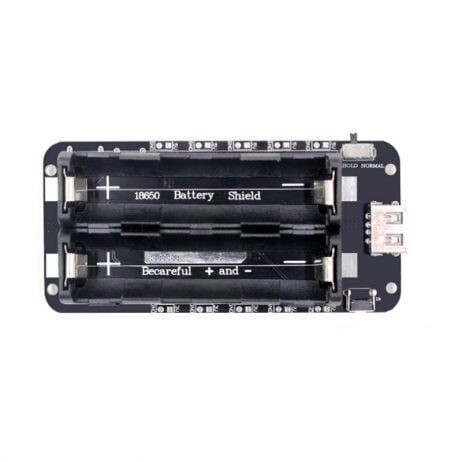
2 x 18650 Lithium Battery Shield V8 for ESP32
Keep your ESP32 Zigbee gateway running during power cuts with dual 18650 cells providing 5V/3A — essential for always-on coordinator uptime.
Frequently Asked Questions
Can the standard ESP32 WROOM-32 act as a native Zigbee coordinator?
No. The original ESP32 (WROOM-32, WROVER) does not have a Zigbee radio — only Wi-Fi (802.11 b/g/n) and Classic Bluetooth/BLE. To get Zigbee from an ESP32-family chip natively, you need the ESP32-H2 (Zigbee/Thread/BLE) or ESP32-C6 (Wi-Fi/BLE/Zigbee/Thread). The original ESP32 can serve as a Wi-Fi gateway for an external Zigbee coordinator chip connected via UART.
How many devices can a Zigbee coordinator handle?
The Zigbee specification allows up to 65,535 devices per network. In practice, a CC2652-based coordinator comfortably manages 100-200 devices. For a typical Indian home with 20-50 Zigbee devices, you will never come close to any limit. The main constraint is the coordinator’s processing power and memory for storing device tables.
Is Zigbee compatible with Matter (the new smart home standard)?
Matter (formerly Project CHIP) uses Thread as its network layer — a protocol that is closely related to Zigbee (also based on 802.15.4) but not directly compatible. The ESP32-C6 and ESP32-H2 support both Thread and Zigbee. Zigbee hubs like Amazon Echo (4th gen) and Apple HomePod mini can bridge existing Zigbee devices to Matter, so your existing Zigbee ecosystem doesn’t become obsolete.
What happens to Zigbee devices if the coordinator loses power?
Existing router-to-router communication continues within the mesh. However, no new devices can join, and the coordinator-dependent features (like state reporting back to Home Assistant) pause until the coordinator restores. For critical automation (gate locks, medical alert sensors), connect the coordinator to a UPS or battery backup.
Build Your Zigbee Smart Home Today
Find ESP32 boards, sensors, and IoT components for your Zigbee coordinator project at Zbotic — fast delivery across India with expert support.






Add comment