
If you are building an IoT project with an ESP32 and struggling with ESP32 WiFi disconnect troubleshoot fix scenarios, you are not alone. WiFi drops are one of the most common frustrations among hobbyists and professionals using the ESP32 in India. Whether your device disconnects every few minutes or fails to reconnect after a drop, this guide will walk you through the root causes and practical solutions step by step.
Why Does ESP32 WiFi Keep Dropping?
The ESP32 is a powerful dual-core microcontroller with integrated WiFi and Bluetooth, but its wireless stack is sensitive to several environmental and software factors. Before you start changing code, it helps to understand the main reasons the chip disconnects from your router:
- Inadequate power supply: The ESP32 draws up to 500 mA peak during WiFi transmission. An unstable 3.3 V rail causes brownout resets that look like WiFi drops.
- Router DHCP lease expiry: When the IP lease expires, most routers send a de-authentication packet. If the ESP32 does not handle this cleanly it stays disconnected.
- Incorrect WiFi mode: Using
WIFI_MODE_STAwith aggressive power saving enabled leads to the modem sleeping at the wrong time. - Heap fragmentation: Long-running sketches that allocate and free memory repeatedly can leave the WiFi driver with insufficient RAM to maintain the connection.
- Firmware bugs in older Arduino-ESP32 core: Versions below 2.0.9 have known issues with the WiFi stack. Always use the latest stable release.
- 2.4 GHz congestion: In cities like Mumbai, Delhi, and Bengaluru, the 2.4 GHz band is extremely crowded. Routers sitting on the same channel as your neighbours cause high packet loss.
Power Supply and Brownout Issues
This is the most overlooked cause of ESP32 WiFi instability. The ESP32’s internal brownout detector triggers a reset when VDD drops below approximately 2.43 V. During a WiFi transmission burst, current demand spikes suddenly. If your regulator cannot respond fast enough, or your USB cable has high resistance, you will see resets in the serial monitor prefixed with Brownout detector was triggered.
How to fix power supply problems:
- Add a 100 µF electrolytic capacitor between VCC and GND close to the ESP32 module. This bulk capacitance buffers the sudden current demand.
- Add a 100 nF ceramic capacitor in parallel for high-frequency decoupling.
- Use a quality USB cable — cheap cables can have more than 1 Ω resistance, causing a significant voltage drop at 500 mA.
- If running from a battery, ensure the LDO or boost converter is rated for at least 800 mA continuous.
- You can lower the brownout trigger voltage in software as a temporary workaround:
WRITE_PERI_REG(RTC_CNTL_BROWN_OUT_REG, 0);— but this should not be your permanent solution.

2 x 18650 Lithium Battery Shield for Arduino, ESP32, ESP8266
Provides a stable 5 V and 3.3 V output from two 18650 cells, with built-in protection circuitry — ideal for field deployments where USB power is unavailable.
Firmware and SDK Configuration Fixes
If your power supply is solid, the next place to look is your firmware. The Arduino-ESP32 core wraps the Espressif IDF (IoT Development Framework), and several default settings are not optimised for always-on WiFi applications.
Update your Arduino-ESP32 core
Open the Arduino IDE Boards Manager and ensure you are on version 3.x or later. Earlier versions have a known race condition in the WiFi event handler that causes silent disconnections. In PlatformIO, update espressif32 to the latest stable platform version in your platformio.ini.
Disable WiFi power saving
By default, the ESP32 uses WIFI_PS_MIN_MODEM power saving mode which periodically turns off the radio to save power. This is great for battery devices but causes packet loss on TCP connections. Disable it immediately after connecting:
WiFi.begin(ssid, password);
while (WiFi.status() != WL_CONNECTED) delay(500);
esp_wifi_set_ps(WIFI_PS_NONE);  // disable power saving
Set a static IP address
DHCP renewals are a common trigger for disconnections. Assigning a static IP removes this variable entirely:
IPAddress ip(192, 168, 1, 100);
IPAddress gateway(192, 168, 1, 1);
IPAddress subnet(255, 255, 255, 0);
IPAddress dns(8, 8, 8, 8);
WiFi.config(ip, gateway, subnet, dns);
WiFi.begin(ssid, password);
Increase the WiFi TX power
If your ESP32 is far from the router, low signal strength causes frequent disconnects. You can increase TX power up to the regulatory maximum:
WiFi.setTxPower(WIFI_POWER_19_5dBm);Note: higher TX power increases current draw. Ensure your power supply can handle it.

Ai Thinker NodeMCU-32S ESP32 Development Board – IPEX Version
The IPEX antenna connector lets you attach a high-gain external antenna, dramatically improving WiFi range and connection stability in thick-walled buildings.
Writing a Robust WiFi Reconnection Routine
Even with all preventive measures in place, network outages do happen. Your code must handle disconnections gracefully and reconnect automatically without requiring a hard reset.
Event-driven reconnection (recommended)
The most reliable approach uses the WiFi event system rather than polling WiFi.status() in the loop:
#include <WiFi.h>

const char* ssid     = "YourSSID";
const char* password = "YourPassword";
bool reconnecting    = false;

void WiFiEvent(WiFiEvent_t event) {
  switch (event) {
    case ARDUINO_EVENT_WIFI_STA_DISCONNECTED:
      if (!reconnecting) {
        reconnecting = true;
        Serial.println("WiFi lost. Reconnecting...");
        WiFi.reconnect();
      }
      break;
    case ARDUINO_EVENT_WIFI_STA_GOT_IP:
      reconnecting = false;
      Serial.print("Reconnected. IP: ");
      Serial.println(WiFi.localIP());
      break;
    default: break;
  }
}

void setup() {
  Serial.begin(115200);
  WiFi.onEvent(WiFiEvent);
  WiFi.begin(ssid, password);
  while (WiFi.status() != WL_CONNECTED) delay(500);
  esp_wifi_set_ps(WIFI_PS_NONE);
}

void loop() {
  // your application code here
}
Watchdog timer as a last resort
If the reconnect attempt itself hangs (rare but possible), a hardware watchdog ensures the device resets and starts fresh. The ESP32’s built-in task watchdog (TWDT) is enabled by default in the IDF. In Arduino, you can also use the esp_task_wdt API to add your own watchdog task.
Exponential backoff
Immediately hammering the router with reconnect requests after a drop can worsen congestion. Use exponential backoff — wait 1 s, then 2 s, then 4 s, capping at 60 s — before each retry. This is especially important in multi-device deployments.
RF Interference and Antenna Placement
Physical placement matters enormously for WiFi reliability, especially with the compact PCB trace antenna found on most ESP32 modules.
- Keep the antenna clear: The antenna area (the notch at the end of the module) must not be covered by metal enclosures, PCB ground planes, or your hand during testing.
- Distance from other 2.4 GHz sources: Microwave ovens, Bluetooth headsets, and ZigBee devices all share the 2.4 GHz band. Keep your ESP32 at least 1 metre away from these sources during testing.
- Router channel selection: Log into your router and set a fixed, non-overlapping channel (1, 6, or 11 for 20 MHz width). Auto-channel selection can cause the router to switch channels and disconnect clients.
- RSSI monitoring: Print
WiFi.RSSI()periodically. Values worse than -75 dBm indicate a weak signal that will cause intermittent drops. Aim for -60 dBm or better.

30Pin ESP32 Expansion Board with Type-C USB and Micro USB Dual Interface
Breaks out all ESP32 pins cleanly on breadboard-compatible headers, making it easy to add decoupling capacitors and debug WiFi stability on a proper test bench.
Modem Sleep and Power Saving Conflicts
The ESP32 has several sleep modes that interact with WiFi in ways that are not always intuitive:
Light Sleep vs Modem Sleep
In Modem Sleep, the CPU stays active but the WiFi radio turns off between DTIM intervals. The router buffers packets for the device. Disconnections occur if the DTIM interval on your router is set too high (above 3 is risky for real-time applications).
In Light Sleep, even the CPU pauses. WiFi reconnection after waking from Light Sleep requires additional code to re-register event handlers in some firmware versions.
Recommended settings for always-on IoT nodes
esp_wifi_set_ps(WIFI_PS_NONE);          // no power saving
WiFi.setSleep(false);                    // Arduino wrapper
WiFi.setAutoReconnect(true);             // IDF auto-reconnect
WiFi.persistent(false);                  // do not save to flash (saves wear)
Deep Sleep and WiFi
If you use esp_deep_sleep_start(), WiFi is completely shut down. On wake, the full WiFi init process runs again. To speed this up, save the WiFi channel and BSSID to RTC memory before sleeping and pass them to WiFi.begin() on wake — this can reduce reconnection time from 3 seconds to under 1 second.
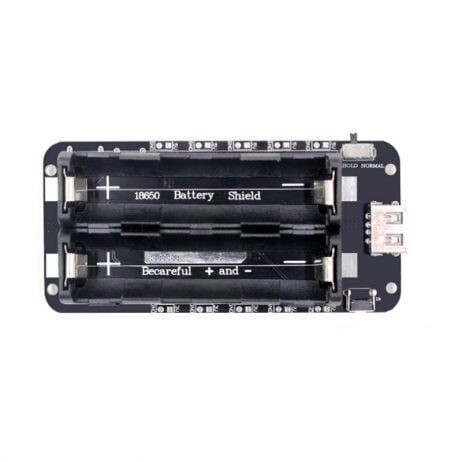
2 x 18650 Battery Shield V8 – 5V/3A, 3V/1A Micro USB for ESP32
Delivers up to 3 A at 5 V, handling ESP32 peak current demands during WiFi transmission without voltage drops or brownout resets.
Frequently Asked Questions
Why does my ESP32 disconnect only at night?
This is almost always the router’s DHCP lease renewal or the router rebooting on a scheduled nightly reboot (common in Indian ISP-provided routers like Airtel and BSNL modems). Check your router admin panel for auto-reboot schedules and disable them, or implement the static IP fix described above.
ESP32 reconnects but my MQTT broker shows duplicate client IDs — what should I do?
When an ESP32 reconnects, it may use the same MQTT client ID. The broker may keep the old “zombie” session alive for a few seconds. Use a unique client ID incorporating the chip’s MAC address: String clientId = "ESP32-" + String((uint32_t)ESP.getEfuseMac(), HEX); and set cleanSession = true in your MQTT connection.
Does running WiFi and Bluetooth simultaneously cause drops?
Yes. The ESP32 uses a coexistence scheduler to share the single 2.4 GHz radio between WiFi and BLE. When BLE advertising is active, WiFi throughput and latency suffer. If you do not need BLE, call btStop() in setup to completely free the radio for WiFi use.
My ESP32-CAM keeps dropping WiFi during image capture — why?
The OV2640 camera and its DMA transfers are notorious for starving the WiFi task of CPU time on single-core ESP32 variants. On the ESP32-CAM (dual-core), pin the WiFi stack to core 0 and the camera capture to core 1 using FreeRTOS task pinning. Also add a 1000 µF capacitor on the power rail — the camera adds significant current spikes.
What is the maximum reliable WiFi range for an ESP32?
With the built-in PCB antenna in open air, expect 50–100 metres. Indoors with concrete walls, this drops to 10–30 metres. An IPEX external antenna can double or triple this range. For even longer distances, consider adding a LoRa module or using the ESP32’s BLE mesh networking.
Build Rock-Solid IoT Projects with Zbotic
Find the right ESP32 boards, power management modules, and sensors for your next WiFi IoT project. Zbotic ships across India with fast delivery.







Add comment