
What if you could monitor the temperature at 10 different points in a building, a server rack, a greenhouse, or a cold chain storage facility — all connected to a single data pin on your Arduino? That is exactly what the 1-Wire bus protocol and the DS1820 family of sensors (including the ubiquitous DS18B20) make possible.
The 1-Wire bus lets you chain dozens of sensors on a single GPIO line. Each sensor has a unique 64-bit address burned into ROM at the factory, so the master (Arduino) can address and read each one individually. The result is clean, scalable wiring — no analog channels consumed, no I2C address conflicts, and virtually unlimited sensor count on a single wire.
In this tutorial we will build a complete 10-sensor temperature logger: sensors on the bus, readings printed to Serial, and optionally logged to an SD card for long-term data collection.
How the 1-Wire Protocol Works
1-Wire is a serial communication protocol developed by Dallas Semiconductor (now Maxim/Analog Devices). It operates on a single bidirectional data line that is shared between all devices on the bus. Power can optionally be provided over the same data line in “parasitic power” mode, though an external VDD supply gives much better performance.
All communication follows a master-slave model. The bus master (Arduino) controls all transactions. A typical read cycle looks like this:
- Reset pulse: Master pulls bus LOW for 480μs, then releases. Devices pull LOW for 60-240μs to acknowledge (presence pulse).
- ROM command: Master sends a command byte. For multi-device buses:
0x55(Match ROM, followed by 64-bit address) or0xCC(Skip ROM, broadcasts to all). - Function command: E.g.,
0x44(Convert T — start temperature conversion) or0xBE(Read Scratchpad). - Data exchange: Device writes temperature data to its scratchpad; master reads it back as 9 bytes.
The timing is tight (microsecond precision) but the OneWire library handles all of this for you.
DS1820 Sensor Family: DS18S20, DS18B20, DS1822
| Model | Resolution | Accuracy | Range | Notes |
|---|---|---|---|---|
| DS18S20 | 9-bit fixed | ±0.5°C | -55 to +125°C | Older, simpler; 0.5°C steps |
| DS18B20 | 9–12 bit (programmable) | ±0.5°C | -55 to +125°C | Most popular; 0.0625°C at 12-bit |
| DS1822 | 9–12 bit (programmable) | ±2°C | -55 to +125°C | Lower accuracy, lower cost |
For most logging applications, the DS18B20 at 12-bit resolution (0.0625°C steps) is the standard choice. It is waterproof versions are widely available, making it suitable for liquid temperature measurement, pipe monitoring, and outdoor use.

DS18B20 Programmable Resolution Temperature Sensor IC
The industry-standard 1-Wire temperature sensor. Unique 64-bit ROM address makes it perfect for multi-sensor bus builds.
Hardware Required
- Arduino Uno, Nano, or Mega
- 10x DS18B20 sensors (TO-92 package or waterproof probe)
- 4.7kΩ resistor (single one for the entire bus)
- Micro SD card module (optional, for logging)
- DS1307 or DS3231 RTC module (optional, for timestamps)
- Jumper wires
Wiring Multiple Sensors on One Bus
All DS18B20 sensors share the same three wires: VCC, GND, and DATA. The 4.7kΩ pull-up resistor between DATA and VCC is mandatory — without it, the bus will not function.
Arduino 5V  ──┬─── DS18B20 #1 VCC
              ├─── DS18B20 #2 VCC
              ├─── ... (all VCC lines together)
              └─── DS18B20 #10 VCC

Arduino GND ──┬─── DS18B20 #1 GND
              ├─── DS18B20 #2 GND
              └─── ... (all GND lines together)

Arduino D2  ──┬── 4.7kΩ ──── Arduino 5V   (pull-up resistor)
              ├─── DS18B20 #1 DATA
              ├─── DS18B20 #2 DATA
              └─── ... (all DATA lines together)
All sensors are literally connected in parallel on the same three wires. The 1-Wire protocol’s address-based addressing allows the master to select and communicate with each sensor independently despite the shared bus.
Long Bus Runs (>3 metres)
For longer cable runs, lower the pull-up resistor to 2.2kΩ–3.3kΩ. Use shielded cable (Cat5, twisted pair) with the shield connected to GND. Terminate the far end with a 100Ω resistor between DATA and GND to reduce ringing. In parasitic power mode, limit bus length to 1–2 metres; with external VCC, you can go much further.
Required Arduino Libraries
Install both via Arduino IDE Library Manager (Sketch → Include Library → Manage Libraries):
- OneWire by Jim Studt et al. — low-level 1-Wire protocol driver
- DallasTemperature by Miles Burton — high-level DS18B20/DS1820 library built on top of OneWire
Step 1: Scan and Record All Sensor Addresses
Before building the logger, you need the 64-bit ROM address of each sensor. The easiest way is to connect all 10 sensors and run the address scanner sketch. Note that order on the bus is arbitrary — label each physical sensor after you identify it.
#include <OneWire.h>
#include <DallasTemperature.h>

#define ONE_WIRE_BUS 2
OneWire oneWire(ONE_WIRE_BUS);
DallasTemperature sensors(&oneWire);

void setup() {
  Serial.begin(115200);
  sensors.begin();

  int count = sensors.getDeviceCount();
  Serial.print("Found "); Serial.print(count); Serial.println(" sensors:");

  DeviceAddress addr;
  for (int i = 0; i < count; i++) {
    if (sensors.getAddress(addr, i)) {
      Serial.print("Sensor "); Serial.print(i); Serial.print(": ");
      for (int j = 0; j < 8; j++) {
        if (addr[j] < 0x10) Serial.print("0");
        Serial.print(addr[j], HEX);
        if (j < 7) Serial.print("-");
      }
      Serial.println();
    }
  }
}

void loop() {}
Run this sketch and copy the addresses from Serial Monitor. You will get output like:
Found 10 sensors:
Sensor 0: 28-FF-A1-B2-C3-D4-E5-F6
Sensor 1: 28-11-22-33-44-55-66-77
...
Label each physical sensor (tape, cable marker) and record which address corresponds to which location.
Step 2: Read All 10 Sensors
The most efficient way to read multiple sensors is to trigger all conversions simultaneously with a broadcast command (requestTemperatures()), then read each device individually after the conversion completes.
#include <OneWire.h>
#include <DallasTemperature.h>

#define ONE_WIRE_BUS 2
OneWire oneWire(ONE_WIRE_BUS);
DallasTemperature sensors(&oneWire);

const char* sensorLabels[] = {
  "Server Room", "UPS Room", "Corridor", "Office 1", "Office 2",
  "Rooftop", "Store", "Basement", "Lab", "Reception"
};

int numSensors;

void setup() {
  Serial.begin(115200);
  sensors.begin();
  numSensors = sensors.getDeviceCount();
  sensors.setResolution(12);  // 12-bit: 0.0625°C steps, 750ms conversion
  Serial.print("Initialized "); Serial.print(numSensors); Serial.println(" sensors");
}

void loop() {
  sensors.requestTemperatures();  // Broadcast: all sensors convert simultaneously
  delay(750);                     // Wait for 12-bit conversion to complete

  Serial.println("--- Temperature Reading ---");
  for (int i = 0; i < numSensors; i++) {
    float tempC = sensors.getTempCByIndex(i);
    if (tempC == DEVICE_DISCONNECTED_C) {
      Serial.print(sensorLabels[i]);
      Serial.println(": DISCONNECTED");
    } else {
      Serial.print(sensorLabels[i]);
      Serial.print(": ");
      Serial.print(tempC, 2);
      Serial.println(" °C");
    }
  }
  Serial.println();
  delay(5000);  // Log every 5 seconds
}
Note: calling requestTemperatures() once broadcasts to ALL sensors. All 10 sensors convert simultaneously, so total wait time is just 750ms for 12-bit resolution — not 750ms × 10.
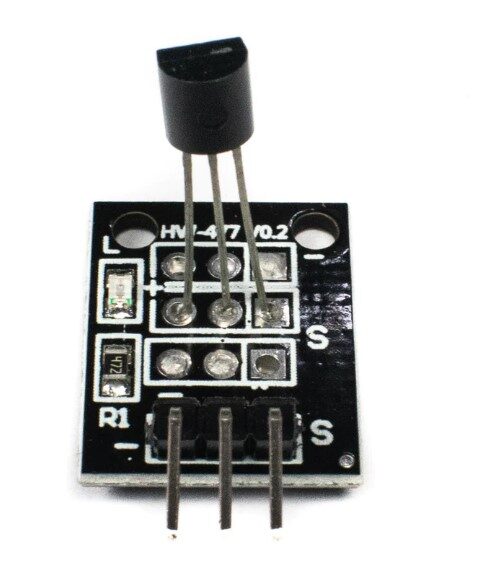
DS18B20 Temperature Sensor Module
Ready-to-use DS18B20 module with pull-up resistor and connectors. Drop it straight onto the bus without extra components.
Step 3: Log to SD Card with Timestamps
For long-term logging, extend the sketch to write CSV data to an SD card. Wire the SD module: CS to D10, MOSI to D11, MISO to D12, SCK to D13, VCC to 5V, GND to GND. Add a DS3231 RTC on I2C (SDA=A4, SCL=A5) for real timestamps.
#include <OneWire.h>
#include <DallasTemperature.h>
#include <SPI.h>
#include <SD.h>
#include <RTClib.h>

#define ONE_WIRE_BUS 2
#define SD_CS        10

OneWire oneWire(ONE_WIRE_BUS);
DallasTemperature sensors(&oneWire);
RTC_DS3231 rtc;
File logFile;

void setup() {
  Serial.begin(115200);
  sensors.begin();
  sensors.setResolution(12);
  rtc.begin();
  SD.begin(SD_CS);

  // Write CSV header
  logFile = SD.open("templog.csv", FILE_WRITE);
  if (logFile) {
    logFile.print("DateTime");
    int n = sensors.getDeviceCount();
    for (int i = 0; i < n; i++) {
      logFile.print(",Sensor_"); logFile.print(i);
    }
    logFile.println();
    logFile.close();
  }
}

void loop() {
  sensors.requestTemperatures();
  delay(750);

  DateTime now = rtc.now();
  char buf[20];
  sprintf(buf, "%04d-%02d-%02d %02d:%02d:%02d",
    now.year(), now.month(), now.day(),
    now.hour(), now.minute(), now.second());

  Serial.print(buf);

  logFile = SD.open("templog.csv", FILE_WRITE);
  if (logFile) logFile.print(buf);

  int n = sensors.getDeviceCount();
  for (int i = 0; i < n; i++) {
    float t = sensors.getTempCByIndex(i);
    Serial.print(","); Serial.print(t, 2);
    if (logFile) { logFile.print(","); logFile.print(t, 2); }
  }

  Serial.println();
  if (logFile) { logFile.println(); logFile.close(); }

  delay(60000);  // Log every 60 seconds
}
The resulting templog.csv file can be opened directly in Excel or Python/pandas for analysis, graphing, and alerting.
Tips for Long-Bus Reliability
- One pull-up resistor per bus, not per sensor. Multiple pull-ups in parallel reduce the effective resistance and can cause signalling problems.
- Check CRC. The DallasTemperature library validates CRC-8 checksums. If you get sporadic garbage readings, increase the pull-up capacitor (add 100pF from DATA to GND) or reduce pull-up resistance.
- Address by ROM address, not by index. Sensor index (0, 1, 2…) can change if a sensor is added or removed from the bus. Address by the fixed 64-bit ROM address using
getTempC(deviceAddress)for stable location-to-label mapping in production systems. - Power-on settling time. After power-up, wait 500ms before issuing the first
requestTemperatures(). The sensors need a conversion cycle to initialise their scratchpad. - Hot-plug support. The 1-Wire protocol allows adding/removing sensors while the bus is powered. Call
sensors.begin()again after topology changes. - Maximum parasitic power bus length: About 1 metre. With external VDD power: up to 100+ metres with appropriate cable and pull-up adjustments.
Frequently Asked Questions
Q: How many DS18B20 sensors can I put on one bus?
Theoretically unlimited (2⁶⁴ unique addresses). In practice, signal integrity limits you to around 100 sensors on a typical Arduino setup. For large networks, use multiple buses (one per GPIO pin) or a bus master IC.
Q: Why is my reading 85°C every time I power on?
85°C is the DS18B20’s power-on reset value in the scratchpad. It means the sensor is returning the default value before a conversion has been requested. Add a 500ms delay after power-up and before the first requestTemperatures() call.
Q: Can DS18B20 sensors be used in water?
The bare TO-92 packaged sensor is not waterproof. Use the waterproof probe version (stainless steel tube, 1m/2m/3m cable) for liquid temperature measurement. The sensor IC inside is the same DS18B20 — accuracy and protocol are identical.
Q: What is the difference between DS18S20 and DS18B20?
The DS18S20 is an older device with fixed 9-bit resolution (0.5°C steps). The DS18B20 offers programmable 9-12 bit resolution (0.0625°C at 12-bit). The DS18B20 is universally preferred for new designs. Both use the same 1-Wire protocol and pin-out.
Q: Can I mix DS18B20 and DS18S20 on the same bus?
Yes. The DallasTemperature library handles both. However, if you use the DS18S20’s “enhanced precision” mode, the conversion time changes — it is simpler to use only one type on a bus.
Q: My sensors read different values from each other in the same environment. Is this normal?
A small variation (±0.5°C) is within the sensor’s specified accuracy. If variation exceeds 1-2°C, check that the sensors are all in the same thermal environment (not some in direct airflow, some not) and verify CRC-validated readings to rule out communication errors.
Build your multi-sensor temperature logger today. Zbotic stocks DS18B20 sensors in both TO-92 and waterproof probe variants, along with Arduino boards, SD modules, and all the components you need. Fast delivery across India.
Conclusion
The 1-Wire bus and DS18B20 sensors are one of the most elegant solutions in electronics — a single GPIO pin, a single 4.7kΩ resistor, and you can scale from 1 to 10 to 100 temperature sensors without adding any additional hardware. The DallasTemperature library makes the coding accessible to beginners, while the protocol’s robustness over long cable runs makes it equally suitable for professional installations. Whether you are monitoring a server room, tracking greenhouse temperatures through the seasons, or logging a cold-chain distribution network, the DS18B20 1-Wire bus remains the gold standard for distributed temperature measurement.







Add comment