
Choosing the correct stepper motor for a CNC router is one of the most important decisions in the entire build process. Under-torqued motors cause missed steps, ruined workpieces, and lost calibration. Over-specified motors waste money and add unnecessary weight and heat. The key is to understand what torque is actually required for your cutting application and then select a motor — and driver — that delivers that torque reliably at your intended cutting speeds.
This guide covers stepper motor CNC router torque requirements from first principles, explains how to calculate the torque needed for each axis, compares NEMA 17 and NEMA 23 motors, and provides practical selection recommendations for common DIY CNC router sizes in India.
Why Torque Is the Critical Specification for CNC Steppers
When a CNC router cuts wood, aluminium, or plastic, the cutting forces create resistance that opposes axis motion. The stepper motor must overcome this cutting resistance plus the friction of the linear motion system (lead screw, V-slot rollers, linear rails) to keep moving at the programmed feed rate. If the opposing force exceeds the motor’s available torque at the operating speed, the motor skips steps — the shaft rotates one or more steps less than commanded — and the tool path becomes inaccurate.
Unlike servo motors, stepper motors do not have position feedback. There is no encoder telling the controller that a step was missed. A missed step means the machine is now at a different position than where the controller thinks it is, and every subsequent move compounds the error. In a CNC context, even a single missed step can ruin a precision part.
This is why CNC router builders in India and worldwide consistently over-specify stepper torque by 50–100%. The safety margin accounts for variations in cutting force (different materials, varying tool sharpness, depth of cut changes), friction variations with temperature, and the torque reduction that occurs at higher speeds.
Understanding the Torque-Speed Curve
The single most important concept for CNC stepper motor selection is the torque-speed curve. Stepper motors do not produce constant torque at all speeds. As RPM increases, available torque decreases — often dramatically. Here is why:
Each time a stepper motor coil is energised, the current in that coil must ramp up to the set level. The time this takes is determined by the coil’s inductance divided by the supply voltage (L/V = time constant). At low speeds, there is plenty of time for current to reach the target level, so the motor produces near-rated torque. At high speeds, the steps happen so quickly that the current never fully reaches its target level — so the motor produces less torque.
A typical NEMA 17 motor rated at 0.5 N·m holding torque may only produce 0.2 N·m at 300 RPM and less than 0.1 N·m at 600 RPM. This is the fundamental reason why higher supply voltage improves CNC performance — it allows current to ramp up faster, maintaining usable torque at higher speeds.
When selecting your motor, never compare just the holding torque values. Always ask for or look up the torque-speed curve at your intended supply voltage, and verify that the torque at your cutting speed is adequate.
Calculating Required Torque for Each Axis
Here is a practical method for estimating the required torque for a DIY CNC router axis:
Step 1: Estimate Cutting Force
Cutting force depends on material and tool. For common DIY CNC materials in India:
- MDF / Plywood (6–12mm passes): 5–20 N cutting force
- Hardwood (3–6mm passes): 20–60 N
- Aluminium (0.3–1mm passes, 3mm end mill): 30–100 N
- Acrylic (3–6mm passes): 10–30 N
Step 2: Calculate Required Motor Torque from Lead Screw/Belt Geometry
For a lead screw driven axis:
T_motor = (F × p) / (2π × η)
Where:
F = cutting force in Newtons
p = lead screw pitch in metres (e.g., 8mm = 0.008m for TR8 lead screw)
η = lead screw efficiency (typically 0.85–0.90 for ball screws, 0.50–0.70 for ACME/trapezoidal)
Example: For MDF cutting at 15N force with an 8mm pitch TR8 ACME lead screw (η = 0.6):
T_motor = (15 × 0.008) / (2π × 0.6) = 0.12 / 3.77 = 0.032 N·m required
This seems low — a NEMA 17 motor producing 0.32 N·m at speed has 10× margin. But this example uses a light 15N cutting force. Heavy aluminium cutting at 80N with the same screw needs 0.17 N·m at speed — which is within the NEMA 17 capability range but leaves limited margin.
Step 3: Add Friction Torque
Add 20–30% for linear guide/bearing friction, lead screw preload, and any gantry weight being moved (for Z-axis). For Y and X axes, friction is typically the dominant factor in light machines.
Step 4: Apply Safety Factor
Multiply the total required torque by 2.0–2.5 as a safety factor. This accounts for varying cutting conditions, supply voltage drop under load, temperature effects, and motor-to-motor variation. Your chosen motor should produce at least this much torque at your maximum cutting speed.

NEMA17 5.6 kg-cm Stepper Motor with Detachable Cable
High-torque NEMA 17 motor at 5.6 kg-cm (0.55 N·m) holding torque — suitable for small to medium CNC routers and laser engravers cutting wood and acrylic.
NEMA 17 vs NEMA 23: Which Is Right for Your Build?
NEMA 17 (42mm flange) and NEMA 23 (57mm flange) are the two most common stepper motor sizes for CNC routers in India. Here is a direct comparison:
| Factor | NEMA 17 | NEMA 23 |
|---|---|---|
| Holding Torque Range | 0.2 – 0.9 N·m | 0.9 – 3.0 N·m |
| Typical Phase Current | 0.8 – 2.0A | 2.0 – 4.0A |
| Driver Required | A4988, DRV8825, TB6600 | TB6600, DM542, DM556 |
| Inductance | Lower (faster response) | Higher (more torque at low speed) |
| Best Router Size | Up to 30×30cm work area, wood/acrylic only | Up to 100×100cm, aluminium capable |
| Price (India) | ₹400 – 900 | ₹800 – 2,000 |
| Frame weight | ~200–350g | ~400–900g |
Choose NEMA 17 If:
- Your work area is 30cm × 30cm or smaller
- You are cutting only wood, MDF, plywood, foam, or thin acrylic
- Your machine uses ball screws (higher efficiency than ACME) or belt drive
- Weight is a concern (e.g., CoreXY or delta designs)
- Budget is limited (NEMA 17 + TB6600 is cheaper than NEMA 23 + DM542)
Choose NEMA 23 If:
- Your work area is 30×30cm to 60×100cm
- You want to cut aluminium or hard woods
- Your machine uses ACME/trapezoidal lead screws (lower efficiency)
- Your gantry is heavy (MDF or aluminium extrusion construction)
- You need high feed rates for production use
Key Motor Specifications to Compare
When comparing stepper motors for CNC use, look at these specifications in order of importance:
1. Holding Torque
The torque when the motor is energised and stationary. This is the maximum torque the motor can ever produce. Use it only as a starting reference — available torque at speed is always less. For CNC routers cutting wood, aim for a minimum of 0.4 N·m (4 kg-cm) for NEMA 17 on small machines and 1.2 N·m (12 kg-cm) for NEMA 23 on medium machines.
2. Phase Current
The current per phase at rated torque. Must be within your driver’s rating. Running a motor above its rated current overheats the windings and can demagnetise the permanent magnets, permanently reducing torque.
3. Phase Inductance
Lower inductance = faster current rise = better torque retention at high speeds. When comparing motors with similar holding torque, choose the lower-inductance version for CNC applications where feed rate matters. Inductance is measured in mH — aim for under 4 mH for NEMA 17 and under 8 mH for NEMA 23 in cutting applications.
4. Motor Length
Longer motors have more torque (more winding volume). A 48mm long NEMA 17 produces significantly more torque than a 34mm version. The tradeoff is weight. For CNC router Z-axis (vertical), minimise motor length to reduce weight on the moving gantry. For X and Y axes, use the longest motor that fits your frame design.
5. Shaft Diameter and Type
Most CNC lead screw couplers are designed for 5mm or 6.35mm shafts with a flat D-cut. Verify the motor shaft diameter matches your coupler. The detachable cable version (with a JST connector rather than flying leads) makes assembly and replacement easier.

A4988 Stepper Motor Driver Controller Board
Budget-friendly stepper driver for small CNC routers using NEMA 17 motors up to 1.5A. Suitable for laser engravers and mini CNC machines.
Matching the Motor to the Right Driver
Choosing the right driver is as important as choosing the right motor. An excellent motor with an underpowered driver will not perform to its potential.
NEMA 17 with A4988 or DRV8825
Suitable for small CNC machines and laser engravers where feed rates are low and cutting forces are light. The A4988 maxes out at around 1.5A with proper cooling. The DRV8825 improves this to 2.0A. Both require careful current trimmer adjustment.
NEMA 17 or Small NEMA 23 with TB6600
The TB6600 at 4A peak current is an excellent match for high-torque NEMA 17 motors and entry-level NEMA 23 motors. Its DIP switch current setting is more reliable than trimmer-based adjustment. The enclosed aluminium housing handles heat better than bare IC modules. This is the recommended combination for budget to mid-range CNC router builds in India.
NEMA 23 with DM542 or DM556 (Industrial Grade)
For serious CNC routers intended for aluminium machining or production use, industrial-grade digital stepper drivers like the Leadshine DM542 provide smoother motion through 256-microstep interpolation, better thermal management, and features like anti-resonance control. These are significantly more expensive but worth it for professional use.
Setting Motor Current on the Driver
Always set the driver current to match the motor’s rated phase current. On the TB6600, this is done via DIP switches. Never exceed the motor’s rated current. Running at 70–80% of rated current reduces heat while maintaining 90%+ of torque — a common CNC builder practice for motors that run warm.
Power Supply Voltage: Why Higher Is Better
The supply voltage powering your stepper drivers has a dramatic effect on high-speed torque. At 12V, a NEMA 17 motor may lose 70% of its torque by 400 RPM. At 24V, torque is maintained further up the speed range. At 36V or 48V (using appropriate drivers rated for those voltages), you can maintain useful torque well above 600 RPM.
For most DIY CNC routers in India, 24V is the practical sweet spot. It provides a significant torque improvement over 12V, is well within the TB6600’s 9–42V rating, and uses affordable regulated switch-mode power supplies available from any Indian electronics supplier.
Calculate your total power supply requirement: multiply the number of motors by the rated phase current by the supply voltage, then multiply by 1.5 for safety headroom. For four NEMA 23 motors at 2.8A phase current with 24V supply: 4 × 2.8A × 24V × 1.5 = approximately 400W total supply requirement. Use a 24V 20A (480W) PSU for this configuration.
Motor Recommendations by Axis and Router Size
Small CNC Router (30×30cm work area, wood and acrylic only)
- X-axis: NEMA 17, 0.55 N·m (5.5 kg-cm) or higher, with TB6600 at 24V
- Y-axis: Same as X, or use dual motors on Y for larger gantries
- Z-axis: NEMA 17, 0.4 N·m minimum (lighter is better for Z)
Medium CNC Router (60×60cm work area, wood and thin aluminium)
- X-axis: NEMA 23, 1.2 N·m minimum, TB6600 at 36V or DM542 at 24V
- Y-axis (dual motors): Two NEMA 23 motors, slaved to same driver output or individual drivers with identical settings
- Z-axis: NEMA 17 high-torque or small NEMA 23 (weight matters here)
Large CNC Router (100×100cm+, aluminium machining)
- NEMA 23 or NEMA 34 motors on all axes
- Industrial digital drivers (DM542 or DM556) at 48V
- Closed-loop servo-stepper hybrids for the most demanding applications
Common Mistakes in CNC Stepper Motor Selection
- Comparing only holding torque numbers. Holding torque is meaningless if the motor loses 80% of torque at your cutting speed. Always consider the torque-speed curve at your intended supply voltage.
- Using 12V when 24V is easy to implement. Upgrading from 12V to 24V costs only the PSU price difference and can double the usable high-speed torque.
- Under-rating the driver. Using a DRV8825 with a 2.5A rated NEMA 23 will result in the driver running hot and possibly failing. Match the driver to the motor’s current requirement.
- Not accounting for dual Y-axis motors. Many router designs use two motors in parallel for the Y axis. Check that your driver can supply current to both motors, or use two separate drivers with identical settings.
- Ignoring acceleration settings. Even correctly sized motors will skip steps if acceleration is set too high. Use Marlin or GRBL to set conservative acceleration values (200–400 mm/s²) until you have verified the machine performs reliably.
- Over-specifying to the point of diminishing returns. Extremely high-torque NEMA 23 motors have higher inductance and may actually perform worse at high feed rates than a more modest motor with lower inductance. Check the datasheet.
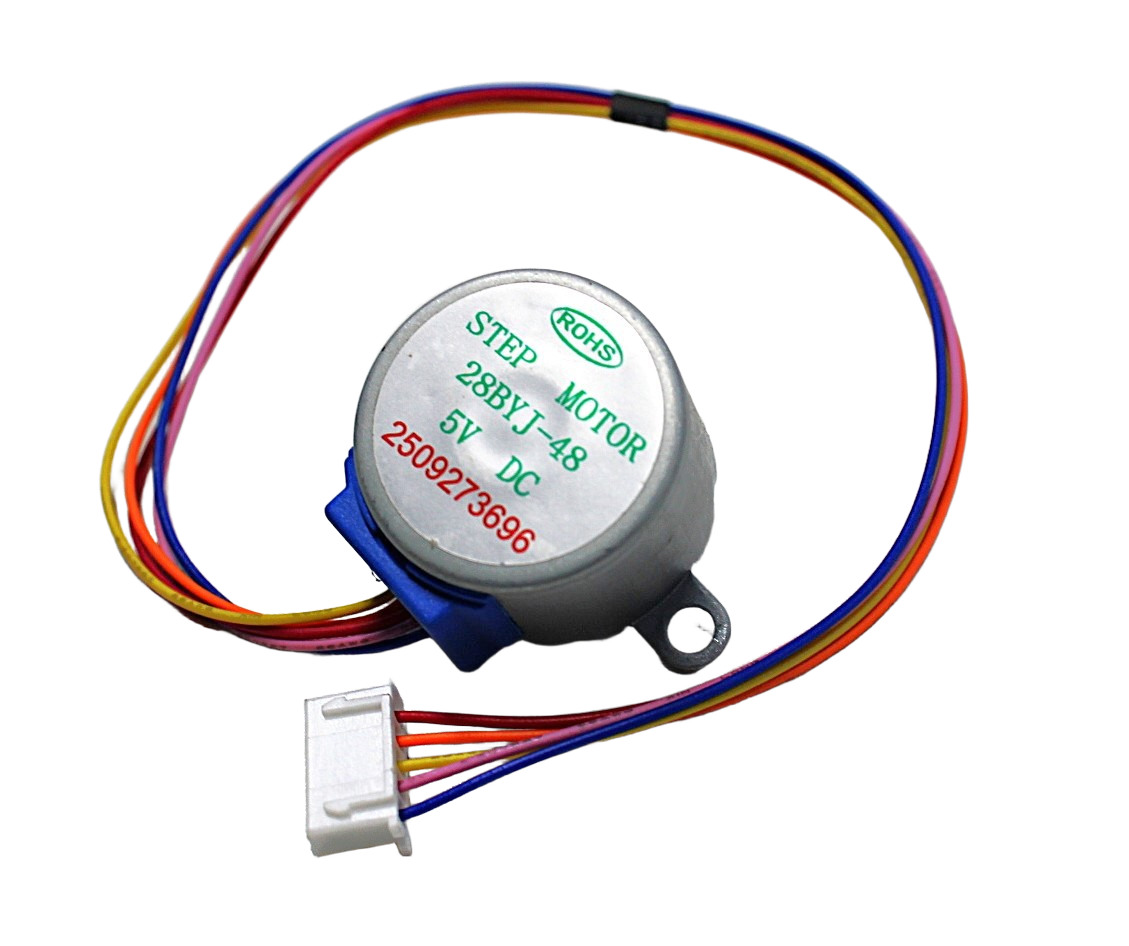
28BYJ-48 5V Stepper Motor
Entry-level unipolar stepper motor perfect for learning stepper control before moving to NEMA 17/23 motors for CNC builds.
Frequently Asked Questions
Q: How much torque does a CNC router need?
For a small hobby CNC router cutting wood and acrylic (30×30cm work area), 0.4–0.55 N·m (4–5.5 kg-cm) holding torque per motor is adequate with a 24V supply. For a medium machine cutting aluminium, use NEMA 23 motors with 1.2–1.8 N·m holding torque. Remember that available torque at cutting speed is always less than the holding torque specification.
Q: Can I use NEMA 17 motors for a CNC router?
Yes, NEMA 17 motors are used successfully in small CNC routers (up to about 30×40cm work area) when cutting wood, MDF, and acrylic. Use high-torque NEMA 17 motors (0.55 N·m or higher) with the TB6600 driver at 24V. For larger machines or aluminium cutting, upgrade to NEMA 23.
Q: What is a good NEMA 23 stepper motor for CNC?
A NEMA 23 motor with 1.2–2.0 N·m holding torque, phase current of 2.5–3.0A, and inductance under 6 mH is a good starting point for a medium CNC router. Pair it with a TB6600 or DM542 driver at 36V for best performance.
Q: Why does my CNC skip steps when cutting?
Skipped steps during cutting are caused by insufficient torque at speed. Possible fixes: increase supply voltage (12V → 24V makes a large difference), increase motor current setting (up to rated value), reduce feed rate, reduce depth of cut, check for mechanical binding or excessive friction in linear guides, and ensure the lead screw nut is properly lubricated.
Q: How many steps per mm for a CNC router?
This depends on your lead screw pitch and microstepping setting. For a standard TR8 lead screw with 8mm pitch: at 1/8 microstepping, the NEMA 17 motor (200 steps/revolution) takes 200 × 8 / 8 = 200 steps per mm. At 1/16 microstepping, it is 400 steps/mm. In GRBL, set $100 (X), $101 (Y), $102 (Z) to the calculated value for your machine geometry.
Q: Should I use ball screws or lead screws (ACME) for a DIY CNC router?
For most DIY CNC routers in India, ACME/trapezoidal lead screws (TR8 or Tr8x8) are the practical choice. They are inexpensive, self-locking (the spindle does not back-drive under gravity), and adequate for wood and acrylic cutting. Ball screws have much lower friction and are better for high-speed aluminium machining, but they are significantly more expensive and require anti-backlash pre-loaded ball nuts to avoid position errors.
Building your own CNC router? Zbotic.in stocks NEMA 17 and NEMA 23 stepper motors, TB6600 and A4988 drivers, and all the motion control components your build needs. Shop stepper motors and drivers with fast shipping anywhere in India.







Add comment