
Industrial noise is one of the most prevalent occupational health hazards worldwide. Prolonged exposure to high sound pressure levels causes irreversible hearing damage, reduces productivity, and increases accident risk. For engineers, plant managers, safety officers, and electronics enthusiasts, building a sound pressure level (SPL) measurement system using Arduino and an appropriate microphone module opens the door to affordable, custom noise monitoring solutions. This comprehensive guide covers SPL measurement theory, sensor selection, wiring, data logging, and compliance with Indian industrial noise standards.
1. Sound Pressure Level Fundamentals
Sound is a pressure wave — alternating compressions and rarefactions in a medium (usually air). The amplitude of these pressure variations, measured in Pascals (Pa), determines how loud a sound is. The range of pressures the human ear can detect is enormous: from the threshold of hearing at 20 µPa to the threshold of pain at approximately 200 Pa — a ratio of 10 million to one. This wide range is why sound level is expressed on a logarithmic decibel (dB) scale.
Sound Pressure Level (SPL) in dB is calculated as:
L = 20 × log₁₀(P / P₀)
Where P is the measured RMS sound pressure and P₀ is the reference sound pressure of 20 µPa (the threshold of human hearing). Each increase of 20 dB represents a 10× increase in sound pressure. Common reference points:
| Sound Level (dB SPL) | Example Sound |
|---|---|
| 0 dB | Threshold of hearing |
| 30 dB | Quiet library, whisper |
| 60 dB | Normal conversation |
| 85 dB | Factory floor, heavy machinery |
| 100 dB | Pneumatic drill, construction site |
| 120 dB | Jet engine at 100m, pain threshold |
| 140 dB | Rifle shot at close range, immediate damage |
Professional sound level measurement uses A-weighting (dB(A)), which filters the frequency response to match human hearing sensitivity — emphasising mid-range frequencies (1–4 kHz) where hearing is most sensitive and attenuating low and very high frequencies. Industrial noise limits are always specified in dB(A).
2. Indian and International Noise Standards
In India, the Occupational Safety, Health and Working Conditions Code, 2020 and the Factories Act regulate workplace noise exposure. The Bureau of Indian Standards (IS 9989) aligns with ILO and ISO standards. Key limits:
- 85 dB(A) for 8 hours: The permissible exposure limit for a full working shift. Exposure above this requires hearing protection and controls.
- 3 dB exchange rate: Each 3 dB increase halves the permissible exposure time. At 88 dB(A), the limit is 4 hours. At 91 dB(A), it is 2 hours, and so on.
- Peak limit: Instantaneous peaks above 140 dB(C) are prohibited regardless of duration.
Industrial zones have their own ambient noise limits under the Environment Protection Act: 75 dB(A) daytime, 70 dB(A) nighttime. Commercial zones: 65 dB(A) day, 55 dB(A) night. Residential zones: 55 dB(A) day, 45 dB(A) night. These limits guide facility siting and community noise control.
Internationally, OSHA (USA) uses 90 dB(A) / 8h with a 5 dB exchange rate (more lenient), while EU Directive 2003/10/EC uses 85 dB(A) / 8h with a 3 dB exchange rate — aligned with Indian practice.
3. Types of SPL Sensors for Arduino
Several microphone and SPL module types are available for Arduino-based sound measurement:
- MEMS microphone modules (e.g., MAX4466, MAX9814, INMP441): MEMS microphones are tiny, low-cost, and suitable for voice and audio frequency measurements. They require an amplifier stage. The MAX4466 and MAX9814 modules provide an analog output; the INMP441 is a digital I2S microphone.
- Electret microphone modules: Simple analog modules with a built-in amplifier. Inexpensive but have poor frequency response flatness and variable sensitivity between units. Adequate for relative noise level monitoring but not precision SPL measurement.
- Dedicated SPL ICs (e.g., ICS43432, SPH0645): These are I2S digital MEMS microphones with very flat frequency response and consistent sensitivity. Better suited for accurate SPL work but require I2S support (ESP32, Teensy, or Raspberry Pi).
- Calibrated sound level modules: Pre-built modules that output a calibrated dB(A) reading as an analog voltage or RS-485 Modbus signal. These are the most accurate option and are used in industrial installations, but cost significantly more.
For an educational or semi-professional Arduino project, the MAX9814 auto-gain microphone amplifier module provides a stable analog signal across a wide dynamic range and is a good starting point.

MQ-135 Air Quality / Gas Sensor Module
Complement your noise monitoring station with air quality sensing — combine SPL measurement and gas detection for comprehensive industrial environment safety monitoring.
4. Hardware Selection and Setup
For an industrial noise monitor using Arduino, we recommend:
- Microphone: MAX9814 module (auto-gain, 40–65 dB gain, 20 Hz – 20 kHz response) — gives stable output even in loud environments by automatically reducing gain when levels are high.
- Microcontroller: Arduino Uno or Mega. The 10-bit ADC (0–1023) sampling at 9.6 kHz provides adequate resolution for broadband SPL measurement. For frequency-resolved measurement, an Arduino Mega or ESP32 is better.
- Display: 16×2 LCD with I2C backpack for standalone monitoring, or a 0.96″ OLED for a compact handheld unit.
- Data logging: SD card module for continuous logging; ESP8266 or ESP32 for WiFi-based monitoring dashboard.
- Alarm output: Relay or buzzer to trigger when noise exceeds the permissible exposure limit.
Position the microphone on a directional mount that avoids picking up vibration through the mounting surface — use foam padding or spring isolation to mechanically decouple the microphone from the PCB or enclosure.
5. Wiring the Microphone Module to Arduino
| MAX9814 Pin | Arduino Uno Pin | Notes |
|---|---|---|
| VDD | 3.3V | Use 3.3V for better ADC noise floor |
| GND | GND | Common ground |
| OUT | A0 | Analog audio signal (DC-biased to VDD/2) |
| GAIN | Leave floating | Float = 60 dB gain; GND = 50 dB; 3.3V = 40 dB |
The MAX9814 output is a DC-biased analog signal: the quiescent (no sound) output sits at VDD/2 (approximately 1.65V on a 3.3V supply). Sound waves cause the voltage to oscillate above and below this midpoint. The amplitude of this oscillation is proportional to the sound pressure level.
For accurate ADC readings, set the Arduino’s analog reference to 3.3V using an external reference: connect the Arduino AREF pin to the 3.3V pin and call analogReference(EXTERNAL) in your setup function. This gives better resolution for the 0–3.3V microphone signal compared to the default 5V reference.
6. Calculating dB SPL from ADC Readings
The relationship between microphone output voltage and sound pressure level depends on the microphone’s sensitivity specification and the amplifier gain. For the MAX9814 at default 60 dB gain with a typical MEMS microphone:
- Typical microphone sensitivity: -38 dBV/Pa (approx 12.6 mV/Pa)
- After 60 dB gain: 12.6 mV/Pa × 1000 = 12.6 V/Pa — but clipped by supply voltage
In practice, we use a different approach for hobbyist SPL meters: sample many ADC readings over a time window, calculate the RMS value of the AC component (after removing the DC bias), and apply a calibration factor derived by comparing to a reference sound level meter. This gives a relative dB reading that can be calibrated to absolute dB SPL:
// Calibration: adjust CALIBRATION_OFFSET to match a reference SPL meter
// Measure the same sound source with a certified SPL meter,
// then adjust this value until your readings match.
const float CALIBRATION_OFFSET = 48.0; // Adjust this during calibration
const int SAMPLE_WINDOW = 50; // ms — RMS sampling window
const int SAMPLE_PIN = A0;
const int DC_OFFSET = 512; // Half of 10-bit ADC range at 5V
                            // Adjust to ~335 if using 3.3V AREF with 10-bit ADC

float measureSPL() {
  unsigned long startTime = millis();
  long sumSquares = 0;
  int sampleCount = 0;

  // Rapid sampling for SAMPLE_WINDOW ms
  while (millis() - startTime < SAMPLE_WINDOW) {
    int raw = analogRead(SAMPLE_PIN);
    long deviation = raw - DC_OFFSET; // Remove DC bias
    sumSquares += deviation * deviation;
    sampleCount++;
  }

  if (sampleCount == 0) return 0;
  float rms = sqrt((float)sumSquares / sampleCount);

  // Convert RMS ADC deviation to dB SPL
  float db = 20.0 * log10(rms) + CALIBRATION_OFFSET;
  return db;
}
The CALIBRATION_OFFSET is determined experimentally by placing your Arduino SPL meter next to a certified Class 2 sound level meter and adjusting the offset until readings match at a reference sound (white noise or a calibration tone). This one-time calibration gives reasonable absolute accuracy (typically ±3 dB) sufficient for occupational noise screening.
7. Full Arduino SPL Meter Code
#include <Wire.h>
#include <LiquidCrystal_I2C.h>

LiquidCrystal_I2C lcd(0x27, 16, 2);

#define MIC_PIN        A0
#define ALARM_LED_PIN  7
#define ALARM_BUZ_PIN  8
#define ALARM_LEVEL    85.0  // dB(A) — 8h occupational limit

const float CALIBRATION_OFFSET = 48.0;
const int   DC_OFFSET = 512;
const int   SAMPLE_WINDOW = 100; // ms per measurement

float minSPL = 999, maxSPL = 0;
unsigned long measurementCount = 0;
float sumSPL = 0;

float measureSPL() {
  unsigned long start = millis();
  long ss = 0;
  int cnt = 0;
  while (millis() - start < SAMPLE_WINDOW) {
    int r = analogRead(MIC_PIN);
    long d = r - DC_OFFSET;
    ss += d * d;
    cnt++;
  }
  if (cnt == 0) return 0;
  float rms = sqrt((float)ss / cnt);
  if (rms < 1) rms = 1; // avoid log(0)
  return 20.0 * log10(rms) + CALIBRATION_OFFSET;
}

void setup() {
  Serial.begin(9600);
  analogReference(DEFAULT); // Change to EXTERNAL if using 3.3V AREF
  pinMode(ALARM_LED_PIN, OUTPUT);
  pinMode(ALARM_BUZ_PIN, OUTPUT);
  lcd.init();
  lcd.backlight();
  lcd.print("SPL Meter Ready");
  delay(2000);
  lcd.clear();
}

void loop() {
  float spl = measureSPL();
  measurementCount++;
  sumSPL += spl;
  if (spl < minSPL) minSPL = spl;
  if (spl > maxSPL) maxSPL = spl;
  float avgSPL = sumSPL / measurementCount;

  // Alarm if above permissible level
  bool alarm = (spl >= ALARM_LEVEL);
  digitalWrite(ALARM_LED_PIN, alarm ? HIGH : LOW);
  if (alarm) { tone(ALARM_BUZ_PIN, 1000, 200); }

  // LCD display
  lcd.setCursor(0, 0);
  lcd.print("SPL:");
  lcd.print(spl, 1);
  lcd.print(" dB  ");
  lcd.setCursor(0, 1);
  lcd.print("Avg:");
  lcd.print(avgSPL, 1);
  lcd.print(" Mx:");
  lcd.print(maxSPL, 0);

  // Serial log (CSV format for data logger)
  Serial.print(millis()); Serial.print(",");
  Serial.print(spl, 2); Serial.print(",");
  Serial.print(avgSPL, 2); Serial.print(",");
  Serial.println(maxSPL, 2);
}
This sketch measures SPL every 100ms, tracks min/max/average over the session, and drives an LED and buzzer alarm when the level exceeds 85 dB. CSV output via Serial makes it easy to import into Excel or Google Sheets for noise exposure analysis.
8. Data Logging and Averaging (Leq)
Industrial noise regulations require monitoring the equivalent continuous sound level, Leq (or LAeq for A-weighted). Leq is the energy-averaged sound level over a time period — it accounts for the fact that louder sounds are more harmful per unit time. The formula for Leq over N measurements:
Leq = 10 × log₁₀(1/N × Σ 10^(Li/10))
Where Li is each individual SPL measurement. This is different from simple arithmetic averaging — it gives more weight to loud measurements. Implement this in your Arduino data logger:
// Calculate Leq from array of N SPL readings
float calculateLeq(float* splArray, int n) {
  float sum = 0;
  for (int i = 0; i < n; i++) {
    sum += pow(10.0, splArray[i] / 10.0);
  }
  return 10.0 * log10(sum / n);
}
For an 8-hour shift analysis, store Leq values calculated every 15 minutes (32 values total) and compute the 8-hour TWA (Time Weighted Average) Leq from these values. This gives you the legally required noise exposure assessment data.
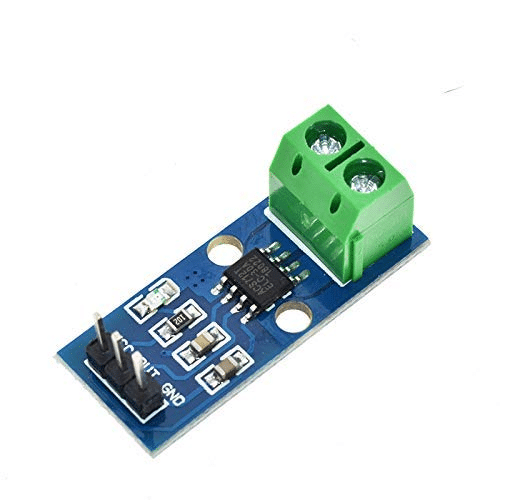
30A Range ACS712 Current Sensor Module
Build a complete industrial monitoring station — add this current sensor to monitor machinery power draw alongside your SPL measurements for comprehensive equipment health tracking.
9. Displaying SPL on LCD and LEDs
For a handheld or wall-mounted noise meter, an LED bargraph or traffic light indicator is immediately understandable without reading numbers. Implement a three-colour LED system:
- Green LED (below 70 dB): Safe level — no protection required.
- Yellow LED (70–85 dB): Caution zone — hearing protection recommended for extended exposure.
- Red LED + buzzer (above 85 dB): Dangerous — mandatory hearing protection, engineering controls required.
#define LED_GREEN  5
#define LED_YELLOW 6
#define LED_RED    7

void updateIndicator(float spl) {
  digitalWrite(LED_GREEN,  spl < 70.0 ? HIGH : LOW);
  digitalWrite(LED_YELLOW, (spl >= 70.0 && spl < 85.0) ? HIGH : LOW);
  digitalWrite(LED_RED,    spl >= 85.0 ? HIGH : LOW);
}
Add a pushbutton to hold the peak reading on the display and a second button to reset the min/max/average statistics. This makes the unit practical for a quick walk-around noise survey of a factory floor.
10. Industrial Applications and Alarm Systems
Arduino-based SPL monitors can serve several real industrial needs, particularly for SMEs that cannot afford commercial noise dosimetry equipment:
Fixed station monitoring: Mount SPL meters at key locations (near generators, compressors, stamping presses) and connect them over RS-485 Modbus to a supervisory computer. Log continuous data for regulatory compliance reporting.
Zone entry warning: Install an SPL sensor at the entrance to high-noise zones. When a worker approaches, the system displays the current dB level, warns if PPE is required, and could integrate with an access control system to prevent entry without registered PPE.
Machine health monitoring: Many machine failures manifest as changes in acoustic noise — a bearing going bad, a gear tooth breaking, or a pump cavitating all produce characteristic noise changes. Monitor the SPL trend of specific machines over time and alert maintenance when the level increases beyond normal baseline.
Night-time ambient monitoring: For factories near residential areas, monitor ambient noise during nighttime hours and alert if the level exceeds CPCB residential zone limits (45 dB(A) night). This helps avoid community complaints and regulatory action.

Capacitive Soil Moisture Sensor
Expand your industrial environment monitoring beyond noise — add soil moisture sensing for outdoor factory grounds monitoring or smart irrigation control on industrial campuses.
Frequently Asked Questions
Is an Arduino-based SPL meter good enough for legal compliance reporting?
No. Legal occupational noise exposure assessments in India must be conducted with calibrated Class 1 or Class 2 sound level meters meeting IEC 61672 standards, operated by a qualified person. Arduino-based meters are excellent for screening, awareness, and trend monitoring, but their results cannot be used as official compliance evidence. Use them to identify problem areas, then bring in a certified instrument for formal measurement.
What is the difference between dB, dB(A), dB(C), and dB(Z)?
These are different frequency weightings. dB(Z) is unweighted — all frequencies treated equally. dB(A) applies an A-weighting filter that approximates human hearing sensitivity (emphasises 1–4 kHz, attenuates bass and very high frequencies). dB(C) is nearly flat with only slight bass attenuation — used for peak measurement and low-frequency noise. Occupational noise limits are specified in dB(A); peak limits are specified in dB(C).
Can I implement A-weighting in Arduino code?
Yes, using digital filters. A-weighting requires a biquad IIR filter applied to the sampled audio data. The Arduino Uno’s 9.6 kHz max sampling rate limits the upper frequency coverage. An Arduino Due at 44 kHz, or an ESP32 with I2S microphone, provides a more complete A-weighting filter up to 20 kHz. Several Arduino audio libraries include A-weighting filter implementations. For the Uno, a simplified approximation using a pre-computed lookup table can achieve useful results within ±2 dB of true A-weighting in the 200 Hz–8 kHz range.
Why does my SPL reading jump around even in a quiet room?
This is normal behaviour — sound level meters are inherently variable because they respond to instantaneous pressure variations including air conditioning noise, computer fans, footsteps, and HVAC. Use a longer averaging window (1 second instead of 100ms), or calculate the Leq over 1-minute periods. In a truly quiet room, readings should stabilise around the HVAC noise floor (typically 35–45 dB in a moderately quiet office).
How do I calibrate my Arduino SPL meter?
The gold standard is to use an acoustic calibrator (a device that produces a known sound level, e.g., 94 dB SPL at 1 kHz) at the microphone and adjust your CALIBRATION_OFFSET until the reading matches. If you don’t have a calibrator, place your meter next to a smartphone running a calibrated SPL app (NIOSH SLM is free and reasonably accurate) in a stable noise environment and adjust the offset to match. Always calibrate in the 60–90 dB range, which is where most industrial monitoring occurs.
Build Your Industrial Noise Monitor
Find microphone modules, gas sensors, current sensors, and all the components you need for a comprehensive industrial environment monitoring station at Zbotic.





Add comment