
PWM frequency is one of the most frequently misunderstood aspects of servo motor control. Most beginners set their servo to 50Hz and leave it there — the standard that dates back to the analogue RC radio era of the 1970s. But modern digital servos support 333Hz and even 1kHz update rates, and choosing the right frequency can make the difference between a sluggish, twitchy gimbal and a rock-solid, fast-responding control surface.
This guide digs into the technical reality behind servo PWM frequencies: what the numbers actually mean, how they affect servo response time and heat generation, which servo hardware actually benefits from higher frequencies, and how to configure custom frequencies on Arduino and ESP32 platforms.
PWM Basics: How Servos Are Controlled
A servo motor is controlled by a PWM (Pulse Width Modulation) signal — a repeating pulse train where the width (duration) of each HIGH pulse determines the servo’s commanded angular position. The relationship is:
- 1000 µs (1ms) pulse width = full clockwise (0°)
- 1500 µs (1.5ms) pulse width = centre position (90°)
- 2000 µs (2ms) pulse width = full counter-clockwise (180°)
The PWM frequency determines how often this pulse is sent. At 50Hz, a new pulse arrives every 20ms (1/50s). At 333Hz, every 3ms. At 1kHz, every 1ms. The pulse width itself stays in the 1000–2000µs range regardless of frequency — but the total period (time between pulses) changes dramatically.
This is the critical insight: frequency determines how often the servo receives a new position command, not what position is commanded. Higher frequency = more frequent updates = potentially faster response to changing commands.
50Hz — The Universal Standard
50Hz became the standard for RC servos because early analogue RC receivers generated a 50Hz signal matched to the servo’s internal refresh rate. The servo’s analogue control circuit compares the incoming pulse width to the motor shaft position (via a potentiometer) and drives the motor to eliminate the difference. This comparison happens once per incoming pulse.
At 50Hz, the servo updates its error comparison every 20ms. For a typical servo with a 0.1 sec/60° speed spec, 20ms between updates is perfectly adequate — the servo is already moving as fast as it physically can between updates.
Advantages of 50Hz:
- Compatible with all servos — analogue and digital
- Low power consumption (control circuit active less often)
- Less EMI interference
- Standard across RC receivers, flight controllers, Arduino Servo.h library
Disadvantages of 50Hz:
- 20ms latency between position updates — perceptible in high-speed applications
- Slower closed-loop error correction in high-performance digital servos
Analogue vs Digital Servos: The Core Difference
This distinction is fundamental before discussing higher frequencies:
Analogue servos have a simple analogue comparator circuit. They sample the incoming PWM signal once per pulse and drive the motor accordingly. They can only update their error correction at the incoming signal frequency. At 50Hz, the motor gets one correction per 20ms. The motor drive is also analogue — a proportional voltage drives the motor, meaning it is not fully torqued at all times.
Digital servos contain a microprocessor that samples the incoming PWM signal and then internally generates a much higher-frequency drive signal to the motor (typically 300Hz to 1kHz internally). This means the motor gets correction commands every 1–3ms regardless of incoming signal frequency. A digital servo at 50Hz still drives its motor internally at 300Hz+ — it just receives position commands from the controller at 50Hz.
The implication: running an analogue servo at 333Hz provides real benefit (more frequent corrections). Running a digital servo at 333Hz provides benefit if the controller-to-servo command latency of 20ms is a bottleneck — which it is in fast gimbal and robotics applications.
333Hz — The Digital Servo Sweet Spot
333Hz became a common high-speed frequency because it is exactly 3× the standard 50Hz and maps cleanly to the internal processing rates of many digital servo MCUs. At 333Hz, the servo receives a new position command every 3ms — a 6.67× improvement in command latency compared to 50Hz.
The practical benefits at 333Hz over 50Hz for a digital servo:
- Faster holding force: The servo corrects against vibrations and external torques 6× more often. Hold a digital servo at 333Hz on a gimbal axis and it resists vibration dramatically better than at 50Hz.
- Smoother motion profiles: When you send interpolated position sequences from a microcontroller (e.g., animated robot joint), 333Hz gives 6× more intermediate positions in the same time, producing silky smooth motion.
- Lower positional latency: In a control loop (camera stabilisation, balancing robot), the 17ms latency reduction per update cycle compounds significantly. A 10Hz control loop with 50Hz servo has 30ms total delay (20ms servo + 10ms compute). At 333Hz: 13ms total — 43% less latency.
Caution: Running an analogue servo at 333Hz will heat it up quickly and potentially damage it. Analogue servos are designed to have their control circuits energised at 50Hz. At 333Hz, the control circuit runs 6× as often, consuming 6× more quiescent current and generating proportional heat. Check your servo’s datasheet before increasing frequency.
1kHz — Maximum Update Rate
1kHz PWM (1ms period) is used in specialised high-speed applications: fast drone gimbal stabilisation, robotics joints requiring sub-ms response, and hardware-in-the-loop simulation testing. At this frequency, there is a critical constraint: the pulse width range (1ms–2ms) must fit within the 1ms period. It does not.
This is the fundamental problem with 1kHz standard PWM for servos: the period (1000µs) is shorter than the maximum pulse width (2000µs). To resolve this, 1kHz servo control uses one of two approaches:
- Compressed pulse width range: Scale the 1000–2000µs range into a 0–1000µs range within the 1ms period. This requires servos specifically programmed to accept this compressed range.
- Digital bus protocol instead of PWM: At 1kHz+ speeds, most professional systems abandon PWM entirely in favour of SPI, UART, or proprietary digital protocols (like Dynamixel, SBUS, or similar). These communicate position as a numeric value rather than as a pulse width, eliminating the period constraint.
For hobbyist projects with standard hobby servos (SG90, MG996R), 1kHz PWM is not recommended and many servos will behave erratically. For robotic systems using smart servos with serial communication, 1kHz+ update rates are achievable via the digital bus, not PWM.
Frequency Comparison Table
| Parameter | 50Hz | 333Hz | 1kHz |
|---|---|---|---|
| Period (time between pulses) | 20ms | 3ms | 1ms |
| Works with analogue servos? | Yes | Risky (heat) | No |
| Works with digital servos? | Yes | Yes (recommended) | Servo-dependent |
| Positional latency | 20ms | 3ms | 1ms |
| Heat generation (digital servo) | Low | Moderate | High |
| Smoothness of motion | Adequate | Very smooth | Smoothest (if supported) |
| Arduino Servo.h default | Yes | Custom code needed | Custom code needed |
| Typical use case | RC, basic Arduino | Robot joints, gimbal | High-speed robots, HIL |
Heat, Power Consumption & Wear at High Frequency
Higher PWM frequency means the servo’s control IC and motor driver switch more often. Switching losses in MOSFETs scale with frequency — doubling frequency roughly doubles switching losses. A digital servo’s internal motor driver running at 300Hz internally is already managing this, but adding 333Hz external PWM adds more switching events in the position-sensing loop.
Practical observations:
- An MG996R at 50Hz at idle (holding position) draws ~10mA. At 333Hz idle: ~25–35mA. The extra current becomes heat in the control IC.
- For continuous duty applications (gimbal stabilisation running 24/7), heat shortens PCB and potentiometer life. Size servos conservatively and consider active cooling or heat spreading with aluminium mounts if running at 333Hz continuously.
- For intermittent use (robot arm moving occasionally, RC aircraft with servo deflections during flight), 333Hz is unlikely to cause thermal issues within normal servo lifespan.
Setting Custom PWM Frequencies on Arduino
The Arduino Servo.h library generates PWM by software on any digital pin. The default frequency is 50Hz. To change to 333Hz, you cannot simply set a register — you need to reconfigure the timer or use a different approach:
Method 1: Direct Timer Register Manipulation (Uno/Nano)
// Use Timer1 for 333Hz PWM on D9/D10
// Note: this conflicts with the Servo library which also uses timers
// Better to use ServoTimer2 library or software PWM library

#include <Servo.h>
// Servo.h uses Timer1 on Uno — conflicting with manual Timer1 changes
// For custom frequency, use the Servo8Bit or ServoTimer2 libraries
// or generate PWM manually with micros()-based timing:

const int SERVO_PIN = 9;
unsigned long lastPulseTime = 0;
int pulseWidthUs = 1500; // Centre position

void loop() {
  unsigned long now = micros();
  // 333Hz = 3000µs period
  if (now - lastPulseTime >= 3000) {
    lastPulseTime = now;
    // Generate pulse manually
    digitalWrite(SERVO_PIN, HIGH);
    delayMicroseconds(pulseWidthUs);
    digitalWrite(SERVO_PIN, LOW);
  }
}
Method 2: PCA9685 PWM Driver Module
The PCA9685 I2C PWM driver module (16 channels) is the cleanest solution for custom servo PWM frequencies on Arduino. It handles all PWM timing in dedicated hardware, freeing the Arduino CPU completely, and supports frequencies from 24Hz to 1526Hz. Set frequency with:
#include <Adafruit_PWMServoDriver.h>
Adafruit_PWMServoDriver pwm = Adafruit_PWMServoDriver();

void setup() {
  pwm.begin();
  pwm.setPWMFreq(333);  // 333Hz for digital servos
}
High-Resolution PWM on ESP32
The ESP32 has a dedicated LEDC (LED Controller) peripheral that generates hardware PWM with configurable frequency and resolution. For servo control at 333Hz:
#include <ESP32Servo.h>

Servo myServo;

void setup() {
  // ESP32Servo library supports custom frequency
  myServo.setPeriodHertz(333);  // 333Hz
  myServo.attach(18, 500, 2500); // pin, min pulse (µs), max pulse (µs)
}

void loop() {
  myServo.write(90);   // Move to 90°
  delay(1000);
  myServo.write(0);
  delay(1000);
}
The ESP32 is the recommended platform for any application requiring 333Hz servo control because it has hardware PWM timers, 240MHz CPU for fast control loops, and WiFi/BLE for wireless control — all relevant for gimbal controllers and robotic systems.
Which Frequency for Which Application
Use 50Hz when:
- Using analogue servos (RC car steering, RC aircraft)
- Simple Arduino projects with SG90 or MG996R
- The servo moves slowly and update rate is not a bottleneck
- Minimising servo heat and power consumption is important
Use 333Hz when:
- Using digital servos in a gimbal or stabilisation system
- Running smooth interpolated motion sequences in a robotic arm
- Building a balancing robot where control loop latency matters
- Your servo’s documentation explicitly supports 333Hz
Use 1kHz or digital protocol when:
- Using smart servos (Dynamixel, Herkulex) with serial communication
- High-speed drone or robotic applications requiring sub-ms latency
- Hardware-in-the-loop simulation
- You have verified the specific servo model supports 1kHz PWM input
Choosing the Right Servo for Your Update Rate
When buying a servo, check its datasheet for the specified operating frequency range:
- Analogue servo: typically specifies 50Hz only. The SG90 and similar are analogue.
- Digital servo: typically specifies 50–333Hz. Look for “digital” in the product description and a microprocessor-based control IC mentioned.
- High-speed digital servo: specifies up to 1kHz. Usually professional/competition grade, priced accordingly.
The MG996R available from Zbotic is a digital servo that supports operation up to 333Hz. It has metal gears, 13kg-cm torque, and the metal gears handle the higher holding force that comes from more frequent positional corrections at elevated frequency.
Recommended Products from Zbotic

Servo MG996 13KG 180 Degree (High Quality)
Metal-geared digital servo rated for high-frequency operation — the best hobbyist choice for 333Hz gimbal and robotic arm applications requiring strong, precise positioning.

TowerPro SG90 180 Degree Rotation Servo Motor
The classic 50Hz analogue servo — use at standard frequency for Arduino projects, RC builds, and any application where update rate is not a bottleneck. Reliable and widely compatible.
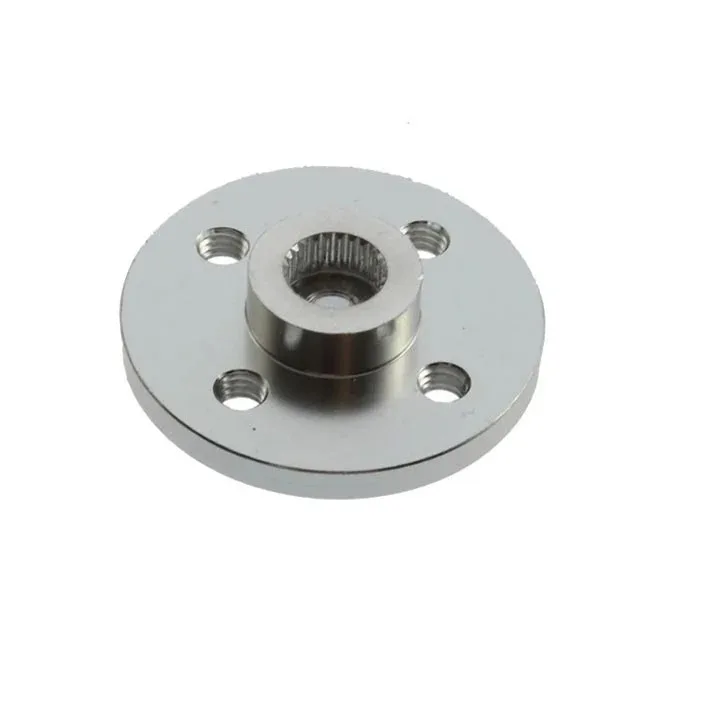
Aluminum Servo Horn/Arm 25T Round Type Disc MG995/MG996
Aluminium servo horns for MG996R — essential when running at 333Hz where increased holding torque at higher frequency can strip plastic horns. Metal horns handle the load reliably.
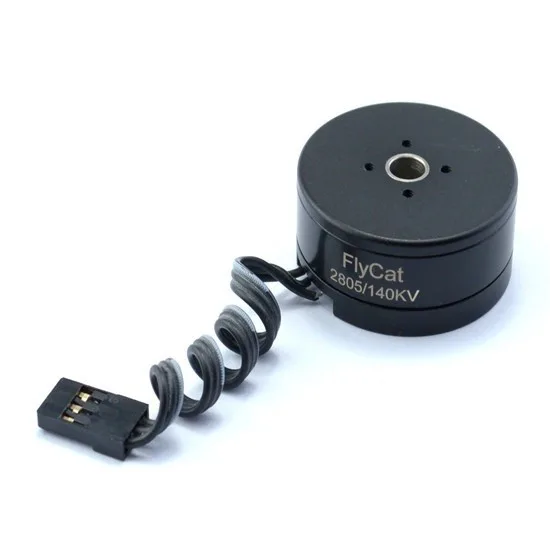
2805 140KV Gimbal Brushless Motor
For applications demanding even lower latency than 333Hz hobby servos, brushless gimbal motors with a SimpleBGC or Alexmos controller operate in the kHz range — ideal for camera stabilisation.
Frequently Asked Questions
Will increasing PWM frequency make my servo faster?
Not directly. PWM frequency affects how often the servo receives a new position command, not the servo’s physical speed. Servo speed (degrees per second) is a mechanical property set by motor KV, gear ratio, and supply voltage. However, at 333Hz the servo corrects position errors 6× more often, which reduces lag in response to changing commands — making it feel faster in dynamic control applications.
My SG90 servo twitches at 100Hz. Is that frequency-related?
Possibly. The SG90 is an analogue servo optimised for 50Hz. At frequencies above 60Hz, the analogue comparator circuit may not reset cleanly between pulses, causing oscillation around the commanded position. Stick to 50Hz for SG90. The twitching you see is the control circuit hunting rather than settling.
Can I run multiple servos at different frequencies from one Arduino?
With the standard Servo.h library, all servos share the same timer and run at the same frequency. For mixed-frequency applications, use a PCA9685 module (configurable per channel group) or multiple ESP32 LEDC channels, each configured independently.
Does higher PWM frequency improve servo accuracy/resolution?
PWM frequency does not directly change angular resolution. Resolution is set by the pulse width timing precision. A 50Hz signal with 1µs timing resolution gives 1001 distinct positions (1000–2000µs in 1µs steps). A 333Hz signal with the same 1µs timing gives the same 1001 positions — the servo cannot physically resolve finer angles regardless. For more positions, increase timing resolution (use 0.5µs steps or hardware timer with higher resolution).
What frequency do flight controllers use for servos?
Most modern flight controllers (Betaflight, ArduPilot) output servos at 50Hz by default for conventional RC protocols, 333Hz for SBUS, and up to 400Hz for some fast digital servo outputs. Betaflight’s PWM output frequency for servo outputs is configurable. Check your flight controller’s servo output specification before connecting premium digital servos expecting 333Hz.
Is there any benefit to 333Hz for a slow application like a pan-tilt camera head?
For a pan-tilt head moving at human-operated speeds (less than 30°/sec), 50Hz is perfectly adequate and you will see no practical difference at 333Hz. Save 333Hz for high-speed applications. The extra heat at 333Hz may actually shorten servo life in a 24/7 surveillance camera application without benefit.
Browse SG90, MG996R, and gimbal brushless motors at Zbotic’s Motors & Actuators section. All servo accessories including horns, brackets, and extension cables are also in stock — fast delivery across India.




Add comment