
RFID RC522 Module: Card Reader Project with Arduino Code
The RFID RC522 Arduino card reader project is one of the most popular electronics builds for Indian students, hobbyists, and security enthusiasts. Using the MFRC522 chip that operates at 13.56 MHz, the RC522 module can read and write Mifare RFID cards and key fobs — the same technology used in metro cards, office access systems, and school ID cards across India. In this comprehensive guide, we cover SPI wiring, the MFRC522 Arduino library, reading card UIDs, writing data to card sectors, and building a complete relay-based access control system.
RC522 Module Overview
The RC522 (full name MFRC522) is an NXP-manufactured RFID reader/writer IC that operates at 13.56 MHz — the frequency used by ISO/IEC 14443A standard cards. This is the standard behind Mifare Classic 1K cards (the most common RFID cards in India, available for ₹10–20 each at Zbotic and local markets), Mifare Classic 4K, Mifare Ultralight, and NTAG series NFC tags.
Key specifications:
- Operating frequency: 13.56 MHz
- Supported card types: Mifare Classic 1K/4K, Mifare Ultralight, NTAG213/215/216, ISO14443A
- Interface: SPI (up to 10 MHz), I2C, UART (module boards usually expose SPI only)
- Operating voltage: 2.5–3.3V (most modules have onboard 3.3V regulator for 5V supply)
- Read range: 0–60 mm (depends on card and antenna size)
- Current: 13–26 mA active, 80 µA in power-down mode
- Module size: 40×60 mm with built-in rectangular copper antenna
The RC522 module is widely available in India for under ₹150 and comes bundled with one white Mifare card and one key fob — everything you need to start immediately.

0.96 Inch I2C OLED Display – SSD1306
Add a status display to your RFID access control system. This OLED shows “Access Granted” / “Denied” messages and the scanned card UID using just two I2C wires alongside SPI for RC522.
SPI Wiring to Arduino
The RC522 uses SPI communication. Wire it to Arduino Uno/Nano as follows. Note that the module operates on 3.3V logic — most Arduino Uno modules handle this via the onboard 3.3V output, but for reliable operation in noisy environments, add a 100 µF capacitor between VCC and GND on the RC522 module.
| RC522 Pin | Arduino Uno/Nano | Notes |
|---|---|---|
| VCC (3.3V) | 3.3V | DO NOT connect to 5V — will damage module |
| GND | GND | Common ground |
| RST | D9 | Reset pin (configurable) |
| SDA (SS/CS) | D10 | Chip select |
| MOSI | D11 | SPI MOSI |
| MISO | D12 | SPI MISO |
| SCK | D13 | SPI Clock |
For Arduino Mega: SPI pins shift to D50 (MISO), D51 (MOSI), D52 (SCK) — keep SS on D10 or any digital pin you define. For ESP32: default SPI is GPIO 18 (SCK), 19 (MISO), 23 (MOSI), with SS on GPIO 5 and RST on GPIO 22.
MFRC522 Library Installation
Install the MFRC522 library by miguelbalboa — the most widely used RC522 library in the Arduino ecosystem with 3000+ GitHub stars.
Via Arduino IDE: Sketch → Include Library → Manage Libraries → search MFRC522 → install (by miguelbalboa). Or via CLI:
arduino-cli lib install "MFRC522"
The library includes excellent example sketches under File → Examples → MFRC522. Start with DumpInfo to read all data from a card — great for exploring your Mifare card structure.
Reading Card UID — Basic Code
The card UID (Unique Identifier) is the primary identifier used in most access control projects. Mifare Classic cards have a 4-byte UID (though some have 7 bytes). Here is the minimal code to read and print UIDs:
#include <SPI.h>
#include <MFRC522.h>

#define SS_PIN  10
#define RST_PIN  9

MFRC522 rfid(SS_PIN, RST_PIN);

void setup() {
  Serial.begin(9600);
  SPI.begin();
  rfid.PCD_Init();
  Serial.println("RFID RC522 Ready. Scan a card...");
  Serial.print("MFRC522 firmware version: 0x");
  Serial.println(rfid.PCD_ReadRegister(rfid.VersionReg), HEX);
}

void loop() {
  // Check for new card
  if (!rfid.PICC_IsNewCardPresent() || !rfid.PICC_ReadCardSerial())
    return;

  Serial.print("Card UID: ");
  String uidStr = "";
  for (byte i = 0; i < rfid.uid.size; i++) {
    Serial.printf("%02X ", rfid.uid.uidByte[i]);
    uidStr += String(rfid.uid.uidByte[i], HEX);
    if (i < rfid.uid.size - 1) uidStr += ":";
  }
  Serial.println();
  Serial.print("Card type: ");
  Serial.println(rfid.PICC_GetTypeName(rfid.PICC_GetType(rfid.uid.sak)));

  rfid.PICC_HaltA();       // Halt PICC
  rfid.PCD_StopCrypto1();  // Stop encryption
  delay(1000);
}
Upload this sketch and open the Serial Monitor at 9600 baud. Wave your Mifare card or key fob over the RC522 module — you will see the UID and card type printed. Write down the UID of your authorised cards for the access control project below.
Writing and Reading Card Data
Mifare Classic 1K cards have 16 sectors × 4 blocks × 16 bytes = 1 KB total storage. Each sector has a sector trailer (the 4th block) that stores access keys and conditions. The default key for all sectors is FF FF FF FF FF FF.
#include <SPI.h>
#include <MFRC522.h>

MFRC522 rfid(10, 9);
MFRC522::MIFARE_Key key;

void setup() {
  Serial.begin(9600);
  SPI.begin();
  rfid.PCD_Init();
  // Default key: all 0xFF
  for (byte i = 0; i < 6; i++) key.keyByte[i] = 0xFF;
}

void loop() {
  if (!rfid.PICC_IsNewCardPresent() || !rfid.PICC_ReadCardSerial()) return;

  byte blockAddr = 4; // Write to block 4 (sector 1, block 0)
  byte dataBlock[] = {
    'Z','b','o','t','i','c','.','i','n',
    ' ','A','c','c','e','s','s'  // 16 bytes total
  };

  // Authenticate with Key A
  MFRC522::StatusCode status =
    rfid.PCD_Authenticate(MFRC522::PICC_CMD_MF_AUTH_KEY_A, blockAddr, &key, &(rfid.uid));

  if (status == MFRC522::STATUS_OK) {
    // Write data
    rfid.MIFARE_Write(blockAddr, dataBlock, 16);
    Serial.println("Data written to card!");

    // Read it back
    byte buffer[18];
    byte size = sizeof(buffer);
    rfid.MIFARE_Read(blockAddr, buffer, &size);
    Serial.print("Read back: ");
    for (byte i = 0; i < 16; i++) Serial.print((char)buffer[i]);
    Serial.println();
  }

  rfid.PICC_HaltA();
  rfid.PCD_StopCrypto1();
  delay(2000);
}
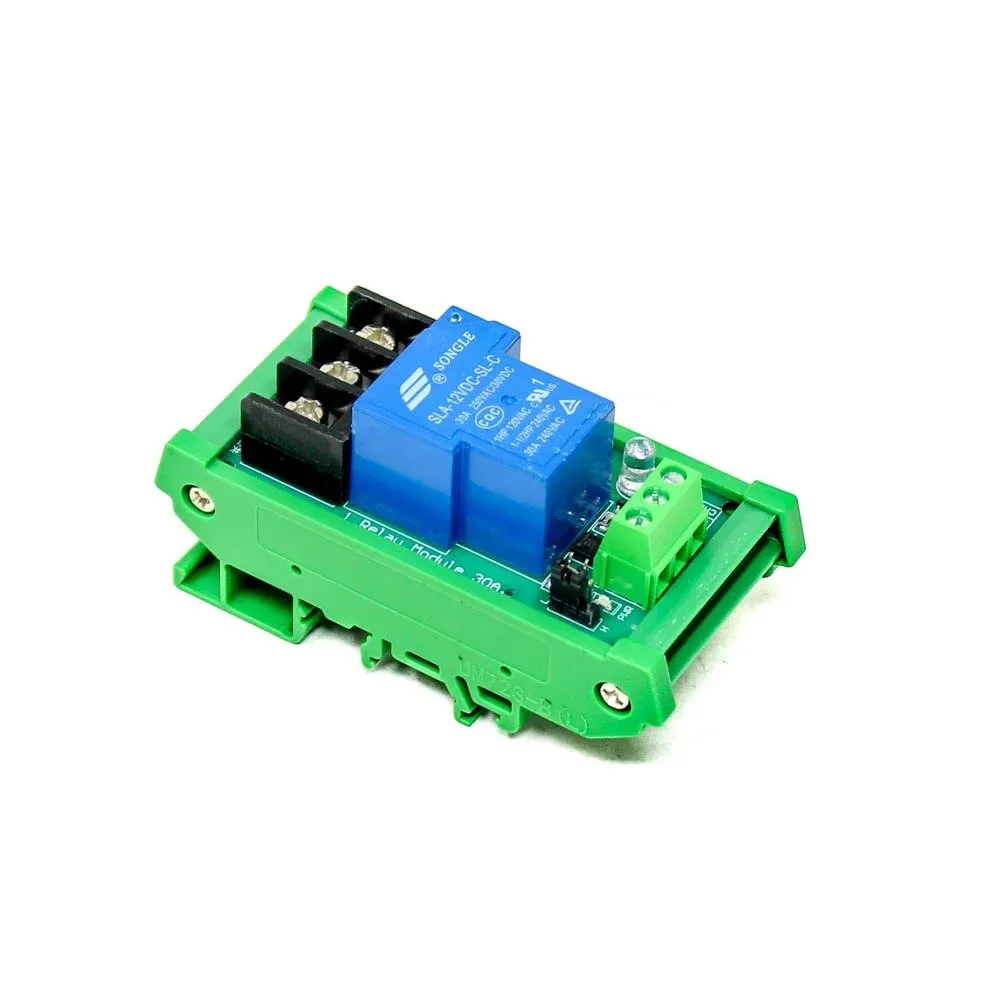
1 Channel 12V 30A Relay Module with Optocoupler
The essential component for your RFID access control door lock. This 30A optocoupler relay module safely controls 12V electric bolts and solenoid locks from Arduino’s 5V signal.
Project: Relay-Based Door Access Control
This is the most popular RC522 project in India — a simple but functional RFID door lock for homes, workshops, labs, and hostels. The system stores a list of authorised card UIDs in the Arduino’s EEPROM (or hardcoded array), checks incoming scans, and activates a relay for 3 seconds when an authorised card is detected.
Components needed
- Arduino Uno or Nano
- RC522 RFID module + Mifare cards
- 1-channel relay module (for 12V electric bolt lock)
- 0.96″ OLED display (optional but recommended for status)
- Buzzer (active, 5V)
- 12V electric bolt lock (widely available at security hardware shops in India)
#include <SPI.h>
#include <MFRC522.h>

#define SS_PIN   10
#define RST_PIN   9
#define RELAY_PIN 6
#define BUZZER    7
#define GREEN_LED 4
#define RED_LED   5

MFRC522 rfid(SS_PIN, RST_PIN);

// Add your authorised card UIDs here
// Use the UID reader sketch first to find your card UIDs
byte authorisedCards[][4] = {
  {0xDE, 0xAD, 0xBE, 0xEF},  // Card 1 — replace with your UID
  {0x12, 0x34, 0x56, 0x78},  // Card 2
  {0xAB, 0xCD, 0xEF, 0x01}   // Card 3 (key fob)
};
const int NUM_CARDS = sizeof(authorisedCards) / sizeof(authorisedCards[0]);

bool isAuthorised(byte* uid, byte uidSize) {
  if (uidSize != 4) return false;
  for (int i = 0; i < NUM_CARDS; i++) {
    bool match = true;
    for (byte j = 0; j < 4; j++) {
      if (uid[j] != authorisedCards[i][j]) { match = false; break; }
    }
    if (match) return true;
  }
  return false;
}

void grantAccess() {
  Serial.println("ACCESS GRANTED");
  digitalWrite(GREEN_LED, HIGH);
  digitalWrite(RELAY_PIN, LOW);  // Active-low relay: unlock door
  tone(BUZZER, 2000, 200);       // Short beep
  delay(3000);                   // Keep unlocked for 3 seconds
  digitalWrite(RELAY_PIN, HIGH); // Lock door
  digitalWrite(GREEN_LED, LOW);
}

void denyAccess() {
  Serial.println("ACCESS DENIED");
  digitalWrite(RED_LED, HIGH);
  tone(BUZZER, 500, 1000);       // Long low beep
  delay(2000);
  digitalWrite(RED_LED, LOW);
}

void setup() {
  Serial.begin(9600);
  SPI.begin();
  rfid.PCD_Init();
  pinMode(RELAY_PIN, OUTPUT);
  pinMode(GREEN_LED, OUTPUT);
  pinMode(RED_LED, OUTPUT);
  pinMode(BUZZER, OUTPUT);
  digitalWrite(RELAY_PIN, HIGH); // Relay off (active-low)
  Serial.println("RFID Access Control Ready");
}

void loop() {
  if (!rfid.PICC_IsNewCardPresent() || !rfid.PICC_ReadCardSerial()) return;

  Serial.print("Scanned UID: ");
  for (byte i = 0; i < rfid.uid.size; i++)
    Serial.printf("%02X ", rfid.uid.uidByte[i]);
  Serial.println();

  if (isAuthorised(rfid.uid.uidByte, rfid.uid.size))
    grantAccess();
  else
    denyAccess();

  rfid.PICC_HaltA();
  rfid.PCD_StopCrypto1();
}
To add or remove cards without re-uploading the sketch, store UIDs in Arduino EEPROM (24 bytes per card for 4-byte UIDs + metadata) and add a “master card” enrolment mode where holding the master card for 5 seconds toggles enrolment mode.
Using RC522 with ESP32 + WiFi Logging
Upgrading from Arduino to ESP32 adds WiFi-based access logging — every card scan is timestamped and uploaded to a Google Sheet, Telegram bot, or local server. This is ideal for attendance systems in schools, offices, and coworking spaces across India.
ESP32 SPI pins for RC522: SS → GPIO 5, RST → GPIO 22, MOSI → GPIO 23, MISO → GPIO 19, SCK → GPIO 18.
// Send scan event to Telegram bot
#include <WiFi.h>
#include <HTTPClient.h>

void notifyTelegram(String uid, bool granted) {
  if (WiFi.status() != WL_CONNECTED) return;
  String botToken = "YOUR_BOT_TOKEN";
  String chatId   = "YOUR_CHAT_ID";
  String msg = (granted ? "✅ ACCESS GRANTED" : "❌ ACCESS DENIED")
             + " | Card: " + uid
             + " | " + String(millis()/1000) + "s uptime";
  String url = "https://api.telegram.org/bot" + botToken +
               "/sendMessage?chat_id=" + chatId +
               "&text=" + msg;
  HTTPClient http;
  http.begin(url);
  http.GET();
  http.end();
}

ESP32-CAM WiFi Module with OV2640 Camera
Combine RFID access control with face recognition using the ESP32-CAM. Wire the RC522 to ESP32-CAM’s SPI pins and add a camera snapshot on each access attempt for dual-factor security.

0.96 Inch SPI OLED LCD Module (7-pin, White)
Display real-time RFID scan results, card UIDs, and access status on this crisp white SSD1306 OLED. SPI interface keeps the I2C bus free for other sensors in your access system.
Frequently Asked Questions
Can RC522 read NFC cards like Jio or DTC bus cards?
The RC522 reads ISO/IEC 14443A cards. Indian metro cards (Delhi Metro, Mumbai Metro), DTC bus cards, and many Jio NFC SIMs use ISO/IEC 14443A — so yes, RC522 can read their UID. However, the data sectors are encrypted with proprietary keys and cannot be accessed without the issuer’s key. You can only read the public UID for identification purposes.
Why does my RC522 show “firmware version 0x00” or “0xFF”?
This indicates a hardware communication failure. Check: (1) VCC is connected to 3.3V, not 5V, (2) SPI pins match your pin definitions in code, (3) common GND between Arduino and RC522, (4) add 100 µF capacitor between RC522 VCC and GND. The module is very sensitive to power supply noise from Arduino’s 3.3V regulator when current is shared with other peripherals.
Can I add multiple RC522 modules to one Arduino?
Yes. SPI supports multiple devices using separate chip select (SS) pins. Connect all modules sharing SCK, MISO, MOSI lines but with individual SS pins (e.g. D10, D8, D7). Initialise each module with MFRC522 rfid1(10, 9); MFRC522 rfid2(8, 9); — they share the same RST pin which is fine since you reset and activate them one at a time.
What is the maximum number of cards I can store for access control?
Arduino Uno has 1 KB EEPROM — enough for ~62 cards (4-byte UID per card + name). For larger deployments, store UIDs in an SD card module (FAT32 text file lookup) or use an ESP32 with SPIFFS/LittleFS which provides 1–4 MB file storage. For institutional use (100+ cards), use a database on a Raspberry Pi server with the ESP32 querying over WiFi.
Is the RC522 project safe for real door security?
Mifare Classic cards (the standard cards bundled with RC522 modules) use the CRYPTO1 cipher which has known cryptographic weaknesses and can be cloned with a Proxmark or phone app in minutes. For serious security, use Mifare DESFire EV2/EV3 cards (hardware AES encryption, not supported by RC522) or NTAG424 DNA cards. The RC522 with Classic cards is suitable for low-security applications like workshop attendance, locker access, and hobbyist projects — not for protecting valuables.



Add comment