
If your ADC is giving erratic readings, your audio circuit has an annoying hum, or your sensor data is jumping around without any physical cause, the culprit is almost certainly noise in electronic circuits. Electrical noise is the unwanted voltage or current that contaminates your signal, and it is one of the biggest challenges in real-world circuit design. In this comprehensive guide, we will cover every major noise source and give you practical, proven techniques to tame it — techniques that apply whether you are building an Arduino weather station or a precision analog amplifier.
Table of Contents
- What Is Electrical Noise?
- Common Sources of Noise in Electronic Circuits
- Thermal Noise and Shot Noise Explained
- Power Supply Noise and How to Filter It
- Decoupling Capacitors: The Most Important Noise Fix
- Grounding and PCB Layout for Low Noise
- Shielding and Filtering Techniques
- Recommended Products for Noise Reduction
- Frequently Asked Questions
What Is Electrical Noise?
Electrical noise is any undesired electrical signal that is superimposed on the actual signal you care about. It can be a tiny fluctuation of a few microvolts on a precision ADC input, or it can be a large 50Hz hum that completely drowns out an audio signal. Noise is characterised by its frequency spectrum, amplitude, and source.
The key metric is the Signal-to-Noise Ratio (SNR), measured in decibels (dB). A higher SNR means your signal is much stronger than the noise floor, resulting in clean, reliable data. For a 10-bit ADC operating at 5V, the least significant bit (LSB) represents about 4.9mV. Any noise greater than 2.5mV can flip that last bit, reducing effective resolution from 10 bits to 9 bits or less.
Understanding noise is not just academic — it directly determines whether your sensor project actually works reliably in a real-world Indian environment, where electrical conditions can be far from ideal (voltage fluctuations, nearby industrial equipment, fluorescent lights, etc.).
Common Sources of Noise in Electronic Circuits
There is no single source of noise — it comes from multiple directions simultaneously. Here are the major categories you will encounter:
1. Conducted Noise
Conducted noise travels through electrical connections — power supply lines, ground paths, and signal wires. Switching power supplies (SMPS), motor drivers, and relay switching all inject sharp current spikes back into the power rail. These spikes then appear as noise on every component powered from the same rail.
2. Radiated Noise (EMI)
Electromagnetic Interference (EMI) radiates through the air from any conductor carrying a rapidly changing current. High-frequency digital signals (clock lines, PWM outputs), switching regulators, and wireless modules (Bluetooth, Wi-Fi) all radiate EMI. Nearby sensitive analog circuits or long signal wires act as antennas and pick up this radiated energy.
3. Capacitive and Inductive Coupling
Two conductors running parallel to each other for a significant length act as a capacitor. A fast-changing voltage on one wire induces a proportional current in the adjacent wire — this is capacitive coupling. Similarly, changing magnetic fields from high-current traces induce voltages in nearby low-current signal traces — this is inductive coupling. On a densely routed breadboard or prototype PCB, this is more common than most beginners realise.
4. Ground Bounce
When digital outputs switch simultaneously (common in microcontrollers), the sudden change in current demand causes a transient voltage drop on the ground line due to its inductance (even a short trace has nanohenries of inductance). This momentary voltage shift on ground appears as a noise spike at every component sharing that ground path.
5. 50Hz Mains Hum
India’s mains supply operates at 230V, 50Hz. This 50Hz (and its harmonics at 100Hz, 150Hz, etc.) couples into circuits via electromagnetic induction from nearby power cables, transformers, or through ground loops between mains-powered equipment. Audio circuits and sensitive analog measurements are most susceptible.
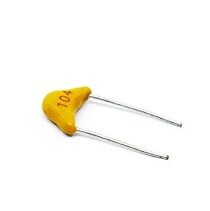
0.1/100nF – TH-Multilayer Ceramic Capacitor (Pack of 50)
The standard decoupling capacitor value used by professional engineers worldwide. Place one across the power pins of every IC and module on your circuit to filter high-frequency switching noise from the supply rail.
Thermal Noise and Shot Noise Explained
Some noise sources are intrinsic to the physics of components themselves and cannot be completely eliminated — only minimised.
Thermal Noise (Johnson-Nyquist Noise)
Every resistor generates a tiny noise voltage due to the random thermal agitation of electrons. The RMS noise voltage is given by: Vn = √(4kTRB), where k is Boltzmann’s constant, T is temperature in Kelvin, R is resistance in ohms, and B is the bandwidth in Hz. At room temperature (around 27°C / 300K), a 10kΩ resistor over 10kHz bandwidth generates approximately 1.3µV of noise — negligible for most digital applications but significant for precision analog measurement.
To minimise thermal noise: use lower-value resistors where possible, limit measurement bandwidth to what you actually need, and cool critical components (in extreme precision applications).
Shot Noise
Shot noise occurs in semiconductor junctions (diodes, transistors, FETs) due to the discrete nature of electron flow. It is proportional to the DC current flowing through the device. In most hobbyist applications, shot noise is well below the system noise floor and not a practical concern.
Power Supply Noise and How to Filter It
The power supply is the most common noise injection point in any circuit. Switching power supplies (SMPS) — including the 12V adapters and buck converters commonly used in Indian maker projects — switch at frequencies from 50kHz to 1MHz. This switching creates voltage ripple and high-frequency spikes on the output rail that feed directly into every connected component.
Even linear regulators are not perfect: they have a finite power supply rejection ratio (PSRR) that degrades at higher frequencies, allowing some noise through. At 1MHz, most LDO regulators offer very little rejection.
Practical power supply noise reduction techniques:
- Bulk capacitance: Place a large electrolytic capacitor (100µF–1000µF) close to your power entry point to absorb low-frequency ripple.
- High-frequency bypass: Add 100nF ceramic capacitors at every IC power pin to handle high-frequency noise.
- Ferrite beads: Series ferrite beads on power lines act as frequency-dependent resistors, blocking high-frequency noise from passing between sections of your circuit.
- LC filters: An inductor in series with the power line followed by a capacitor to ground forms a low-pass filter. Very effective for SMPS ripple suppression.
- Separate analog and digital supply planes: On mixed-signal PCBs, use different power plane sections for analog (AVCC) and digital (VCC) rails, connected via a ferrite bead.

0.1µF Ceramic Capacitor (Pack of 50)
The workhorse decoupling capacitor for any electronics workbench. These 104 ceramic capacitors are used by professionals on every IC power pin to kill high-frequency supply noise. Available in a 50-piece pack for all your projects.
Decoupling Capacitors: The Most Important Noise Fix
If there is one single habit that separates experienced electronics engineers from beginners, it is the consistent use of decoupling capacitors. A decoupling capacitor (also called a bypass capacitor) is placed between the VCC and GND pins of every IC — as close to the IC’s power pins as physically possible.
Here is why they work: when a digital IC switches its outputs, it demands a sudden burst of current from the power supply. The inductance of the power trace prevents this current from arriving instantly from the supply, so without a local reservoir, the supply voltage dips briefly — creating a noise spike. The decoupling capacitor acts as a local energy reservoir: it delivers the required current instantly, then recharges slowly from the supply. This keeps the IC’s supply voltage stable.
The two-capacitor strategy used by professionals:
- 100nF (0.1µF) ceramic capacitor — handles high-frequency noise (1MHz and above). Place as close to the IC’s VCC pin as possible.
- 10µF–100µF electrolytic or tantalum capacitor — handles lower-frequency ripple. Can be placed a bit further away, near the power entry to the board section.
On a breadboard prototype, place a 100nF ceramic capacitor from the 5V rail to the GND rail as close as possible to each IC. For an Arduino project with multiple sensor modules, put one 100nF capacitor across the power pins of each module. This simple step can eliminate the vast majority of noise issues beginners encounter.
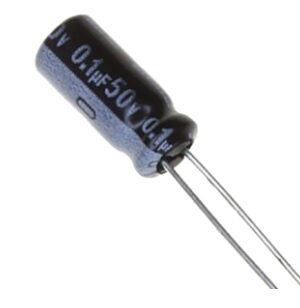
0.1µF 50V Capacitor (Pack of 50)
Rated at 50V for safe use in a variety of circuits up to 12V-24V systems. These 0.1µF capacitors are ideal for decoupling across relay coils, SMPS outputs, and motor driver power pins where higher voltage tolerance is needed.
Grounding and PCB Layout for Low Noise
Good grounding is inseparable from good noise management. A poor ground layout can undo all the benefits of decoupling capacitors and filtering. Here are the layout principles that matter most:
- Solid ground plane: On a two-layer PCB, dedicate the entire bottom layer to ground copper pour. Every GND via connects to this plane, giving very low impedance return paths for all currents.
- Keep decoupling capacitors close: A 100nF capacitor placed 5cm from the IC is significantly less effective than one placed 5mm away. The trace between the capacitor and the IC pin has inductance that limits the capacitor’s effectiveness at high frequencies.
- Minimise loop areas: The area enclosed by a signal trace and its return current path acts as an antenna. Small loop areas radiate less and pick up less EMI. Route signal traces directly above their return current path on the ground plane.
- Separate high-current and low-current paths: Keep motor drive traces, relay coil drive traces, and LED drive traces away from sensitive analog signal traces. High current in nearby traces creates magnetic fields that induce noise.
- Star grounding for mixed-signal boards: Connect analog ground and digital ground planes at a single point (the star point) near the power supply. This prevents digital switching currents from flowing through the analog ground plane.
Shielding and Filtering Techniques
When layout optimisation is not enough, shielding and active/passive filtering come into play.
Shielding
Metal enclosures provide excellent shielding against radiated EMI. A grounded aluminium or steel box around your sensitive circuit blocks external electric fields. For individual signals, shielded cable (coaxial or twisted-pair with shield) prevents the cable from acting as an antenna in high-noise environments.
RC Filters on Sensor Inputs
A simple RC low-pass filter on an ADC input — a 1kΩ resistor in series with the signal, and a 100nF capacitor from the junction to GND — forms a filter with a cutoff frequency of about 1.6kHz. This eliminates high-frequency noise above 1.6kHz from the ADC reading while passing DC and slow-changing sensor signals unchanged.
Software Averaging
For sensor data, software techniques like moving average or oversampling can reduce the effective noise floor. Reading the ADC 16 times and averaging gives you an extra bit of resolution (oversampling theorem). This is free noise reduction — just computation time.

DHT11 Digital Relative Humidity and Temperature Sensor Module
The DHT11 uses a digital protocol rather than analog voltage output — an inherently more noise-immune approach. Great for learning the difference between analog and digital sensor interfaces and when each is preferable.
Frequently Asked Questions
Q: My Arduino ADC readings are noisy — what should I do first?
Start with the cheapest fix: add a 100nF ceramic capacitor between the Arduino’s 5V and GND pins on the breadboard. Then add a 100nF cap directly across the sensor’s power pins. If noise persists, add an RC low-pass filter (1kΩ + 100nF) on the analog input pin. Finally, use software averaging in your code.
Q: Can a motor cause noise in my sensor readings?
Absolutely — motors are one of the noisiest components in any circuit. DC motors generate back-EMF spikes when switching, and the brushes create high-frequency interference. Always place a 100nF capacitor across the motor terminals, connect it to a completely separate power supply if possible, and add a common ground connection between supplies. Snubber diodes across the motor terminals also help significantly.
Q: What is the difference between filtering and shielding?
Filtering acts in the frequency domain — it attenuates noise at specific frequencies (e.g., a low-pass filter blocks high-frequency noise). Shielding acts in the spatial domain — it prevents electromagnetic fields from entering or leaving a physical region. Both are complementary and often used together for best results.
Q: Why does my circuit work on a breadboard but have noise problems on my prototype PCB?
Counter-intuitively, breadboard layouts often have more distributed capacitance between long jumper wires that accidentally acts as filtering. On a PCB, traces are shorter but more tightly coupled. Ensure you have proper decoupling capacitors on the PCB, a solid ground plane, and that high-current traces do not run next to analog signal traces.
Q: Is 50Hz hum in my audio circuit dangerous?
It is not electrically dangerous, but it is a clear sign of a ground loop or inadequate shielding. Never use the mains earth conductor as a signal ground. Isolate audio input sources using isolation transformers or optocouplers, and route all audio cables away from mains power cables.
Build cleaner circuits today. Stock up on ceramic capacitors, resistors, and sensors at Zbotic Electronics Components — everything you need to fight noise in your circuits, delivered fast across India.







Add comment