
If you are building a CNC router, 3D printer, laser cutter, or any other precision motion system, the two stepper motor frame sizes you will encounter most are NEMA 17 and NEMA 23. Both are industry-standard formats that describe the mounting face dimensions, but they represent very different performance tiers. Choosing the wrong one leads to either an underpowered machine that misses steps on heavy cuts, or an overengineered, expensive build that wastes money and creates unnecessary vibration.
This guide takes a deep technical look at NEMA 17 vs NEMA 23 stepper motors, covering frame dimensions, torque curves, driver requirements, heat management, noise, and which applications genuinely benefit from the larger motor. We also look at the Indian market context: what these motors cost in India, what drivers you pair with them, and which makes sense for popular Indian maker projects like desktop CNC routers and DIY 3D printers.
What Does NEMA Mean?
NEMA stands for the National Electrical Manufacturers Association. In the context of stepper motors, the NEMA number refers to the size of the motor’s face plate in tenths of an inch. NEMA 17 means a 1.7 × 1.7 inch (43.2 × 43.2 mm) faceplate. NEMA 23 means a 2.3 × 2.3 inch (57.2 × 57.2 mm) faceplate.
Crucially, NEMA tells you only the mounting dimensions — the bolt hole pattern and faceplate size. It does NOT tell you the motor’s torque or power rating. Two NEMA 17 motors from different manufacturers can have very different torque ratings depending on their body length and winding design. A short-body NEMA 17 (e.g., 20 mm long) might produce only 150 g·cm holding torque, while a long-body NEMA 17 (e.g., 60 mm long) can produce 5.5 kg·cm or more.
Always look at the actual holding torque specification in N·m or kg·cm, not just the NEMA frame size, when selecting a stepper for your application.
NEMA 17: Specs and Characteristics
NEMA 17 is the dominant stepper motor in the desktop 3D printer world. All major FDM printer designs — Prusa, Ender, Voron, RatRig — use NEMA 17 motors for XY and Z axes. Here is what the standard looks like:
| Parameter | Typical NEMA 17 Value |
|---|---|
| Faceplate size | 42.3 × 42.3 mm |
| Shaft diameter | 5 mm |
| Step angle | 1.8° (200 steps/rev) |
| Holding torque range | 300 g·cm – 6.5 kg·cm |
| Rated current | 0.4 – 2.0 A per phase |
| Body lengths available | 20, 33, 40, 47, 60 mm |
| Weight (typical 40 mm body) | ~280 g |
| Common driver | A4988, DRV8825, TMC2208/2209 |
The 42HS48 is a very popular NEMA 17 variant in India: 48 mm body length, 5.6 kg·cm holding torque, 1.2 A rated current with a detachable cable. This motor covers the vast majority of 3D printer and light CNC applications.
NEMA 23: Specs and Characteristics
NEMA 23 is the workhorse of desktop CNC routers and heavier automation equipment. Here is the standard profile:
| Parameter | Typical NEMA 23 Value |
|---|---|
| Faceplate size | 57.2 × 57.2 mm |
| Shaft diameter | 6.35 mm (1/4″) or 8 mm |
| Step angle | 1.8° (200 steps/rev) |
| Holding torque range | 0.5 – 3.0 N·m (5 – 30 kg·cm) |
| Rated current | 1.5 – 4.0 A per phase |
| Body lengths available | 41, 56, 76, 112 mm |
| Weight (typical 56 mm body) | ~600–900 g |
| Common driver | DM542, TB6600, DM860, MA860H |
NEMA 23 motors draw significantly more current than NEMA 17 and require dedicated external stepper drivers — not the small integrated chips (A4988, DRV8825) used with NEMA 17. The driver must be capable of 3–4 A per phase. The DM542 (Leadshine-style) is the most common choice in India for CNC applications.
Torque Comparison
Let us put the torque numbers in perspective with a concrete example. On a standard CNC router using M8 leadscrews (1.25 mm pitch), the force available at the cutting tool depends on the motor torque translated through the leadscrew:
NEMA 17 (42HS48, 5.6 kg·cm):
Linear force ≈ (5.6 kg·cm × 2π) / (1.25 mm / 10 mm/cm) × efficiency ≈ ~260 N of axis thrust
NEMA 23 (57HS76, 18 kg·cm):
Linear force ≈ ~850 N of axis thrust
For cutting soft materials (MDF, acrylic, foam, plywood up to 12 mm) at reasonable speeds, a NEMA 17 with a good driver and microstepping provides plenty of force. For cutting hardwood, aluminium, or when running very fast rapids that create high acceleration loads, NEMA 23 provides the torque headroom needed.
At high speeds, stepper motors lose torque — this is a fundamental property of the stepper’s back-EMF. NEMA 23, having more copper windings and more magnetic material, loses torque more slowly as speed increases. This makes NEMA 23 better for high-speed CNC work (rapid moves over 3,000 mm/min on ball screws).
Driver Requirements
This is where the practical difference really shows. NEMA 17 motors pair with compact, affordable microstepping drivers:
- A4988 — ₹50–100, 2 A max, 1/16 microstepping, simple step/dir interface
- DRV8825 — ₹80–150, 2.2 A max, 1/32 microstepping, slightly quieter than A4988
- TMC2208/2209 — ₹200–450, 2 A RMS / 2.8 A peak, StealthChop for ultra-quiet operation, UART configurable. These are the gold standard for 3D printers.
NEMA 23 motors require heavier external drivers:
- TB6600 — ₹350–600, 4 A max, 1/32 microstepping. Budget option, runs hot.
- DM542 (Leadshine clone) — ₹800–1500, 4.2 A max, 256-subdivision microstepping, excellent smoothness. Industry standard for desktop CNC.
- DM860 — ₹1500–2500, 7.2 A max, for the most demanding NEMA 23 builds and NEMA 34 motors.
The cost difference in drivers is significant: a full 3-axis NEMA 17 setup with TMC2209 drivers costs roughly ₹1,500–2,500 in drivers alone. A 3-axis NEMA 23 setup with DM542 drivers costs ₹4,000–6,000 just in drivers, before the motors.
Heat, Noise, and Resonance
Stepper motors always dissipate heat — they draw rated current even when stationary to maintain holding torque. NEMA 23 motors running at 3–4 A per phase get hot: expect 60–80°C on the motor body without active cooling. This is normal but requires proper ventilation in the electronics enclosure.
Noise and vibration are worse in NEMA 23 at low speeds due to the larger rotor inertia. Resonance (the bouncy, rhythmic vibration at certain step rates) is more pronounced. Modern DM542 drivers compensate with anti-resonance algorithms, which is a key reason to use quality drivers with NEMA 23 rather than cheap TB6600 clones.
NEMA 17 with TMC2208/2209 in StealthChop mode is remarkably quiet — 3D printers using these can run near-silently. NEMA 23 CNC builds will always be noisier at the motor, though the cutting tool noise dominates anyway.
Which Application Uses Which?
| Application | Recommended | Why |
|---|---|---|
| FDM 3D printer (XYZ) | NEMA 17 | Light load, speed, silent operation priority |
| Desktop CNC router (wood/MDF) | NEMA 17 or 23 | NEMA 17 for soft materials, NEMA 23 for speed/hardwood |
| CNC router for aluminium | NEMA 23 | High cutting forces require torque headroom |
| Laser engraver (low mass) | NEMA 17 | Very low load, speed and acceleration priority |
| Pick and place / plotter | NEMA 17 | Precision over torque |
| Large-format CNC (> 600mm) | NEMA 23 | Longer axes need more torque to move faster |
| Telescope / astronomy tracker | NEMA 17 | Ultra-low speed, very low load |
Cost in India
In the Indian market, NEMA 17 motors range from ₹350 (basic short-body, 3 kg·cm) to ₹900 (long-body, D-type shaft, 5.6 kg·cm with detachable cable). The 42HS48 variant is the most popular and typically costs ₹500–700 from reputable Indian suppliers.
NEMA 23 motors range from ₹800 (basic, 1.3 N·m) to ₹2,500 (2.8 N·m, dual shaft) from Indian electronics suppliers. Imported branded options (Leadshine, Stepper Online) cost more but offer better documentation and quality consistency.
Total axis cost (motor + driver + coupling + linear rail or leadscrew) is therefore roughly 2.5–4× higher for NEMA 23 vs NEMA 17. For a 3-axis machine, this difference can be ₹8,000–15,000 — meaningful for hobbyist budgets.
Recommended Products from Zbotic

42HS48 NEMA17 5.6 kg·cm Stepper Motor — D-Type Shaft
Best-in-class NEMA 17 for 3D printers and light CNC — 48 mm body, detachable cable, D-type shaft for secure coupler grip. Handles the full range of desktop motion applications.

A4988 Stepper Motor Driver Controller Board
The standard driver for NEMA 17 motors — up to 2 A per phase, 1/16 microstepping, plug-in compatible with GRBL shields and 3D printer boards. Essential for any CNC build.
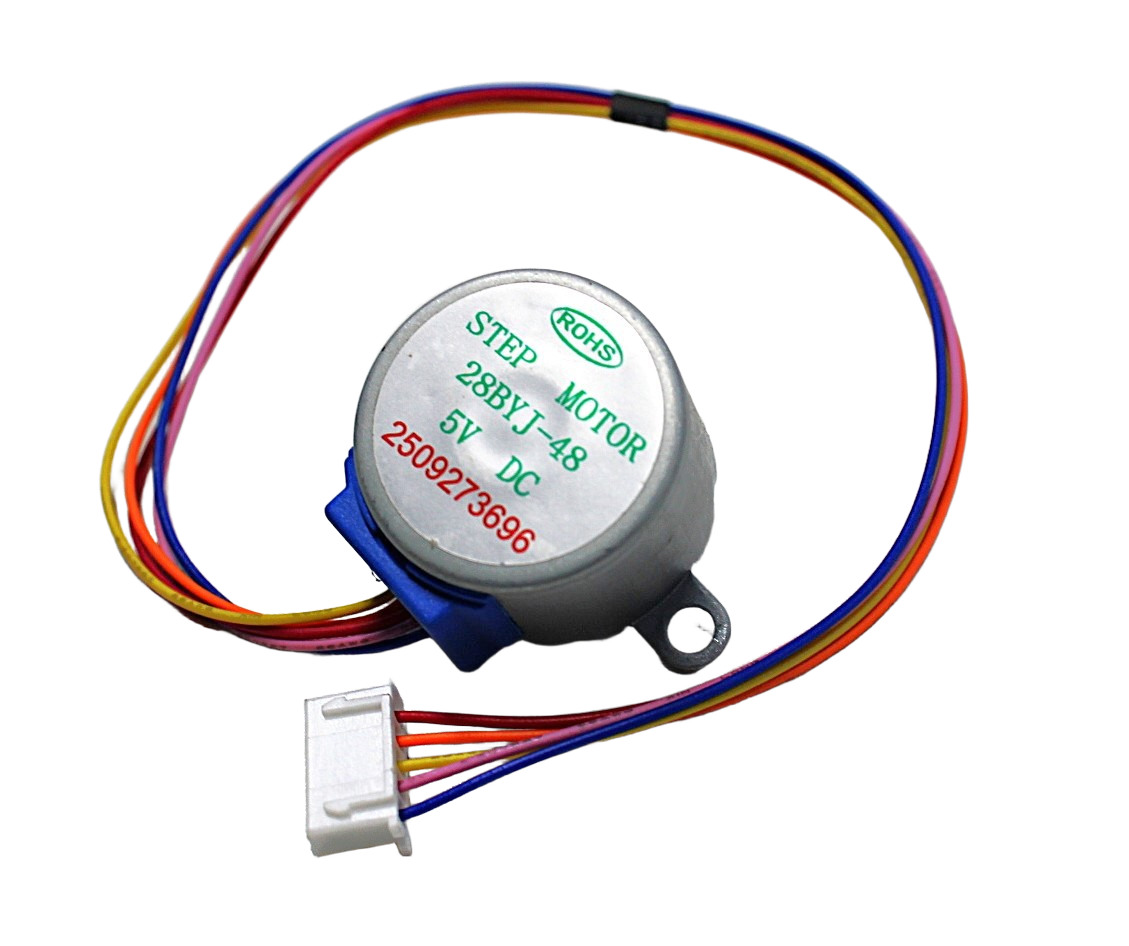
28BYJ-48 5V Stepper Motor
Entry-level geared stepper for beginners — not for CNC but perfect for learning stepper control basics with an Arduino and ULN2003 driver before upgrading to NEMA 17.
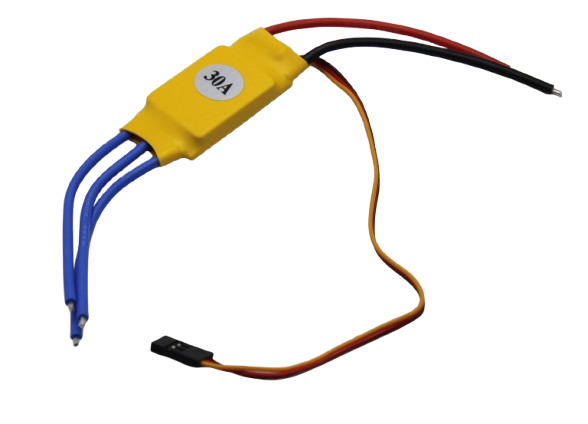
30A BLDC ESC Brushless Speed Controller
When your CNC spindle is a brushless motor rather than stepper-driven — this 30A ESC controls BLDC spindle motors on router builds, laser cutters, and plasma tables.
Frequently Asked Questions
Can I use a NEMA 17 for a CNC router cutting aluminium?
It depends on your speeds and depth of cut. Shallow passes (0.2–0.5 mm) at slow feed rates (300–600 mm/min) are possible with a well-tuned NEMA 17 and a rigid machine. But NEMA 23 provides the torque headroom that allows higher feed rates and deeper cuts without losing steps. For aluminium CNC work as a primary use case, NEMA 23 is the right choice.
What is the difference between holding torque and running torque?
Holding torque is the maximum torque the motor can resist when stationary with power applied — it is the number on the spec sheet. Running torque is lower and decreases as step rate (speed) increases due to inductance and back-EMF. At high speeds, NEMA 23’s larger inductance can actually cause it to lose torque faster — always check the motor’s torque-speed curve, not just holding torque.
Do I need microstepping for a CNC machine?
Yes, for two reasons: smoothness and resolution. Without microstepping, stepper motors produce audible 200-step-per-revolution clunking. With 1/16 microstepping on an A4988, you get 3200 microsteps per revolution — enough for sub-0.01 mm resolution on a 1 mm pitch leadscrew. Note that microstepping reduces available torque, so never depend on microstepped torque for cutting force — use it only for smooth motion.
Can I run a NEMA 23 motor with an A4988 driver?
Technically possible but not recommended. A4988 is rated for 2 A max; most NEMA 23 motors need 2.5–4 A per phase for rated torque. Running a NEMA 23 at 2 A gives you maybe 40–60% of rated torque. The A4988 will overheat quickly. Use a proper NEMA 23 driver like TB6600 or DM542.
Which is better for a Voron or Rat Rig 3D printer?
NEMA 17. These machines are specifically designed around NEMA 17 motors, and the community has years of tuning data around NEMA 17 + TMC2209 combinations. The 5.6 kg·cm 42HS48 motor is more than sufficient for any CoreXY or cartesian printer. Using NEMA 23 would require chassis modifications and provides no benefit for 3D printing loads.
How do I mount a NEMA 17 vs NEMA 23?
Both use standard mounting: four M3 screws (NEMA 17) or four M5 screws (NEMA 23) arranged in a square pattern at the faceplate corners. Bolt circle diameter is 31 mm for NEMA 17 and 47.14 mm for NEMA 23. Most CNC router kits and printed motor mounts are available for both sizes.
Zbotic stocks NEMA 17 stepper motors, A4988 and DRV8825 drivers, and complete motion hardware — shipped fast across India.






Add comment