
If you are looking to build long-range, low-power IoT devices, LoRaWAN with ESP32 and TTN (The Things Network) is one of the most powerful and cost-effective combinations available to Indian makers today. LoRaWAN allows sensor nodes to transmit data kilometres away using just a few milliwatts of power — making it ideal for agriculture, water metering, asset tracking, and environmental monitoring across India’s vast geography.
LoRa vs LoRaWAN: Understanding the Difference
These two terms are often used interchangeably but they refer to different layers of the same technology stack:
LoRa (Long Range) is the physical radio modulation technology developed by Semtech. It uses Chirp Spread Spectrum (CSS) modulation in sub-GHz frequencies (IN865 band for India: 865–867 MHz). LoRa provides the raw radio link between two devices — like a pair of walkie-talkies.
LoRaWAN is the network protocol layer built on top of LoRa. It defines how end-devices join a network, how data packets are addressed and routed, and how security is handled (AES-128 encryption). LoRaWAN adds the concept of a gateway (a receiver connected to the internet) and a network server (which routes packets to your application).
Key LoRaWAN Parameters for India
| Parameter | India (IN865) | Notes |
|---|---|---|
| Frequency band | 865–867 MHz | Licensed to all users; no permit required for short-range |
| Spreading factors | SF7–SF12 | Higher SF = longer range, lower data rate, more airtime |
| Max payload | 51–222 bytes | Depends on spreading factor |
| Duty cycle limit | 1% (36 s/hour) | TTN enforces Fair Use Policy |
| Typical range | 2–15 km | Urban 2–5 km, rural/agricultural 5–15 km |
Why Use The Things Network (TTN) in India?
The Things Network is a global, community-operated LoRaWAN network. It is free to use for development and low-volume deployments (up to 30 seconds of uplink airtime per day per device under the Fair Use Policy). In India, TTN coverage is rapidly growing, with gateways deployed in Bengaluru, Mumbai, Delhi, Hyderabad, Pune, and many smaller cities.
Even if there is no TTN gateway near you, you can deploy your own gateway (cost: ₹8,000–₹25,000 depending on the model) and contribute coverage to the community while using it for your own projects. The TTN V3 stack supports both OTAA (Over-the-Air Activation) and ABP (Activation by Personalisation), though OTAA is strongly recommended for security.
TTN Alternatives for India
- Helium Network: A blockchain-incentivised LoRaWAN network with growing Indian coverage.
- AWS IoT Core for LoRaWAN: Fully managed LoRaWAN service with private gateway support.
- Private ChirpStack: Self-hosted LoRaWAN network server — best for enterprises needing data sovereignty.
Hardware Setup: ESP32 + LoRa Module
The most popular way to add LoRa capability to an ESP32 is through an SX1276 or SX1278 LoRa module. The SX1276 covers 868 MHz and 915 MHz (suitable for IN865), while the SX1278 covers 433 MHz (NOT suitable for Indian LoRaWAN). Make sure you use an 868 MHz or India-specific LoRa module.
Wiring the LoRa Module to ESP32
The SX1276-based module (e.g., RYLR896 or RA-02) communicates with the ESP32 over SPI. Here is the wiring for a standard ESP32 development board:
| LoRa Module Pin | ESP32 Pin | Notes |
|---|---|---|
| VCC | 3.3V | 3.3 V only — do NOT use 5 V |
| GND | GND | |
| SCK | GPIO18 | VSPI clock |
| MISO | GPIO19 | VSPI MISO |
| MOSI | GPIO23 | VSPI MOSI |
| NSS/CS | GPIO5 | Chip select |
| DIO0 | GPIO26 | IRQ pin for receive done |
| RST | GPIO14 | Module reset |

Ai Thinker NodeMCU-32S ESP32 Development Board – IPEX Version
The IPEX external antenna connector on this board is perfect for LoRaWAN projects where both WiFi and LoRa antennas need to be mounted externally for maximum range.
Setting Up TTN: Application, Device, and Gateway Registration
Step 1: Create a TTN Account
Go to console.thethingsnetwork.org and create a free account. Select the server closest to you — currently TTN’s nearest cluster for India is in Asia-Pacific (ap1.cloud.thethings.network).
Step 2: Create an Application
In the TTN console, go to Applications → Create Application. Give it a unique ID (e.g., zbotic-farm-monitor). This application will hold all the devices in your deployment.
Step 3: Register Your Device
Inside the application, click “Register end device”. Select OTAA activation mode. You will get three keys:
- DevEUI: A globally unique 8-byte identifier for your device (usually printed on the module or generated randomly).
- AppEUI (JoinEUI): Identifies your application server. TTN auto-generates one.
- AppKey: A 16-byte secret key used to derive session keys during the OTAA join process. Keep this secret.
Copy these three values — you will need them in your Arduino code.
Arduino Code: Sending Sensor Data Over LoRaWAN
The most popular LoRaWAN library for ESP32 is MCCI LoRaWAN LMIC library (Arduino-LMIC). Install it via the Arduino Library Manager.
#include <lmic.h>
#include <hal/hal.h>
#include <SPI.h>
#include <DHT.h>

// TTN OTAA credentials (MSB first)
static const u1_t PROGMEM APPEUI[8]  = { 0x00, 0x00, 0x00, 0x00, 0x00, 0x00, 0x00, 0x00 };
static const u1_t PROGMEM DEVEUI[8]  = { /* your DevEUI LSB first */ };
static const u1_t PROGMEM APPKEY[16] = { /* your AppKey MSB first */ };

void os_getArtEui(u1_t* buf) { memcpy_P(buf, APPEUI, 8); }
void os_getDevEui(u1_t* buf) { memcpy_P(buf, DEVEUI, 8); }
void os_getDevKey(u1_t* buf) { memcpy_P(buf, APPKEY, 16); }

// Pin mapping for SX1276
const lmic_pinmap lmic_pins = {
  .nss  = 5,
  .rxtx = LMIC_UNUSED_PIN,
  .rst  = 14,
  .dio  = {26, 25, LMIC_UNUSED_PIN},
};

DHT dht(4, DHT11);

void do_send(osjob_t* j) {
  if (LMIC.opmode & OP_TXRXPEND) return;
  float temp = dht.readTemperature();
  float hum  = dht.readHumidity();
  uint8_t payload[4];
  int16_t t = (int16_t)(temp * 100);
  uint16_t h = (uint16_t)(hum * 100);
  payload[0] = t >> 8; payload[1] = t & 0xFF;
  payload[2] = h >> 8; payload[3] = h & 0xFF;
  LMIC_setTxData2(1, payload, sizeof(payload), 0);
}

void onEvent(ev_t ev) {
  if (ev == EV_TXCOMPLETE) {
    // schedule next transmission in 60 seconds
    os_setTimedCallback(&sendjob, os_getTime()+sec2osticks(60), do_send);
  }
}

osjob_t sendjob;
void setup() {
  dht.begin();
  os_init();
  LMIC_reset();
  LMIC_setClockError(MAX_CLOCK_ERROR * 1 / 100);
  do_send(&sendjob);
}

void loop() { os_runloop_once(); }
On TTN, navigate to your device’s “Live data” tab to see incoming packets. The raw payload will be hex — you need to add a payload formatter (JavaScript function) to decode it into temperature and humidity values in the TTN console.

DHT20 SIP Packaged Temperature and Humidity Sensor
The DHT20 uses I2C (not 1-Wire), has better accuracy than DHT11, and its SIP package makes it easy to solder onto custom LoRaWAN sensor node PCBs.
Low Power Optimisation: Making Your Node Last Years on a Battery
The promise of LoRaWAN is years of battery life from a small cell. Achieving this requires carefully managing every phase of the duty cycle.
Typical Power Budget
| Phase | Duration | Current (ESP32) |
|---|---|---|
| Deep sleep | ~58 s (per 60 s cycle) | 10–20 µA |
| Boot + sensor read | 500 ms | 50–80 mA |
| LoRa TX (SF9, 14 dBm) | ~300 ms | 120 mA |
| RX1 window wait | 1000 ms | 12 mA |
Deep Sleep Between Transmissions
Use the ESP32’s deep sleep with RTC timer wake-up between transmissions. Save the LMIC session state (devaddr, session keys, frame counter) to RTC memory so you do not need to rejoin the network on every wake:
RTC_DATA_ATTR lmic_t RTC_LMIC;    // save LMIC state to RTC RAM
// After TX complete:
RTC_LMIC = LMIC;
esp_sleep_enable_timer_wakeup(TX_INTERVAL * 1000000ULL);
esp_deep_sleep_start();
// On next boot, restore:
LMIC = RTC_LMIC;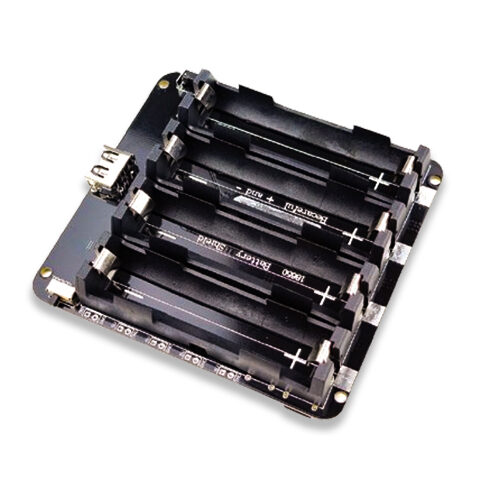
4 x 18650 Lithium Battery Shield for ESP32 with On-Off Button
Four 18650 cells provide up to 40,000 mWh of capacity — enough to power an ESP32 LoRaWAN node sending data every 10 minutes for well over a year.
Frequently Asked Questions
Do I need a licence to operate LoRa in India?
The IN865 frequency band (865–867 MHz) is a licence-exempt band in India for short-range devices under the Wireless Planning and Coordination (WPC) wing of DoT. For typical IoT sensor nodes with LoRa modules rated under 1 W EIRP, no individual licence is required. However, always verify with the latest WPC regulations as rules can change.
What is the difference between LoRaWAN Class A, B, and C devices?
Class A devices are the most common and most power-efficient. They open two short downlink windows after each uplink. Class B devices schedule additional downlink windows at regular beacon intervals — useful for time-sensitive downlink commands. Class C devices keep the receiver open continuously, consuming more power but allowing near-instant downlink delivery. For battery-powered sensor nodes, always use Class A.
Can I use the ESP32 as a LoRaWAN gateway?
The ESP32 can run a single-channel LoRa packet forwarder (“poor man’s gateway”), but a real LoRaWAN gateway requires a multi-channel concentrator chip (like the SX1302). Single-channel gateways are useful for testing but should not be registered on TTN as production gateways since they cannot receive all spreading factors simultaneously.
How does LoRaWAN compare to NB-IoT for Indian deployments?
NB-IoT (deployed by Jio, Airtel) uses licensed spectrum and works anywhere there is 4G coverage — ideal for urban meters and tracking. LoRaWAN works in unlicensed spectrum and requires you to own or access gateways — ideal for private industrial or agricultural deployments where cellular coverage is poor or where you want no ongoing SIM costs.
Why is my TTN device not joining the network?
Common causes: incorrect byte order for DevEUI (LMIC requires LSB-first), missing or wrong AppKey, no TTN gateway within range, or incorrect regional frequency plan (must be IN865 for India, not EU868). Check the TTN console’s “Live data” tab — if you see join requests appearing there, the gateway is receiving your packets. If nothing appears, check antenna and gateway coverage.
Build Your LoRaWAN Sensor Network with Zbotic
Get ESP32 boards, environmental sensors, and power management modules for your long-range IoT deployments. Fast shipping across India.





Add comment