
The LM2596 buck converter module is one of the most essential components in any Indian electronics maker’s toolkit. Whether you are stepping down a 12V adapter to 5V for an Arduino, regulating a LiPo pack output to 3.3V for an ESP32, or building a portable power supply, this LM2596 buck converter tutorial will walk you through everything you need to know — from how the IC works to complete wiring instructions and practical applications.
What Is the LM2596?
The LM2596 is a step-down (buck) switching voltage regulator IC from Texas Instruments. It is available in fixed-voltage variants (3.3V, 5V, 12V) and an adjustable version. The adjustable LM2596-ADJ, used on almost all the breakout modules sold in India, can output any voltage from 1.25V to 37V from an input of up to 40V.
Core specifications:
- Input voltage: 4.5V – 40V DC
- Output voltage: 1.25V – 37V (adjustable), fixed options available
- Maximum output current: 3A continuous
- Switching frequency: 150 kHz (internal oscillator)
- Efficiency: up to 92% (vs linear regulators like 7805 which waste power as heat)
- Dropout voltage: ~1V (input must be at least ~1.5V above output)
The key advantage over linear regulators (LM7805, LM317) is efficiency. A 7805 converting 12V to 5V at 1A dissipates 7W as heat — it needs a large heatsink. The LM2596 performing the same conversion at 1A dissipates less than 0.5W. This efficiency advantage is critical for battery-powered Indian maker projects where every milliwatt counts.
How a Buck Converter Works
A buck converter uses rapid switching (turning current on and off at high frequency) combined with an inductor and capacitor to efficiently step voltage down. Here is the basic principle:
- The LM2596’s internal switch (a power MOSFET) turns ON, allowing current to flow from input through the inductor to the output capacitor and load.
- The inductor stores energy in its magnetic field as current ramps up.
- The switch turns OFF. The inductor resists the change in current and continues delivering energy to the output through the freewheeling diode.
- This cycle repeats at 150kHz — fast enough that the inductor and output capacitor smooth the output into a stable DC voltage.
The ratio of ON-time to OFF-time (duty cycle) determines the output voltage. A higher duty cycle = higher output voltage. The LM2596 adjusts this duty cycle automatically using a feedback loop from the output via the feedback resistor network.
LM2596 Module Pinout and Components
The standard LM2596 breakout module sold by Zbotic has these terminals:
- IN+ / IN–: DC input (4.5V to 40V). Usually marked with screw terminals or through-hole pads.
- OUT+ / OUT–: Regulated DC output (1.25V to 37V depending on trim pot setting).
- Trim potentiometer (blue pot): Rotating this clockwise or counter-clockwise adjusts the output voltage by changing the feedback resistor ratio.
On-board components:
- LM2596-ADJ IC (the main switching regulator)
- Schottky freewheeling diode (usually 1N5822 or SS34)
- 100µH inductor
- Output electrolytic capacitor (100µF–220µF)
- Input filter capacitor
- 10-turn precision potentiometer (on quality modules) or standard 3296 trim pot
Many LM2596 modules available in India also include a voltmeter display (red 3-digit LED) that shows the output voltage in real time — highly useful for setting and monitoring the output without a separate multimeter.
Step-by-Step Wiring Tutorial
Follow these steps to get your LM2596 module working correctly:
What You Need:
- LM2596 adjustable buck converter module
- DC power source (battery, adapter, or bench PSU) — 4.5V to 40V input
- Multimeter (to verify output voltage)
- Load (LED, Arduino, motor driver — whatever you are powering)
- Connecting wires
Step 1: Connect Input Power
Connect your input DC power source to the IN+ and IN– terminals. Observe polarity — reversing polarity will damage the IC. Most modules lack reverse-polarity protection.
Input source +  →  IN+ terminal
Input source –  →  IN– terminal
Step 2: Set Output Voltage Before Connecting Load
This is the most important step. Before connecting any load, use a multimeter set to DC voltage to measure between OUT+ and OUT–. Slowly turn the blue trim potentiometer and watch the voltage change. Set it to your desired output voltage.
- Turning clockwise: usually increases voltage (varies by module brand)
- Turning counter-clockwise: usually decreases voltage
Recommended output voltages for common loads:
- Arduino Uno / Nano: 5V (can accept 6–12V on VIN, but 5V to 5V pin is cleaner)
- ESP8266 / ESP32: 3.3V
- Raspberry Pi: 5V
- 12V LED strips: 12V
- Servo motors: 5V–6V
Step 3: Connect Load
Once the output voltage is set and verified with a multimeter, connect your load:
OUT+ terminal  →  Load positive (+)
OUT– terminal  →  Load negative (–)
Step 4: Verify Under Load
With the load connected, re-check the output voltage. Buck converters have good load regulation, but cheap modules may show 100–200mV drop under full load. Re-adjust the trim pot if needed.
Output Voltage Setting and Calculation
For those building custom circuits (not using the breakout module), the LM2596-ADJ output voltage is set by two resistors (R1 and R2) in a voltage divider on the feedback pin:
Vout = Vref × (1 + R2/R1)

Where:
  Vref = 1.23V (internal reference)
  R1   = 1kΩ (fixed, connected between FB pin and output)
  R2   = variable resistor (connected between FB pin and GND)

Example: To get 5V output:
5.0 = 1.23 × (1 + R2/1000)
R2 = 1000 × ((5.0/1.23) – 1)
R2 ≈ 3065Ω ≈ use 3.3kΩ resistor
On the breakout module, R2 is the trim potentiometer. Adjusting it varies R2 and thus the output voltage continuously between 1.25V and 37V.
Practical Applications for Indian Makers
1. LiPo to 5V for Arduino Projects
A 3S LiPo (11.1V nominal, 12.6V max) directly powering an Arduino via VIN is inefficient with a linear regulator. Use the LM2596 to step down to 5V — the Arduino gets clean regulated power, and you waste much less energy as heat.
2. Car/Bike Power Supply for Electronics
Indian car and bike batteries output 12V–14.4V. The LM2596 easily steps this down to 5V for dashcams, GPS modules, or custom displays. It handles the input fluctuation (cranking drops voltage temporarily) better than linear regulators.
3. Solar Panel Power Management
Small solar panels (6V, 12V, 18V) have variable output voltage depending on sunlight. The LM2596 regulates this to a stable voltage for charging your project’s battery or powering microcontrollers.
4. LED Driver (Constant Voltage)
LED strips require a precise voltage. Step down from any available higher-voltage source to exactly 12V (for 12V LED strips) or 5V (for WS2812B addressable LEDs) without any heat issues.
5. Multi-Voltage DIY Power Supply
Use a 24V DC adapter with multiple LM2596 modules to create a bench power supply with multiple output voltages — 3.3V, 5V, 9V, 12V — each independently adjustable.
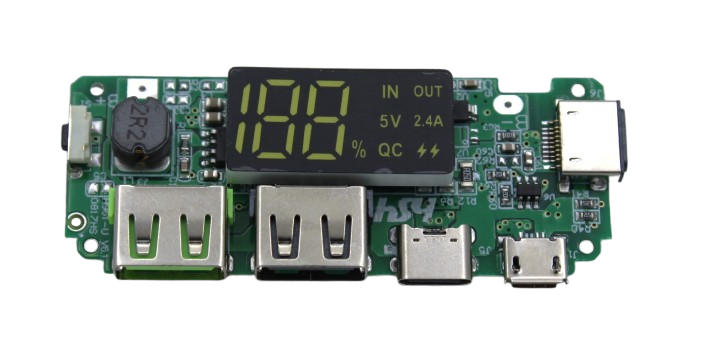
18650 5V 2.4A Dual USB Booster Module with Display
Boost 3.7V Li-ion cell voltage to regulated 5V 2.4A with dual USB output and battery level display. Ideal complement to LM2596 builds for USB power delivery stages.
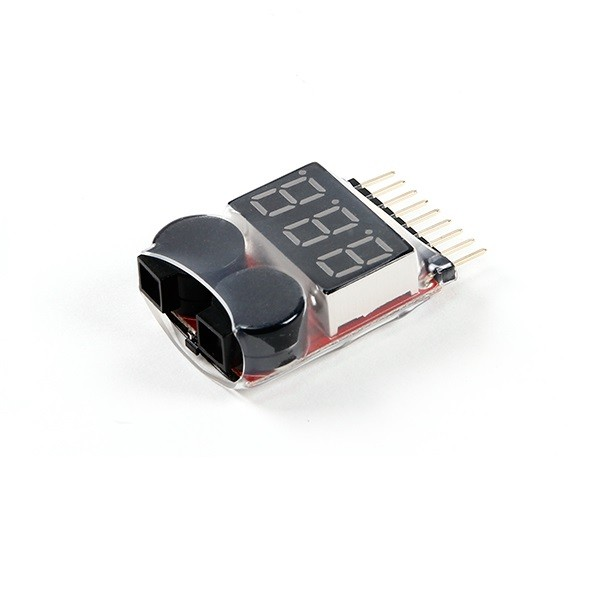
1-8S LiPo Battery Voltage Tester
Monitor your input LiPo pack voltage cell-by-cell when using the LM2596 with multi-cell batteries. Prevents over-discharge of the input source.
LM2596 Limitations to Know
The LM2596 is excellent for most DIY uses, but it has real limitations that Indian makers should understand:
- 150kHz switching frequency: Compared to modern buck converters (e.g., MP2307 at 340kHz, XL4016 at 180–300kHz), the LM2596’s lower switching frequency requires a larger inductor and output capacitor, resulting in a physically larger module. It is not ideal for ultra-compact designs.
- 3A maximum current: For loads above 3A (e.g., large motors, heating elements, high-power LED arrays), use a higher-current module like the XL4016 (8A) or LTC3780 (up to 10A).
- Minimum load requirement: Some LM2596 modules require a minimum load of ~10mA to regulate properly. At zero load, the output voltage may drift above the set point. This is rarely an issue in practice but worth knowing for precision applications.
- EMI noise: Switching converters generate electromagnetic interference (EMI). If you are running an FM radio receiver or other RF-sensitive circuit nearby, the LM2596’s 150kHz switching noise can cause interference. Add ferrite beads on input/output leads if needed.
- Heatsink may be required: Above 2A output, the LM2596 IC can get warm. Most modules have no heatsink pad by default. For sustained 3A loads, either add a small adhesive heatsink or choose an alternative module with integrated cooling.
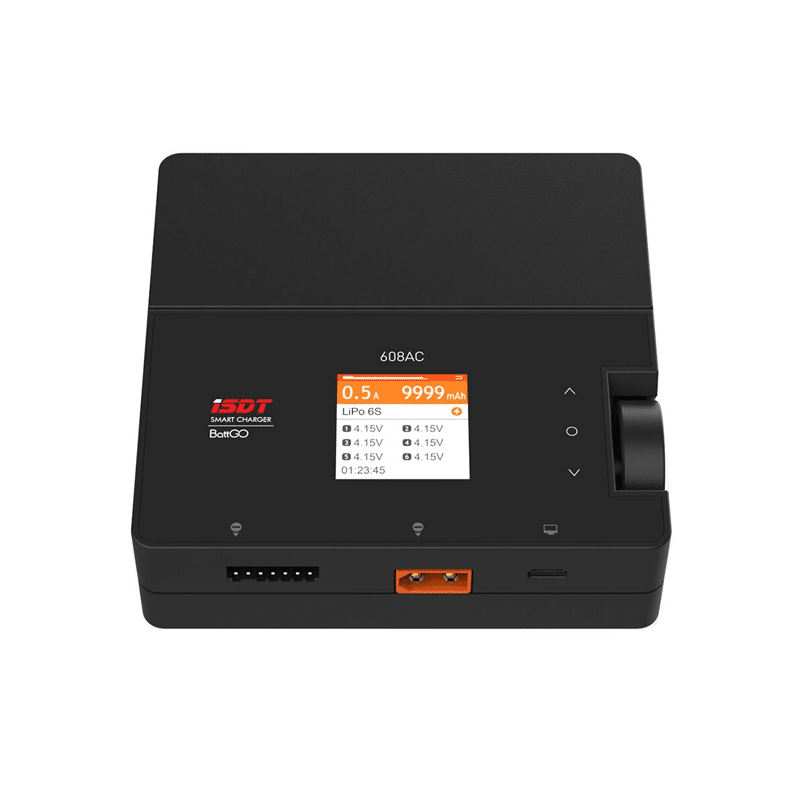
ISDT 608AC LiPo Charger – 50W AC / 200W DC Dual Mode
When your LM2596 project uses LiPo batteries as input, keep them properly charged with this professional-grade ISDT balance charger. Supports 1–6S packs.
Frequently Asked Questions
Can I use the LM2596 module to charge a battery?
Technically yes — if you set the output to 4.2V and limit current externally — but this is not recommended. The LM2596 is a voltage regulator, not a charger. It does not have the CC/CV charging profile required for safe lithium battery charging. Use a dedicated TP4056 or ISDT charger for lithium batteries.
What is the maximum input voltage for the LM2596 module?
The LM2596 IC is rated for up to 40V input, but most modules have capacitors rated for 35V–50V. To be safe, keep the input below 35V for commercially available modules. For higher-voltage inputs, check your specific module’s component ratings.
My LM2596 output voltage keeps drifting. What is wrong?
Voltage drift on cheap LM2596 modules is often caused by a low-quality trim potentiometer with poor wiper contact stability. Replace the 3296 trim pot with a higher-quality 10-turn precision potentiometer, or use fixed resistors if your target voltage is constant.
Can I connect two LM2596 modules in parallel for more current?
This is not straightforward. Buck converters in parallel can fight each other due to mismatched output voltages causing one to supply all current while the other fights it. For currents above 3A, use a single higher-rated module (XL4016 for 8A, or a dedicated high-current buck converter module).
Why does the LM2596 module get hot even at low currents?
If the module gets hot at low current (e.g., 0.5A), there is likely a large voltage differential between input and output. All switching losses plus the unavoidable inductor and diode losses scale with voltage difference. A 24V → 3.3V conversion at 1A will run hotter than a 9V → 5V conversion at 1A. Consider reducing input voltage where possible.
Shop DC-DC converters, power modules, and battery accessories at Zbotic — trusted by makers across India.



Add comment