
When ultrasonic sensors don’t have the range, speed, or precision you need, it’s time to graduate to LiDAR. The LIDAR-Lite v3 from Garmin is the most popular entry-level LiDAR sensor for robotics enthusiasts, offering accurate distance measurements up to 40 metres at up to 500 readings per second — all from a compact module that connects directly to Arduino via I2C or PWM. Whether you’re building an autonomous rover, a drone altitude hold system, or a 360° scanning robot, this guide covers everything you need to get started.
How LiDAR Distance Measurement Works
LiDAR (Light Detection and Ranging) measures distance by measuring the time of flight of a laser pulse. The sensor emits a brief laser pulse (typically 905 nm near-infrared, invisible to human eyes), which travels to the target, reflects, and returns to the sensor. By precisely measuring this round-trip time and multiplying by the speed of light (3×10⁸ m/s), the sensor computes distance.
Time-of-Flight Calculation:
// Distance = (Speed of Light × Time of Flight) / 2
// The /2 accounts for the round trip (out and back)
// d = (3×10⁸ m/s × 1×10⁻⁸ s) / 2 = 1.5 metres
// So 10 nanoseconds of flight time = 1.5 metres of distance
The LIDAR-Lite v3 uses a more sophisticated approach called correlation ranging. Instead of measuring a single pulse, it fires a series of modulated pulses and cross-correlates the transmitted and received waveforms. This gives it much better performance on low-reflectivity targets and in bright ambient light compared to simpler time-of-flight approaches.
Why LiDAR Beats Ultrasonic: Ultrasonic sensors emit 40 kHz sound waves. Sound travels at ~343 m/s. This means for a 1 cm resolution at 10 metres, you need to measure 58 μs accurately — achievable but challenged by temperature variations (speed of sound changes 0.6 m/s per °C) and the wide cone angle (ultrasonic is typically 15° wide, making pinpoint detection impossible). Light travels at 3×10⁸ m/s, giving the LiDAR 3000× better time resolution and a narrow ~1° beam angle for precision.
LIDAR-Lite v3 Specifications
The LIDAR-Lite v3 (Garmin part number 010-01722-00) is the third generation of Garmin’s popular LiDAR module:
- Operating range: 0.05 m to 40 m (5 cm to 40 m)
- Accuracy: ±2.5 cm (default mode)
- Resolution: 1 cm
- Maximum data rate: 500 Hz (2 ms per reading)
- Field of view: ~1.2° (very narrow beam — essentially a pencil-width spot)
- Operating voltage: 4.75V – 5.5V
- Operating current: 85 mA typical (135 mA peak)
- Standby current: 40 μA
- Interface: I2C (address 0x62) and PWM (output)
- I2C speed: Up to 400 kHz
- PWM output: 10 μs per centimetre (100 μs at 10 cm, 4000 μs at 40 m)
- Laser class: 1 (eye-safe per FDA and IEC 60825-1)
- Laser wavelength: 905 nm (near-infrared)
- Operating temperature: -20°C to +60°C
- Dimensions: 40 × 48 × 20 mm
- Weight: 22 g
- Connector: 6-wire JST harness
Reflectivity Considerations: LIDAR-Lite v3 performs best on targets with >25% reflectivity (white paper: 90%, black cloth: 5%). On very dark or absorptive surfaces, effective range drops to 5–15 m. On retroreflective targets (road signs, reflective tape), range can exceed 40 m. This is the key limitation compared to ultrasonic for robotics in dark environments.
LIDAR-Lite v3 vs Ultrasonic Sensors
| Parameter | LIDAR-Lite v3 | HC-SR04 (Ultrasonic) | JSN-SR04T (Waterproof) |
|---|---|---|---|
| Max range | 40 m | 4 m | 4.5 m |
| Accuracy | ±2.5 cm | ±3 mm (±3 cm real-world) | ±2 cm |
| Beam angle | ~1.2° | ~15° | ~15° |
| Update rate | 500 Hz | ~40 Hz (25ms cycle) | ~25 Hz |
| Works in wind? | Yes | Affected | Affected |
| Works on glass? | Poorly (transparent) | Yes | Yes |
| Works on dark surfaces? | Reduced range | Yes | Yes |
| Current draw | 85 mA | 15 mA | 30 mA |
| Price | ₹6,000–12,000 | ₹40–80 | ₹250–400 |
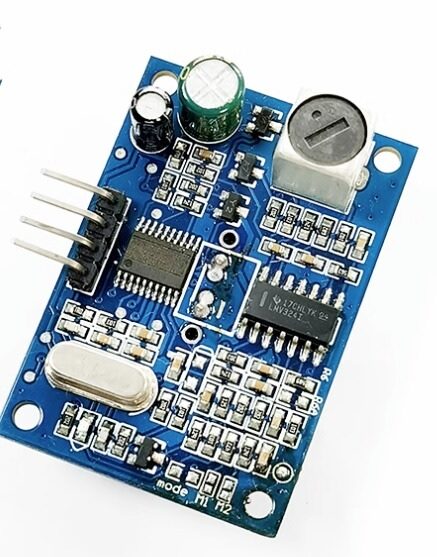
JSN-SR04T Waterproof Ultrasonic Rangefinder Module v3.0
Before committing to LiDAR, try the waterproof JSN-SR04T for outdoor obstacle detection up to 4.5m. An ideal complement for close-range coverage below LIDAR-Lite v3’s 5cm minimum range.
Wiring to Arduino (I2C and PWM)
LIDAR-Lite v3 Wire Colors
The sensor comes with a 6-wire JST harness:
| Wire Color | Function | Arduino Connection |
|---|---|---|
| Red | 5V Power | 5V (via 680 μF capacitor!) |
| Black | GND | GND |
| Green | I2C SDA | A4 (SDA) |
| Blue | I2C SCL | A5 (SCL) |
| Orange | Mode Control / PWM | D2 (PWM mode) or 3.3V/GND (mode select) |
| Yellow | Power Enable | Leave unconnected or tie to GND |
Critical: The 680 μF Capacitor! The LIDAR-Lite v3 draws up to 135 mA peak current when firing the laser. Arduino’s 5V rail cannot supply this transiently. Without a large buffer capacitor (Garmin recommends 680 μF, 40V electrolytic), you’ll see I2C communication errors and erratic distance readings. Always connect the capacitor directly across the red and black wires near the sensor.
Mode Configuration
// Orange (Mode) wire configurations:
// Floating or 3.3V:  I2C mode (default, address 0x62)
// GND via 10kΩ:      PWM mode (10 μs/cm on orange wire)
// Pulsed to GND:     Trigger single measurement in PWM mode

// Yellow (Power Enable) wire:
// Leave unconnected: Sensor always powered
// Drive HIGH (>2.7V): Sensor on
// Drive LOW (<0.8V):  Sensor in low-power standby (40 μA)
Arduino Code Examples
I2C Mode Using LIDARLite Library
// Install: Library Manager → search "LIDARLite" by Garmin
#include <Wire.h>
#include <LIDARLite.h>

LIDARLite lidar;

void setup() {
  Serial.begin(115200);
  lidar.begin(0, true);  // Set I2C address to default (0x62), enable print
  lidar.configure(0);    // Default configuration — balanced speed/accuracy
  // Configuration modes:
  // 0: Default — balanced
  // 1: Short range (fast, less accurate at far distances)
  // 2: Default range — no waveform smoothing
  // 3: Maximum range — some error at short range
  // 4: High sensitivity — more readings at low signal
  // 5: Low sensitivity — reduces false positives
}

void loop() {
  // Take a single reading (fast, 14.3ms)
  int distance = lidar.distance();

  // Or take a reading with bias correction (slower but more accurate)
  // Call with bias correction every ~100 readings
  static int readCount = 0;
  if (++readCount % 100 == 0) {
    distance = lidar.distance(true);  // With bias correction
    readCount = 0;
  }

  Serial.print("Distance: ");
  Serial.print(distance);
  Serial.println(" cm");

  delay(10);  // 100 Hz reading rate
}
PWM Mode (No Library Needed)
// PWM mode: 10 μs per cm, 1 cm resolution
// Connect orange wire to D2 (interrupt pin)

const int PWM_PIN = 2;

void setup() {
  Serial.begin(115200);
  pinMode(PWM_PIN, INPUT);
  // Orange wire already pulled to GND via 10kΩ for PWM mode
}

void loop() {
  // pulseIn returns microseconds, 10 μs = 1 cm
  unsigned long pulseDuration = pulseIn(PWM_PIN, HIGH, 40000);
  // Timeout of 40ms (covers max range 400 cm = 4000 μs...
  // but for 40m range: 40m = 4000cm × 10μs = 40000μs)

  if (pulseDuration == 0) {
    Serial.println("No signal or timeout");
  } else {
    float distanceCm = pulseDuration / 10.0;
    Serial.print("Distance: ");
    Serial.print(distanceCm, 1);
    Serial.println(" cm");
  }

  delay(100);
}
High-Speed Continuous Reading (500 Hz)
#include <Wire.h>
#include <LIDARLite.h>

LIDARLite lidar;
const int READ_INTERVAL_MS = 2;  // 2ms = 500Hz

void setup() {
  Wire.begin();
  Wire.setClock(400000);  // Fast I2C mode (400 kHz)
  Serial.begin(500000);   // High baud rate to keep up with data
  lidar.begin(0, false);
  lidar.configure(1);     // Short range high-speed configuration
}

void loop() {
  static unsigned long lastRead = 0;

  if (millis() - lastRead >= READ_INTERVAL_MS) {
    lastRead = millis();

    // Direct register write for maximum speed
    // Start measurement without bias correction
    Wire.beginTransmission(0x62);
    Wire.write(0x00);  // ACQ_COMMAND register
    Wire.write(0x04);  // Start measurement (no bias correction)
    Wire.endTransmission();

    delayMicroseconds(1000);  // Wait for measurement

    // Read 2-byte distance result from registers 0x8F (high byte) + 0x10 (low byte)
    Wire.beginTransmission(0x62);
    Wire.write(0x8F);  // Request high+low bytes auto-increment
    Wire.endTransmission(false);
    Wire.requestFrom(0x62, 2, true);

    int high = Wire.read();
    int low = Wire.read();
    int distance = (high << 8) | low;

    Serial.println(distance);
  }
}
Robotics Applications
Autonomous Obstacle Avoidance
Mount LIDAR-Lite v3 on a servo motor scanning left-right (180°). For each servo position, take a distance reading. Build a simple map: if any distance <50 cm in the forward arc, stop and choose the direction with the most clearance. This basic obstacle avoidance works well for indoor robots.
#include <Servo.h>
#include <LIDARLite.h>

LIDARLite lidar;
Servo scanServo;

const int SERVO_PIN = 9;
const int SCAN_STEPS = 7;  // 7 angles: 0, 30, 60, 90, 120, 150, 180°
int scanAngles[7] = {0, 30, 60, 90, 120, 150, 180};
int scanDistances[7];

void scanEnvironment() {
  for (int i = 0; i < SCAN_STEPS; i++) {
    scanServo.write(scanAngles[i]);
    delay(150);  // Wait for servo to settle
    scanDistances[i] = lidar.distance();
  }
}

void printScanMap() {
  Serial.println("nObstacle Map (cm):");
  for (int i = 0; i < SCAN_STEPS; i++) {
    Serial.print(scanAngles[i]); Serial.print("°: ");
    Serial.println(scanDistances[i]);
  }
}
Wall Following Robot
Mount the sensor pointing sideways (90° to robot direction). Use a PID controller to maintain a fixed distance from the wall (e.g., 30 cm). The error = (desired_distance – measured_distance), the PID output adjusts the differential speed of left/right motors. LIDAR-Lite v3’s fast 500 Hz update rate enables tight PID loops for smooth wall following even at high speed.
Drone Altitude Hold Integration
LIDAR-Lite v3 is widely used in commercial drones (DJI Phantom series used earlier versions) for terrain-following altitude hold. Unlike barometric pressure sensors that give absolute altitude above sea level, LiDAR measures actual height above ground — critical for precision agriculture, indoor flight, and landing.
Flight Controller Integration:
- ArduPilot/ArduCopter: LIDAR-Lite v3 is natively supported. Set RNGFND_TYPE=3 (I2C) or RNGFND_TYPE=4 (PWM), configure max/min range parameters. Enables terrain following mode and precision landing.
- Pixhawk: Connect to I2C port. Mission Planner shows lidar reading in real-time. Set RNGFND_MAX_CM=4000.
- Custom flight controller: Feed distance readings into altitude PID as the height feedback signal, replacing or fusing with barometric altitude.
Mounting Considerations: Mount pointing downward on vibration-damped standoffs. Propeller wash doesn’t affect LiDAR like it does ultrasonic. However, avoid mounting below the landing gear — impact on landing could damage the unit. The narrow 1.2° beam means ground readings can be noisy on grass or uneven terrain — apply a median filter over 5–10 readings.
360-Degree Scanning Setup
A single LIDAR-Lite v3 mounted on a rotating platform creates a 2D LiDAR scanner — a budget alternative to dedicated 360° LiDAR units (RPLIDAR A1 costs 4–5× more). The challenge is transmitting data and power through a continuously rotating joint.
Approach 1 (Slip Ring): Use a 6-wire slip ring to carry 5V power and I2C signals. The sensor rotates continuously, and the microcontroller reads distance + angle (from encoder) to build a polar scan. Scan rate is limited by motor RPM × sensor reading rate.
Approach 2 (Servo Scan): Simpler — mount on a servo, scan back and forth from 0° to 180°. 7 positions × 150ms = about 1 second per sweep. Crude but effective for static obstacle mapping in slow robots.
Point Cloud Visualization: Use Processing or Python (matplotlib polar plot) to visualise the scan data in real-time. Each reading is a (angle, distance) point that maps to (x, y) via: x = distance × cos(angle), y = distance × sin(angle).
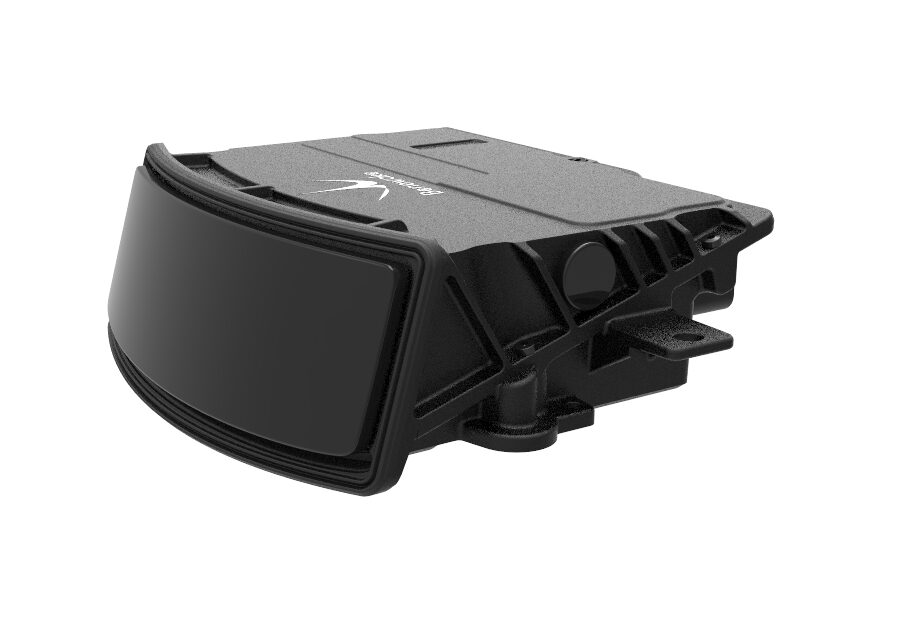
Benewake AD2-S-X3 Automotive-Grade LiDAR
Stepping up from LIDAR-Lite v3? The Benewake AD2-S-X3 is an automotive-grade 3D LiDAR for advanced autonomous navigation, ADAS research, and industrial robotics applications.
Troubleshooting and Common Issues
I2C Always Returns 0 or Garbled Data
This is almost always the missing decoupling capacitor. Add a 680 μF electrolytic capacitor directly across 5V and GND at the sensor connector. Also check that your I2C pull-up resistors are appropriate (4.7 kΩ to 5V for 5V systems). If using a long wire run (>30 cm), the I2C capacitance may require 2.2 kΩ pull-ups.
Reading Intermittently Shows Maximum Value (4000 cm)
The sensor returns 40 m (4000 cm) when no valid return signal is detected — either the target is out of range, too dark, or the beam is missing the target. Check for: dark/absorptive surfaces, transparent surfaces (glass, clear plastic), the beam pointing at an angle where the return doesn’t hit the receiver, or the sensor overheating (>60°C).
Readings Jump Between Two Values
Typically caused by the sensor detecting two surfaces — for example, looking through a glass window at an object behind it. The laser partially reflects off the glass (shorter distance) and partially passes through to the object (longer distance). The sensor alternates between both returns.
Only Works at Close Range (<5 m) in Bright Sunlight
Strong ambient IR (sunlight) overwhelms the weak return signal from distant targets. LIDAR-Lite v3 is rated for outdoor use but performance degrades in direct sunlight, especially on low-reflectivity targets. Mount in shade, or use configuration mode 4 (high sensitivity) to improve sensitivity at the cost of potential false positives.
Cannot Change I2C Address
The LIDAR-Lite v3 supports I2C address change via register 0x1A. Write your desired address (0x08–0x77, excluding 0x62) to register 0x1A, then save to flash by setting bit 0 of register 0x16. This persists through power cycles. Useful when using multiple LIDAR-Lite sensors on the same bus.
Frequently Asked Questions
Is the LIDAR-Lite v3 laser safe for eyes?
Yes. LIDAR-Lite v3 is Class 1 laser product, which is considered safe under all conditions of normal use. The 905 nm near-IR laser pulses are extremely brief (nanoseconds) and the average power is well below safety thresholds. However, avoid staring directly into the sensor aperture with optical instruments (telescopes, magnifying glasses) which could concentrate the beam.
Can LIDAR-Lite v3 measure distance through fog or dust?
Partially. Fine dust reduces range but doesn’t block the sensor entirely. Heavy fog significantly scatters 905 nm light, reducing effective range to 5–10 m. For outdoor applications with frequent fog, consider longer-wavelength LiDAR (1550 nm) which scatters less in atmospheric conditions. For dusty indoor environments (woodshops, grain storage), LIDAR-Lite v3 performs better than ultrasonic, which is strongly affected by dust temperature gradients.
What is the minimum detectable range?
5 cm (50 mm) is the official minimum range. Below this, the return pulse arrives too quickly for the correlation algorithm to process correctly. If you need close-range detection under 5 cm, combine with an ultrasonic sensor for the near zone. This hybrid approach (IR/LiDAR for >5 cm, ultrasonic for <5 cm) is used in several commercial robots.
Can I use LIDAR-Lite v3 with Raspberry Pi?
Yes. Enable I2C on the Pi (raspi-config → Interfaces → I2C), connect SDA to GPIO2, SCL to GPIO3. Use the Python library from Garmin’s GitHub or the smbus2 library for direct register access. The Pi’s 3.3V I2C interface works because the LIDAR-Lite v3 I2C pins are 3.3V tolerant (despite operating from 5V power).
How does LIDAR-Lite v3 compare to RPLIDAR A1?
Completely different use case. RPLIDAR A1 is a full 360° scanning LiDAR (8 m range, 5.5 Hz rotation rate) designed for SLAM (Simultaneous Localization and Mapping) in mobile robots. LIDAR-Lite v3 is a fixed-direction single-point rangefinder with much longer range (40 m) and faster rate (500 Hz). Use RPLIDAR A1 for room mapping; use LIDAR-Lite v3 for altitude hold, obstacle detection at range, or precision single-direction ranging.
Why does the LIDAR-Lite work outdoors but fails inside?
This is backwards from what most people expect. Garmin’s LIDAR-Lite v3 actually performs better outdoors (larger unobstructed targets) than indoors in some cases. Indoor failure is often due to: (1) Target within 5 cm minimum range, (2) Sensor pointed at a translucent surface (frosted glass, diffuse acrylic), (3) Target surface at a steep angle causing specular reflection away from sensor. Check beam alignment — the narrow 1.2° beam requires precise pointing.
Conclusion
The LIDAR-Lite v3 occupies a unique position in the sensor ecosystem: it’s the most capable long-range distance sensor accessible to Arduino hobbyists without moving to professional-grade equipment costing tens of thousands of rupees. Its 40-metre range, 2.5 cm accuracy, and 500 Hz update rate make it the enabling technology for serious autonomous robots, altitude-aware drones, and precision ranging systems.
The key requirements for success are the 680 μF decoupling capacitor (non-negotiable), appropriate mounting angle, and understanding the reflectivity limitations. Once those are addressed, the LIDAR-Lite v3 delivers remarkably reliable performance that would have cost 100× more just a decade ago.
Whether you’re adding altitude hold to your quadcopter, giving your rover a longer horizon to plan around, or building a 2D map of your room for a ROS navigation project, the LIDAR-Lite v3 is the sensor that makes it possible.





Add comment