
The ESP32 ULP coprocessor deep sleep sensor wake capability is one of the chip’s most underappreciated features. ULP stands for Ultra Low Power — a small, independent processor embedded inside the ESP32 that continues running even when the main CPU cores are completely powered down. This means your sensor can be read, a threshold can be checked, and the main core can be woken up only when something meaningful happens — all while consuming just 5–150 µA instead of the 80–200 mA that the active ESP32 draws. For battery-powered IoT devices in India, this is a game-changer.
What is the ESP32 ULP Coprocessor?
The ULP (Ultra Low Power) coprocessor is a small processor built into the ESP32 that operates independently of the main Xtensa LX6 cores. It was specifically designed for the scenario where you need a sensor to be checked regularly but do not want the power cost of keeping the main CPU running. The ULP runs from a dedicated power domain that remains active even during deep sleep, drawing as little as 5 µA for the ULP coprocessor itself plus whatever the sensor draws.
The ULP has access to:
- 8 KB of RTC SLOW memory (shared with the main CPU — this is how data is passed between ULP and main CPU)
- 8 KB of RTC FAST memory
- Low-power ADC for reading analogue sensors directly
- GPIO control (set/clear pins, read digital inputs)
- I2C master (on newer ESP32 revisions and ESP32-S2/S3)
- Timer for periodic wake-up
The ULP can trigger wake-up of the main CPU when a condition is met — for example, when an ADC reading exceeds a threshold, when a GPIO pin changes state, or when a specific number of ULP cycles have completed. This architecture allows you to have your cake and eat it too: very low average power with responsive event detection.
ESP32 Deep Sleep Modes Explained
Understanding deep sleep requires knowing which power domains the ESP32 keeps active:
| Sleep Mode | CPU Cores | ULP | Typical Current | Wake Sources |
|---|---|---|---|---|
| Active | Both on | N/A | 80–240 mA | — |
| Light sleep | Paused | Running | 800 µA | Timer, GPIO, ULP, touch, UART |
| Deep sleep | Off | Running | 10–150 µA | Timer, GPIO, ULP, touch |
| Hibernation | Off | Off | 5 µA | Timer, GPIO only |
For ULP-based sensor monitoring, deep sleep with ULP running is the key mode. The main CPU boots fresh on each wake-up (or preserves RTC memory state for fast recovery), runs its task, publishes data via Wi-Fi, and goes back to deep sleep. The ULP continues monitoring in between, waking the main CPU only when something important happens.
The 10–150 µA range depends on what the ULP is doing and what peripherals remain powered. Just the chip with nothing else: ~10 µA. ULP sampling an ADC at 1 Hz: ~25–40 µA. ULP + RTC sensor module active: ~100–150 µA.

BMP280 Barometric Pressure and Altitude Sensor I2C/SPI Module
The BMP280 operates at 3.3V with ultra-low standby current (0.1 µA) — ideal for ULP weather sensor nodes that monitor pressure and altitude in deep sleep mode.
ULP Architecture: FSM vs RISC-V
Depending on your ESP32 variant, you will encounter two different ULP implementations:
ULP-FSM (Finite State Machine): Found on the original ESP32 and ESP32-S2. Programmed in a custom assembly-like language. Limited instruction set (around 30 instructions). Supports ADC reading, GPIO control, and basic arithmetic. The FSM architecture is compact and power-efficient but programming it requires writing low-level assembly code, which is challenging.
ULP-RISC-V: Found on ESP32-S2 (alongside FSM), ESP32-S3, and ESP32-C3. Programmed in C using a dedicated toolchain. This is a significant improvement — you write normal C code, compile it with the ULP-RISC-V GCC toolchain, and it runs on the ULP while the main CPU sleeps. The RISC-V ULP supports I2C, GPIO, and ADC, and programming it is accessible to anyone who knows C.
For the original ESP32 with FSM ULP, Espressif provides a useful C macro layer that makes FSM assembly more readable. ESP-IDF also includes a ULP component with helper macros like I_ADC(), I_GPIO_READ(), and I_WAKE(). For new projects, target ESP32-S3 or ESP32-C3 if you want ULP-RISC-V C programming.
Using ULP to Poll Sensors in Deep Sleep
The general pattern for ULP sensor monitoring is:
- Main CPU setup phase: Initialise the sensor, configure ULP program, load ULP code into RTC memory, start ULP, call
esp_deep_sleep_start(). - ULP running phase: ULP wakes periodically (every 1–60 seconds), reads the sensor (ADC or I2C), compares to threshold stored in RTC memory, increments a counter.
- Wake condition: When a threshold is exceeded (or N readings have accumulated), ULP calls
WAKEinstruction, main CPU boots. - Main CPU wake phase: Reads accumulated data from RTC memory, processes it (sends MQTT, stores to SD, shows on display), returns to deep sleep.

LM35 Temperature Sensors
The LM35 outputs an analogue voltage proportional to temperature — perfect for ULP ADC reading, as the ESP32’s ULP can read ADC channels directly without I2C overhead.
Practical Example: Temperature Threshold Wake
This example uses the ESP32’s ULP-FSM (original ESP32) to read an LM35 analogue temperature sensor via the RTC ADC (ADC1 channel 6, GPIO34) and wake the main CPU when temperature exceeds 35°C:
// main.c — ESP-IDF project (simplified)
#include "esp_sleep.h"
#include "ulp.h"
#include "soc/rtc_periph.h"
#include "driver/rtc_io.h"
#include "driver/adc.h"

// ULP program — reads ADC1_CH6 (GPIO34)
// and wakes main CPU if reading > threshold
const ulp_insn_t ulp_program[] = {
  // Read ADC1 channel 6 (GPIO34), store in R0
  // ADC reading range: 0–4095 (12-bit)
  // LM35: 10 mV/°C. At 35°C: 350 mV = ~480 ADC counts (at 3.3V FS)
  I_ADC(R0, 0, 6),           // Read ADC, result in R0
  I_ST(R0, R2, 0),           // Store reading to RTC memory
  M_BL(1, 480),              // Branch if R0 < 480 (below 35°C)
  I_WAKE(),                  // Wake main CPU if >= 35°C
  M_LABEL(1),
  I_HALT()                   // Return to deep sleep
};

void app_main() {
  esp_sleep_wakeup_cause_t cause = esp_sleep_get_wakeup_cause();
  if (cause == ESP_SLEEP_WAKEUP_ULP) {
    // Read the stored ADC value from RTC memory word 0
    uint16_t raw_adc = (uint16_t)RTC_SLOW_MEM[0];
    float voltage = (raw_adc / 4096.0f) * 3.3f;
    float temperature = voltage * 100.0f; // LM35: 10mV/°C
    printf("ALERT: Temperature = %.1f°C — sending MQTT alertn", temperature);
    // Connect WiFi, publish alert, disconnect
    // ... (WiFi + MQTT code here)
  }
  // Load ULP program
  size_t size = sizeof(ulp_program) / sizeof(ulp_insn_t);
  ulp_process_macros_and_load(0, ulp_program, &size);
  ulp_set_wakeup_period(0, 5000000); // Wake ULP every 5 seconds (µs)
  ulp_run(0);
  esp_sleep_enable_ulp_wakeup();
  esp_deep_sleep_start();
}
For ESP32-S3 with ULP-RISC-V, the same logic is written in C and compiled with the ulp_riscv component — no assembly macros needed. The C code runs on the ULP like any normal C program.
Battery Life Calculations for ULP Projects
Let us calculate the expected battery life for a realistic ULP temperature monitor powered by two 18650 batteries (combined ~6,000 mAh):
| Activity | Duration | Current | Charge/Hour |
|---|---|---|---|
| Deep sleep + ULP running | Baseline | 40 µA | 0.04 mAh |
| Main CPU boot + WiFi connect | 3 seconds | 150 mA avg | 0.125 mAh per wake |
| MQTT publish + disconnect | 1 second | 80 mA | 0.022 mAh per wake |
If the temperature alarm triggers once per day (main CPU wakes once per 24 hours), the daily charge consumption is approximately: (40 µA × 24h) = 0.96 mAh + (0.147 mAh per wake × 1) = 1.11 mAh/day. With 6,000 mAh capacity and 80% usable: 6000 × 0.8 / 1.11 = approximately 4,320 days (nearly 12 years).
Even with wakes every hour (e.g., send hourly reports), daily consumption = 0.96 + (0.147 × 24) = 4.49 mAh/day → 6000 × 0.8 / 4.49 = over 1,000 days (2.7 years) on two 18650 cells. This is the power of ULP-based architecture.
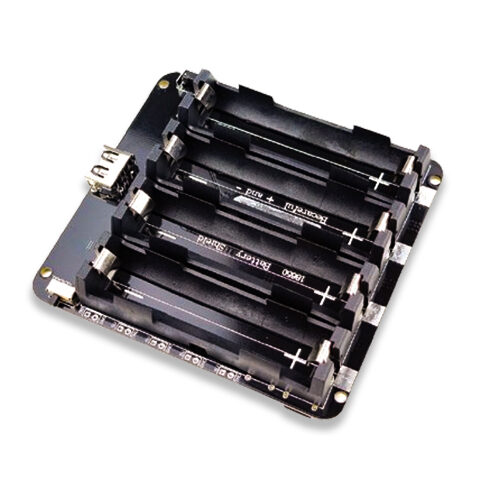
4 x 18650 Lithium Battery Shield V8/V9 for ESP32/ESP8266 with On-Off Button
With four 18650 cells (~12,000 mAh), this battery shield can power an ESP32 ULP sensor node for potentially years between charges — ideal for remote, inaccessible installations.

GY-BME280-3.3 Precision Altimeter Atmospheric Pressure Sensor Module
The BME280 measures temperature, humidity, and pressure with ultra-low standby current, making it one of the best sensors for ULP deep sleep monitoring projects.
ULP Limitations and Workarounds
Limited instruction set (FSM): The FSM ULP only has ~30 instructions and no multiplication or division. Floating-point is impossible. Workaround: do the heavy maths on the main CPU; ULP only does simple threshold comparisons.
No Wi-Fi or Bluetooth from ULP: The ULP cannot use Wi-Fi or BLE — these are tied to the main CPU. The ULP’s job is only to decide if the main CPU needs to wake up. All connectivity happens in the main CPU wake phase.
ADC accuracy in deep sleep: The RTC ADC (used by ULP) has lower resolution and higher offset errors than the normal SAR ADC. Calibration is essential. Read the sensor multiple times, average the readings, and apply a calibration offset determined experimentally.
8 KB RTC memory limit: The ULP program and data must fit in 8 KB of RTC SLOW memory. For FSM programs this is rarely an issue. For RISC-V programs with complex logic, memory can be tight — keep ULP code minimal and delegate complex processing to the main CPU.
I2C sensor access (FSM): The FSM ULP does not have a hardware I2C controller — you must bit-bang I2C in ULP assembly, which is tricky. For I2C sensors in ULP context, use ESP32-S2/S3/C3 with ULP-RISC-V (which has hardware I2C support) or use analogue sensors like LM35 that work directly with the ADC.
Frequently Asked Questions
Does the ESP32-C3 have a ULP coprocessor?
Yes, the ESP32-C3 has a ULP-RISC-V coprocessor. It can be programmed in C using the ulp_riscv component in ESP-IDF. The RISC-V ULP on C3 supports ADC, GPIO, and I2C, making it more capable than the FSM ULP on the original ESP32 while still consuming very little power.
Can I use the ULP to control GPIO (turn LEDs or relays on/off) in deep sleep?
Yes! The ULP can control any GPIO that is connected to the RTC domain (GPIO0–GPIO21 on original ESP32). You can have the ULP blink an LED at a low duty cycle, toggle a relay based on a sensor threshold, or signal an external circuit — all without waking the main CPU.
What is the difference between ULP wake and timer wake in deep sleep?
Timer wake uses the RTC timer to wake the main CPU at a fixed interval (e.g., every 30 seconds). The main CPU wakes, reads sensor, decides whether to publish, goes back to sleep. This is simpler to program but less power-efficient because the main CPU wakes even when nothing has changed. ULP wake is smarter: the ULP polls continuously and only wakes the main CPU when a condition is met, dramatically reducing unnecessary wake-ups and power consumption.
Can I preserve variables between deep sleep wake-ups?
Yes. Variables stored in RTC memory (declared with RTC_DATA_ATTR in ESP-IDF) survive deep sleep. This lets you accumulate a buffer of readings across multiple ULP wake cycles and only transmit when the buffer is full, further reducing Wi-Fi on-time and average power consumption.
Conclusion
The ESP32 ULP coprocessor with deep sleep sensor wake capability transforms the ESP32 from a “convenience” IoT board into a serious, long-life embedded sensor platform. By offloading the continuous sensor polling to the ULP while the main CPU sleeps, you can achieve multi-year battery life while maintaining event-driven responsiveness. For Indian IoT developers building agricultural monitors, cold chain sensors, water level detectors, industrial alarms, and smart building systems in locations with limited power access, ULP deep sleep is the architecture that makes truly maintenance-free deployments possible. Start with a simple threshold-wake example, measure your actual power consumption with a µCurrent meter, and optimise from there.





Add comment