
If you’ve ever built an ESP32 project, you know the frustration of hardcoding WiFi credentials into your firmware. The ESP32 WiFi provisioning app method solves this problem elegantly — letting end users configure WiFi at runtime without recompiling code. Whether you’re shipping a product to customers or simply tired of reflashing every time you change networks, this tutorial covers everything you need to know about ESP32 WiFi provisioning in 2026.
What Is WiFi Provisioning?
WiFi provisioning is the process of securely transferring network credentials (SSID and password) to an IoT device after it has been manufactured or deployed. Instead of baking credentials into firmware — a practice that is insecure, inflexible, and frustrating for end users — provisioning allows the device to receive credentials dynamically.
In the Indian maker community, this is increasingly important as more hobbyists and startups move from prototype to small-batch production. Imagine deploying 50 ESP32-based temperature monitors across a factory floor — you certainly don’t want to compile 50 different firmware binaries!
The ESP-IDF (Espressif IoT Development Framework) includes a robust wifi_provisioning component that supports multiple transport layers: SoftAP (device hosts its own WiFi AP) and BLE (Bluetooth Low Energy). The Arduino ecosystem also supports provisioning through libraries like WiFiProvisioner and ESPAsync_WiFiManager.
ESP32 Provisioning Methods Explained
There are three main approaches to ESP32 WiFi provisioning, each with distinct trade-offs:
1. SoftAP Provisioning
The ESP32 creates its own WiFi access point. The user connects their phone to this AP, then opens a captive portal (web page) or uses an app to send credentials. This works on all smartphones without any special app, making it the most user-friendly approach for consumer products. Downside: the user must manually switch WiFi networks on their phone.
2. BLE Provisioning
The ESP32 advertises itself over Bluetooth Low Energy. The Espressif provisioning app (available for Android and iOS) connects via BLE and sends credentials. This is seamless — no WiFi network switching needed — but requires the end user to install an app.
3. SmartConfig / ESP-Touch
An older Espressif protocol where credentials are encoded in WiFi packets that the ESP32 sniffs in promiscuous mode. Less reliable and largely deprecated in favour of the two methods above. Avoid for new projects.
For most 2026 projects, BLE provisioning is the recommended approach for product deployments, while SoftAP captive portal remains the go-to for maker projects and prototypes.

Ai Thinker NodeMCU-32S-ESP32 Development Board – IPEX Version
A classic dual-core ESP32 dev board with generous flash and RAM — perfect for running full BLE + WiFi provisioning workflows simultaneously.
SoftAP Provisioning Step-by-Step
Let’s build a SoftAP captive portal provisioning system using the Arduino framework. This is the quickest way to get provisioning working without installing ESP-IDF.
First, install the ESPAsync_WiFiManager library from the Arduino Library Manager. Also install ESPAsyncWebServer and AsyncTCP.
Basic SoftAP Provisioning Sketch
#include <WiFi.h>
#include <ESPAsync_WiFiManager.h>
#include <AsyncTCP.h>
#include <ESPAsyncWebServer.h>

AsyncWebServer server(80);
ESPAsync_WiFiManager wifiManager(&server, nullptr);

void setup() {
  Serial.begin(115200);

  // Auto-connect: if saved credentials fail, start AP
  wifiManager.autoConnect("ESP32-Setup", "12345678");

  Serial.println("Connected! IP: " + WiFi.localIP().toString());
}

void loop() {
  // Your application code here
}
When the ESP32 boots and cannot connect to a saved network, it starts a SoftAP named “ESP32-Setup”. The user connects to this network (password: 12345678), and a captive portal automatically opens in their browser showing all available WiFi networks. The user selects their network, enters the password, and the ESP32 saves the credentials to NVS (non-volatile storage) flash and reboots.
Customising the Portal
ESPAsync_WiFiManager lets you add custom parameters to the portal — great for capturing MQTT broker URLs, API keys, or device names at provisioning time:
ESPAsync_WMParameter mqtt_server("mqtt", "MQTT Server", "192.168.1.100", 40);
wifiManager.addParameter(&mqtt_server);
wifiManager.autoConnect("ESP32-Setup");

// After provisioning:
String mqttHost = mqtt_server.getValue();
Serial.println("MQTT: " + mqttHost);
Triggering Re-Provisioning
Add a physical button that, when held for 3 seconds, clears saved credentials and restarts the provisioning portal:
#define RESET_BUTTON 0  // GPIO0 (BOOT button on most boards)

void checkResetButton() {
  if (digitalRead(RESET_BUTTON) == LOW) {
    delay(3000);
    if (digitalRead(RESET_BUTTON) == LOW) {
      Serial.println("Clearing WiFi credentials...");
      wifiManager.resetSettings();
      ESP.restart();
    }
  }
}
BLE Provisioning with the Espressif App
For ESP-IDF projects (or Arduino with ESP-IDF components), Espressif provides a polished BLE provisioning solution. Download the ESP BLE Prov app from the Google Play Store or App Store.
ESP-IDF BLE Provisioning Code
#include "wifi_provisioning/manager.h"
#include "wifi_provisioning/scheme_ble.h"

void app_main(void) {
    // Initialize NVS
    esp_err_t ret = nvs_flash_init();
    if (ret == ESP_ERR_NVS_NO_FREE_PAGES ||
        ret == ESP_ERR_NVS_NEW_VERSION_FOUND) {
        nvs_flash_erase();
        nvs_flash_init();
    }

    // Initialize WiFi
    wifi_init_sta();

    // Configure provisioning manager
    wifi_prov_mgr_config_t config = {
        .scheme = wifi_prov_scheme_ble,
        .scheme_event_handler = WIFI_PROV_SCHEME_BLE_EVENT_HANDLER_FREE_BTDM
    };
    wifi_prov_mgr_init(config);

    bool provisioned = false;
    wifi_prov_mgr_is_provisioned(&provisioned);

    if (!provisioned) {
        // Start BLE provisioning
        wifi_prov_mgr_start_provisioning(
            WIFI_PROV_SECURITY_1,
            "abcd1234",  // Proof of possession
            "PROV_ESP32",
            NULL
        );
    } else {
        wifi_prov_mgr_deinit();
        // Connect to saved WiFi
    }
}
The “Proof of Possession” (PoP) string prevents unauthorised provisioning — only someone who knows this string (printed on the device label, for example) can provision the device. In production, use a unique per-device PoP derived from the device MAC address.

Ai Thinker ESP32-C3-01M Wi-Fi + BLE Module
Compact ESP32-C3 module with onboard WiFi and BLE — ideal for production deployments where BLE provisioning is preferred over SoftAP.
Building a Custom Provisioning Portal
For full control over the provisioning UI, you can build a completely custom captive portal using ESPAsyncWebServer and serve HTML from SPIFFS/LittleFS:
Custom Portal Architecture
The ESP32 hosts a small web server with two endpoints: GET / serves the HTML form, and POST /save receives the credentials, saves them to NVS, and redirects the user before rebooting.
#include <WiFi.h>
#include <ESPAsyncWebServer.h>
#include <Preferences.h>

AsyncWebServer server(80);
Preferences prefs;

const char* PORTAL_HTML = R"rawliteral(
<!DOCTYPE html>
<html><head>
<meta name='viewport' content='width=device-width,initial-scale=1'>
<title>WiFi Setup</title>
<style>body{font-family:sans-serif;max-width:400px;margin:40px auto;padding:20px}
input,select{width:100%;padding:10px;margin:8px 0;box-sizing:border-box}
button{background:#ff6b00;color:white;border:none;padding:12px;width:100%;cursor:pointer}</style>
</head><body>
<h2>WiFi Configuration</h2>
<form action='/save' method='POST'>
<label>Network Name (SSID)</label>
<input name='ssid' placeholder='Your WiFi name' required>
<label>Password</label>
<input type='password' name='pass' placeholder='WiFi password'>
<button type='submit'>Save and Connect</button>
</form>
</body></html>
)rawliteral";

void setup() {
  WiFi.softAP("MyDevice-Setup", "setup1234");

  server.on("/", HTTP_GET, [](AsyncWebServerRequest* req) {
    req->send(200, "text/html", PORTAL_HTML);
  });

  server.on("/save", HTTP_POST, [](AsyncWebServerRequest* req) {
    String ssid = req->arg("ssid");
    String pass = req->arg("pass");

    prefs.begin("wifi", false);
    prefs.putString("ssid", ssid);
    prefs.putString("pass", pass);
    prefs.end();

    req->send(200, "text/html",
      "<h2>Saved! Device will reboot...</h2>");
    delay(2000);
    ESP.restart();
  });

  server.begin();
}
WiFi Scanning in the Portal
Improve UX by scanning for nearby networks and showing a dropdown instead of a text field. Call WiFi.scanNetworks() in async mode and populate the results via a GET /scan JSON endpoint that your portal fetches with JavaScript.
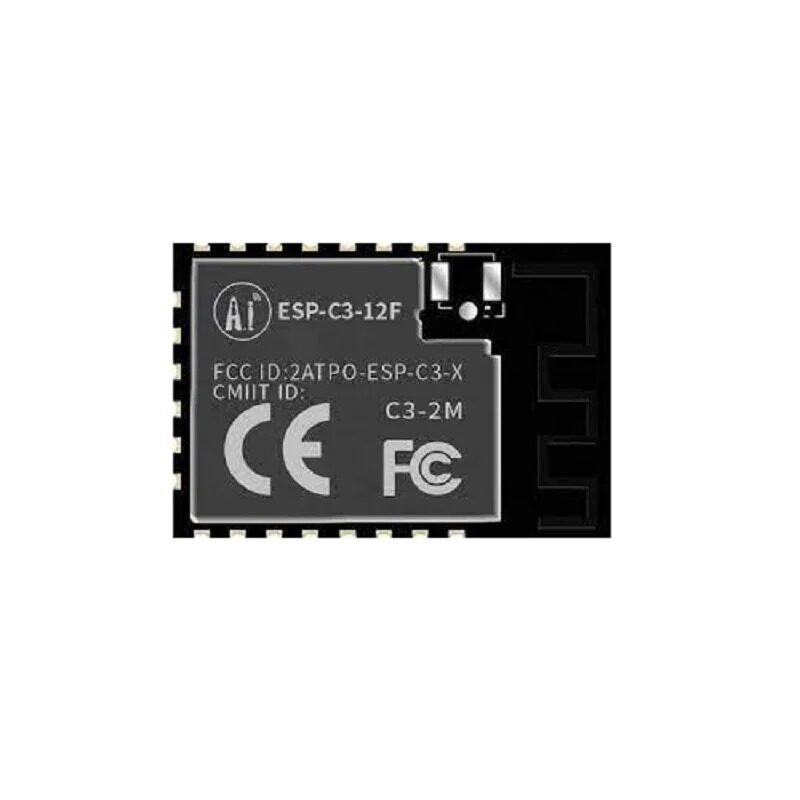
Ai-Thinker ESP32-C3-12F Wi-Fi + BLE Module
The larger ESP32-C3 module with 4MB flash — gives you ample space to store SPIFFS-hosted provisioning portal HTML and JavaScript files.
Security Best Practices
WiFi provisioning introduces a brief window of vulnerability — the device is advertising itself publicly before credentials are set. Follow these practices for production-grade security:
1. Use Proof of Possession (PoP)
Always set a unique PoP per device in BLE provisioning. Derive it from the device’s MAC address using a simple hash or XOR: String pop = String(ESP.getEfuseMac(), HEX).substring(0, 8);. Print this on the device label as a QR code.
2. Limit Provisioning Time Window
Auto-cancel provisioning mode after 3-5 minutes if no credentials are received. Use a timer or task watchdog: after the timeout, either reboot or fall back to a default configuration.
3. Encrypt Credentials in NVS
ESP-IDF 5.x supports NVS encryption using flash encryption keys. Enable flash encryption for production builds so stored WiFi passwords cannot be extracted via UART bootloader even if physical access is obtained.
4. Use HTTPS for Custom Portals
While implementing full TLS in a captive portal is complex, you can at minimum serve the portal over the SoftAP network (isolated from the internet) and clearly label the SSID so users know they’re on the device’s private network.
5. Validate Credentials Before Saving
Before persisting credentials, attempt a trial WiFi connection. Only save to NVS if the connection succeeds. This prevents users from accidentally locking themselves out with a typo in their password.

30Pin ESP32 Expansion Board with Type-C USB and Micro USB
Breakout board that makes it easy to add a reset button for provisioning mode re-entry — essential for building user-friendly ESP32 products.
Frequently Asked Questions
Can the ESP32 run WiFi and BLE provisioning at the same time?
Yes. The ESP32’s radio supports WiFi + BLE coexistence mode. During BLE provisioning, the WiFi stack is running in station mode attempting connections in the background. After credentials are received via BLE, the BLE stack is freed (using WIFI_PROV_SCHEME_BLE_EVENT_HANDLER_FREE_BTDM) to release memory for WiFi operation.
Where does the ESP32 store WiFi credentials?
By default, the Arduino WiFi library and ESP-IDF save credentials to NVS (Non-Volatile Storage) — a key-value store in flash memory that persists across reboots and power cuts. The namespace is typically nvs.net80211 for the WiFi driver’s built-in storage, or your own namespace when using the Preferences library.
What happens if the user enters the wrong WiFi password?
The ESP32 will attempt to connect, fail (usually timing out after 10-30 seconds), and — if you’ve implemented proper error handling — restart the provisioning portal. Always set a connection timeout using WiFi.waitForConnectResult(10000) and handle the WL_CONNECT_FAILED status.
Does ESP32 provisioning work with enterprise WiFi (WPA2-Enterprise)?
Yes, ESP-IDF supports WPA2-Enterprise (EAP-TLS, EAP-PEAP, EAP-TTLS). However, the Arduino framework’s WiFiManager libraries typically don’t support it. You’ll need to use ESP-IDF directly and call esp_wifi_sta_wpa2_ent_enable() with the appropriate certificates.
Is the Espressif provisioning app available for iOS?
Yes. Search for “ESP BLE Provisioning” on the Apple App Store or “ESP SoftAP Provisioning” for the SoftAP variant. Both apps are free and maintained by Espressif. For production products, you’ll want to build your own branded app using Espressif’s open-source provisioning SDK for iOS and Android.
Ready to Build Your ESP32 Project?
Get all your ESP32 modules, sensors, and development boards from Zbotic — India’s trusted electronics component store with fast delivery across India.







Add comment